

 README

README

Fern



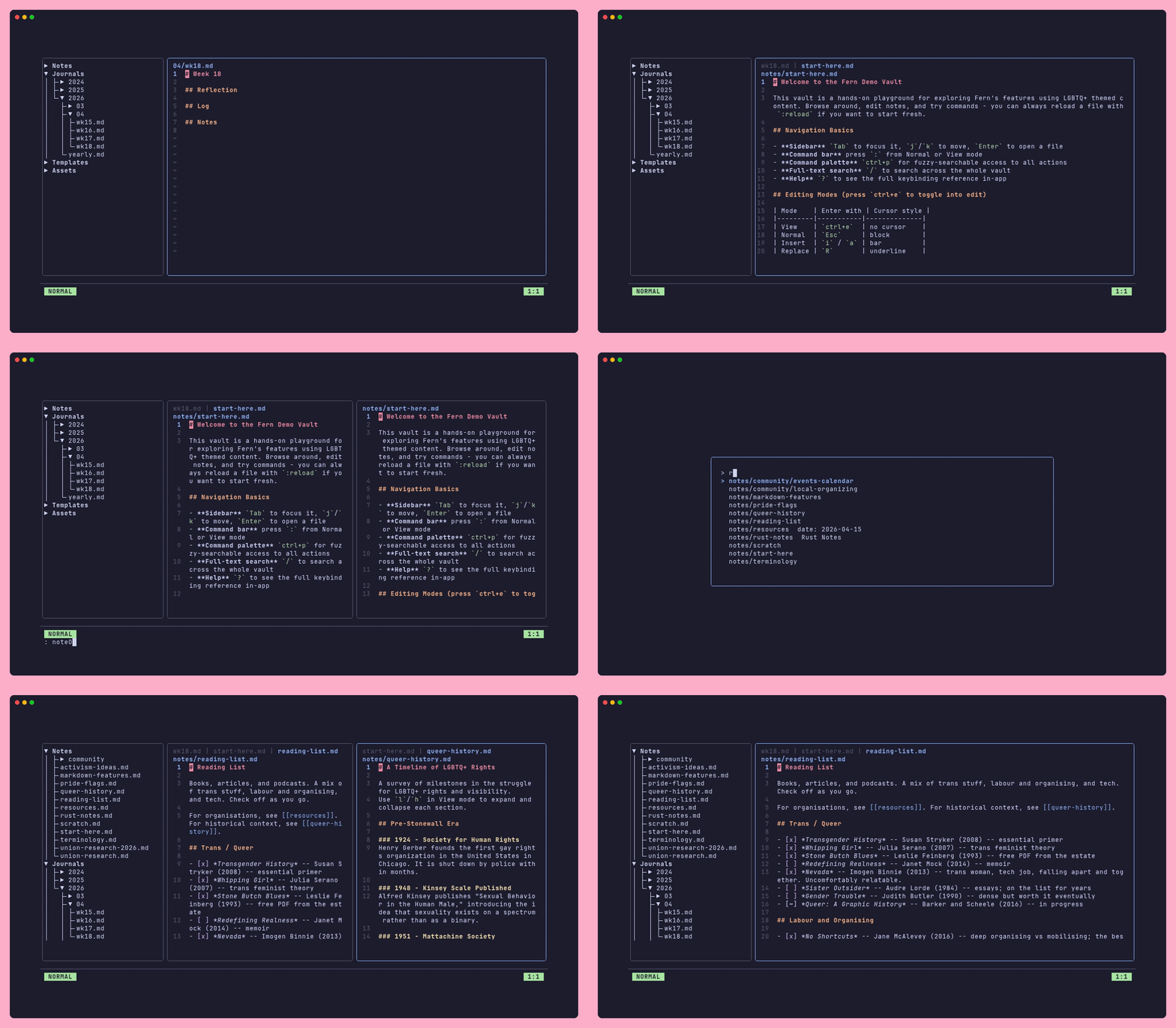
Fern aims to be everything you love about note-taking tools like Obsidian or Notion with out the bloated GUI overhead, cloud data storage, or proprietary lock-ins. A beautiful Terminal UI (TUI) that is local first, privacy respecting, light-weight, yet powerful enough to manage your personal knowledge Vault of notes and journal entries with ease.
Features
- Notes, Journals & Templates: daily, weekly, monthly, and yearly journal entries; templates to keep new notes consistent and simple to setup. Don't lose your flow!
- Full-text search: regex-compatible search across your entire vault (
/) - Command palette: fuzzy-searchable palette for quick access to all commands (
ctrl+p) - Collapsible sidebar tree: tree directory over Notes, Journals, Assets and Templates subfolders (
ctrl+b) - Tabs & split panes: open multiple notes side-by-side panes or in tabs within a panes. Change tab order and move tabs between panes easily.
- Wikilinks & Markdown links: links are automatically rewritten when notes are renamed. No more dead links!
- Bookmarks: save and re-open important tabs quickly
- Themes: comes with a set of popular themes, pride flag themes, & support for your own custom JSON themes. Add them in a PR for others to enjoy too!
- Multiple vaults: create and switch between vaults on the fly
- UI Supports Multiple Languages: Use Fern in the language you're most comfortable with. Don't see your language of choise? Help out with adding translations or open a ticket.
- Local-first: no telemetry, no cloud sync service; runs well on resource-constrained systems
- Vim-like editing modes: Normal, Insert, Replace, and Visual modes with an indicator in the command bar
- Configurable keybindings: remap any action shortcuts in User config file
Installation
Binary Releases
For Windows, Mac OS(10.12+) or Linux, you can download a pre-built binary release here.
Homebrew (macOS and Linux)
brew tap InodeLabs/tap https://codeberg.org/InodeLabs/homebrew-tap
brew install --cask fern
Scoop (Windows)
scoop bucket add InodeLabs https://codeberg.org/InodeLabs/scoop-bucket
scoop install fern
Linux packages (DEB / RPM)
Pre-built .deb and .rpm packages are available on the releases page.
# Debian / Ubuntu
sudo dpkg -i fern_*.deb

# Fedora / RHEL / openSUSE
sudo rpm -i fern_*.rpm
# or with dnf:
sudo dnf install fern_*.rpm
Snap

snapcraft pack
sudo snap install fern_*.snap --dangerous
NOTE: Fern stores its config, indexes, and state inside the snap's common per-user data area so they persist across snap revisions.
Vaults in your home directory work through the home interface.
If you keep vaults on USB drives or other external media, connect removable-media after install:
sudo snap connect fern:removable-media
Go
go install codeberg.org/InodeLabs/fern@latest
NOTE: If you get an error that fern cannot be found or that it is not defined, you may need to add ~/go/bin to your $PATH (for macOS/Linux). On Windows, add %HOME%\go\bin, not to be confused with C:\Go\bin, which is for Go's own binaries, not apps like fern.
Manual (from Source Code)
You will need to have Go installed first.
git clone https://codeberg.org/InodeLabs/fern
cd fern
go install
Using Fern
Run fern in your terminal to launch the TUI. On first run you will be prompted to set up a new vault or point Fern at an existing one.
Try the Demo Vault!
Meet Fern(she/her). She's a transfem 🏳️⚧️, tech worker 👩🏽💻 who is just trying to keep her head above water and get organised in today's crazy world. Good thing she has Fern! Her vault* contains some example notes (cross-linked), along with sample journals, templates, and bookmarks. This demo vault can be found in the demo folder (I'm not so creative in names, sorry). For an orientation to the Vault and a tour of some of Fern's main features, open the start-here.md in the sidebar, under the Notes section! Have fun and explore all of Fern's features without needing to set up a new vault or touch any of your existing notes.
After installing Fern, you can load it:
- From the CLI: by running
fern open ./demo - From inside Fern: by running the
vaultLoadcommand::vaultLoad ./demo
*All notes, journals, etc are purely fictional. McBoatface is not a real politician, to my knowledge!
Command Bar
Press : from Normal or View mode to jump to the command bar. Commands support tab-completion on both the command name and their arguments. Don't worry if you can't remember them all!
Some commonly used commands:
| Command | Action |
|---|---|
:noteAdd <name> |
Create a new note |
:journalOpen today |
Open today's journal (also: yesterday, this-week, etc.) |
:search <query> |
Full-text search across the vault (regex-compatible) |
:w / :wq |
Save / save and quit |
:q / :q! |
Quit / force quit |
For the complete command reference, see the Command Bar docs.
Templates
Templates are markdown files stored in the templates/ folder of your vault. When you create a note from a template, Fern substitutes built-in variables before opening the file.
Some commonly used template variables:
| Variable | Description |
|---|---|
{{DATE}} |
Today's date (default format YYYY-MM-DD) |
{{DATE+7d}} |
Date with offset (units: d days, w weeks, m months, y years) |
{{WEEKSTART}} |
First day of the current week |
{{WEEKNO}} |
Current week number (two digits) |
{{TITLE}} |
Filename stem of the note being created |
{{LOOP:1..3}}...{{ENDLOOP}} |
Repeat a block, with {{I}} as the loop index |
A custom format can be appended to any date variable with a colon: {{DATE:DD MMM YYYY}}. Unknown variables like {{AUTHOR}} prompt for a value when the template is applied.
For the full template reference, see the Templates docs.
Configuration
Fern is configured through TOML files: a global file at ~/.config/fern/config.toml that applies to all vaults, and an optional per-vault file at {vault}/.fern/config.toml that overrides global settings for that vault only. Both are created automatically on first run with all options commented out.
For the full configuration reference including all keys, defaults, and keybinding remapping, see the Configuration docs.
Keybindings
Fern uses vim-style modal editing: Normal, Insert, Replace, and Visual modes, with View mode for read-only rendered markdown. The active mode is always shown in the status bar. Press ? at any time to open the in-app keybinding reference.
Some key shortcuts (pun intended) to know are:
| Key | Action |
|---|---|
Tab / Shift+Tab |
Cycle focus between sidebar and viewer |
ctrl+b |
Toggle sidebar |
ctrl+e |
Toggle between View and Normal (edit) mode |
ctrl+p |
Command palette |
/ |
Search vault |
: |
Command bar |
? |
In-app keybinding reference |
ctrl+q |
Quit |
All bindings are customisable in your user config file. If they are too vim-y, make them emacs-y. Hate both those? Do something totally different! For the complete keybinding reference covering all modes, see the Interface docs and Editing modes.
Project Roadmap
Here's a near-term list of features I'm hoping to work on adding to Fern along with a very-rough release plan:
v1.4
- Visualize your Vault's Graph: Have a way to export your vault's notes/journals connections graph.
- Right sidebar: could hold note/vault stats, outbound and inbound links for the active note, etc. I'm all ears if you have ideas for what could/should live in this space!
v1.5
- Technical Debt Paydown: Review of app to paydown any technical cruft that has accumulated over the last few months
- Intelligent Indenting: All sub-items change indentation as well in the same direction as the parent item/bullet (optional setting)
And mor! Open an issue for any features you want to see!
To Contributors
We use golangci-lint and gocyclo as part of our Git pre-commit hook and the CI workflows for formatting, linting and overall code quality checks.
Please ensure you have both installed:
# golanci-lint Docs: https://golangci-lint.run/docs/welcome/install/local/
curl -sSfL https://golangci-lint.run/install.sh | sh -s -- -b $(go env GOPATH)/bin latest
# gocyclo Docs: https://github.com/fzipp/gocyclo
go install github.com/fzipp/gocyclo/cmd/gocyclo@latest
Found a bug? Got an idea for a new feature?
Please open a ticket at https://codeberg.org/InodeLabs/fern/issues/new/choose.
 Documentation
 Source Files
 Directories

Directories

| Path | Synopsis |
|---|---|
|
cmd
|
|
|
themegen
command
themegen writes JSON theme files to the themes directory at project root.
|
themegen writes JSON theme files to the themes directory at project root. |
|
internal
|
|
|
bookmark
Package bookmark manages the vault bookmark file.
|
Package bookmark manages the vault bookmark file. |
|
commands
Package commands provides pure functions for vault file operations.
|
Package commands provides pure functions for vault file operations. |
|
config
Package config loads, parses, and holds Fern's runtime configuration.
|
Package config loads, parses, and holds Fern's runtime configuration. |
|
debug
Package debug provides lightweight file-based debug logging for development.
|
Package debug provides lightweight file-based debug logging for development. |
|
i18n
Package i18n provides runtime-switchable UI string translations.
|
Package i18n provides runtime-switchable UI string translations. |
|
journal
Package journal resolves and creates periodic journal log files.
|
Package journal resolves and creates periodic journal log files. |
|
search
Package search provides full-text grep-style search over vault files.
|
Package search provides full-text grep-style search over vault files. |
|
template
Package template applies date-variable substitution to note templates.
|
Package template applies date-variable substitution to note templates. |
|
tests
Package tests provides helpers for use in table-driven tests.
|
Package tests provides helpers for use in table-driven tests. |
|
theme
Package theme loads and resolves built-in and custom UI themes.
|
Package theme loads and resolves built-in and custom UI themes. |
|
tui
Package tui is the top-level Bubble Tea application model.
|
Package tui is the top-level Bubble Tea application model. |
|
tui/bookmarkeditor
Package bookmarkeditor is a TUI component for editing vault bookmarks.
|
Package bookmarkeditor is a TUI component for editing vault bookmarks. |
|
tui/cmdbar
Package cmdbar is the command/status bar TUI component.
|
Package cmdbar is the command/status bar TUI component. |
|
tui/common
Package common holds shared types and styles used across TUI components.
|
Package common holds shared types and styles used across TUI components. |
|
tui/dialog
Package dialog is a modal yes/no confirmation dialog TUI component.
|
Package dialog is a modal yes/no confirmation dialog TUI component. |
|
tui/palette
Package palette is the command-palette TUI component.
|
Package palette is the command-palette TUI component. |
|
tui/searchmodal
Package searchmodal is the full-text search modal TUI component.
|
Package searchmodal is the full-text search modal TUI component. |
|
tui/settingseditor
Package settingseditor provides a modal TUI component for editing Fern config settings.
|
Package settingseditor provides a modal TUI component for editing Fern config settings. |
|
tui/sidebar
Package sidebar is the file-browser sidebar TUI component.
|
Package sidebar is the file-browser sidebar TUI component. |
|
tui/tabcomplete
Package tabcomplete provides filesystem path completion and tab-cycling helpers for TUI input fields.
|
Package tabcomplete provides filesystem path completion and tab-cycling helpers for TUI input fields. |
|
tui/templateprompt
Package templateprompt is a TUI prompt for selecting note templates.
|
Package templateprompt is a TUI prompt for selecting note templates. |
|
tui/viewer
Package viewer is the main markdown viewer/editor TUI component.
|
Package viewer is the main markdown viewer/editor TUI component. |
|
vault
Package vault provides helpers for creating and inspecting vaults.
|
Package vault provides helpers for creating and inspecting vaults. |
|
vfiles
Package vfiles maintains an SQLite index of vault files and their metadata.
|
Package vfiles maintains an SQLite index of vault files and their metadata. |
|
Package themes embeds the distributed theme JSON files into the binary.
|
Package themes embeds the distributed theme JSON files into the binary. |