

 README

README

DingTalk Workspace CLI (dws)
dws — DingTalk Workspace on the command line, built for humans and AI agents.




中文版 · English · Reference · Changelog
[!IMPORTANT] Co-creation Phase: This project accesses DingTalk enterprise data and requires enterprise admin authorization. Please join the DingTalk DWS co-creation group to complete whitelist configuration. See Getting Started below.

Table of Contents
Why dws?
- For humans —
--helpfor usage,--dry-runto preview requests,-f table/json/rawfor output formats. - For AI agents — structured JSON responses + built-in Agent Skills, ready out of the box.
- For enterprise admins — zero-trust architecture: OAuth device-flow auth + domain allowlisting + least-privilege scoping. Not a single byte can bypass authentication and audit.
Installation
macOS / Linux:
curl -fsSL https://raw.githubusercontent.com/DingTalk-Real-AI/dingtalk-workspace-cli/main/scripts/install.sh | sh
Windows (PowerShell):
irm https://raw.githubusercontent.com/DingTalk-Real-AI/dingtalk-workspace-cli/main/scripts/install.ps1 | iex
Other install methods
Pre-built binary: download from GitHub Releases.
Build from source:
git clone https://github.com/DingTalk-Real-AI/dingtalk-workspace-cli.git
cd dingtalk-workspace-cli
go build -o dws ./cmd       # build to current directory
cp dws ~/.local/bin/         # install to PATH
Requires Go 1.25+. Use
make packageto cross-compile for all platforms (macOS / Linux / Windows x amd64 / arm64).
Getting Started
Step 1: Create a DingTalk Application
Go to the Open Platform Console. Under "Internal Enterprise Apps - DingTalk Apps", click Create App.
View screenshot

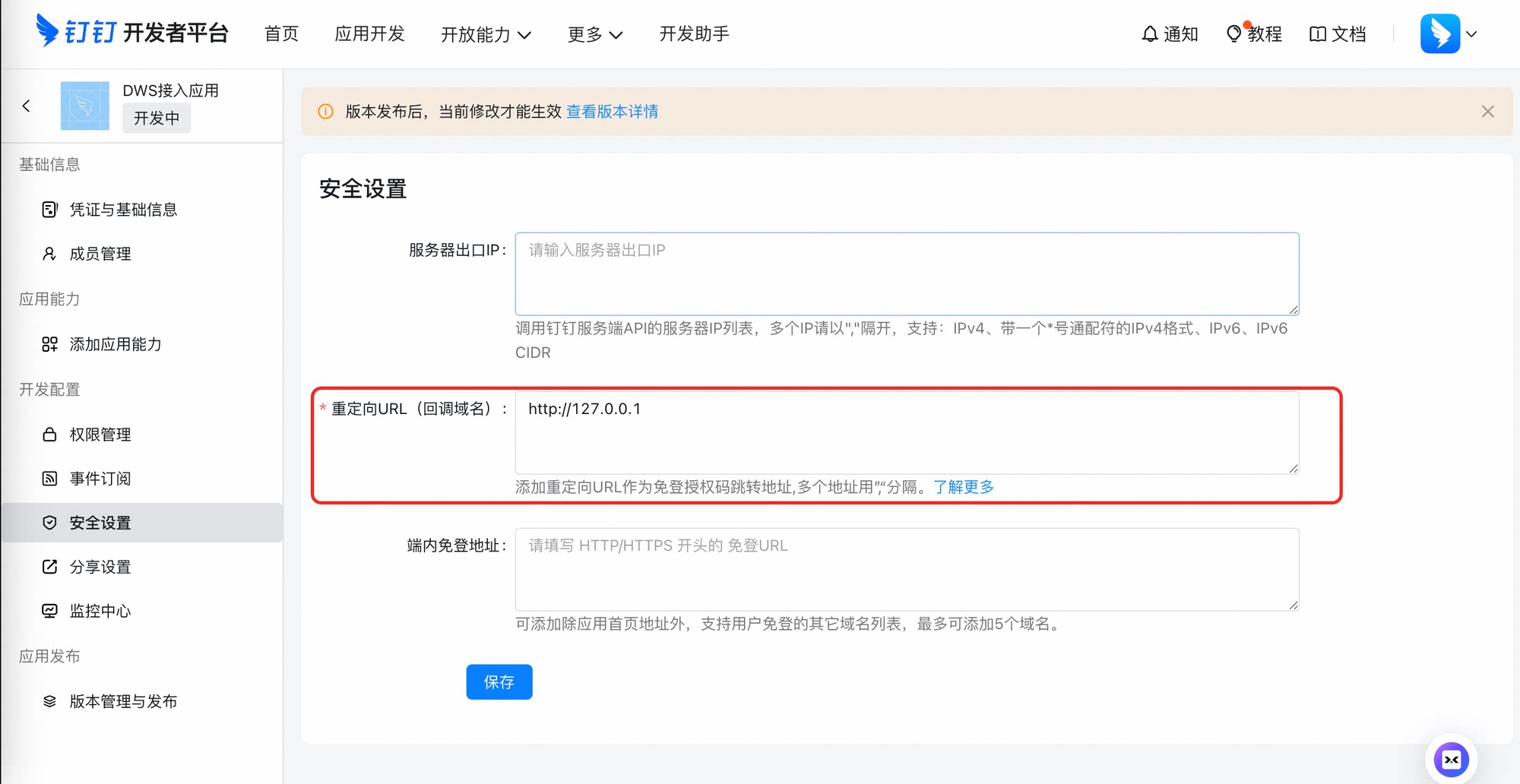
Step 2: Configure Redirect URL
Go to app settings → Security Settings. Add the following redirect URLs and save:
http://127.0.0.1
https://login.dingtalk.com
http://127.0.0.1is for local browser login;https://login.dingtalk.comis for--devicedevice-flow login (Docker containers, remote servers, and other headless environments). We recommend configuring both.
View screenshot
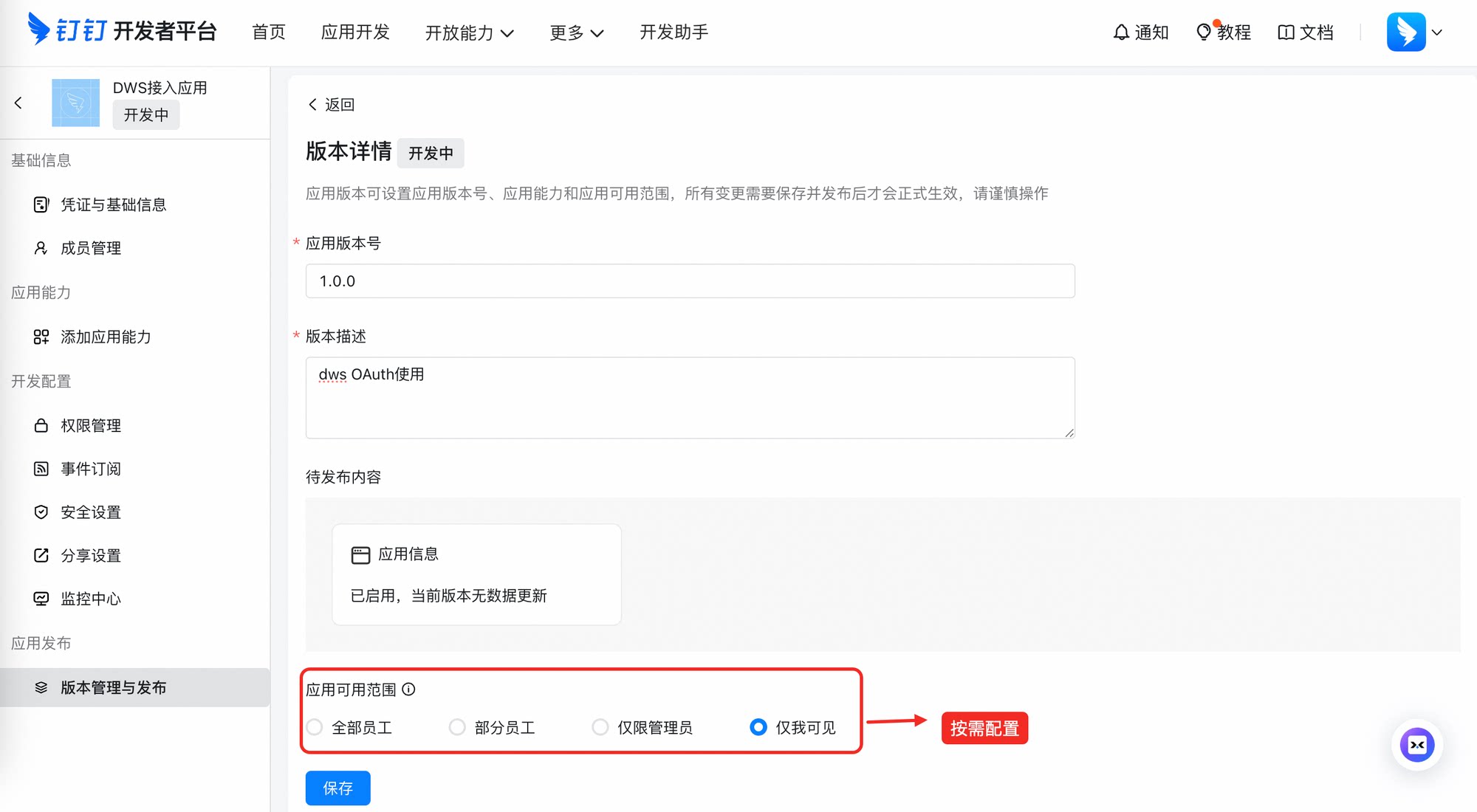
Step 3: Publish the Application
Click "App Release - Version Management & Release" to publish and go live.
View screenshot
Step 4: Request Whitelist Access
Join the DingTalk DWS co-creation group and provide your Client ID and admin confirmation to complete whitelist setup.
Step 5: Authenticate
dws auth login --client-id <your-app-key> --client-secret <your-app-secret>
Or via environment variables:
export DWS_CLIENT_ID=<your-app-key>
export DWS_CLIENT_SECRET=<your-app-secret>
dws auth login
CLI flags take precedence over environment variables. Credentials are used for DingTalk's OAuth device flow.
Quick Start
dws contact user search --keyword "engineering"     # search contacts
dws calendar event list                            # list calendar events
dws todo task create --title "Quarterly report" --executors "<your-userId>"   # create a todo (replace <your-userId>)
dws todo task list --dry-run                       # preview without executing
Using with Agents
dws is designed as an AI-native CLI. Complete Installation and Getting Started first, then configure your agent:
# Configure auth via environment variables (recommended for agents, no interactive login)
export DWS_CLIENT_ID=<your-app-key>
export DWS_CLIENT_SECRET=<your-app-secret>
dws auth login
Agent Invocation Patterns
# Use --yes to skip confirmation prompts (required for agents)
dws todo task create --title "Review PR" --executors "<your-userId>" --yes

# Use --dry-run to preview operations (safe execution)
dws contact user search --keyword "engineering" --dry-run

# Use --jq to extract precisely (save tokens)
dws contact user get-self --jq '.result[0].orgEmployeeModel | {name: .orgUserName, dept: .depts[0].deptName, userId}'
Schema Discovery
Agents don't need pre-built knowledge of every command. Use dws schema to dynamically discover capabilities:
# Step 1: Discover all available products
dws schema --jq '.products[] | {id, tool_count: (.tools | length)}'

# Step 2: Inspect target tool's parameter schema
dws schema aitable.query_records --jq '.tool.input_schema'

# Step 3: Construct the correct call
dws aitable record query --base-id BASE_ID --table-id TABLE_ID --limit 10
Agent Skills
The repo ships Agent Skills (SKILL.md files) for every DingTalk product. After installing, tools like Claude Code / Cursor can use DingTalk capabilities directly:
# Install skills into current project
curl -fsSL https://raw.githubusercontent.com/DingTalk-Real-AI/dingtalk-workspace-cli/main/scripts/install-skills.sh | sh
install.shinstalls to$HOME/.agents/skills/dws(global);install-skills.shinstalls to./.agents/skills/dws(current project).
Author your own Agent Skills and orchestrate them with dws skills for cross-product workflows: ISV Skill → dws Skill → DingTalk Open Platform API (enforced auth + full audit).
Features
Smart Input Correction — auto-corrects common AI model parameter mistakes v1.0.1
Built-in pipeline engine that normalizes flag names, splits sticky arguments, and fuzzy-matches typos:
# Naming convention auto-conversion (camelCase / snake_case / UPPER -> kebab-case)
dws aitable record query --baseId BASE_ID --tableId TABLE_ID         # auto-corrected to --base-id --table-id

# Sticky argument splitting
dws contact user search --keyword "engineering" --timeout30           # auto-split to --timeout 30

# Fuzzy flag name matching
dws aitable record query --base-id BASE_ID --tabel-id TABLE_ID       # --tabel-id -> --table-id

# Value normalization (boolean / number / date / enum)
# "yes" -> true, "1,000" -> 1000, "2024/03/29" -> "2024-03-29", "ACTIVE" -> "active"
| Agent Output | dws Auto-Corrects To |
|---|---|
--userId |
--user-id |
--limit100 |
--limit 100 |
--tabel-id |
--table-id |
--USER-ID |
--user-id |
--user_name |
--user-name |
jq Filtering & Field Selection — fine-grained output control to reduce token consumption v1.0.1
# Built-in jq expressions
dws aitable record query --base-id BASE_ID --table-id TABLE_ID --jq '.invocation.params'
dws schema --jq '.products[] | {id, tools: (.tools | length)}'

# Return only specific fields
dws aitable record query --base-id BASE_ID --table-id TABLE_ID --fields invocation,response
Schema Introspection — query parameter schemas before making calls v1.0.1
dws schema                                              # list all products and tools
dws schema aitable.query_records                        # view parameter schema
dws schema aitable.query_records --jq '.tool.input_schema.required'   # view required fields
dws schema --jq '.products[].id'                        # extract all product IDs
Pipe & File Input — read flag values from files or stdin v1.0.1
# Read message body from a file
dws chat message send-by-bot --robot-code BOT_CODE --group GROUP_ID \
  --title "Weekly Report" --text @report.md

# Pipe content via stdin
cat report.md | dws chat message send-by-bot --robot-code BOT_CODE --group GROUP_ID \
  --title "Weekly Report"

# Read from stdin explicitly
dws chat message send-by-bot --robot-code BOT_CODE --group GROUP_ID \
  --title "Weekly Report" --text @-
Key Services
| Service | Command | Description |
|---|---|---|
| Contact | contact |
Users / departments |
| Chat | chat |
Group management / members / bot messaging / webhook |
| Calendar | calendar |
Events / meeting rooms / free-busy |
| Todo | todo |
Task management |
| Approval | oa |
Processes / forms / instances |
| Attendance | attendance |
Clock-in / shifts / statistics |
| Ding | ding |
DING messages / send / recall |
| Report | report |
Reports / templates / statistics |
| AITable | aitable |
AI table operations |
| Workbench | workbench |
App query |
| DevDoc | devdoc |
Open platform docs search |
Run dws --help for the full list, or dws <service> --help for subcommands.
Coming soon
doc (documents) · mail (email) · minutes (AI transcription) · drive (cloud drive) · conference (video) · tb (Teambition) · aiapp (AI apps) · live (streaming) · skill (marketplace)
Security by Design
dws treats security as a first-class architectural concern, not an afterthought. Credentials never touch disk, tokens never leave trusted domains, permissions never exceed grants, operations never escape audit — every API call must pass through DingTalk Open Platform's authentication and audit chain, no exceptions.
For Developers
| Mechanism | Details |
|---|---|
| Encrypted token storage | PBKDF2 + AES-256-GCM encryption, keyed by device physical MAC address; cross-platform Keychain/DPAPI integration provides additional protection — tokens cannot be decrypted on another machine |
| Input security | Path traversal protection (symlink resolution + working directory containment), CRLF injection blocking, Unicode visual spoofing filtering — prevents AI Agents from being tricked by malicious instructions |
| Domain allowlist | DWS_TRUSTED_DOMAINS defaults to *.dingtalk.com; bearer tokens are never sent to non-allowlisted domains |
| HTTPS enforced | All requests require TLS; HTTP only permitted for loopback during development |
| Dry-run preview | --dry-run shows call parameters without executing, preventing accidental mutations |
| Zero credential persistence | Client ID / Secret used in memory only — never written to config files or logs |
For Enterprise Admins
| Mechanism | Details |
|---|---|
| OAuth device-flow auth | Users must authenticate through an admin-authorized DingTalk application |
| Least-privilege scoping | CLI can only invoke APIs granted to the application — no privilege escalation |
| Allowlist gating | Admin confirmation required during co-creation phase; self-service approval planned |
| Full-chain audit | Every data read/write passes through the DingTalk Open Platform API — enterprise admins can trace complete call logs in real time; no anomalous operation can hide |
For ISVs
| Mechanism | Details |
|---|---|
| Tenant data isolation | Operates under authorized app identity; cross-tenant access is impossible |
| Skill sandbox | Agent Skills are Markdown documents (SKILL.md) — prompt descriptions only, no arbitrary code execution |
| Zero blind spots | Every API call during ISV–dws skill orchestration is forced through DingTalk Open Platform authentication — full call chain is traceable with no bypass path |
Found a vulnerability? Report via GitHub Security Advisories. See SECURITY.md.
Reference & Docs
- Reference — environment variables, exit codes, output formats, shell completion
- Architecture — discovery-driven pipeline, IR, transport layer
- Changelog — release history and migration notes
Contributing
See CONTRIBUTING.md for build instructions, testing, and development workflow.
License
Apache-2.0
 Directories

Directories

| Path | Synopsis |
|---|---|
|
internal
|
|
|
auth
identity.go manages agent instance identification for tracking.
|
identity.go manages agent instance identification for tracking. |
|
cobracmd
Package cobracmd provides shared Cobra command utilities used across multiple internal packages (app, cli, compat, helpers).
|
Package cobracmd provides shared Cobra command utilities used across multiple internal packages (app, cli, compat, helpers). |
|
config
Package config provides shared constants used across multiple internal packages.
|
Package config provides shared constants used across multiple internal packages. |
|
convert
Package convert provides shared type conversion helpers used across multiple internal packages (cli, compat).
|
Package convert provides shared type conversion helpers used across multiple internal packages (cli, compat). |
|
generator/cmd_generate
command
|
|
|
generator/cmd_snapshot
command
|
|
|
i18n
Package i18n provides lightweight internationalization for the DWS CLI.
|
Package i18n provides lightweight internationalization for the DWS CLI. |
|
keychain
Package keychain provides cross-platform secure storage for secrets.
|
Package keychain provides cross-platform secure storage for secrets. |
|
logging
Package logging provides file-based structured logging for diagnostics.
|
Package logging provides file-based structured logging for diagnostics. |
|
validate
Package validate provides input sanitization and validation functions to prevent injection attacks (control characters, CRLF, Unicode spoofing, ANSI escape sequences) at the CLI boundary.
|
Package validate provides input sanitization and validation functions to prevent injection attacks (control characters, CRLF, Unicode spoofing, ANSI escape sequences) at the CLI boundary. |
|
test
|
|