

 README

README

SMTPBridge




Bridge email to other messaging services.
Do not expose this to the Internet as this is only intended to be used on a local network.
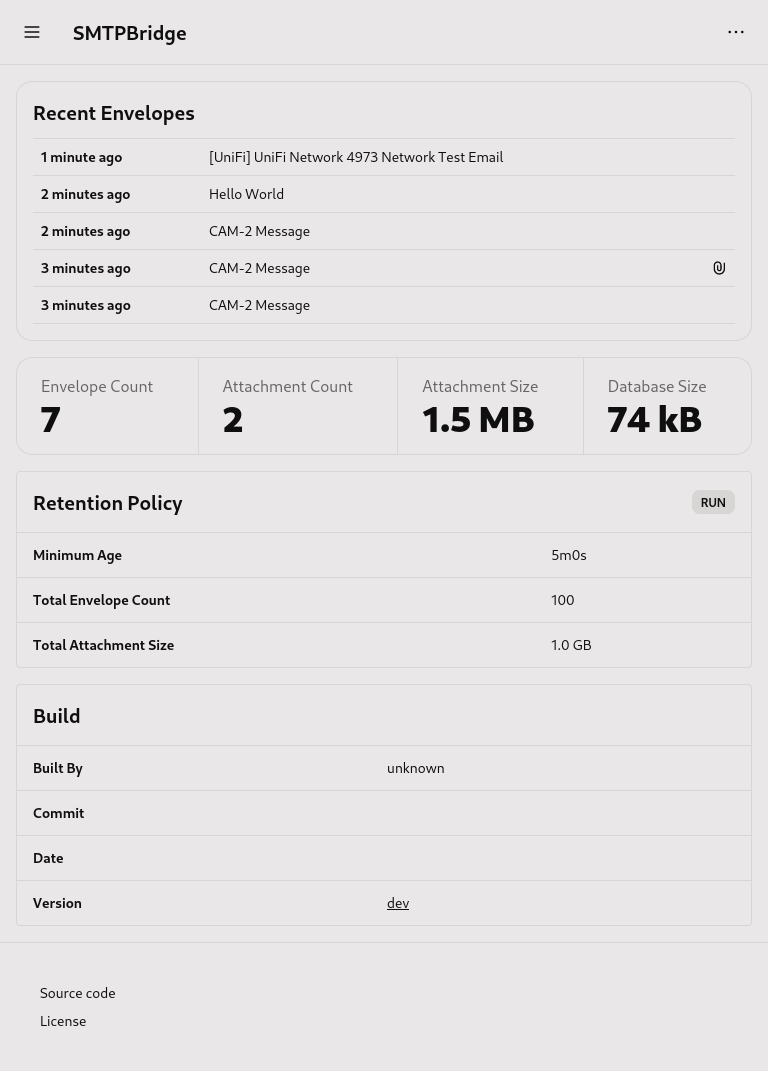
Features
- Envelopes that contain subject, from, to, text, html, and attachments of an email
- Endpoints for sending envelopes
- Rules for matching envelopes
- SMTP server that creates envelopes
- HTTP server
- Create, view, and delete envelopes
- View and test endpoints
- Create, view, update, and delete rules
- Authentication for HTTP and SMTP servers
- Retention policy for deleting old envelopes
- Healthcheck for monitoring
Use Cases
- Pictures from IP cameras
- System messages from servers
Migration
Until 1.X.X, every 0.X.0 release may break something or everything.
It is recommended to delete smtpbridge_data on every minor release and also check the Full Config example for changes.
Usage
smtpbridge
Show Help
smtpbridge -help
Show Version
smtpbridge -version
Supported Endpoints
Apprise
Apprise requires Python to be installed along with the apprise package.
Install Apprise with the following command.
pip install apprise
If you are using a Python virtual environment, then set the python_executable config variable.
python_executable: .venv/bin/python3
Make sure you install Apprise in that virtual environment.
Config
Config file is loaded from one of the following locations in order.
config.yamlconfig.yml.smtpbridge.yaml.smtpbridge.yml~/.smtpbridge.yaml~/.smtpbridge.yml/etc/smtpbridge.yaml/etc/smtpbridge.yml
CLI flags take priority over config files and environment.
Simple Config
This config prints emails received via SMTP to console.
endpoints:
  hello_world:
    kind: console

rules:
  hello_world:
Full Config
# Used for development
debug: false

# Used by HTTP, ...
time_format: 12h # [12h, 24h]

# Directory for storing data
data_directory: smtpbridge_data

# Python executable used by Apprise, ...
python_executable: python3

# Healthcheck enables verification that the program has not crashed or lost network access
# You can use a third party service such as healthchecks.io
healthcheck:
  # URL to fetch, empty means health checking is disabled
  url: "" # [https://hc-ping.com/cb8bcf81-d3c4-4c98-85a6-734c3b7ddb2b, ...]

  # Interval between each fetch
  interval: 5m # [5m, 5h45m, ...]

  # Run on startup
  startup: false

# Retention policy will delete resources that pass the configured policy
retention:
  # Envelopes in database
  envelope_count: # [0, 100, 250, ...]
  envelope_age: # [5m, 5h45m, ...]

  # Attachment files in file store
  attachment_size: # [100 MB, 1 GB, ...]

  # Traces in database
  trace_age: 168h # 7 days [5m, 5h45m, ...]

# HTTP server
http:
  disable: false
  host: "" # [127.0.0.1, ...]
  port: 8080

  # Authentication is disabled if both username and password are empty
  username: ""
  password: ""

  # Public URL
  url: "" # [http://127.0.0.1:8080, ...]

# SMTP server
smtp:
  disable: false
  host: "" # [127.0.0.1, ...]
  port: 1025

  # Authentication is disabled if both username and password are empty
  username: ""
  password: ""

  # Maximum payload size
  max_payload_size: 25 MB # [100 MB, 1 GB, ...]

# Endpoints for envelopes
endpoints:
  # Console
  console_endpoint:
    kind: console

  # Telegram
  telegram_endpoint:
    kind: telegram
    config:
      # https://core.telegram.org/bots/features#creating-a-new-bot
      token: 2222222222222222222222
      # https://stackoverflow.com/a/32572159
      chat_id: 111111111111111111111

  # Shoutrrr (can only send text)
  shoutrrr_endpoint:
    kind: shoutrrr
    config:
      # https://containrrr.dev/shoutrrr/v0.8/services/overview/
      urls: telegram://token@telegram?chats=@channel-1[,chat-id-1,...]

  # Apprise
  shoutrrr_endpoint:
    kind: apprise
    config:
      # https://github.com/caronc/apprise#supported-notifications
      urls: tgram://bottoken/ChatID

  # Full example
  example_endpoint:
    kind: console
    name: Example Endpoint
    # Do not send title and body
    text_disable: false
    # Do not send attachments
    attachment_disable: false
    # Custom template for title
    title_template: {{ .Message.Subject }}
    # Custom template for body
    body_template: {{ .Message.Text }}

rules:
  example_rule:
    name: Example Rule
    expression: or (eq .Message.Subject "cam-1") (eq .Message.Subject "cam-2")
    endpoints:
      - console_endpoint
Templates
See text/template on how to template.
Each *_template config variable has access to the Envelope model via the . operator.
The following custom functions are available in endpoint templates.
| Name | Description | Example |
|---|---|---|
| PermaLink | Permanent HTTP link to the given model. | {{ PermaLink .Message }} => http://127.0.0.1:8080/envelopes/1 |
Expressions
Rule expressions are just Templates without {{ }} and without the custom functions.
Docker
Docker Compose
version: "3"
services:
  smtpbridge:
    image: ghcr.io/itsnotgoodname/smtpbridge:latest
    container_name: smtpbridge
    environment:
      APPRISE_ENABLE: "true" # Optional
      APPRISE_VERSION: "1.5.0" # Optional
      SMTPBRIDGE_CONFIG_YAML: | # Optional
        endpoints:
          hello_world:
            kind: console

        rules:
          hello_world:
    ports:
      - 1025:1025
      - 8080:8080
    volumes:
      - /path/to/data:/data
      - /path/to/config:/config # Optional
      - /etc/timezone:/etc/timezone:ro # Optional
      - /etc/localtime:/etc/localtime:ro # Optional
    restart: unless-stopped
Docker CLI
docker run -d \
  --name=smtpbridge \
  -e APPRISE_ENABLE=true `# Optional` \
  -e APPRISE_ENABLE=1.5.0 `# Optional` \
  -p 1025:1025 \
  -p 8080:8080 \
  -v /path/to/data:/data \
  -v /path/to/config:/config `# Optional` \
  -v /etc/timezone:/etc/timezone:ro `# Optional` \
  -v /etc/localtime:/etc/localtime:ro `# Optional` \
  --restart unless-stopped \
  ghcr.io/itsnotgoodname/smtpbridge:latest
Development
The following programs are required.
- Make
- Go
- pnpm
Make
You should look at the Makefile before running any of the following commands.
Install tooling.
make tooling
Start the Go server.
make dev
Start Vite.
make dev-web
To Do
- feat: read mbox files
- feat: CRUD endpoints
- feat: IMAP for viewing mail
- feat: OpenAPI
- feat: Windows installer
- fix: chrome keeps thinking some HTTP pages are French
 Directories

Directories

| Path | Synopsis |
|---|---|
|
cmd
|
|
|
smtpbridge
command
|
|
|
stress-database
command
|
|
|
internal
|
|
|
pkg
|
|
|
web is used by http/pages packages.
|
web is used by http/pages packages. |
|
components
components are used by pages.
|
components are used by pages. |
|
events
events are used by pages/components packages.
|
events are used by pages/components packages. |
|
helpers
helpers are used by pages/components packages.
|
helpers are used by pages/components packages. |
|
pages
pages is used by http package.
|
pages is used by http package. |
|
routes
routes lists all available HTTP routes.
|
routes lists all available HTTP routes. |