

 README
¶
LaForge





Many shells and agents, side by side, in your browser. LaForge is tmux for the agent era: one small local server keeps your terminals running, and a web client lays them out as tabs and split panes. Start Claude Code, Codex, Antigravity, Qwen Code, Copilot or a plain shell in any pane, close the browser, come back later, and everything is where you left it.
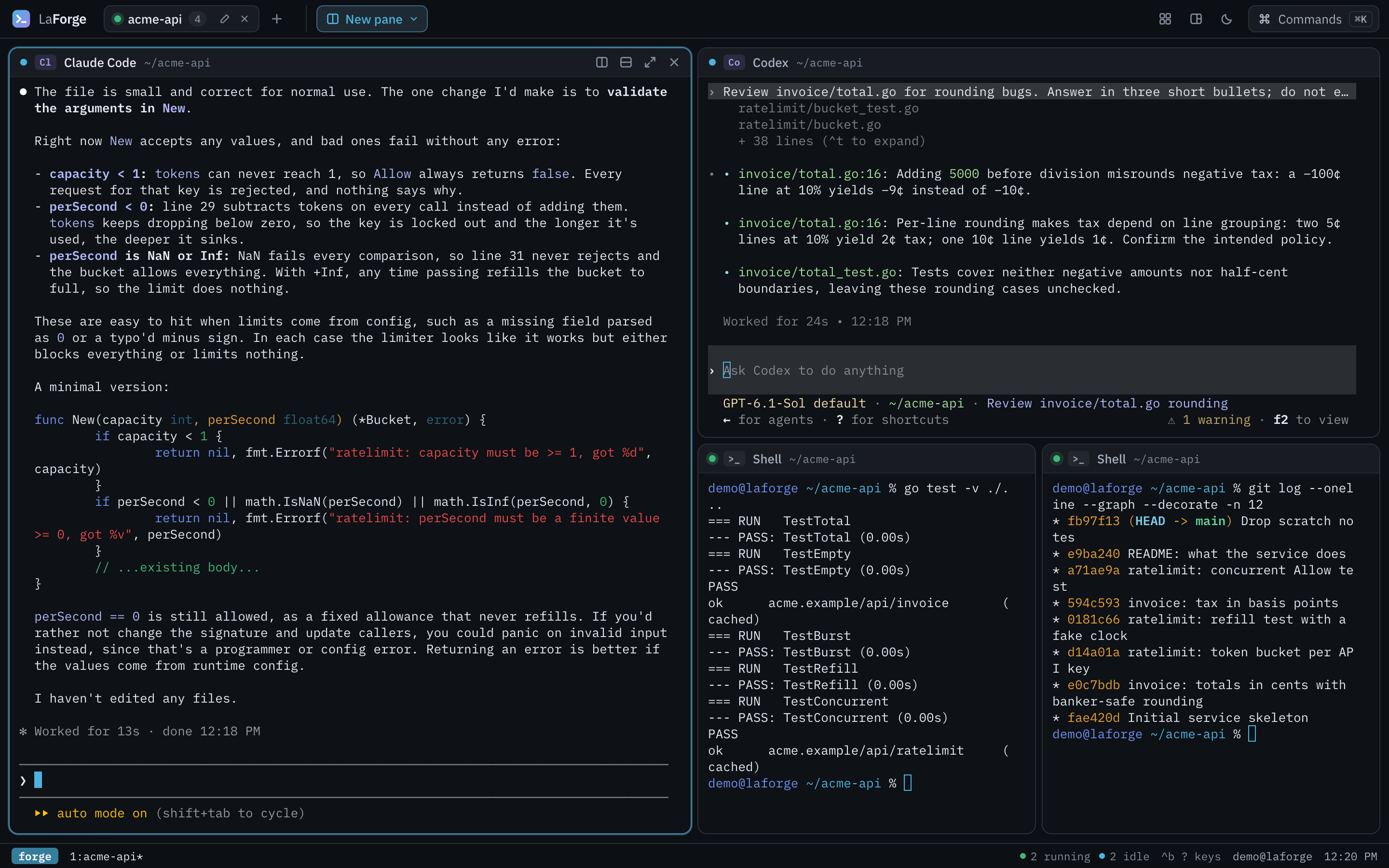
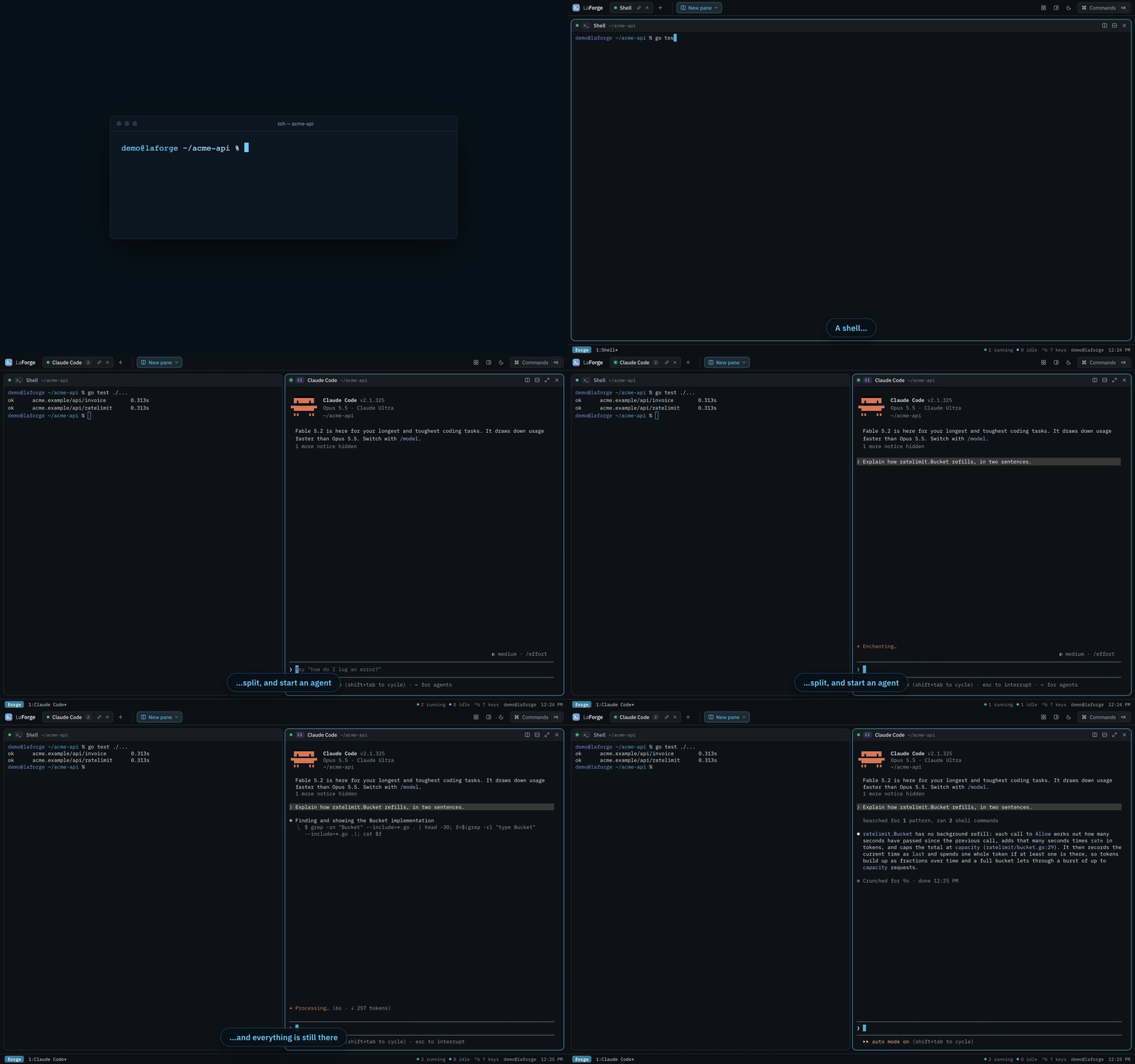
la up        # start the forge (or find the running one) and open it
la status    # the forge and its panes
la open      # a fresh link to the running forge
la down      # stop the forge and every pane in it
LaForge is part of Outcome, and works on its own.
Install
macOS and Linux, from a signed release:
curl -fsSL https://github.com/RunOutcome/laforge/releases/latest/download/install.sh | sh
The installer verifies the release signature and checksum before it puts
la in ~/.local/bin; it needs no root and starts nothing. Windows (experimental):
unzip la.exe from the release onto your PATH; panes run PowerShell.
Build
Needs Go 1.26+ (release builds use the go.mod toolchain, 1.27.4). Node 20+ only to change the web client.
make build      # bin/la (the built web client in forge/dist is committed)
make install    # copies it to ~/.local/bin/la-<version>; la points at it
make test       # Go and web tests
make web        # rebuild the web client after changing web/
make dev        # web client with hot reload against a running `la up`
In a container
The image carries the forge, a shell toolbox (zsh, git, ripgrep, fd, jq, Python, make) and AI agent CLIs, so nothing but Docker (or Podman) is needed on the machine.
make image                 # builds laforge:local
la up --container          # runs it with this folder at /workspace, opens the link
la status                  # shows the container and its link
la down --container        # stops it; logins and installed agents stay
| Agent | How it gets there |
|---|---|
Codex (@openai/codex, Apache-2.0) |
built into the image |
Qwen Code (@qwen-code/qwen-code, Apache-2.0) |
built into the image |
opencode (opencode-ai, MIT) |
built into the image |
Claude Code (@anthropic-ai/claude-code) |
installed from npm on first start |
Copilot CLI (@github/copilot) |
installed from npm on first start |
Antigravity (agy) |
installed with Google's installer on first start (INSTALL_ANTIGRAVITY=0 skips) |
Claude Code, the Copilot CLI and Antigravity have proprietary licences, so the
image never carries them: on its first start the container installs them into its home
volume as your own install (about 20 seconds; their tiles in the picker turn
on when it is done, and ~/.laforge/forge/agents-install.log in the container
shows progress). ON_FIRST_START="" skips that; set it to other npm packages
to install those instead. Change what is built in with
docker build --build-arg BUNDLED="…".
The container's home is the volume laforge-home: each agent's login,
history and settings survive restarts and new images. Sign in once inside a
pane (claude, codex login, agy, qwen, copilot), or put API keys in
~/.laforge/forge/agents.env (ANTHROPIC_API_KEY=…, OPENAI_API_KEY=…,
DASHSCOPE_API_KEY=…, one per line), which la up --container passes in.
The port is published on 127.0.0.1 only, and the forge still needs its token.
One folder is mounted per container; to work on another, la down --container
and la up --container from there. LAFORGE_IMAGE picks another image.
Using it
la up starts the forge in the background on 127.0.0.1:4646 (any free
port if that one is taken), prints a link and opens it. The link carries a
token; the browser keeps it as a cookie, and nothing else on the machine
can reach the panes without it. New panes start in the folder you ran
la up from.
Keys follow tmux: press the prefix Ctrl-b, then
| Key | Does |
|---|---|
% or | |
split right |
" or - |
split down |
arrows or h j k l |
move between panes |
o |
next pane |
z |
zoom the pane |
x |
close the pane (asks first) |
c |
new tab |
n / p, 1–9 |
next / previous tab, go to tab |
, |
rename the tab |
space / m |
tiled / main-and-stack layout |
+ / _ |
bigger / smaller text |
: or ⌘K |
command palette |
? |
all keys |
| Ctrl-b | send a literal Ctrl-b |
New pane (next to the tabs) adds a pane to the current tab: pick a shell
or an agent to start it at once, or an empty pane to the right or below. In an
empty pane, press 1–9 to start a profile, or Enter for a shell.
A tab is named after its focused pane until you rename it: the pencil on the
tab, a double-click, or Ctrl-b ,. Clearing the name goes back to automatic.
The tab's ✕ closes it and its panes (it asks first when any are running).
Drag the gaps between panes to resize them; double-click a gap to even them.
Profiles
The built-in profiles are your login shell and each agent CLI that is
installed (claude, codex, agy, qwen, copilot, grok, opencode,
ollama). Each runs unchanged, with its own login. When an agent exits, its
pane stays open as your shell in the same folder (the pane's label changes to
Shell); exit there closes it. Add or replace profiles in
~/.laforge/forge/profiles.json:
[
  { "name": "aider", "label": "Aider", "description": "aider chat", "command": "aider", "agent": true },
  { "name": "logs", "label": "Logs", "command": "tail", "args": ["-f", "/var/log/system.log"] }
]
Panes inherit the environment la up was started with (minus variables that
would make an agent think it runs inside another agent), plus
LAFORGE_SESSION.
Files
Everything is in ~/.laforge/forge ($LAFORGE_HOME to change):
forge.json (the running forge's port, pid and token, mode 0600),
forge.log, layout.json and profiles.json.
Embedding
LaForge is built to be mounted by a host program. Outcome runs it as
out la …:
import laforge "github.com/RunOutcome/laforge/cli"

// in the host's command switch:
case "la":
    os.Exit(laforge.Main(laforge.Config{Prog: "out la", Reexec: []string{"la"}}, args[1:]))
| Package | What it is |
|---|---|
terminal |
pseudo-terminals (Unix PTY, Windows ConPTY), the replay ring, sessions with readers that rejoin without gaps |
forge |
the HTTP API, WebSocket streams and the embedded web client, as an http.Handler |
cli |
the la command tree as a library |
web |
the React client (Forge component, layout model) |
API
All routes but /api/health need the token, as the cookie or
Authorization: Bearer <token>. Changes (POST, PUT, PATCH, DELETE) from a
browser are accepted only from the forge's own origin: other local ports
share the cookie's site, so Origin and Sec-Fetch-Site are checked. A
client embedding the forge from another origin needs to proxy it.
| Route | |
|---|---|
GET /api/health |
{product, version, pid} |
GET /api/profiles |
profiles, each with available |
GET /api/sessions |
every session |
POST /api/sessions |
{profile, cwd?, title?, cols?, rows?} starts one |
PATCH /api/sessions/{id} |
{title} |
DELETE /api/sessions/{id} |
stops it (?force=1 to kill) and forgets it |
GET /api/sessions/{id}/stream |
WebSocket: binary output (the replay buffer first); send {"type":"input","data":…} or {"type":"resize","cols":…,"rows":…}; closes with "ended" when the session ends |
GET/PUT /api/layout |
the client's layout |
GET/PUT /api/config |
{cwd}: where new panes start |
Releases
See RELEASING.md and CHANGELOG.md.
Licence
Apache-2.0. Copyright 2026 COR Holdings, LLC. LaForge includes third-party
software under its own licences: THIRD_PARTY_NOTICES.md,
or la notices.
 Directories
¶
| Path | Synopsis |
|---|---|
|
Package cli is the la command tree as a library.
|
Package cli is the la command tree as a library. |
|
cmd
|
|
|
la
command
Command la is LaForge.
|
Command la is LaForge. |
|
Package forge is the LaForge backend: it runs shells and agent CLIs in pseudo-terminals, keeps them alive while browsers come and go, and serves the Forge web client that lays them out as tabs and split panes.
|
Package forge is the LaForge backend: it runs shells and agent CLIs in pseudo-terminals, keeps them alive while browsers come and go, and serves the Forge web client that lays them out as tabs and split panes. |
|
Package terminal runs a command in a pseudo-terminal, keeps its output in a ring buffer and lets readers attach (platform-topology.md §8a.4).
|
Package terminal runs a command in a pseudo-terminal, keeps its output in a ring buffer and lets readers attach (platform-topology.md §8a.4). |