

 README

README

Lab


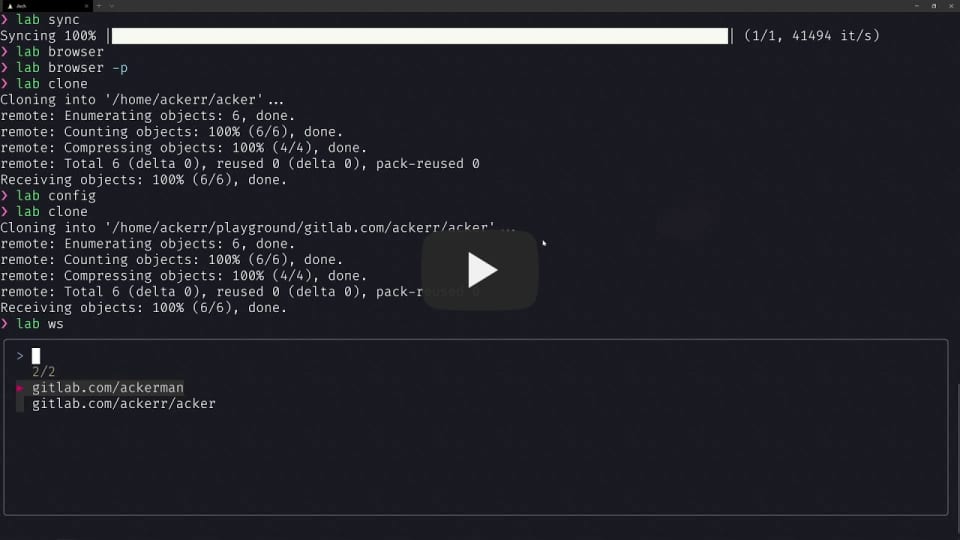
A command-line tool for gitlab. 中文
Feature
lab sync        Sync gitlab projects
lab browser     Fuzzy find gitlab repo and open it in $BROWSER
lab clone       Fuzzy find gitlab repo and clone it
lab ws          Fuzzy find repo in your codespace
lab lint        Check .gitlab-ci.yml syntax
lab open        Open the current repo remote in $BROWSER
lab ci          View the pipeline jobs trace log, default view running job
lab config      Use $EDITOR open config file
For more information, please use lab help.
Install
homebrew
$ brew install ackerr/tap/lab
scoop
$ scoop bucket add ackerr https://github.com/Ackerr/scoop-bucket
$ scoop install ackerr/lab
go get
$ go get -u "github.com/ackerr/lab"
Configure
Recommended use lab config to edit config file (~/.config/lab/config.toml), this command will open the config file use $EDITOR. If config file don't exist, it will use config template auto generate.
All configuration is as follows:
Two variables are required,
base_urlandtoken. The way to get gitlab token, see this
[gitlab]
# gitlab domain, like https://gitlab.com
base_url = $GITLAB_BASE_URL

# gitlab access token
token = $GITLAB_TOKEN

# If set, lab clone and lab ws will use this path as target path
# default empty
codespace = ""

# If set, lab clone will auto set user.name in repo gitconfig
# default empty
name = ""

# If set, lab clone will auto set user.email in repo gitconfig
# default empty
email = ""

[main]
# If set 1, it will use fzf as fuzzy finder, default use go-fuzzyfinder
# default 0
fzf = 0

# lab clone extra custom git clone config
# example `clone_opts="--origin ackerr --branch fix"`
# default empty
clone_opts = ""
 Documentation

Documentation


There is no documentation for this package.
 Source Files
 Directories
Click to show internal directories.
Click to hide internal directories.