

 README

README

The Atlas Kubernetes Operator
Manage your database with Kubernetes using Atlas.
What is Atlas?
Atlas is a popular open-source schema management tool. It is designed to help software engineers, DBAs and DevOps practitioners manage their database schemas. Users can use the Atlas DDL (data-definition language) or plain SQL to describe the desired database schema and use the command-line tool to plan and apply the migrations to their systems.
What is the Atlas Kubernetes Operator?
Like many other stateful resources, reconciling the desired state of a database with its actual state can be a complex task that requires a lot of domain knowledge. Kubernetes Operators were introduced to the Kubernetes ecosystem to help users manage complex stateful resources by codifying this domain knowledge into a Kubernetes controller.
The Atlas Kubernetes Operator is a Kubernetes controller that uses Atlas to manage the schema of your database. The Atlas Kubernetes Operator allows you to define the desired schema of your and apply it to your database using the Kubernetes API.
Features
- Support for declarative migrations for schemas defined in Plain SQL or Atlas HCL.
- Detect risky changes such as accidentally dropping columns or tables and define a policy to handle them.
- Support for versioned migrations.
- Scan databases on a schedule for security issues, such as installed extensions with known vulnerabilities (CVEs).
- Supported databases: MySQL, MariaDB, PostgreSQL, SQLite, SQL Server, ClickHouse, CockroachDB, YugabyteDB (YSQL)
Declarative schema migrations
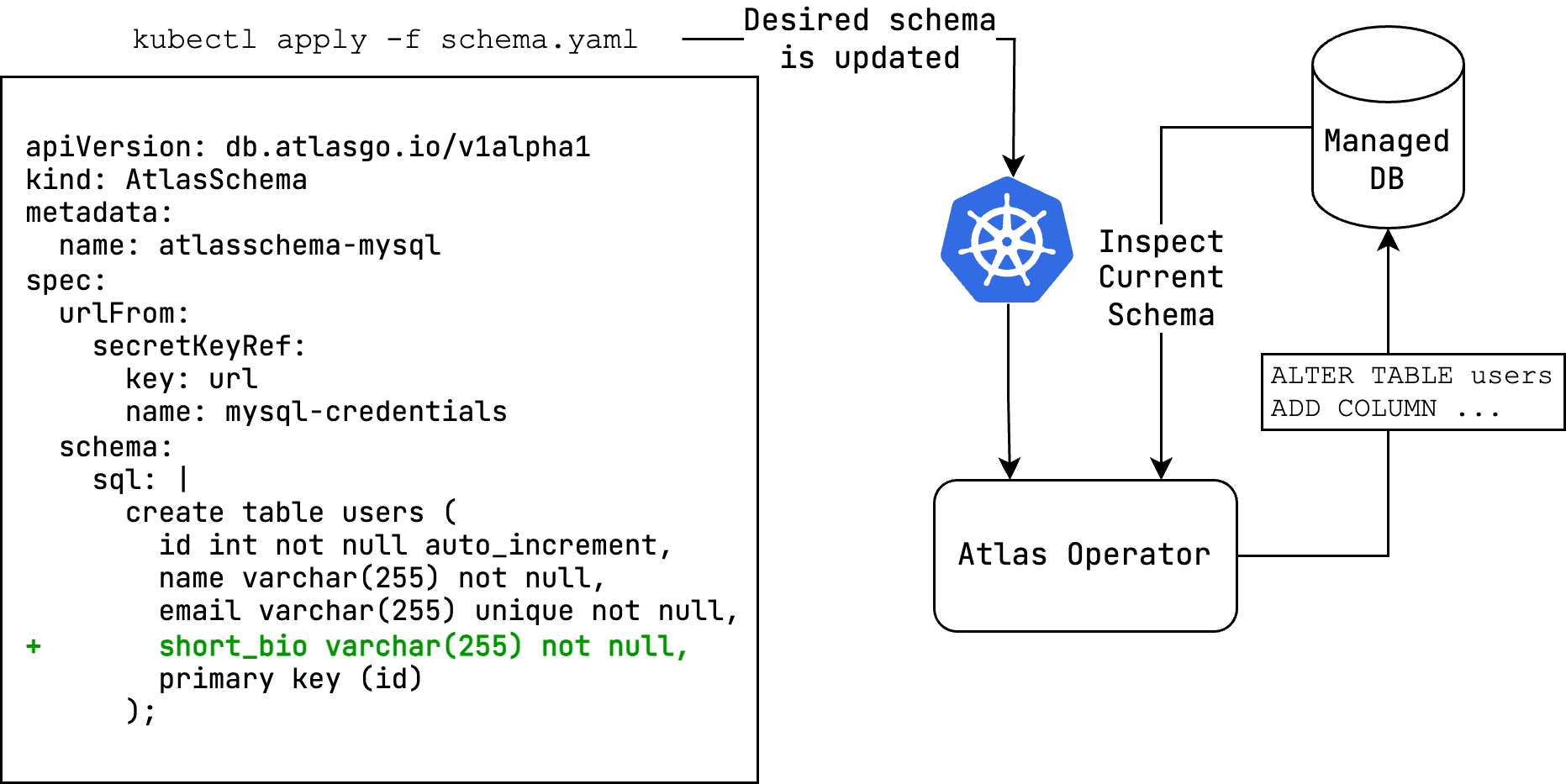
The Atlas Kubernetes Operator supports declarative migrations.
In declarative migrations, the desired state of the database is defined by the user and the operator is responsible
for reconciling the desired state with the actual state of the database (planning and executing CREATE, ALTER
and DROP statements).
Versioned schema migrations
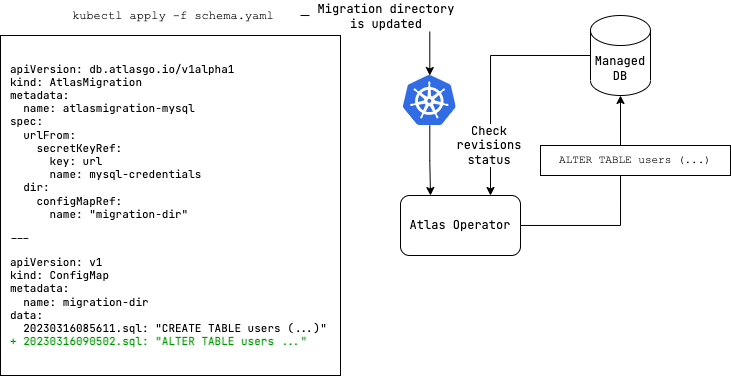
The Atlas Kubernetes Operator also supports versioned migrations.
In versioned migrations, the database schema is defined by a series of SQL scripts ("migrations") that are applied
in lexicographical order. The user can specify the version and migration directory to run, which can be located
on the Atlas Cloud or stored as a ConfigMap in your Kubernetes
cluster.
Security scanning
The AtlasSecurityScan resource runs atlas security scan against a
database and grades what it finds. The cve check resolves the installed extensions against the Atlas Security
Graph and reports the ones affected by a published CVE. New CVEs are published for versions that are already
installed, and an apply can install a new extension, so the scan runs on a schedule and again whenever a resource
listed in triggers completes an apply. This feature requires an Atlas Pro
token of an organization whose plan includes the Security Graph.
apiVersion: db.atlasgo.io/v1alpha1
kind: AtlasSecurityScan
metadata:
  name: postgres
spec:
  urlFrom:
    secretKeyRef:
      key: url
      name: postgres-credentials
  cloud:
    tokenFrom:
      secretKeyRef:
        key: ATLAS_TOKEN
        name: atlas-token-secret
  # Every morning, in a named zone, and whenever these resources apply a change.
  schedule: "0 6 * * *"
  timeZone: UTC
  triggers:
    - kind: AtlasSchema
      name: myapp
    - kind: AtlasMigration
      name: myapp-migrations
  policy:
    # Findings below this level are not reported.
    minSeverity: ELEVATED
    # A non-waived finding at this level or above makes Compliant=False.
    failOn: HIGH
    # Waivers stay in the report, marked with their reason, and stop counting.
    ignore:
      - id: CVE-2026-14678
        reason: "pg_trgm is not reachable from the application role; SEC-1234"
        expirationTime: "2026-12-31T00:00:00Z"
At least one of schedule and triggers must be set. The schedule is a five-field cron expression or one of
@hourly, @daily, @weekly, @monthly and @yearly, evaluated in timeZone; @every is rejected because it
drifts. A window missed while the operator was down is caught up with a single scan.
Two conditions answer two different questions:
| Condition | Question | False means |
|---|---|---|
Ready |
Did the controller do its job? | The last attempt failed; the reason says how. |
Compliant |
Is the database within policy as of the last successful scan? |
A non-waived finding reached failOn. Unknown when failOn is unset, before the first scan, or once retries are exhausted. |
A finding is a result, not a malfunction: it moves Compliant, never Ready. Only a scan that could not run
clears Ready, and it is retried with a backoff up to backoffLimit, after which the resource stalls and makes one
attempt for each new set of inputs. kubectl wait --for=condition=Ready returns when a result exists;
--for=condition=Compliant is a CI gate.
$ kubectl get atlassecurityscans
NAME       READY   REASON    COMPLIANT   FINDINGS   HIGHEST   LAST SCAN   NEXT SCAN              AGE
postgres   True    Scanned   False       3          HIGH      2m          2026-09-11T06:00:00Z   30d
The status holds a summary that never contains the connection URL, the extension names, the CVE ids the user did
not write, or any CLI or driver error text. The findings live in a separate AtlasSecurityReport object with the
same name, owned by the scan and replaced on every successful scan:
$ kubectl get atlassecurityreport postgres -o yaml
report:
  serverVersion: "15.4"
  summary:
    driver: postgres
    total: 1
    highestLevel: HIGH
  extensions: [pgcrypto]
  vulnerabilities:
    - id: CVE-2026-2005
      extension: pgcrypto
      version: "1.3"
      level: HIGH
      cvssSeverity: HIGH
      title: PostgreSQL pgcrypto heap buffer overflow executes arbitrary code
      suggestion: Upgrade the database engine to version 15.16 or later
The report is deliberately not readable through the built-in view and edit roles, which the scan itself joins.
The chart ships a <fullname>-securityreport-viewer ClusterRole for it (atlas-operator-securityreport-viewer
for a release named atlas-operator), aggregated into admin by default; see rbac.securityReports in the values.
To scan on demand, set the annotation to any new value and wait for it to be echoed back:
T=$(date -u +%FT%TZ)
kubectl annotate atlassecurityscan/postgres db.atlasgo.io/scan-requested-at="$T" --overwrite
kubectl wait atlassecurityscan/postgres --for=jsonpath="{.status.lastHandledScanRequest}=$T" --timeout=10m
spec.suspend: true pauses scanning without deleting the resource; resuming runs one scan that covers everything
that became due meanwhile. A security block, including notify webhooks, can be given through a custom
project configuration, which requires allowCustomConfig=true. spec.policy is the only policy
the scan has, and every extension the database has is scanned: a custom configuration that sets
security.min_severity, security.fail_on, security.cve.min_severity, security.cve.ignore or exclude for
the environment the scan runs with is rejected with InvalidTarget. Each of them keeps a finding from ever
reaching the operator, which would leave a clean verdict and a report describing a policy the scan never ran with.
When the operator is installed with labelSelector or watchNamespaces, a trigger must be managed by the same
instance, or it is reported as TriggerNotFound.
Installation
The Atlas Kubernetes Operator is available as a Helm chart. To install the chart with the release name atlas-operator:
helm install atlas-operator oci://ghcr.io/ariga/charts/atlas-operator --create-namespace --namespace atlas-operator
Configuration
To configure the operator, you can set the following values in the values.yaml file:
-
prewarmDevDB: The Operator always keeps devdb resources around to speed up the migration process. Set this tofalseto disable this feature. -
watchSecrets: The Operator watches the Secrets referenced byAtlasSchemaandAtlasMigrationresources, so that rotating one triggers a reconcile of the resources that use it. This requireslistandwatchon secrets in every watched namespace. Set this tofalseto read Secrets directly from the API server instead, which requires onlygeton the Secret being read; referenced Secrets are still read on every reconcile, but rotating one no longer triggers a reconcile on its own. Defaults to the value ofrbac.clusterWideSecretAccess.Note that
AtlasMigrationstores the state of alocalorconfigMapRefmigration directory in a Secret it owns, so the Operator needsget,createandupdateon secrets in the namespaces it manages regardless of this setting. -
allowCustomConfig: Enable this to allow customatlas.hclconfiguration. To use this feature, you can set theconfigfield in theAtlasSchemaorAtlasMigrationresource.
  spec:
    envName: myenv
    config: |
      env myenv {}
    # config from secretKeyRef
    # configFrom:
    #   secretKeyRef:
    #     key: config
    #     name: my-secret
To use variables in the config field:
  spec:
    envName: myenv
    variables:
      - name: db_url
        value: "mysql://root"
      # variables from secretKeyRef
      # - name: db_url
      #   valueFrom:
      #     secretKeyRef:
      #       key: db_url
      #       name: my-secret
      # variables from configMapKeyRef
      # - name: db_url
      #   valueFrom:
      #     configMapKeyRef:
      #       key: db_url
      #       name: my-configmap
    config: |
      variable "db_url" {
        type = string
      }
      env myenv {
        url = var.db_url
      }
Note: Allowing custom configuration enables executing arbitrary commands using the
externaldata source as well as arbitrary SQL using thesqldata source. Use this feature with caution.
extraEnvs: Used to set environment variables for the operator
  extraEnvs: []
  # extraEnvs:
  #   - name: MSSQL_ACCEPT_EULA
  #     value: "Y"
  #   - name: MSSQL_PID
  #     value: "Developer"
  #   - name: ATLAS_TOKEN
  #     valueFrom:
  #       secretKeyRef:
  #         key: ATLAS_TOKEN
  #         name: atlas-token-secret
  #   - name: BAZ
  #     valueFrom:
  #       configMapKeyRef:
  #         key: BAZ
  #         name: configmap-resource
Note: The SQL Server driver requires the
MSSQL_ACCEPT_EULAandMSSQL_PIDenvironment variables to be set for acceptance of the Microsoft EULA and the product ID, respectively.
extraVolumes: Used to mount additional volumes to the operator
  extraVolumes: []
  # extraVolumes:
  #   - name: my-volume
  #     secret:
  #       secretName: my-secret
  #   - name: my-volume
  #     configMap:
  #       name: my-configmap
extraVolumeMounts: Used to mount additional volumes to the operator
  extraVolumeMounts: []
  # extraVolumeMounts:
  #   - name: my-volume
  #     mountPath: /path/to/mount
  #   - name: my-volume
  #     mountPath: /path/to/mount
Authentication
If you want use use any feature that requires logging in (triggers, functions, procedures, sequence support or SQL Server, ClickHouse, and Redshift drivers), you need to provide the operator with an Atlas token. You can do this by creating a secret with the token:
kubectl create secret generic atlas-token-secret \
  --from-literal=ATLAS_TOKEN='aci_xxxxxxx'
Then set the ATLAS_TOKEN environment variable in the operator's deployment manifest:
values:
  extraEnvs:
    - name: ATLAS_TOKEN
      valueFrom:
        secretKeyRef:
          key: ATLAS_TOKEN
          name: atlas-token-secret
Getting started
In this example, we will create a MySQL database and apply a schema to it. After installing the operator, follow these steps to get started:
- Create a MySQL database and a secret with an Atlas URL to the database:
kubectl apply -f https://raw.githubusercontent.com/ariga/atlas-operator/master/examples/databases/mysql.yaml
Result:
deployment.apps/mysql created
service/mysql created
secret/mysql-credentials created
- Create a file named
schema.yamlcontaining anAtlasSchemaresource to define the desired schema:
apiVersion: db.atlasgo.io/v1alpha1
kind: AtlasSchema
metadata:
  name: atlasschema-mysql
spec:
  urlFrom:
    secretKeyRef:
      key: url
      name: mysql-credentials
  schema:
    sql: |
      create table users (
        id int not null auto_increment,
        name varchar(255) not null,
        email varchar(255) unique not null,
        short_bio varchar(255) not null,
        primary key (id)
      );
- Apply the schema:
kubectl apply -f schema.yaml
Result:
atlasschema.db.atlasgo.io/atlasschema-mysql created
- Check that our table was created:
kubectl exec -it $(kubectl get pods -l app=mysql -o jsonpath='{.items[0].metadata.name}') -- mysql -uroot -ppass -e "describe myapp.users"
Result:
+-----------+--------------+------+-----+---------+----------------+
| Field     | Type         | Null | Key | Default | Extra          |
+-----------+--------------+------+-----+---------+----------------+
| id        | int          | NO   | PRI | NULL    | auto_increment |
| name      | varchar(255) | NO   |     | NULL    |                |
| email     | varchar(255) | NO   | UNI | NULL    |                |
| short_bio | varchar(255) | NO   |     | NULL    |                |
+-----------+--------------+------+-----+---------+----------------+
Hooray! We applied our desired schema to our target database.
Now, let's try versioned migrations with a PostgreSQL database.
- Create a PostgresQL database and a secret with an Atlas URL to the database:
kubectl apply -f https://raw.githubusercontent.com/ariga/atlas-operator/master/examples/databases/postgres.yaml
Result:
deployment.apps/postgres created
service/postgres unchanged
- Create a file named
migrationdir.yamlto define your migration directory
apiVersion: v1
kind: ConfigMap
metadata:
  name: migrationdir
data:
  20230316085611.sql: |
    create sequence users_seq;
    create table users (
      id int not null default nextval ('users_seq'),
      name varchar(255) not null,
      email varchar(255) unique not null,
      short_bio varchar(255) not null,
      primary key (id)
    );
  atlas.sum: |
    h1:FwM0ApKo8xhcZFrSlpa6dYjvi0fnDPo/aZSzajtbHLc=
    20230316085611.sql h1:ldFr73m6ZQzNi8q9dVJsOU/ZHmkBo4Sax03AaL0VUUs=
- Create a file named
atlasmigration.yamlto define your migration resource that links to the migration directory.
apiVersion: db.atlasgo.io/v1alpha1
kind: AtlasMigration
metadata:
  name: atlasmigration-sample
spec:
  urlFrom:
    secretKeyRef:
      key: url
      name: postgres-credentials
  dir:
    configMapRef:
      name: "migrationdir"
Alternatively, we can define a migration directory inlined in the migration resource instead of using a ConfigMap:
apiVersion: db.atlasgo.io/v1alpha1
kind: AtlasMigration
metadata:
  name: atlasmigration-sample
spec:
  urlFrom:
    secretKeyRef:
      key: url
      name: postgres-credentials
  dir:
    local:
      20230316085611.sql: |
        create sequence users_seq;
        create table users (
          id int not null default nextval ('users_seq'),
          name varchar(255) not null,
          email varchar(255) unique not null,
          short_bio varchar(255) not null,
          primary key (id)
        );
      atlas.sum: |
        h1:FwM0ApKo8xhcZFrSlpa6dYjvi0fnDPo/aZSzajtbHLc=
        20230316085611.sql h1:ldFr73m6ZQzNi8q9dVJsOU/ZHmkBo4Sax03AaL0VUUs=
- Apply migration resources:
kubectl apply -f migrationdir.yaml
kubectl apply -f atlasmigration.yaml
Result:
atlasmigration.db.atlasgo.io/atlasmigration-sample created
- Check that our table was created:
kubectl exec -it $(kubectl get pods -l app=postgres -o jsonpath='{.items[0].metadata.name}') -- psql -U root -d postgres -c "\d+ users"
Result:
  Column   |          Type          | Collation | Nullable |            Default             | Storage  | Compression | Stats target | Description
-----------+------------------------+-----------+----------+--------------------------------+----------+-------------+--------------+-------------
 id        | integer                |           | not null | nextval('users_seq'::regclass) | plain    |             |              |
 name      | character varying(255) |           | not null |                                | extended |             |              |
 email     | character varying(255) |           | not null |                                | extended |             |              |
 short_bio | character varying(255) |           | not null |                                | extended |             |              |
Please refer to this link to explore the supported API for versioned migrations.
API Reference
Example resource:
apiVersion: db.atlasgo.io/v1alpha1
kind: AtlasSchema
metadata:
  name: atlasschema-mysql
spec:
  urlFrom:
    secretKeyRef:
      key: url
      name: mysql-credentials
  policy:
    # Fail if the diff planned by Atlas contains destructive changes.
    lint:
      destructive:
        error: true
    diff:
      # Omit any DROP INDEX statements from the diff planned by Atlas.
      skip:
        drop_index: true
  schema:
    sql: |
      create table users (
        id int not null auto_increment,
        name varchar(255) not null,
        primary key (id)
      );
  exclude:
    - ignore_me
This resource describes the desired schema of a MySQL database.
- The
urlFromfield is a reference to a secret containing an Atlas URL to the target database. - The
schemafield contains the desired schema in SQL. To define the schema in HCL instead of SQL, use thehclfield:
To learn more about defining SQL resources in HCL see this guide.spec: schema: hcl: | table "users" { // ... } - The
policyfield defines different policies that direct the way Atlas will plan and execute schema changes.- The
lintpolicy defines a policy for linting the schema. In this example, we define a policy that will fail if the diff planned by Atlas contains destructive changes. - The
diffpolicy defines a policy for planning the schema diff. In this example, we define a policy that will omit anyDROP INDEXstatements from the diff planned by Atlas.
- The
Dev database pod metadata
Both AtlasSchema and AtlasMigration accept labels and annotations for generated dev database pods:
spec:
  devDB:
    metadata:
      labels:
        team: platform
      annotations:
        example.com/purpose: schema-analysis
Omitting devDB.spec keeps the automatically generated database configuration; no custom devURL is required. Metadata can also accompany a custom devDB.spec and devURL.
Labels are added only to the pod template, not the Deployment selector. Operator-managed labels and the atlasgo.io/conntmpl annotation take precedence over custom values. Like the custom pod spec, metadata is applied when the dev database Deployment is created; existing Deployments are not updated.
Version checks
The operator will periodically check for new versions and security advisories related to the operator.
To disable version checks, set the SKIP_VERCHECK environment variable to true in the operator's
deployment manifest.
Troubleshooting
In successful reconciliation, the conditon status will look like this:
Status:
  Conditions:
    Last Transition Time: 2024-03-20T09:59:56Z
    Message: ""
    Reason: Applied
    Status: True
    Type: Ready
  Last Applied: 1710343398
  Last Applied Version: 20240313121148
  observed_hash: d5a1c1c08de2530d9397d4
In case of an error, the condition status will be set to false and reason field will contain the type of error that occurred (e.g. Reconciling, ReadingMigrationData, Migrating, etc.). To get more information about the error, you can check the message field.
For AtlasSchema resource:
| Reason | Description |
|---|---|
| Reconciling | The operator is reconciling the desired state with the actual state of the database |
| ReadSchema | There was an error about reading the schema from ConfigMap or database credentials |
| GettingDevDB | Failed to get a Dev Database, which used for normalization the schema |
| VerifyingFirstRun | Occurred when a first run of the operator that contain destructive changes |
| LintPolicyError | Occurred when the lint policy is violated |
| ApplyingSchema | Failed to apply to database |
For AtlasMigration resource:
| Reason | Description |
|---|---|
| Reconciling | The operator is reconciling the desired state with the actual state of the database |
| GettingDevDB | Failed to get a Dev Database which is required to compute a migration plan |
| ReadingMigrationData | Failed to read the migration directory from ConfigMap, Atlas Cloud or invalid database credentials |
| ProtectedFlowError | Occurred when the migration is protected and the operator is not able to apply it |
| ApprovalPending | Applying the migration requires manual approval on Atlas Cloud. The URL used for approval is provided in the approvalUrl field of the status object |
| Migrating | Failed to migrate to database |
| DriftDetected | The pre-apply drift check (spec.policy.drift) found that the database does not match the state registered for its current version, so the migration was not applied. Fix the drift, add an exclude pattern, or set onError to CONTINUE to apply anyway and only log the drift in the Atlas Registry |
Support
Need help? File issues on the Atlas Issue Tracker or join our Discord server.
Development
Start MiniKube
minikube start
Install CRDs
make install
Start Skaffold
skaffold dev --profile kustomize
License
The Atlas Kubernetes Operator is licensed under the Apache License 2.0.
 Directories

Directories

| Path | Synopsis |
|---|---|
|
api
|
|
|
v1alpha1
Package v1alpha1 contains API Schema definitions for the db v1alpha1 API group +kubebuilder:object:generate=true +groupName=db.atlasgo.io
|
Package v1alpha1 contains API Schema definitions for the db v1alpha1 API group +kubebuilder:object:generate=true +groupName=db.atlasgo.io |
|
internal
|
|