

 README

README

CDK Pipelines for GitHub Workflows

The APIs in this module are experimental and under active development. They are subject to non-backward compatible changes or removal in any future version. These are not subject to the Semantic Versioning model and breaking changes will be announced in the release notes. This means that while you may use them, you may need to update your source code when upgrading to a newer version of this package.
A construct library for painless Continuous Delivery of CDK applications, deployed via GitHub Workflows.
The CDK already has a CI/CD solution, CDK Pipelines, which creates an AWS CodePipeline that deploys CDK applications. This module serves the same surface area, except that it is implemented with GitHub Workflows.
Table of Contents
Usage
Assuming you have a
Stage
called MyStage that includes CDK stacks for your app and you want to deploy it
to two AWS environments (BETA_ENV and PROD_ENV):
import "github.com/aws/aws-cdk-go/awscdk"


app := awscdk.NewApp()

pipeline := src.NewGitHubWorkflow(app, jsii.String("Pipeline"), &GitHubWorkflowProps{
	Synth: awscdk.NewShellStep(jsii.String("Build"), &ShellStepProps{
		Commands: []*string{
			jsii.String("yarn install"),
			jsii.String("yarn build"),
		},
	}),
	AwsCreds: *src.AwsCredentials_FromOpenIdConnect(&OpenIdConnectProviderProps{
		GitHubActionRoleArn: jsii.String("arn:aws:iam::<account-id>:role/GitHubActionRole"),
	}),
})

// Build the stages
betaStage := NewMyStage(app, jsii.String("Beta"), &StageProps{
	Env: *bETA_ENV,
})
prodStage := NewMyStage(app, jsii.String("Prod"), &StageProps{
	Env: *pROD_ENV,
})

// Add the stages for sequential build - earlier stages failing will stop later ones:
pipeline.AddStage(betaStage)
pipeline.AddStage(prodStage)

// OR add the stages for parallel building of multiple stages with a Wave:
wave := pipeline.AddWave(jsii.String("Wave"))
wave.AddStage(betaStage)
wave.AddStage(prodStage)

app.Synth()
When you run cdk synth, a deploy.yml workflow will be created under
.github/workflows in your repo. This workflow will deploy your application
based on the definition of the pipeline. In the example above, it will deploy
the two stages in sequence, and within each stage, it will deploy all the
stacks according to their dependency order and maximum parallelism. If your app
uses assets, assets will be published to the relevant destination environment.
The Pipeline class from cdk-pipelines-github is derived from the base CDK
Pipelines class, so most features should be supported out of the box. See the
CDK Pipelines
documentation for more details.
To express GitHub-specifc details, such as those outlined in Additional Features, you have a few options:
-
Use a
GitHubStageinstead ofStage(or make aGitHubStagesubclass instead of aStagesubclass) - this adds theGitHubCommonPropsto theStageproperties- With this you can use
pipeline.addStage(myGitHubStage)orwave.addStage(myGitHubStage)and the properties of the stage will be used
- With this you can use
-
Using a
Stage(or subclass thereof) or aGitHubStage(or subclass thereof) you can callpipeline.addStageWithGitHubOptions(stage, stageOptions)orwave.addStageWithGitHubOptions(stage, stageOptions)- In this case you're providing the same options along with the stage instead of embedded in the stage.
- Note that properties of a
GitHubStageadded withaddStageWithGitHubOptions()will override the options provided toaddStageWithGitHubOptions()
NOTES:
- Environments must be bootstrapped separately using
cdk bootstrap. See CDK Environment Bootstrapping for details.
Initial Setup
Assuming you have your CDK app checked out on your local machine, here are the suggested steps to develop your GitHub Workflow.
-
Set up AWS Credentials your local environment. It is highly recommended to authenticate via an OpenId Connect IAM Role. You can set one up using the
GithubActionRoleclass provided in this module. For more information (and alternatives), see AWS Credentials. -
When you've updated your pipeline and are ready to deploy, run
cdk synth. This creates a workflow file in.github/workflows/deploy.yml. -
When you are ready to test your pipeline, commit your code changes as well as the
deploy.ymlfile to GitHub. GitHub will automatically try to run the workflow found under.github/workflows/deploy.yml. -
You will be able to see the result of the run on the
Actionstab in your repository: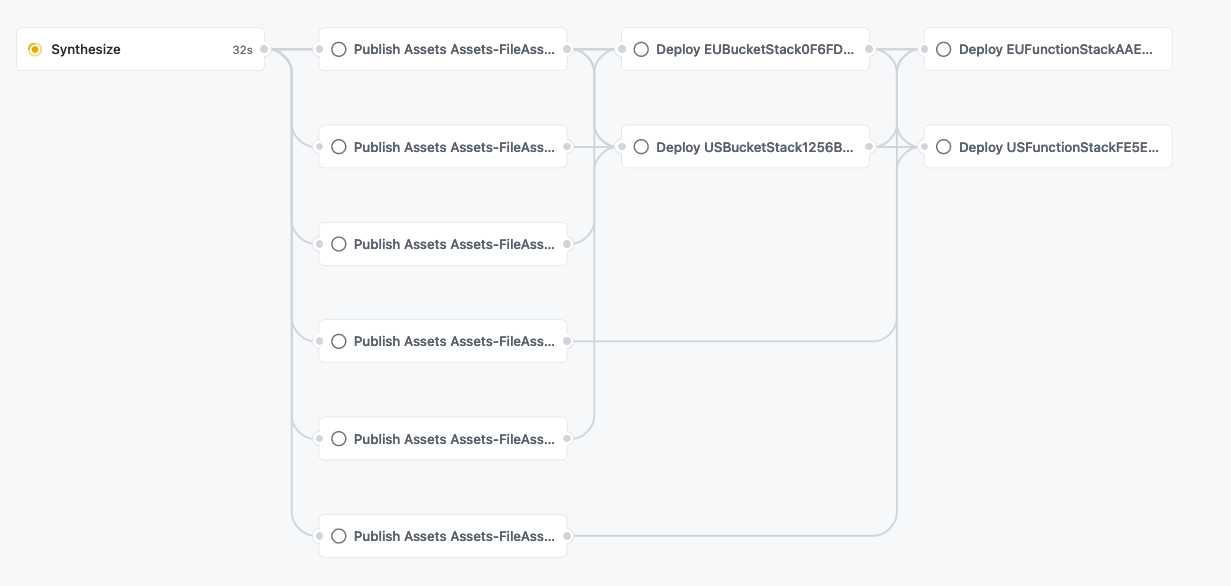
For an in-depth run-through on creating your own GitHub Workflow, see the Tutorial section.
AWS Credentials
There are two ways to supply AWS credentials to the workflow:
- GitHub Action IAM Role (recommended).
- Long-lived AWS Credentials stored in GitHub Secrets.
The GitHub Action IAM Role authenticates via the GitHub OpenID Connect provider and is recommended, but it requires preparing your AWS account beforehand. This approach allows your Workflow to exchange short-lived tokens directly from AWS. With OIDC, benefits include:
- No cloud secrets.
- Authentication and authorization management.
- Rotating credentials.
You can read more here.
GitHub Action Role
Authenticating via OpenId Connect means you do not need to store long-lived
credentials as GitHub Secrets. With OIDC, you provide a pre-provisioned IAM
role with optional role session name to your GitHub Workflow via the awsCreds.fromOpenIdConnect API:
import "github.com/aws/aws-cdk-go/awscdk"


app := awscdk.NewApp()

pipeline := src.NewGitHubWorkflow(app, jsii.String("Pipeline"), &GitHubWorkflowProps{
	Synth: awscdk.NewShellStep(jsii.String("Build"), &ShellStepProps{
		Commands: []*string{
			jsii.String("yarn install"),
			jsii.String("yarn build"),
		},
	}),
	AwsCreds: *src.AwsCredentials_FromOpenIdConnect(&OpenIdConnectProviderProps{
		GitHubActionRoleArn: jsii.String("arn:aws:iam::<account-id>:role/GitHubActionRole"),
		RoleSessionName: jsii.String("optional-role-session-name"),
	}),
})
There are two ways to create this IAM role:
- Use the
GitHubActionRoleconstruct (recommended and described below). - Manually set up the role (Guide).
GitHubActionRole Construct
Because this construct involves creating an IAM role in your account, it must
be created separate to your GitHub Workflow and deployed via a normal
cdk deploy with your local AWS credentials. Upon successful deployment, the
arn of your newly created IAM role will be exposed as a CfnOutput.
To utilize this construct, create a separate CDK stack with the following code
and cdk deploy:
type myGitHubActionRole struct {
	stack
}

func newMyGitHubActionRole(scope construct, id *string, props stackProps) *myGitHubActionRole {
	this := &myGitHubActionRole{}
	newStack_Override(this, scope, id, props)

	provider := src.NewGitHubActionRole(this, jsii.String("github-action-role"), &GitHubActionRoleProps{
		Repos: []*string{
			jsii.String("myUser/myRepo"),
		},
	})
	return this
}

app := awscdk.NewApp()
NewMyGitHubActionRole(app, jsii.String("MyGitHubActionRole"))
app.Synth()
Note: If you have previously created the GitHub identity provider with url
https://token.actions.githubusercontent.com, the above example will fail
because you can only have one such provider defined per account. In this
case, you must provide the already created provider into your GithubActionRole
construct via the provider property.
Make sure the audience for the provider is
sts.amazonaws.comin this case.
type myGitHubActionRole struct {
	stack
}

func newMyGitHubActionRole(scope construct, id *string, props stackProps) *myGitHubActionRole {
	this := &myGitHubActionRole{}
	newStack_Override(this, scope, id, props)

	provider := src.NewGitHubActionRole(this, jsii.String("github-action-role"), &GitHubActionRoleProps{
		Repos: []*string{
			jsii.String("myUser/myRepo"),
		},
		Provider: *src.GitHubActionRole_ExistingGitHubActionsProvider(this),
	})
	return this
}
GitHub Secrets
Authenticating via this approach means that you will be manually creating AWS
credentials and duplicating them in GitHub secrets. The workflow expects the
GitHub repository to include secrets with AWS credentials under
AWS_ACCESS_KEY_ID and AWS_SECRET_ACCESS_KEY. You can override these defaults
by supplying the awsCreds.fromGitHubSecrets API to the workflow:
import "github.com/aws/aws-cdk-go/awscdk"


app := awscdk.NewApp()

pipeline := src.NewGitHubWorkflow(app, jsii.String("Pipeline"), &GitHubWorkflowProps{
	Synth: awscdk.NewShellStep(jsii.String("Build"), &ShellStepProps{
		Commands: []*string{
			jsii.String("yarn install"),
			jsii.String("yarn build"),
		},
	}),
	AwsCreds: *src.AwsCredentials_FromGitHubSecrets(&GitHubSecretsProviderProps{
		AccessKeyId: jsii.String("MY_ID"),
		 // GitHub will look for the access key id under the secret `MY_ID`
		SecretAccessKey: jsii.String("MY_KEY"),
	}),
})
Runners with Preconfigured Credentials
If your runners provide credentials themselves, you can configure awsCreds to
skip passing credentials:
import "github.com/aws/aws-cdk-go/awscdk"


app := awscdk.NewApp()

pipeline := src.NewGitHubWorkflow(app, jsii.String("Pipeline"), &GitHubWorkflowProps{
	Synth: awscdk.NewShellStep(jsii.String("Build"), &ShellStepProps{
		Commands: []*string{
			jsii.String("yarn install"),
			jsii.String("yarn build"),
		},
	}),
	AwsCreds: *src.AwsCredentials_RunnerHasPreconfiguredCreds(),
})
Using Docker in the Pipeline
You can use Docker in GitHub Workflows in a similar fashion to CDK Pipelines. For a full discussion on how to use Docker in CDK Pipelines, see Using Docker in the Pipeline.
Just like CDK Pipelines, you may need to authenticate to Docker registries to avoid being throttled.
Authenticating to Docker registries
You can specify credentials to use for authenticating to Docker registries as part of the Workflow definition. This can be useful if any Docker image assets — in the pipeline or any of the application stages — require authentication, either due to being in a different environment (e.g., ECR repo) or to avoid throttling (e.g., DockerHub).
import "github.com/aws/aws-cdk-go/awscdk"


app := awscdk.NewApp()

pipeline := src.NewGitHubWorkflow(app, jsii.String("Pipeline"), &GitHubWorkflowProps{
	Synth: awscdk.NewShellStep(jsii.String("Build"), &ShellStepProps{
		Commands: []*string{
			jsii.String("yarn install"),
			jsii.String("yarn build"),
		},
	}),
	DockerCredentials: []dockerCredential{
		*src.DockerCredential_Ecr(jsii.String("<account-id>.dkr.ecr.<aws-region>.amazonaws.com")),
		*src.DockerCredential_DockerHub(&DockerHubCredentialSecrets{
			// These properties are defaults; feel free to omit
			UsernameKey: jsii.String("DOCKERHUB_USERNAME"),
			PersonalAccessTokenKey: jsii.String("DOCKERHUB_TOKEN"),
		}),
		*src.DockerCredential_CustomRegistry(jsii.String("custom-registry"), &ExternalDockerCredentialSecrets{
			UsernameKey: jsii.String("CUSTOM_USERNAME"),
			PasswordKey: jsii.String("CUSTOM_PASSWORD"),
		}),
	},
})
Runner Types
You can choose to run the workflow in either a GitHub hosted or self-hosted runner.
GitHub Hosted Runner
The default is Runner.UBUNTU_LATEST. You can override this as shown below:
import "github.com/aws/aws-cdk-go/awscdk"


app := awscdk.NewApp()

pipeline := src.NewGitHubWorkflow(app, jsii.String("Pipeline"), &GitHubWorkflowProps{
	Synth: awscdk.NewShellStep(jsii.String("Build"), &ShellStepProps{
		Commands: []*string{
			jsii.String("yarn install"),
			jsii.String("yarn build"),
		},
	}),
	Runner: *src.Runner_WINDOWS_LATEST(),
})
Self Hosted Runner
The following example shows how to configure the workflow to run on a self-hosted runner. Note that you do not need to pass in self-hosted explicitly as a label.
import "github.com/aws/aws-cdk-go/awscdk"


app := awscdk.NewApp()

pipeline := src.NewGitHubWorkflow(app, jsii.String("Pipeline"), &GitHubWorkflowProps{
	Synth: awscdk.NewShellStep(jsii.String("Build"), &ShellStepProps{
		Commands: []*string{
			jsii.String("yarn install"),
			jsii.String("yarn build"),
		},
	}),
	Runner: *src.Runner_SelfHosted([]*string{
		jsii.String("label1"),
		jsii.String("label2"),
	}),
})
Escape Hatches
You can override the deploy.yml workflow file post-synthesis however you like.
import "github.com/aws/aws-cdk-go/awscdk"


app := awscdk.NewApp()

pipeline := src.NewGitHubWorkflow(app, jsii.String("Pipeline"), &GitHubWorkflowProps{
	Synth: awscdk.NewShellStep(jsii.String("Build"), &ShellStepProps{
		Commands: []*string{
			jsii.String("yarn install"),
			jsii.String("yarn build"),
		},
	}),
})

deployWorkflow := pipeline.WorkflowFile
// add `on: workflow_call: {}` to deploy.yml
deployWorkflow.Patch(src.JsonPatch_Add(jsii.String("/on/workflow_call"), map[string]interface{}{
}))
// remove `on: workflow_dispatch` from deploy.yml
deployWorkflow.Patch(src.JsonPatch_Remove(jsii.String("/on/workflow_dispatch")))
Additional Features
Below is a compilation of additional features available for GitHub Workflows.
GitHub Action Step
If you want to call a GitHub Action in a step, you can utilize the GitHubActionStep.
GitHubActionStep extends Step and can be used anywhere a Step type is allowed.
The jobSteps array is placed into the pipeline job at the relevant jobs.<job_id>.steps as documented here.
In this example,
import "github.com/aws/aws-cdk-go/awscdk"


app := awscdk.NewApp()

pipeline := src.NewGitHubWorkflow(app, jsii.String("Pipeline"), &GitHubWorkflowProps{
	Synth: awscdk.NewShellStep(jsii.String("Build"), &ShellStepProps{
		Commands: []*string{
			jsii.String("yarn install"),
			jsii.String("yarn build"),
		},
	}),
})

// "Beta" stage with a pre-check that uses code from the repo and an action
stage := NewMyStage(app, jsii.String("Beta"), &StageProps{
	Env: *bETA_ENV,
})
pipeline.AddStage(stage, &AddStageOpts{
	Pre: []step{
		*src.NewGitHubActionStep(jsii.String("PreBetaDeployAction"), &GitHubActionStepProps{
			JobSteps: []jobStep{
				&jobStep{
					Name: jsii.String("Checkout"),
					Uses: jsii.String("actions/checkout@v3"),
				},
				&jobStep{
					Name: jsii.String("pre beta-deploy action"),
					Uses: jsii.String("my-pre-deploy-action@1.0.0"),
				},
				&jobStep{
					Name: jsii.String("pre beta-deploy check"),
					Run: jsii.String("npm run preDeployCheck"),
				},
			},
		}),
	},
})

app.Synth()
Configure GitHub Environment
You can run your GitHub Workflow in select GitHub Environments. Via the GitHub UI, you can configure environments with protection rules and secrets, and reference those environments in your CDK app. A workflow that references an environment must follow any protection rules for the environment before running or accessing the environment's secrets.
Assuming (just like in the main example) you have a
Stage
called MyStage that includes CDK stacks for your app and you want to deploy it
to two AWS environments (BETA_ENV and PROD_ENV) as well as GitHub Environments
beta and prod:
import "github.com/aws/aws-cdk-go/awscdk"


app := awscdk.NewApp()

pipeline := src.NewGitHubWorkflow(app, jsii.String("Pipeline"), &GitHubWorkflowProps{
	Synth: awscdk.NewShellStep(jsii.String("Build"), &ShellStepProps{
		Commands: []*string{
			jsii.String("yarn install"),
			jsii.String("yarn build"),
		},
	}),
	AwsCreds: *src.AwsCredentials_FromOpenIdConnect(&OpenIdConnectProviderProps{
		GitHubActionRoleArn: jsii.String("arn:aws:iam::<account-id>:role/GitHubActionRole"),
	}),
})

pipeline.AddStageWithGitHubOptions(awscdk.NewStage(this, jsii.String("Beta"), &StageProps{
	Env: *bETA_ENV,
}), &AddGitHubStageOptions{
	GitHubEnvironment: &GitHubEnvironment{
		Name: jsii.String("beta"),
	},
})
pipeline.AddStageWithGitHubOptions(NewMyStage(this, jsii.String("Prod"), &StageProps{
	Env: *pROD_ENV,
}), &AddGitHubStageOptions{
	GitHubEnvironment: &GitHubEnvironment{
		Name: jsii.String("prod"),
	},
})

app.Synth()
Waves for Parallel Builds
You can add a Wave to a pipeline, where each stage of a wave will build in parallel.
Note: The
pipeline.addWave()call will return aWaveobject that is actually aGitHubWaveobject, but due to JSII rules the return type ofaddWave()cannot be changed. If you need to usewave.addStageWithGitHubOptions()then you should callpipeline.addGitHubWave()instead, or you can useGitHubStages to carry the GitHub properties.
When deploying to multiple accounts or otherwise deploying mostly-unrelated stacks, using waves can be a huge win.
Here's a relatively large (but real) example, without a wave:

You can see how dependencies get chained unnecessarily, where the cUrl step should be the final step (a test) for an account:

Here's the exact same stages deploying the same stacks to the same accounts, but with a wave:

And the dependency chains are reduced to only what is actually needed, with the cUrl calls as the final stage for each account:

For additional information and a code example see here.
Manual Approval Step
One use case for using GitHub Environments with your CDK Pipeline is to create a manual approval step for specific environments via Environment protection rules. From the GitHub UI, you can specify up to 5 required reviewers that must approve before the deployment can proceed:

For more information and a tutorial for how to set this up, see this discussion.
Pipeline YAML Comments
An "AUTOMATICALLY GENERATED FILE..." comment will by default be added to the top of the pipeline YAML. This can be overriden as desired to add additional context to the pipeline YAML.
declare const pipeline: GitHubWorkflow;

pipeline.workflowFile.commentAtTop = `AUTOGENERATED FILE, DO NOT EDIT DIRECTLY!

Deployed stacks from this pipeline:
${STACK_NAMES.map((s)=>`- ${s}\n`)}`;
This will generate the normal deploy.yml file, but with the additional comments:
# AUTOGENERATED FILE, DO NOT EDIT DIRECTLY!

# Deployed stacks from this pipeline:
# - APIStack
# - AuroraStack

name: deploy
on:
  push:
    branches:
< the rest of the pipeline YAML contents>
Tutorial
You can find an example usage in test/example-app.ts which includes a simple CDK app and a pipeline.
You can find a repository that uses this example here: eladb/test-app-cdkpipeline.
To run the example, clone this repository and install dependencies:
cd ~/projects # or some other playground space
git clone https://github.com/cdklabs/cdk-pipelines-github
cd cdk-pipelines-github
yarn
Now, create a new GitHub repository and clone it as well:
cd ~/projects
git clone https://github.com/myaccount/my-test-repository
You'll need to set up AWS credentials in your environment. Note that this tutorial uses long-lived GitHub secrets as credentials for simplicity, but it is recommended to set up a GitHub OIDC role instead.
export AWS_ACCESS_KEY_ID=xxxx
export AWS_SECRET_ACCESS_KEY=xxxxx
Bootstrap your environments:
export CDK_NEW_BOOTSTRAP=1
npx cdk bootstrap aws://ACCOUNTID/us-east-1
npx cdk bootstrap aws://ACCOUNTID/eu-west-2
Now, run the manual-test.sh script when your working directory is the new repository:
cd ~/projects/my-test-repository
~/projects/cdk-piplines/github/test/manual-test.sh
This will produce a cdk.out directory and a .github/workflows/deploy.yml file.
Commit and push these files to your repo and you should see the deployment
workflow in action. Make sure your GitHub repository has AWS_ACCESS_KEY_ID and
AWS_SECRET_ACCESS_KEY secrets that can access the same account that you
synthesized against.
In this tutorial, you are supposed to commit
cdk.out(i.e. the code is pre-synthed). Do not do this in your app; you should always synth during the synth step of the GitHub workflow. In the example app this is achieved through thepreSynthed: trueoption. It is for example purposes only and is not something you should do in your app.import "github.com/aws/aws-cdk-go/awscdk" pipeline := src.NewGitHubWorkflow(awscdk.NewApp(), jsii.String("Pipeline"), &GitHubWorkflowProps{ Synth: awscdk.NewShellStep(jsii.String("Build"), &ShellStepProps{ Commands: []*string{ jsii.String("echo \"nothing to do (cdk.out is committed)\""), }, }), // only the example app should do this. your app should synth in the synth step. PreSynthed: jsii.Boolean(true), })
Not supported yet
Most features that exist in CDK Pipelines are supported. However, as the CDK Pipelines feature are expands, the feature set for GitHub Workflows may lag behind. If you see a feature that you feel should be supported by GitHub Workflows, please open a GitHub issue to track it.
Contributing
See CONTRIBUTING for more information.
License
This project is licensed under the Apache-2.0 License.
 Documentation

Documentation

Overview 
GitHub Workflows support for CDK Pipelines
Index 
- func GitHubActionRole_ExistingGitHubActionsProvider(scope constructs.Construct) awsiam.IOpenIdConnectProvider
- func GitHubActionRole_IsConstruct(x interface{}) *bool
- func GitHubActionStep_Sequence(steps *[]pipelines.Step) *[]pipelines.Step
- func GitHubStage_IsConstruct(x interface{}) *bool
- func GitHubStage_IsStage(x interface{}) *bool
- func GitHubStage_Of(construct constructs.IConstruct) awscdk.Stage
- func GitHubWorkflow_IsConstruct(x interface{}) *bool
- func JsonPatch_Apply(document interface{}, ops ...JsonPatch) interface{}
- func NewAwsCredentialsProvider_Override(a AwsCredentialsProvider)
- func NewAwsCredentials_Override(a AwsCredentials)
- func NewGitHubActionRole_Override(g GitHubActionRole, scope constructs.Construct, id *string, ...)
- func NewGitHubActionStep_Override(g GitHubActionStep, id *string, props *GitHubActionStepProps)
- func NewGitHubStage_Override(g GitHubStage, scope constructs.Construct, id *string, props *GitHubStageProps)
- func NewGitHubWave_Override(g GitHubWave, id *string, pipeline GitHubWorkflow, props *pipelines.WaveProps)
- func NewGitHubWorkflow_Override(g GitHubWorkflow, scope constructs.Construct, id *string, ...)
- func NewYamlFile_Override(y YamlFile, filePath *string, options *YamlFileOptions)
- type AddGitHubStageOptions
- type AwsCredentials
- type AwsCredentialsProvider
- type AwsCredentialsSecrets
- type CheckRunOptions
- type CheckSuiteOptions
- type ContainerCredentials
- type ContainerOptions
- type CreateOptions
- type CronScheduleOptions
- type DeleteOptions
- type DeploymentOptions
- type DeploymentStatusOptions
- type DockerCredential
- type DockerHubCredentialSecrets
- type ExternalDockerCredentialSecrets
- type ForkOptions
- type GitHubActionRole
- type GitHubActionRoleProps
- type GitHubActionStep
- type GitHubActionStepProps
- type GitHubCommonProps
- type GitHubEnvironment
- type GitHubSecretsProviderProps
- type GitHubStage
- type GitHubStageProps
- type GitHubWave
- type GitHubWorkflow
- type GitHubWorkflowProps
- type GollumOptions
- type IssueCommentOptions
- type IssuesOptions
- type Job
- type JobDefaults
- type JobMatrix
- type JobPermission
- type JobPermissions
- type JobSettings
- type JobStep
- type JobStepOutput
- type JobStrategy
- type JsonPatch
- func JsonPatch_Add(path *string, value interface{}) JsonPatch
- func JsonPatch_Copy(from *string, path *string) JsonPatch
- func JsonPatch_Move(from *string, path *string) JsonPatch
- func JsonPatch_Remove(path *string) JsonPatch
- func JsonPatch_Replace(path *string, value interface{}) JsonPatch
- func JsonPatch_Test(path *string, value interface{}) JsonPatch
- type LabelOptions
- type MilestoneOptions
- type OpenIdConnectProviderProps
- type PageBuildOptions
- type ProjectCardOptions
- type ProjectColumnOptions
- type ProjectOptions
- type PublicOptions
- type PullRequestOptions
- type PullRequestReviewCommentOptions
- type PullRequestReviewOptions
- type PullRequestTargetOptions
- type PushOptions
- type RegistryPackageOptions
- type ReleaseOptions
- type RepositoryDispatchOptions
- type RunSettings
- type Runner
- type StackCapabilities
- type StatusOptions
- type WatchOptions
- type WorkflowDispatchOptions
- type WorkflowRunOptions
- type WorkflowTriggers
- type YamlFile
- type YamlFileOptions
Constants 
This section is empty.
Variables 
This section is empty.
Functions 
func GitHubActionRole_ExistingGitHubActionsProvider 
func GitHubActionRole_ExistingGitHubActionsProvider(scope constructs.Construct) awsiam.IOpenIdConnectProvider
Reference an existing GitHub Actions provider.
You do not need to pass in an arn because the arn for such a provider is always the same. Experimental.
func GitHubActionRole_IsConstruct 
func GitHubActionRole_IsConstruct(x interface{}) *bool
Checks if `x` is a construct.
Returns: true if `x` is an object created from a class which extends `Construct`. Deprecated: use `x instanceof Construct` instead.
func GitHubActionStep_Sequence 
Define a sequence of steps to be executed in order. Experimental.
func GitHubStage_IsConstruct ¶ added in v0.3.140
func GitHubStage_IsConstruct(x interface{}) *bool
Checks if `x` is a construct.
Returns: true if `x` is an object created from a class which extends `Construct`. Deprecated: use `x instanceof Construct` instead.
func GitHubStage_IsStage ¶ added in v0.3.140
func GitHubStage_IsStage(x interface{}) *bool
Test whether the given construct is a stage. Experimental.
func GitHubStage_Of ¶ added in v0.3.140
func GitHubStage_Of(construct constructs.IConstruct) awscdk.Stage
Return the stage this construct is contained with, if available.
If called on a nested stage, returns its parent. Experimental.
func GitHubWorkflow_IsConstruct 
func GitHubWorkflow_IsConstruct(x interface{}) *bool
Checks if `x` is a construct.
Returns: true if `x` is an object created from a class which extends `Construct`. Deprecated: use `x instanceof Construct` instead.
func JsonPatch_Apply 
func JsonPatch_Apply(document interface{}, ops ...JsonPatch) interface{}
Applies a set of JSON-Patch (RFC-6902) operations to `document` and returns the result.
Returns: The result document. Experimental.
func NewAwsCredentialsProvider_Override 
func NewAwsCredentialsProvider_Override(a AwsCredentialsProvider)
Experimental.
func NewGitHubActionRole_Override 
func NewGitHubActionRole_Override(g GitHubActionRole, scope constructs.Construct, id *string, props *GitHubActionRoleProps)
Experimental.
func NewGitHubActionStep_Override 
func NewGitHubActionStep_Override(g GitHubActionStep, id *string, props *GitHubActionStepProps)
Experimental.
func NewGitHubStage_Override ¶ added in v0.3.140
func NewGitHubStage_Override(g GitHubStage, scope constructs.Construct, id *string, props *GitHubStageProps)
Experimental.
func NewGitHubWave_Override ¶ added in v0.3.140
func NewGitHubWave_Override(g GitHubWave, id *string, pipeline GitHubWorkflow, props *pipelines.WaveProps)
Create with `GitHubWorkflow.addWave()` or `GitHubWorkflow.addGitHubWave()`. You should not have to instantiate a GitHubWave yourself. Experimental.
func NewGitHubWorkflow_Override 
func NewGitHubWorkflow_Override(g GitHubWorkflow, scope constructs.Construct, id *string, props *GitHubWorkflowProps)
Experimental.
func NewYamlFile_Override 
func NewYamlFile_Override(y YamlFile, filePath *string, options *YamlFileOptions)
Experimental.
Types 
type AddGitHubStageOptions 
type AddGitHubStageOptions struct {
	// Additional steps to run after all of the stacks in the stage.
	// Experimental.
	Post *[]pipelines.Step `field:"optional" json:"post" yaml:"post"`
	// Additional steps to run before any of the stacks in the stage.
	// Experimental.
	Pre *[]pipelines.Step `field:"optional" json:"pre" yaml:"pre"`
	// Instructions for stack level steps.
	// Experimental.
	StackSteps *[]*pipelines.StackSteps `field:"optional" json:"stackSteps" yaml:"stackSteps"`
	// Run the stage in a specific GitHub Environment.
	//
	// If specified,
	// any protection rules configured for the environment must pass
	// before the job is set to a runner. For example, if the environment
	// has a manual approval rule configured, then the workflow will
	// wait for the approval before sending the job to the runner.
	//
	// Running a workflow that references an environment that does not
	// exist will create an environment with the referenced name.
	// See: https://docs.github.com/en/actions/deployment/targeting-different-environments/using-environments-for-deployment
	//
	// Experimental.
	GitHubEnvironment *GitHubEnvironment `field:"optional" json:"gitHubEnvironment" yaml:"gitHubEnvironment"`
	// Job level settings that will be applied to all jobs in the stage.
	//
	// Currently the only valid setting is 'if'.
	// Experimental.
	JobSettings *JobSettings `field:"optional" json:"jobSettings" yaml:"jobSettings"`
	// In some cases, you must explicitly acknowledge that your CloudFormation stack template contains certain capabilities in order for CloudFormation to create the stack.
	//
	// If insufficiently specified, CloudFormation returns an `InsufficientCapabilities`
	// error.
	// Experimental.
	StackCapabilities *[]StackCapabilities `field:"optional" json:"stackCapabilities" yaml:"stackCapabilities"`
}
Options to pass to `addStageWithGitHubOpts`. Experimental.
type AwsCredentials 
type AwsCredentials interface {
}
Provides AWS credenitals to the pipeline jobs. Experimental.
type AwsCredentialsProvider 
type AwsCredentialsProvider interface {
	// Experimental.
	CredentialSteps(region *string, assumeRoleArn *string) *[]*JobStep
	// Experimental.
	JobPermission() JobPermission
}
AWS credential provider. Experimental.
func AwsCredentials_FromGitHubSecrets 
func AwsCredentials_FromGitHubSecrets(props *GitHubSecretsProviderProps) AwsCredentialsProvider
Reference credential secrets to authenticate with AWS.
This method assumes that your credentials will be stored as long-lived GitHub Secrets. Experimental.
func AwsCredentials_FromOpenIdConnect 
func AwsCredentials_FromOpenIdConnect(props *OpenIdConnectProviderProps) AwsCredentialsProvider
Provide AWS credentials using OpenID Connect. Experimental.
func AwsCredentials_RunnerHasPreconfiguredCreds 
func AwsCredentials_RunnerHasPreconfiguredCreds() AwsCredentialsProvider
Don't provide any AWS credentials, use this if runners have preconfigured credentials. Experimental.
type AwsCredentialsSecrets 
type AwsCredentialsSecrets struct {
	// Experimental.
	AccessKeyId *string `field:"optional" json:"accessKeyId" yaml:"accessKeyId"`
	// Experimental.
	SecretAccessKey *string `field:"optional" json:"secretAccessKey" yaml:"secretAccessKey"`
	// Experimental.
	SessionToken *string `field:"optional" json:"sessionToken" yaml:"sessionToken"`
}
Names of secrets for AWS credentials. Experimental.
type CheckRunOptions 
type CheckRunOptions struct {
	// Which activity types to trigger on.
	// Experimental.
	Types *[]*string `field:"optional" json:"types" yaml:"types"`
}
Check run options. Experimental.
type CheckSuiteOptions 
type CheckSuiteOptions struct {
	// Which activity types to trigger on.
	// Experimental.
	Types *[]*string `field:"optional" json:"types" yaml:"types"`
}
Check suite options. Experimental.
type ContainerCredentials 
type ContainerCredentials struct {
	// The password.
	// Experimental.
	Password *string `field:"required" json:"password" yaml:"password"`
	// The username.
	// Experimental.
	Username *string `field:"required" json:"username" yaml:"username"`
}
Credentials to use to authenticate to Docker registries. Experimental.
type ContainerOptions 
type ContainerOptions struct {
	// The Docker image to use as the container to run the action.
	//
	// The value can
	// be the Docker Hub image name or a registry name.
	// Experimental.
	Image *string `field:"required" json:"image" yaml:"image"`
	// f the image's container registry requires authentication to pull the image, you can use credentials to set a map of the username and password.
	//
	// The credentials are the same values that you would provide to the docker
	// login command.
	// Experimental.
	Credentials *ContainerCredentials `field:"optional" json:"credentials" yaml:"credentials"`
	// Sets a map of environment variables in the container.
	// Experimental.
	Env *map[string]*string `field:"optional" json:"env" yaml:"env"`
	// Additional Docker container resource options.
	// See: https://docs.docker.com/engine/reference/commandline/create/#options
	//
	// Experimental.
	Options *[]*string `field:"optional" json:"options" yaml:"options"`
	// Sets an array of ports to expose on the container.
	// Experimental.
	Ports *[]*float64 `field:"optional" json:"ports" yaml:"ports"`
	// Sets an array of volumes for the container to use.
	//
	// You can use volumes to
	// share data between services or other steps in a job. You can specify
	// named Docker volumes, anonymous Docker volumes, or bind mounts on the
	// host.
	//
	// To specify a volume, you specify the source and destination path:
	// `<source>:<destinationPath>`.
	// Experimental.
	Volumes *[]*string `field:"optional" json:"volumes" yaml:"volumes"`
}
Options petaining to container environments. Experimental.
type CreateOptions 
type CreateOptions struct {
}
The Create event accepts no options. Experimental.
type CronScheduleOptions 
type CronScheduleOptions struct {
	// See: https://pubs.opengroup.org/onlinepubs/9699919799/utilities/crontab.html#tag_20_25_07
	//
	// Experimental.
	Cron *string `field:"required" json:"cron" yaml:"cron"`
}
CRON schedule options. Experimental.
type DeleteOptions 
type DeleteOptions struct {
}
The Delete event accepts no options. Experimental.
type DeploymentOptions 
type DeploymentOptions struct {
}
The Deployment event accepts no options. Experimental.
type DeploymentStatusOptions 
type DeploymentStatusOptions struct {
}
The Deployment status event accepts no options. Experimental.
type DockerCredential 
type DockerCredential interface {
	// Experimental.
	Name() *string
	// Experimental.
	PasswordKey() *string
	// Experimental.
	Registry() *string
	// Experimental.
	UsernameKey() *string
}
Represents a credential used to authenticate to a docker registry.
Uses the official Docker Login GitHub Action to authenticate. See: https://github.com/marketplace/actions/docker-login
Experimental.
func DockerCredential_CustomRegistry 
func DockerCredential_CustomRegistry(registry *string, creds *ExternalDockerCredentialSecrets) DockerCredential
Create a credential for a custom registry.
This method assumes that you will have long-lived GitHub Secrets stored under the usernameKey and passwordKey that will authenticate to the registry you provide. See: https://github.com/marketplace/actions/docker-login
Experimental.
func DockerCredential_DockerHub 
func DockerCredential_DockerHub(creds *DockerHubCredentialSecrets) DockerCredential
Reference credential secrets to authenticate to DockerHub.
This method assumes that your credentials will be stored as long-lived GitHub Secrets under the usernameKey and personalAccessTokenKey.
The default for usernameKey is `DOCKERHUB_USERNAME`. The default for personalAccessTokenKey is `DOCKERHUB_TOKEN`. If you do not set these values, your credentials should be found in your GitHub Secrets under these default keys. Experimental.
func DockerCredential_Ecr 
func DockerCredential_Ecr(registry *string) DockerCredential
Create a credential for ECR.
This method will reuse your AWS credentials to log in to AWS. Your AWS credentials are already used to deploy your CDK stacks. It can be supplied via GitHub Secrets or using an IAM role that trusts the GitHub OIDC identity provider.
NOTE - All ECR repositories in the same account and region share a domain name (e.g., 0123456789012.dkr.ecr.eu-west-1.amazonaws.com), and can only have one associated set of credentials (and DockerCredential). Attempting to associate one set of credentials with one ECR repo and another with another ECR repo in the same account and region will result in failures when using these credentials in the pipeline. Experimental.
type DockerHubCredentialSecrets 
type DockerHubCredentialSecrets struct {
	// The key of the GitHub Secret containing the DockerHub personal access token.
	// Experimental.
	PersonalAccessTokenKey *string `field:"optional" json:"personalAccessTokenKey" yaml:"personalAccessTokenKey"`
	// The key of the GitHub Secret containing the DockerHub username.
	// Experimental.
	UsernameKey *string `field:"optional" json:"usernameKey" yaml:"usernameKey"`
}
Locations of GitHub Secrets used to authenticate to DockerHub. Experimental.
type ExternalDockerCredentialSecrets 
type ExternalDockerCredentialSecrets struct {
	// The key of the GitHub Secret containing your registry password.
	// Experimental.
	PasswordKey *string `field:"required" json:"passwordKey" yaml:"passwordKey"`
	// The key of the GitHub Secret containing your registry username.
	// Experimental.
	UsernameKey *string `field:"required" json:"usernameKey" yaml:"usernameKey"`
}
Generic structure to supply the locations of GitHub Secrets used to authenticate to a docker registry. Experimental.
type GitHubActionRole 
type GitHubActionRole interface {
	constructs.Construct
	// The tree node.
	// Experimental.
	Node() constructs.Node
	// The role that gets created.
	//
	// You should use the arn of this role as input to the `gitHubActionRoleArn`
	// property in your GitHub Workflow app.
	// Experimental.
	Role() awsiam.IRole
	// Returns a string representation of this construct.
	// Experimental.
	ToString() *string
}
Creates or references a GitHub OIDC provider and accompanying role that trusts the provider.
This role can be used to authenticate against AWS instead of using long-lived AWS user credentials stored in GitHub secrets.
You can do this manually in the console, or create a separate stack that uses this construct. You must `cdk deploy` once (with your normal AWS credentials) to have this role created for you.
You can then make note of the role arn in the stack output and send it into the Github Workflow app via the `gitHubActionRoleArn` property. The role arn will be `arn:aws:iam::<accountId>:role/GithubActionRole`. See: https://docs.github.com/en/actions/deployment/security-hardening-your-deployments/configuring-openid-connect-in-amazon-web-services
Experimental.
func NewGitHubActionRole 
func NewGitHubActionRole(scope constructs.Construct, id *string, props *GitHubActionRoleProps) GitHubActionRole
Experimental.
type GitHubActionRoleProps 
type GitHubActionRoleProps struct {
	// A list of GitHub repositories you want to be able to access the IAM role.
	//
	// Each entry should be your GitHub username and repository passed in as a
	// single string.
	//
	// For example, `['owner/repo1', 'owner/repo2'].
	// Experimental.
	Repos *[]*string `field:"required" json:"repos" yaml:"repos"`
	// The GitHub OpenId Connect Provider. Must have provider url `https://token.actions.githubusercontent.com`. The audience must be `sts:amazonaws.com`.
	//
	// Only one such provider can be defined per account, so if you already
	// have a provider with the same url, a new provider cannot be created for you.
	// Experimental.
	Provider awsiam.IOpenIdConnectProvider `field:"optional" json:"provider" yaml:"provider"`
	// The name of the Oidc role.
	// Experimental.
	RoleName *string `field:"optional" json:"roleName" yaml:"roleName"`
}
Properties for the GitHubActionRole construct. Experimental.
type GitHubActionStep 
type GitHubActionStep interface {
	pipelines.Step
	// Return the steps this step depends on, based on the FileSets it requires.
	// Experimental.
	Dependencies() *[]pipelines.Step
	// The list of FileSets consumed by this Step.
	// Experimental.
	DependencyFileSets() *[]pipelines.FileSet
	// Experimental.
	Env() *map[string]*string
	// Identifier for this step.
	// Experimental.
	Id() *string
	// Whether or not this is a Source step.
	//
	// What it means to be a Source step depends on the engine.
	// Experimental.
	IsSource() *bool
	// Experimental.
	JobSteps() *[]*JobStep
	// The primary FileSet produced by this Step.
	//
	// Not all steps produce an output FileSet--if they do
	// you can substitute the `Step` object for the `FileSet` object.
	// Experimental.
	PrimaryOutput() pipelines.FileSet
	// Add an additional FileSet to the set of file sets required by this step.
	//
	// This will lead to a dependency on the producer of that file set.
	// Experimental.
	AddDependencyFileSet(fs pipelines.FileSet)
	// Add a dependency on another step.
	// Experimental.
	AddStepDependency(step pipelines.Step)
	// Configure the given FileSet as the primary output of this step.
	// Experimental.
	ConfigurePrimaryOutput(fs pipelines.FileSet)
	// Return a string representation of this Step.
	// Experimental.
	ToString() *string
}
Specifies a GitHub Action as a step in the pipeline. Experimental.
func NewGitHubActionStep 
func NewGitHubActionStep(id *string, props *GitHubActionStepProps) GitHubActionStep
Experimental.
type GitHubActionStepProps 
type GitHubActionStepProps struct {
	// The Job steps.
	// Experimental.
	JobSteps *[]*JobStep `field:"required" json:"jobSteps" yaml:"jobSteps"`
	// Environment variables to set.
	// Experimental.
	Env *map[string]*string `field:"optional" json:"env" yaml:"env"`
}
Experimental.
type GitHubCommonProps ¶ added in v0.3.140
type GitHubCommonProps struct {
	// Run the stage in a specific GitHub Environment.
	//
	// If specified,
	// any protection rules configured for the environment must pass
	// before the job is set to a runner. For example, if the environment
	// has a manual approval rule configured, then the workflow will
	// wait for the approval before sending the job to the runner.
	//
	// Running a workflow that references an environment that does not
	// exist will create an environment with the referenced name.
	// See: https://docs.github.com/en/actions/deployment/targeting-different-environments/using-environments-for-deployment
	//
	// Experimental.
	GitHubEnvironment *GitHubEnvironment `field:"optional" json:"gitHubEnvironment" yaml:"gitHubEnvironment"`
	// Job level settings that will be applied to all jobs in the stage.
	//
	// Currently the only valid setting is 'if'.
	// Experimental.
	JobSettings *JobSettings `field:"optional" json:"jobSettings" yaml:"jobSettings"`
	// In some cases, you must explicitly acknowledge that your CloudFormation stack template contains certain capabilities in order for CloudFormation to create the stack.
	//
	// If insufficiently specified, CloudFormation returns an `InsufficientCapabilities`
	// error.
	// Experimental.
	StackCapabilities *[]StackCapabilities `field:"optional" json:"stackCapabilities" yaml:"stackCapabilities"`
}
Common properties to extend both StageProps and AddStageOpts. Experimental.
type GitHubEnvironment ¶ added in v0.4.0
type GitHubEnvironment struct {
	// Name of the environment.
	// See: https://docs.github.com/en/actions/using-workflows/workflow-syntax-for-github-actions#example-using-environment-name-and-url
	//
	// Experimental.
	Name *string `field:"required" json:"name" yaml:"name"`
	// The url for the environment.
	// See: https://docs.github.com/en/actions/using-workflows/workflow-syntax-for-github-actions#example-using-environment-name-and-url
	//
	// Experimental.
	Url *string `field:"optional" json:"url" yaml:"url"`
}
Github environment with name and url. See: https://docs.github.com/en/actions/using-workflows/workflow-syntax-for-github-actions#jobsjob_idenvironment
Experimental.
type GitHubSecretsProviderProps 
type GitHubSecretsProviderProps struct {
	// Experimental.
	AccessKeyId *string `field:"required" json:"accessKeyId" yaml:"accessKeyId"`
	// Experimental.
	SecretAccessKey *string `field:"required" json:"secretAccessKey" yaml:"secretAccessKey"`
	// Experimental.
	SessionToken *string `field:"optional" json:"sessionToken" yaml:"sessionToken"`
}
Locations of GitHub Secrets used to authenticate to AWS. Experimental.
type GitHubStage ¶ added in v0.3.140
type GitHubStage interface {
	awscdk.Stage
	// The default account for all resources defined within this stage.
	// Experimental.
	Account() *string
	// Artifact ID of the assembly if it is a nested stage. The root stage (app) will return an empty string.
	//
	// Derived from the construct path.
	// Experimental.
	ArtifactId() *string
	// The cloud assembly asset output directory.
	// Experimental.
	AssetOutdir() *string
	// The tree node.
	// Experimental.
	Node() constructs.Node
	// The cloud assembly output directory.
	// Experimental.
	Outdir() *string
	// The parent stage or `undefined` if this is the app.
	//
	// *.
	// Experimental.
	ParentStage() awscdk.Stage
	// Experimental.
	Props() *GitHubStageProps
	// The default region for all resources defined within this stage.
	// Experimental.
	Region() *string
	// The name of the stage.
	//
	// Based on names of the parent stages separated by
	// hypens.
	// Experimental.
	StageName() *string
	// Synthesize this stage into a cloud assembly.
	//
	// Once an assembly has been synthesized, it cannot be modified. Subsequent
	// calls will return the same assembly.
	// Experimental.
	Synth(options *awscdk.StageSynthesisOptions) cxapi.CloudAssembly
	// Returns a string representation of this construct.
	// Experimental.
	ToString() *string
}
Experimental.
func NewGitHubStage ¶ added in v0.3.140
func NewGitHubStage(scope constructs.Construct, id *string, props *GitHubStageProps) GitHubStage
Experimental.
type GitHubStageProps ¶ added in v0.3.140
type GitHubStageProps struct {
	// Default AWS environment (account/region) for `Stack`s in this `Stage`.
	//
	// Stacks defined inside this `Stage` with either `region` or `account` missing
	// from its env will use the corresponding field given here.
	//
	// If either `region` or `account`is is not configured for `Stack` (either on
	// the `Stack` itself or on the containing `Stage`), the Stack will be
	// *environment-agnostic*.
	//
	// Environment-agnostic stacks can be deployed to any environment, may not be
	// able to take advantage of all features of the CDK. For example, they will
	// not be able to use environmental context lookups, will not automatically
	// translate Service Principals to the right format based on the environment's
	// AWS partition, and other such enhancements.
	//
	// Example:
	//   // Use a concrete account and region to deploy this Stage to
	//   new Stage(app, 'Stage1', {
	//     env: { account: '123456789012', region: 'us-east-1' },
	//   });
	//
	//   // Use the CLI's current credentials to determine the target environment
	//   new Stage(app, 'Stage2', {
	//     env: { account: process.env.CDK_DEFAULT_ACCOUNT, region: process.env.CDK_DEFAULT_REGION },
	//   });
	//
	// Experimental.
	Env *awscdk.Environment `field:"optional" json:"env" yaml:"env"`
	// The output directory into which to emit synthesized artifacts.
	//
	// Can only be specified if this stage is the root stage (the app). If this is
	// specified and this stage is nested within another stage, an error will be
	// thrown.
	// Experimental.
	Outdir *string `field:"optional" json:"outdir" yaml:"outdir"`
	// Run the stage in a specific GitHub Environment.
	//
	// If specified,
	// any protection rules configured for the environment must pass
	// before the job is set to a runner. For example, if the environment
	// has a manual approval rule configured, then the workflow will
	// wait for the approval before sending the job to the runner.
	//
	// Running a workflow that references an environment that does not
	// exist will create an environment with the referenced name.
	// See: https://docs.github.com/en/actions/deployment/targeting-different-environments/using-environments-for-deployment
	//
	// Experimental.
	GitHubEnvironment *GitHubEnvironment `field:"optional" json:"gitHubEnvironment" yaml:"gitHubEnvironment"`
	// Job level settings that will be applied to all jobs in the stage.
	//
	// Currently the only valid setting is 'if'.
	// Experimental.
	JobSettings *JobSettings `field:"optional" json:"jobSettings" yaml:"jobSettings"`
	// In some cases, you must explicitly acknowledge that your CloudFormation stack template contains certain capabilities in order for CloudFormation to create the stack.
	//
	// If insufficiently specified, CloudFormation returns an `InsufficientCapabilities`
	// error.
	// Experimental.
	StackCapabilities *[]StackCapabilities `field:"optional" json:"stackCapabilities" yaml:"stackCapabilities"`
}
Experimental.
type GitHubWave ¶ added in v0.3.140
type GitHubWave interface {
	pipelines.Wave
	// Identifier for this Wave.
	// Experimental.
	Id() *string
	// Additional steps that are run after all of the stages in the wave.
	// Experimental.
	Post() *[]pipelines.Step
	// Additional steps that are run before any of the stages in the wave.
	// Experimental.
	Pre() *[]pipelines.Step
	// The stages that are deployed in this wave.
	// Experimental.
	Stages() *[]pipelines.StageDeployment
	// Add an additional step to run after all of the stages in this wave.
	// Experimental.
	AddPost(steps ...pipelines.Step)
	// Add an additional step to run before any of the stages in this wave.
	// Experimental.
	AddPre(steps ...pipelines.Step)
	// Add a Stage to this wave.
	//
	// It will be deployed in parallel with all other stages in this
	// wave.
	// Experimental.
	AddStage(stage awscdk.Stage, options *pipelines.AddStageOpts) pipelines.StageDeployment
	// Add a Stage to this wave.
	//
	// It will be deployed in parallel with all other stages in this
	// wave.
	// Experimental.
	AddStageWithGitHubOptions(stage awscdk.Stage, options *AddGitHubStageOptions) pipelines.StageDeployment
}
Multiple stages that are deployed in parallel.
A `Wave`, but with addition GitHub options 
Create with `GitHubWorkflow.addWave()` or `GitHubWorkflow.addGitHubWave()`. You should not have to instantiate a GitHubWave yourself. Experimental.
func NewGitHubWave ¶ added in v0.3.140
func NewGitHubWave(id *string, pipeline GitHubWorkflow, props *pipelines.WaveProps) GitHubWave
Create with `GitHubWorkflow.addWave()` or `GitHubWorkflow.addGitHubWave()`. You should not have to instantiate a GitHubWave yourself. Experimental.
type GitHubWorkflow 
type GitHubWorkflow interface {
	pipelines.PipelineBase
	// The FileSet tha contains the cloud assembly.
	//
	// This is the primary output of the synth step.
	// Experimental.
	CloudAssemblyFileSet() pipelines.FileSet
	// The tree node.
	// Experimental.
	Node() constructs.Node
	// The build step that produces the CDK Cloud Assembly.
	// Experimental.
	Synth() pipelines.IFileSetProducer
	// The waves in this pipeline.
	// Experimental.
	Waves() *[]pipelines.Wave
	// Experimental.
	WorkflowFile() YamlFile
	// Experimental.
	WorkflowName() *string
	// Experimental.
	WorkflowPath() *string
	// Experimental.
	AddGitHubWave(id *string, options *pipelines.WaveOptions) GitHubWave
	// Deploy a single Stage by itself.
	//
	// Add a Stage to the pipeline, to be deployed in sequence with other
	// Stages added to the pipeline. All Stacks in the stage will be deployed
	// in an order automatically determined by their relative dependencies.
	// Experimental.
	AddStage(stage awscdk.Stage, options *pipelines.AddStageOpts) pipelines.StageDeployment
	// Deploy a single Stage by itself with options for further GitHub configuration.
	//
	// Add a Stage to the pipeline, to be deployed in sequence with other Stages added to the pipeline.
	// All Stacks in the stage will be deployed in an order automatically determined by their relative dependencies.
	// Experimental.
	AddStageWithGitHubOptions(stage awscdk.Stage, options *AddGitHubStageOptions) pipelines.StageDeployment
	// Add a Wave to the pipeline, for deploying multiple Stages in parallel.
	//
	// Use the return object of this method to deploy multiple stages in parallel.
	//
	// Example:
	//
	// “`ts
	// declare const pipeline: GitHubWorkflow; // assign pipeline a value
	//
	// const wave = pipeline.addWave('MyWave');
	// wave.addStage(new MyStage(this, 'Stage1'));
	// wave.addStage(new MyStage(this, 'Stage2'));
	// “`.
	// Experimental.
	AddWave(id *string, options *pipelines.WaveOptions) pipelines.Wave
	// Send the current pipeline definition to the engine, and construct the pipeline.
	//
	// It is not possible to modify the pipeline after calling this method.
	// Experimental.
	BuildPipeline()
	// Implemented by subclasses to do the actual pipeline construction.
	// Experimental.
	DoBuildPipeline()
	// Returns a string representation of this construct.
	// Experimental.
	ToString() *string
}
CDK Pipelines for GitHub workflows. Experimental.
func NewGitHubWorkflow 
func NewGitHubWorkflow(scope constructs.Construct, id *string, props *GitHubWorkflowProps) GitHubWorkflow
Experimental.
type GitHubWorkflowProps 
type GitHubWorkflowProps struct {
	// The build step that produces the CDK Cloud Assembly.
	//
	// The primary output of this step needs to be the `cdk.out` directory
	// generated by the `cdk synth` command.
	//
	// If you use a `ShellStep` here and you don't configure an output directory,
	// the output directory will automatically be assumed to be `cdk.out`.
	// Experimental.
	Synth pipelines.IFileSetProducer `field:"required" json:"synth" yaml:"synth"`
	// Names of GitHub repository secrets that include AWS credentials for deployment.
	// Deprecated: Use `awsCreds.fromGitHubSecrets()` instead.
	AwsCredentials *AwsCredentialsSecrets `field:"optional" json:"awsCredentials" yaml:"awsCredentials"`
	// Configure provider for AWS credentials used for deployment.
	// Experimental.
	AwsCreds AwsCredentialsProvider `field:"optional" json:"awsCreds" yaml:"awsCreds"`
	// Build container options.
	// Experimental.
	BuildContainer *ContainerOptions `field:"optional" json:"buildContainer" yaml:"buildContainer"`
	// Version of the CDK CLI to use.
	// Experimental.
	CdkCliVersion *string `field:"optional" json:"cdkCliVersion" yaml:"cdkCliVersion"`
	// The Docker Credentials to use to login.
	//
	// If you set this variable,
	// you will be logged in to docker when you upload Docker Assets.
	// Experimental.
	DockerCredentials *[]DockerCredential `field:"optional" json:"dockerCredentials" yaml:"dockerCredentials"`
	// A role that utilizes the GitHub OIDC Identity Provider in your AWS account.
	//
	// If supplied, this will be used instead of `awsCredentials`.
	//
	// You can create your own role in the console with the necessary trust policy
	// to allow gitHub actions from your gitHub repository to assume the role, or
	// you can utilize the `GitHubActionRole` construct to create a role for you.
	// Deprecated: Use `awsCreds.fromOpenIdConnect()` instead.
	GitHubActionRoleArn *string `field:"optional" json:"gitHubActionRoleArn" yaml:"gitHubActionRoleArn"`
	// Job level settings that will be applied to all jobs in the workflow, including synth and asset deploy jobs.
	//
	// Currently the only valid setting
	// is 'if'. You can use this to run jobs only in specific repositories.
	// See: https://docs.github.com/en/actions/using-workflows/workflow-syntax-for-github-actions#example-only-run-job-for-specific-repository
	//
	// Experimental.
	JobSettings *JobSettings `field:"optional" json:"jobSettings" yaml:"jobSettings"`
	// GitHub workflow steps to execute after build.
	// Experimental.
	PostBuildSteps *[]*JobStep `field:"optional" json:"postBuildSteps" yaml:"postBuildSteps"`
	// GitHub workflow steps to execute before build.
	// Experimental.
	PreBuildSteps *[]*JobStep `field:"optional" json:"preBuildSteps" yaml:"preBuildSteps"`
	// Indicates if the repository already contains a synthesized `cdk.out` directory, in which case we will simply checkout the repo in jobs that require `cdk.out`.
	// Experimental.
	PreSynthed *bool `field:"optional" json:"preSynthed" yaml:"preSynthed"`
	// Will assume the GitHubActionRole in this region when publishing assets.
	//
	// This is NOT the region in which the assets are published.
	//
	// In most cases, you do not have to worry about this property, and can safely
	// ignore it.
	// Experimental.
	PublishAssetsAuthRegion *string `field:"optional" json:"publishAssetsAuthRegion" yaml:"publishAssetsAuthRegion"`
	// The type of runner to run the job on.
	//
	// The runner can be either a
	// GitHub-hosted runner or a self-hosted runner.
	// Experimental.
	Runner Runner `field:"optional" json:"runner" yaml:"runner"`
	// Name of the workflow.
	// Experimental.
	WorkflowName *string `field:"optional" json:"workflowName" yaml:"workflowName"`
	// File path for the GitHub workflow.
	// Experimental.
	WorkflowPath *string `field:"optional" json:"workflowPath" yaml:"workflowPath"`
	// GitHub workflow triggers.
	// Experimental.
	WorkflowTriggers *WorkflowTriggers `field:"optional" json:"workflowTriggers" yaml:"workflowTriggers"`
}
Props for `GitHubWorkflow`. Experimental.
type GollumOptions 
type GollumOptions struct {
}
The Gollum event accepts no options. Experimental.
type IssueCommentOptions 
type IssueCommentOptions struct {
	// Which activity types to trigger on.
	// Experimental.
	Types *[]*string `field:"optional" json:"types" yaml:"types"`
}
Issue comment options. Experimental.
type IssuesOptions 
type IssuesOptions struct {
	// Which activity types to trigger on.
	// Experimental.
	Types *[]*string `field:"optional" json:"types" yaml:"types"`
}
Issues options. Experimental.
type Job 
type Job struct {
	// You can modify the default permissions granted to the GITHUB_TOKEN, adding or removing access as required, so that you only allow the minimum required access.
	//
	// Use `{ contents: READ }` if your job only needs to clone code.
	//
	// This is intentionally a required field since it is required in order to
	// allow workflows to run in GitHub repositories with restricted default
	// access.
	// See: https://docs.github.com/en/actions/reference/authentication-in-a-workflow#permissions-for-the-github_token
	//
	// Experimental.
	Permissions *JobPermissions `field:"required" json:"permissions" yaml:"permissions"`
	// The type of machine to run the job on.
	//
	// The machine can be either a
	// GitHub-hosted runner or a self-hosted runner.
	//
	// Example:
	//   []*string{
	//   	"ubuntu-latest",
	//   }
	//
	// Experimental.
	RunsOn interface{} `field:"required" json:"runsOn" yaml:"runsOn"`
	// A job contains a sequence of tasks called steps.
	//
	// Steps can run commands,
	// run setup tasks, or run an action in your repository, a public repository,
	// or an action published in a Docker registry. Not all steps run actions,
	// but all actions run as a step. Each step runs in its own process in the
	// runner environment and has access to the workspace and filesystem.
	// Because steps run in their own process, changes to environment variables
	// are not preserved between steps. GitHub provides built-in steps to set up
	// and complete a job.
	// Experimental.
	Steps *[]*JobStep `field:"required" json:"steps" yaml:"steps"`
	// Concurrency ensures that only a single job or workflow using the same concurrency group will run at a time.
	//
	// A concurrency group can be any
	// string or expression. The expression can use any context except for the
	// secrets context.
	// Experimental.
	Concurrency interface{} `field:"optional" json:"concurrency" yaml:"concurrency"`
	// A container to run any steps in a job that don't already specify a container.
	//
	// If you have steps that use both script and container actions,
	// the container actions will run as sibling containers on the same network
	// with the same volume mounts.
	// Experimental.
	Container *ContainerOptions `field:"optional" json:"container" yaml:"container"`
	// Prevents a workflow run from failing when a job fails.
	//
	// Set to true to
	// allow a workflow run to pass when this job fails.
	// Experimental.
	ContinueOnError *bool `field:"optional" json:"continueOnError" yaml:"continueOnError"`
	// A map of default settings that will apply to all steps in the job.
	//
	// You
	// can also set default settings for the entire workflow.
	// Experimental.
	Defaults *JobDefaults `field:"optional" json:"defaults" yaml:"defaults"`
	// A map of environment variables that are available to all steps in the job.
	//
	// You can also set environment variables for the entire workflow or an
	// individual step.
	// Experimental.
	Env *map[string]*string `field:"optional" json:"env" yaml:"env"`
	// The environment that the job references.
	//
	// All environment protection rules
	// must pass before a job referencing the environment is sent to a runner.
	// See: https://docs.github.com/en/actions/reference/environments
	//
	// Experimental.
	Environment interface{} `field:"optional" json:"environment" yaml:"environment"`
	// You can use the if conditional to prevent a job from running unless a condition is met.
	//
	// You can use any supported context and expression to
	// create a conditional.
	// Experimental.
	If *string `field:"optional" json:"if" yaml:"if"`
	// The name of the job displayed on GitHub.
	// Experimental.
	Name *string `field:"optional" json:"name" yaml:"name"`
	// Identifies any jobs that must complete successfully before this job will run.
	//
	// It can be a string or array of strings. If a job fails, all jobs
	// that need it are skipped unless the jobs use a conditional expression
	// that causes the job to continue.
	// Experimental.
	Needs *[]*string `field:"optional" json:"needs" yaml:"needs"`
	// A map of outputs for a job.
	//
	// Job outputs are available to all downstream
	// jobs that depend on this job.
	// Experimental.
	Outputs *map[string]*string `field:"optional" json:"outputs" yaml:"outputs"`
	// Used to host service containers for a job in a workflow.
	//
	// Service
	// containers are useful for creating databases or cache services like Redis.
	// The runner automatically creates a Docker network and manages the life
	// cycle of the service containers.
	// Experimental.
	Services *map[string]*ContainerOptions `field:"optional" json:"services" yaml:"services"`
	// A strategy creates a build matrix for your jobs.
	//
	// You can define different
	// variations to run each job in.
	// Experimental.
	Strategy *JobStrategy `field:"optional" json:"strategy" yaml:"strategy"`
	// The maximum number of minutes to let a job run before GitHub automatically cancels it.
	// Experimental.
	TimeoutMinutes *float64 `field:"optional" json:"timeoutMinutes" yaml:"timeoutMinutes"`
}
A GitHub Workflow job definition. Experimental.
type JobDefaults 
type JobDefaults struct {
	// Default run settings.
	// Experimental.
	Run *RunSettings `field:"optional" json:"run" yaml:"run"`
}
Default settings for all steps in the job. Experimental.
type JobMatrix 
type JobMatrix struct {
	// Each option you define in the matrix has a key and value.
	//
	// The keys you
	// define become properties in the matrix context and you can reference the
	// property in other areas of your workflow file. For example, if you define
	// the key os that contains an array of operating systems, you can use the
	// matrix.os property as the value of the runs-on keyword to create a job
	// for each operating system.
	// Experimental.
	Domain *map[string]*[]*string `field:"optional" json:"domain" yaml:"domain"`
	// You can remove a specific configurations defined in the build matrix using the exclude option.
	//
	// Using exclude removes a job defined by the
	// build matrix.
	// Experimental.
	Exclude *[]*map[string]*string `field:"optional" json:"exclude" yaml:"exclude"`
	// You can add additional configuration options to a build matrix job that already exists.
	//
	// For example, if you want to use a specific version of npm
	// when the job that uses windows-latest and version 8 of node runs, you can
	// use include to specify that additional option.
	// Experimental.
	Include *[]*map[string]*string `field:"optional" json:"include" yaml:"include"`
}
A job matrix. Experimental.
type JobPermission 
type JobPermission string
Access level for workflow permission scopes. Experimental.
const (
	// Read-only access.
	// Experimental.
	JobPermission_READ JobPermission = "READ"
	// Read-write access.
	// Experimental.
	JobPermission_WRITE JobPermission = "WRITE"
	// No access at all.
	// Experimental.
	JobPermission_NONE JobPermission = "NONE"
)
type JobPermissions 
type JobPermissions struct {
	// Experimental.
	Actions JobPermission `field:"optional" json:"actions" yaml:"actions"`
	// Experimental.
	Checks JobPermission `field:"optional" json:"checks" yaml:"checks"`
	// Experimental.
	Contents JobPermission `field:"optional" json:"contents" yaml:"contents"`
	// Experimental.
	Deployments JobPermission `field:"optional" json:"deployments" yaml:"deployments"`
	// Experimental.
	Discussions JobPermission `field:"optional" json:"discussions" yaml:"discussions"`
	// Experimental.
	IdToken JobPermission `field:"optional" json:"idToken" yaml:"idToken"`
	// Experimental.
	Issues JobPermission `field:"optional" json:"issues" yaml:"issues"`
	// Experimental.
	Packages JobPermission `field:"optional" json:"packages" yaml:"packages"`
	// Experimental.
	PullRequests JobPermission `field:"optional" json:"pullRequests" yaml:"pullRequests"`
	// Experimental.
	RepositoryProjects JobPermission `field:"optional" json:"repositoryProjects" yaml:"repositoryProjects"`
	// Experimental.
	SecurityEvents JobPermission `field:"optional" json:"securityEvents" yaml:"securityEvents"`
	// Experimental.
	Statuses JobPermission `field:"optional" json:"statuses" yaml:"statuses"`
}
The available scopes and access values for workflow permissions.
If you specify the access for any of these scopes, all those that are not specified are set to `JobPermission.NONE`, instead of the default behavior when none is specified. Experimental.
type JobSettings 
type JobSettings struct {
	// jobs.<job_id>.if.
	// See: https://docs.github.com/en/actions/using-workflows/workflow-syntax-for-github-actions#jobsjob_idif
	//
	// Experimental.
	If *string `field:"optional" json:"if" yaml:"if"`
}
Job level settings applied to all jobs in the workflow. Experimental.
type JobStep 
type JobStep struct {
	// Prevents a job from failing when a step fails.
	//
	// Set to true to allow a job
	// to pass when this step fails.
	// Experimental.
	ContinueOnError *bool `field:"optional" json:"continueOnError" yaml:"continueOnError"`
	// Sets environment variables for steps to use in the runner environment.
	//
	// You can also set environment variables for the entire workflow or a job.
	// Experimental.
	Env *map[string]*string `field:"optional" json:"env" yaml:"env"`
	// A unique identifier for the step.
	//
	// You can use the id to reference the
	// step in contexts.
	// Experimental.
	Id *string `field:"optional" json:"id" yaml:"id"`
	// You can use the if conditional to prevent a job from running unless a condition is met.
	//
	// You can use any supported context and expression to
	// create a conditional.
	// Experimental.
	If *string `field:"optional" json:"if" yaml:"if"`
	// A name for your step to display on GitHub.
	// Experimental.
	Name *string `field:"optional" json:"name" yaml:"name"`
	// Runs command-line programs using the operating system's shell.
	//
	// If you do
	// not provide a name, the step name will default to the text specified in
	// the run command.
	// Experimental.
	Run *string `field:"optional" json:"run" yaml:"run"`
	// The maximum number of minutes to run the step before killing the process.
	// Experimental.
	TimeoutMinutes *float64 `field:"optional" json:"timeoutMinutes" yaml:"timeoutMinutes"`
	// Selects an action to run as part of a step in your job.
	//
	// An action is a
	// reusable unit of code. You can use an action defined in the same
	// repository as the workflow, a public repository, or in a published Docker
	// container image.
	// Experimental.
	Uses *string `field:"optional" json:"uses" yaml:"uses"`
	// A map of the input parameters defined by the action.
	//
	// Each input parameter
	// is a key/value pair. Input parameters are set as environment variables.
	// The variable is prefixed with INPUT_ and converted to upper case.
	// Experimental.
	With *map[string]interface{} `field:"optional" json:"with" yaml:"with"`
}
A job step. Experimental.
type JobStepOutput 
type JobStepOutput struct {
	// The name of the job output that is being bound.
	// Experimental.
	OutputName *string `field:"required" json:"outputName" yaml:"outputName"`
	// The ID of the step that exposes the output.
	// Experimental.
	StepId *string `field:"required" json:"stepId" yaml:"stepId"`
}
An output binding for a job. Experimental.
type JobStrategy 
type JobStrategy struct {
	// When set to true, GitHub cancels all in-progress jobs if any matrix job fails.
	//
	// Default: true.
	// Experimental.
	FailFast *bool `field:"optional" json:"failFast" yaml:"failFast"`
	// You can define a matrix of different job configurations.
	//
	// A matrix allows
	// you to create multiple jobs by performing variable substitution in a
	// single job definition. For example, you can use a matrix to create jobs
	// for more than one supported version of a programming language, operating
	// system, or tool. A matrix reuses the job's configuration and creates a
	// job for each matrix you configure.
	//
	// A job matrix can generate a maximum of 256 jobs per workflow run. This
	// limit also applies to self-hosted runners.
	// Experimental.
	Matrix *JobMatrix `field:"optional" json:"matrix" yaml:"matrix"`
	// The maximum number of jobs that can run simultaneously when using a matrix job strategy.
	//
	// By default, GitHub will maximize the number of jobs
	// run in parallel depending on the available runners on GitHub-hosted
	// virtual machines.
	// Experimental.
	MaxParallel *float64 `field:"optional" json:"maxParallel" yaml:"maxParallel"`
}
A strategy creates a build matrix for your jobs.
You can define different variations to run each job in. Experimental.
type JsonPatch 
type JsonPatch interface {
}
Utility for applying RFC-6902 JSON-Patch to a document.
Use the the `JsonPatch.apply(doc, ...ops)` function to apply a set of operations to a JSON document and return the result.
Operations can be created using the factory methods `JsonPatch.add()`, `JsonPatch.remove()`, etc.
const output = JsonPatch.apply(input,
JsonPatch.replace('/world/hi/there', 'goodbye'),
JsonPatch.add('/world/foo/', 'boom'),
JsonPatch.remove('/hello'),
);. Experimental.
func JsonPatch_Add 
Adds a value to an object or inserts it into an array.
In the case of an array, the value is inserted before the given index. The - character can be used instead of an index to insert at the end of an array.
Example:
src.JsonPatch_Add(jsii.String("/biscuits/1"), map[string]*string{
	"name": jsii.String("Ginger Nut"),
})
Experimental.
func JsonPatch_Copy 
Copies a value from one location to another within the JSON document.
Both from and path are JSON Pointers.
Example:
src.JsonPatch_Copy(jsii.String("/biscuits/0"), jsii.String("/best_biscuit"))
Experimental.
func JsonPatch_Move 
Moves a value from one location to the other.
Both from and path are JSON Pointers.
Example:
src.JsonPatch_Move(jsii.String("/biscuits"), jsii.String("/cookies"))
Experimental.
func JsonPatch_Remove 
Removes a value from an object or array.
Example:
src.JsonPatch_Remove(jsii.String("/biscuits/0"))
Experimental.
func JsonPatch_Replace 
Replaces a value.
Equivalent to a “remove” followed by an “add”.
Example:
src.JsonPatch_Replace(jsii.String("/biscuits/0/name"), jsii.String("Chocolate Digestive"))
Experimental.
func JsonPatch_Test 
Tests that the specified value is set in the document.
If the test fails, then the patch as a whole should not apply.
Example:
src.JsonPatch_Test(jsii.String("/best_biscuit/name"), jsii.String("Choco Leibniz"))
Experimental.
type LabelOptions 
type LabelOptions struct {
	// Which activity types to trigger on.
	// Experimental.
	Types *[]*string `field:"optional" json:"types" yaml:"types"`
}
label options. Experimental.
type MilestoneOptions 
type MilestoneOptions struct {
	// Which activity types to trigger on.
	// Experimental.
	Types *[]*string `field:"optional" json:"types" yaml:"types"`
}
Milestone options. Experimental.
type OpenIdConnectProviderProps 
type OpenIdConnectProviderProps struct {
	// A role that utilizes the GitHub OIDC Identity Provider in your AWS account.
	//
	// You can create your own role in the console with the necessary trust policy
	// to allow gitHub actions from your gitHub repository to assume the role, or
	// you can utilize the `GitHubActionRole` construct to create a role for you.
	// Experimental.
	GitHubActionRoleArn *string `field:"required" json:"gitHubActionRoleArn" yaml:"gitHubActionRoleArn"`
	// The role session name to use when assuming the role.
	// Experimental.
	RoleSessionName *string `field:"optional" json:"roleSessionName" yaml:"roleSessionName"`
}
Role to assume using OpenId Connect. Experimental.
type PageBuildOptions 
type PageBuildOptions struct {
}
The Page build event accepts no options. Experimental.
type ProjectCardOptions 
type ProjectCardOptions struct {
	// Which activity types to trigger on.
	// Experimental.
	Types *[]*string `field:"optional" json:"types" yaml:"types"`
}
Project card options. Experimental.
type ProjectColumnOptions 
type ProjectColumnOptions struct {
	// Which activity types to trigger on.
	// Experimental.
	Types *[]*string `field:"optional" json:"types" yaml:"types"`
}
Probject column options. Experimental.
type ProjectOptions 
type ProjectOptions struct {
	// Which activity types to trigger on.
	// Experimental.
	Types *[]*string `field:"optional" json:"types" yaml:"types"`
}
Project options. Experimental.
type PublicOptions 
type PublicOptions struct {
}
The Public event accepts no options. Experimental.
type PullRequestOptions 
type PullRequestOptions struct {
	// Which activity types to trigger on.
	// Experimental.
	Types *[]*string `field:"optional" json:"types" yaml:"types"`
}
Pull request options. Experimental.
type PullRequestReviewCommentOptions 
type PullRequestReviewCommentOptions struct {
	// Which activity types to trigger on.
	// Experimental.
	Types *[]*string `field:"optional" json:"types" yaml:"types"`
}
Pull request review comment options. Experimental.
type PullRequestReviewOptions 
type PullRequestReviewOptions struct {
	// Which activity types to trigger on.
	// Experimental.
	Types *[]*string `field:"optional" json:"types" yaml:"types"`
}
Pull request review options. Experimental.
type PullRequestTargetOptions 
type PullRequestTargetOptions struct {
	// When using the push and pull_request events, you can configure a workflow to run on specific branches or tags.
	//
	// For a pull_request event, only
	// branches and tags on the base are evaluated. If you define only tags or
	// only branches, the workflow won't run for events affecting the undefined
	// Git ref.
	// See: https://docs.github.com/en/actions/reference/workflow-syntax-for-github-actions#filter-pattern-cheat-sheet
	//
	// Experimental.
	Branches *[]*string `field:"optional" json:"branches" yaml:"branches"`
	// When using the push and pull_request events, you can configure a workflow to run when at least one file does not match paths-ignore or at least one modified file matches the configured paths.
	//
	// Path filters are not
	// evaluated for pushes to tags.
	// See: https://docs.github.com/en/actions/reference/workflow-syntax-for-github-actions#filter-pattern-cheat-sheet
	//
	// Experimental.
	Paths *[]*string `field:"optional" json:"paths" yaml:"paths"`
	// When using the push and pull_request events, you can configure a workflow to run on specific branches or tags.
	//
	// For a pull_request event, only
	// branches and tags on the base are evaluated. If you define only tags or
	// only branches, the workflow won't run for events affecting the undefined
	// Git ref.
	// See: https://docs.github.com/en/actions/reference/workflow-syntax-for-github-actions#filter-pattern-cheat-sheet
	//
	// Experimental.
	Tags *[]*string `field:"optional" json:"tags" yaml:"tags"`
	// Which activity types to trigger on.
	// Experimental.
	Types *[]*string `field:"optional" json:"types" yaml:"types"`
}
Pull request target options. Experimental.
type PushOptions 
type PushOptions struct {
	// When using the push and pull_request events, you can configure a workflow to run on specific branches or tags.
	//
	// For a pull_request event, only
	// branches and tags on the base are evaluated. If you define only tags or
	// only branches, the workflow won't run for events affecting the undefined
	// Git ref.
	// See: https://docs.github.com/en/actions/reference/workflow-syntax-for-github-actions#filter-pattern-cheat-sheet
	//
	// Experimental.
	Branches *[]*string `field:"optional" json:"branches" yaml:"branches"`
	// When using the push and pull_request events, you can configure a workflow to run when at least one file does not match paths-ignore or at least one modified file matches the configured paths.
	//
	// Path filters are not
	// evaluated for pushes to tags.
	// See: https://docs.github.com/en/actions/reference/workflow-syntax-for-github-actions#filter-pattern-cheat-sheet
	//
	// Experimental.
	Paths *[]*string `field:"optional" json:"paths" yaml:"paths"`
	// When using the push and pull_request events, you can configure a workflow to run on specific branches or tags.
	//
	// For a pull_request event, only
	// branches and tags on the base are evaluated. If you define only tags or
	// only branches, the workflow won't run for events affecting the undefined
	// Git ref.
	// See: https://docs.github.com/en/actions/reference/workflow-syntax-for-github-actions#filter-pattern-cheat-sheet
	//
	// Experimental.
	Tags *[]*string `field:"optional" json:"tags" yaml:"tags"`
}
Options for push-like events. Experimental.
type RegistryPackageOptions 
type RegistryPackageOptions struct {
	// Which activity types to trigger on.
	// Experimental.
	Types *[]*string `field:"optional" json:"types" yaml:"types"`
}
Registry package options. Experimental.
type ReleaseOptions 
type ReleaseOptions struct {
	// Which activity types to trigger on.
	// Experimental.
	Types *[]*string `field:"optional" json:"types" yaml:"types"`
}
Release options. Experimental.
type RepositoryDispatchOptions 
type RepositoryDispatchOptions struct {
	// Which activity types to trigger on.
	// Experimental.
	Types *[]*string `field:"optional" json:"types" yaml:"types"`
}
Repository dispatch options. Experimental.
type RunSettings 
type RunSettings struct {
	// Which shell to use for running the step.
	//
	// Example:
	//   "bash"
	//
	// Experimental.
	Shell *string `field:"optional" json:"shell" yaml:"shell"`
	// Working directory to use when running the step.
	// Experimental.
	WorkingDirectory *string `field:"optional" json:"workingDirectory" yaml:"workingDirectory"`
}
Run settings for a job. Experimental.
type Runner 
type Runner interface {
	// Experimental.
	RunsOn() interface{}
}
The type of runner to run the job on.
Can be GitHub or Self-hosted. In case of self-hosted, a list of labels can be supplied. Experimental.
func Runner_MACOS_LATEST 
func Runner_MACOS_LATEST() Runner
func Runner_SelfHosted 
Creates a runner instance that sets runsOn to `self-hosted`.
Additional labels can be supplied. There is no need to supply `self-hosted` as a label explicitly. Experimental.
func Runner_UBUNTU_LATEST 
func Runner_UBUNTU_LATEST() Runner
func Runner_WINDOWS_LATEST 
func Runner_WINDOWS_LATEST() Runner
type StackCapabilities 
type StackCapabilities string
Acknowledge IAM resources in AWS CloudFormation templates. See: https://docs.aws.amazon.com/AWSCloudFormation/latest/UserGuide/using-iam-template.html#capabilities
Experimental.
const (
	// Acknowledge your stack includes IAM resources.
	// Experimental.
	StackCapabilities_IAM StackCapabilities = "IAM"
	// Acknowledge your stack includes custom names for IAM resources.
	// Experimental.
	StackCapabilities_NAMED_IAM StackCapabilities = "NAMED_IAM"
	// Acknowledge your stack contains one or more macros.
	// Experimental.
	StackCapabilities_AUTO_EXPAND StackCapabilities = "AUTO_EXPAND"
)
type StatusOptions 
type StatusOptions struct {
}
The Status event accepts no options. Experimental.
type WatchOptions 
type WatchOptions struct {
	// Which activity types to trigger on.
	// Experimental.
	Types *[]*string `field:"optional" json:"types" yaml:"types"`
}
Watch options. Experimental.
type WorkflowDispatchOptions 
type WorkflowDispatchOptions struct {
}
The Workflow dispatch event accepts no options. Experimental.
type WorkflowRunOptions 
type WorkflowRunOptions struct {
	// Which activity types to trigger on.
	// Experimental.
	Types *[]*string `field:"optional" json:"types" yaml:"types"`
}
Workflow run options. Experimental.
type WorkflowTriggers 
type WorkflowTriggers struct {
	// Runs your workflow anytime the check_run event occurs.
	// Experimental.
	CheckRun *CheckRunOptions `field:"optional" json:"checkRun" yaml:"checkRun"`
	// Runs your workflow anytime the check_suite event occurs.
	// Experimental.
	CheckSuite *CheckSuiteOptions `field:"optional" json:"checkSuite" yaml:"checkSuite"`
	// Runs your workflow anytime someone creates a branch or tag, which triggers the create event.
	// Experimental.
	Create *CreateOptions `field:"optional" json:"create" yaml:"create"`
	// Runs your workflow anytime someone deletes a branch or tag, which triggers the delete event.
	// Experimental.
	Delete *DeleteOptions `field:"optional" json:"delete" yaml:"delete"`
	// Runs your workflow anytime someone creates a deployment, which triggers the deployment event.
	//
	// Deployments created with a commit SHA may not have
	// a Git ref.
	// Experimental.
	Deployment *DeploymentOptions `field:"optional" json:"deployment" yaml:"deployment"`
	// Runs your workflow anytime a third party provides a deployment status, which triggers the deployment_status event.
	//
	// Deployments created with a
	// commit SHA may not have a Git ref.
	// Experimental.
	DeploymentStatus *DeploymentStatusOptions `field:"optional" json:"deploymentStatus" yaml:"deploymentStatus"`
	// Runs your workflow anytime when someone forks a repository, which triggers the fork event.
	// Experimental.
	Fork *ForkOptions `field:"optional" json:"fork" yaml:"fork"`
	// Runs your workflow when someone creates or updates a Wiki page, which triggers the gollum event.
	// Experimental.
	Gollum *GollumOptions `field:"optional" json:"gollum" yaml:"gollum"`
	// Runs your workflow anytime the issue_comment event occurs.
	// Experimental.
	IssueComment *IssueCommentOptions `field:"optional" json:"issueComment" yaml:"issueComment"`
	// Runs your workflow anytime the issues event occurs.
	// Experimental.
	Issues *IssuesOptions `field:"optional" json:"issues" yaml:"issues"`
	// Runs your workflow anytime the label event occurs.
	// Experimental.
	Label *LabelOptions `field:"optional" json:"label" yaml:"label"`
	// Runs your workflow anytime the milestone event occurs.
	// Experimental.
	Milestone *MilestoneOptions `field:"optional" json:"milestone" yaml:"milestone"`
	// Runs your workflow anytime someone pushes to a GitHub Pages-enabled branch, which triggers the page_build event.
	// Experimental.
	PageBuild *PageBuildOptions `field:"optional" json:"pageBuild" yaml:"pageBuild"`
	// Runs your workflow anytime the project event occurs.
	// Experimental.
	Project *ProjectOptions `field:"optional" json:"project" yaml:"project"`
	// Runs your workflow anytime the project_card event occurs.
	// Experimental.
	ProjectCard *ProjectCardOptions `field:"optional" json:"projectCard" yaml:"projectCard"`
	// Runs your workflow anytime the project_column event occurs.
	// Experimental.
	ProjectColumn *ProjectColumnOptions `field:"optional" json:"projectColumn" yaml:"projectColumn"`
	// Runs your workflow anytime someone makes a private repository public, which triggers the public event.
	// Experimental.
	Public *PublicOptions `field:"optional" json:"public" yaml:"public"`
	// Runs your workflow anytime the pull_request event occurs.
	// Experimental.
	PullRequest *PullRequestOptions `field:"optional" json:"pullRequest" yaml:"pullRequest"`
	// Runs your workflow anytime the pull_request_review event occurs.
	// Experimental.
	PullRequestReview *PullRequestReviewOptions `field:"optional" json:"pullRequestReview" yaml:"pullRequestReview"`
	// Runs your workflow anytime a comment on a pull request's unified diff is modified, which triggers the pull_request_review_comment event.
	// Experimental.
	PullRequestReviewComment *PullRequestReviewCommentOptions `field:"optional" json:"pullRequestReviewComment" yaml:"pullRequestReviewComment"`
	// This event runs in the context of the base of the pull request, rather than in the merge commit as the pull_request event does.
	//
	// This prevents
	// executing unsafe workflow code from the head of the pull request that
	// could alter your repository or steal any secrets you use in your workflow.
	// This event allows you to do things like create workflows that label and
	// comment on pull requests based on the contents of the event payload.
	//
	// WARNING: The `pull_request_target` event is granted read/write repository
	// token and can access secrets, even when it is triggered from a fork.
	// Although the workflow runs in the context of the base of the pull request,
	// you should make sure that you do not check out, build, or run untrusted
	// code from the pull request with this event. Additionally, any caches
	// share the same scope as the base branch, and to help prevent cache
	// poisoning, you should not save the cache if there is a possibility that
	// the cache contents were altered.
	// See: https://securitylab.github.com/research/github-actions-preventing-pwn-requests
	//
	// Experimental.
	PullRequestTarget *PullRequestTargetOptions `field:"optional" json:"pullRequestTarget" yaml:"pullRequestTarget"`
	// Runs your workflow when someone pushes to a repository branch, which triggers the push event.
	// Experimental.
	Push *PushOptions `field:"optional" json:"push" yaml:"push"`
	// Runs your workflow anytime a package is published or updated.
	// Experimental.
	RegistryPackage *RegistryPackageOptions `field:"optional" json:"registryPackage" yaml:"registryPackage"`
	// Runs your workflow anytime the release event occurs.
	// Experimental.
	Release *ReleaseOptions `field:"optional" json:"release" yaml:"release"`
	// You can use the GitHub API to trigger a webhook event called repository_dispatch when you want to trigger a workflow for activity that happens outside of GitHub.
	// Experimental.
	RepositoryDispatch *RepositoryDispatchOptions `field:"optional" json:"repositoryDispatch" yaml:"repositoryDispatch"`
	// You can schedule a workflow to run at specific UTC times using POSIX cron syntax.
	//
	// Scheduled workflows run on the latest commit on the default or
	// base branch. The shortest interval you can run scheduled workflows is
	// once every 5 minutes.
	// See: https://pubs.opengroup.org/onlinepubs/9699919799/utilities/crontab.html#tag_20_25_07
	//
	// Experimental.
	Schedule *[]*CronScheduleOptions `field:"optional" json:"schedule" yaml:"schedule"`
	// Runs your workflow anytime the status of a Git commit changes, which triggers the status event.
	// Experimental.
	Status *StatusOptions `field:"optional" json:"status" yaml:"status"`
	// Runs your workflow anytime the watch event occurs.
	// Experimental.
	Watch *WatchOptions `field:"optional" json:"watch" yaml:"watch"`
	// You can configure custom-defined input properties, default input values, and required inputs for the event directly in your workflow.
	//
	// When the
	// workflow runs, you can access the input values in the github.event.inputs
	// context.
	// Experimental.
	WorkflowDispatch *WorkflowDispatchOptions `field:"optional" json:"workflowDispatch" yaml:"workflowDispatch"`
	// This event occurs when a workflow run is requested or completed, and allows you to execute a workflow based on the finished result of another workflow.
	//
	// A workflow run is triggered regardless of the result of the
	// previous workflow.
	// Experimental.
	WorkflowRun *WorkflowRunOptions `field:"optional" json:"workflowRun" yaml:"workflowRun"`
}
The set of available triggers for GitHub Workflows. See: https://docs.github.com/en/actions/reference/events-that-trigger-workflows
Experimental.
type YamlFile 
type YamlFile interface {
	// A comment to be added to the top of the YAML file.
	//
	// Can be multiline. All non-empty line are pefixed with '# '. Empty lines are kept, but not commented.
	//
	// For example:
	// “`ts
	// declare const pipeline: GitHubWorkflow;
	// pipeline.workflowFile.commentAtTop =
	// `AUTOGENERATED FILE, DO NOT EDIT!
	// See ReadMe.md
	// `;
	// “`
	//
	// Results in YAML:
	// “`yaml
	// # AUTOGENERATED FILE, DO NOT EDIT!
	// # See ReadMe.md
	//
	// name: deploy
	// ...
	// “`.
	// Experimental.
	CommentAtTop() *string
	// Experimental.
	SetCommentAtTop(val *string)
	// Applies an RFC 6902 JSON-patch to the synthesized object file. See https://datatracker.ietf.org/doc/html/rfc6902 for more information.
	//
	// For example, with the following yaml file
	// “`yaml
	// name: deploy
	// on:
	//    push:
	//      branches:
	//        - main
	//    workflow_dispatch: {}
	// ...
	// “`
	//
	// modified in the following way:
	//
	// “`ts
	// declare const pipeline: GitHubWorkflow;
	// pipeline.workflowFile.patch(JsonPatch.add("/on/workflow_call", "{}"));
	// pipeline.workflowFile.patch(JsonPatch.remove("/on/workflow_dispatch"));
	// “`
	//
	// would result in the following yaml file:
	//
	// “`yaml
	// name: deploy
	// on:
	//    push:
	//      branches:
	//        - main
	//    workflow_call: {}
	// ...
	// “`.
	// Experimental.
	Patch(patches ...JsonPatch)
	// Returns the patched yaml file.
	// Experimental.
	ToYaml() *string
	// Update the output object.
	// Experimental.
	Update(obj interface{})
	// Write the patched yaml file to the specified location.
	// Experimental.
	WriteFile()
}
Represents a Yaml File. Experimental.
func NewYamlFile 
func NewYamlFile(filePath *string, options *YamlFileOptions) YamlFile
Experimental.
type YamlFileOptions 
type YamlFileOptions struct {
	// The object that will be serialized.
	//
	// You can modify the object's contents
	// before synthesis.
	// Experimental.
	Obj interface{} `field:"optional" json:"obj" yaml:"obj"`
}
Options for `YamlFile`. Experimental.
 Source Files

Source Files

- AddGitHubStageOptions.go
- AwsCredentials.go
- AwsCredentialsProvider.go
- AwsCredentialsProvider__checks.go
- AwsCredentialsSecrets.go
- AwsCredentials__checks.go
- CheckRunOptions.go
- CheckSuiteOptions.go
- ContainerCredentials.go
- ContainerOptions.go
- CreateOptions.go
- CronScheduleOptions.go
- DeleteOptions.go
- DeploymentOptions.go
- DeploymentStatusOptions.go
- DockerCredential.go
- DockerCredential__checks.go
- DockerHubCredentialSecrets.go
- ExternalDockerCredentialSecrets.go
- ForkOptions.go
- GitHubActionRole.go
- GitHubActionRoleProps.go
- GitHubActionRole__checks.go
- GitHubActionStep.go
- GitHubActionStepProps.go
- GitHubActionStep__checks.go
- GitHubCommonProps.go
- GitHubEnvironment.go
- GitHubSecretsProviderProps.go
- GitHubStage.go
- GitHubStageProps.go
- GitHubStage__checks.go
- GitHubWave.go
- GitHubWave__checks.go
- GitHubWorkflow.go
- GitHubWorkflowProps.go
- GitHubWorkflow__checks.go
- GollumOptions.go
- IssueCommentOptions.go
- IssuesOptions.go
- Job.go
- JobDefaults.go
- JobMatrix.go
- JobPermission.go
- JobPermissions.go
- JobSettings.go
- JobStep.go
- JobStepOutput.go
- JobStrategy.go
- JsonPatch.go
- JsonPatch__checks.go
- LabelOptions.go
- MilestoneOptions.go
- OpenIdConnectProviderProps.go
- PageBuildOptions.go
- ProjectCardOptions.go
- ProjectColumnOptions.go
- ProjectOptions.go
- PublicOptions.go
- PullRequestOptions.go
- PullRequestReviewCommentOptions.go
- PullRequestReviewOptions.go
- PullRequestTargetOptions.go
- PushOptions.go
- RegistryPackageOptions.go
- ReleaseOptions.go
- RepositoryDispatchOptions.go
- RunSettings.go
- Runner.go
- Runner__checks.go
- StackCapabilities.go
- StatusOptions.go
- WatchOptions.go
- WorkflowDispatchOptions.go
- WorkflowRunOptions.go
- WorkflowTriggers.go
- YamlFile.go
- YamlFileOptions.go
- YamlFile__checks.go
- main.go
 Directories