

 README

README

PowerShiftFormatter
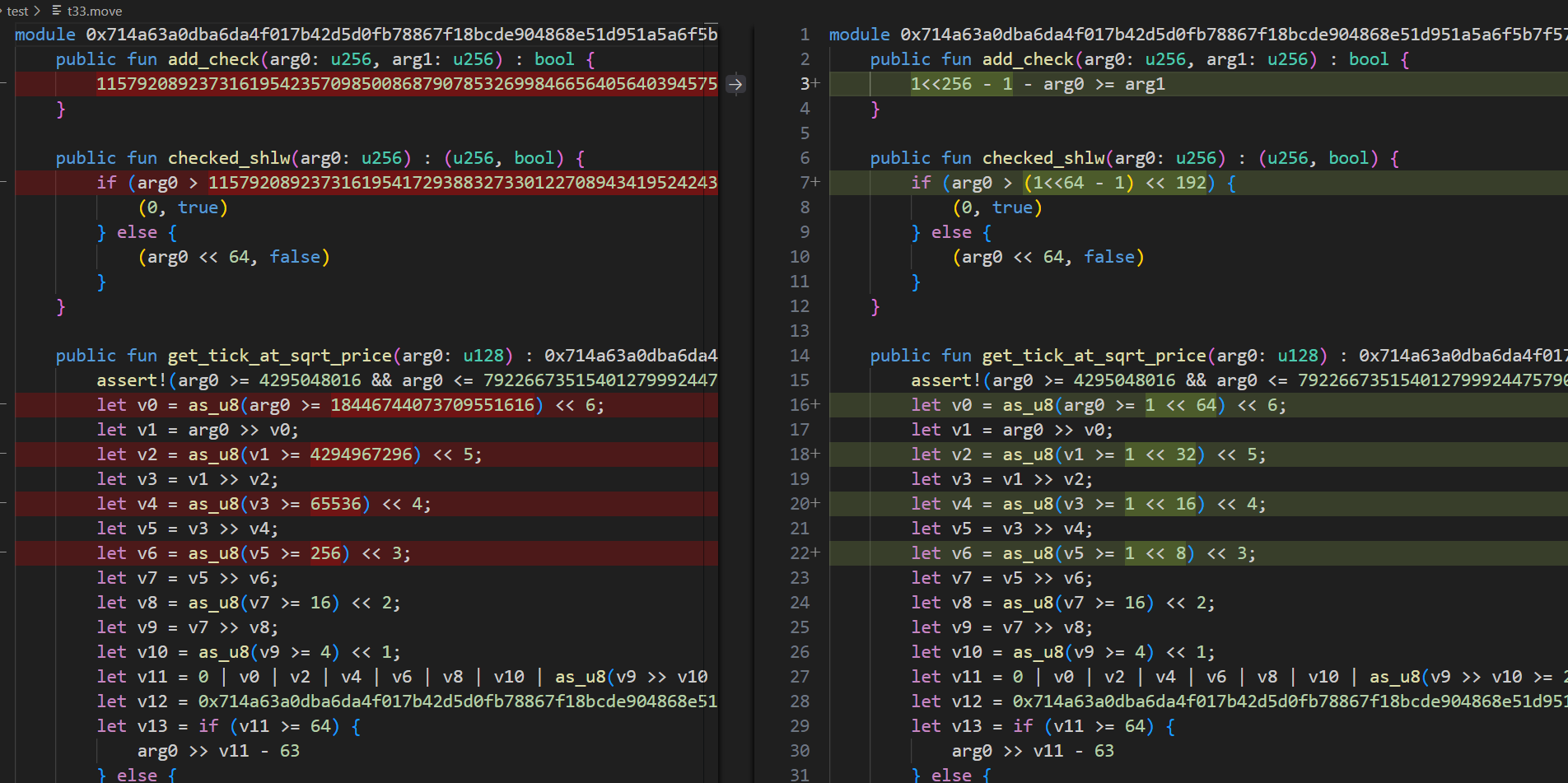
PowerShiftFormatter is a Go library and command-line tool designed to detect and reformat large integers into more human-readable expressions based on powers of two. Specifically, it attempts to represent numbers in the forms (2^n - 1) << m or (2^n + 1) << m, outputting them as C-style bit-shift expressions like (1<<n - 1) << m.
This can be particularly useful for understanding or simplifying large numeric constants in source code, configuration files, or data dumps, especially when these numbers relate to bitmasks, memory sizes, or other power-of-two-aligned quantities.
Features
- Decomposition:
- Identifies if a
*big.Intcan be expressed as(2^n - 1) << m. - Identifies if a
*big.Intcan be expressed as(2^n + 1) << m.
- Identifies if a
- Formatting:
- Formats successful decompositions into strings like
(1<<n - 1) << mor1 << (m+1)(for(2^0+1)<<m). - Handles edge cases like
0,1,2gracefully.
- Formats successful decompositions into strings like
- CLI Tool:
- Processes text files to find and replace numbers.
- Uses regular expressions to identify standalone numbers.
- Allows specifying a threshold: only numbers greater than the threshold are processed.
- Can read from a file and write to a file or standard output.
math/bigSupport: Works with arbitrarily large integers.
Motivation
Large integer constants encountered in code or data can often be opaque. For example, 65535 is less immediately obvious than (1<<16 - 1). This tool aims to:
- Reveal underlying patterns if numbers are constructed from powers of two.
- Make constants more readable and understandable, especially for values related to bitwise operations or hardware limits.
- Potentially simplify or "beautify" numerical constants in various text-based formats.
Installation
CLI Tool
To install the PowerShiftFormatter CLI tool:
go install github.com/doraemonkeys/PowerShiftFormatter@latest
Ensure your $(go env GOPATH)/bin directory is in your system's PATH.
Library
To use it as a library in your Go project:
go get github.com/doraemonkeys/doraemon
Usage
As a Library
Import the package into your Go code:
import (
	"fmt"
	"math/big"

	"github.com/doraemonkeys/doraemon"
)

func main() {
	num1Str := "65535" // (2^16 - 1)
	num1, _ := new(big.Int).SetString(num1Str, 10)

	ok, n, m := doraemon.DecomposeAsPowerOfTwoMinusOneShifted(num1)
	if ok {
		fmt.Printf("%s can be (2^%d - 1) << %d\n", num1Str, n, m)
		_, formatted := doraemon.FormatAsPowerOfTwoMinusOneShiftedBig(num1)
		fmt.Printf("Formatted: %s\n", formatted) // Output: (1<<16 - 1)
	}

	num2Str := "131074" // (2^16 + 1) << 1
	num2, _ := new(big.Int).SetString(num2Str, 10)

	ok, n, m = doraemon.DecomposeAsPowerOfTwoPlusOneShifted(num2)
	if ok {
		fmt.Printf("%s can be (2^%d + 1) << %d\n", num2Str, n, m)
		_, formatted := doraemon.FormatAsPowerOfTwoPlusOneShiftedBig(num2)
		fmt.Printf("Formatted: %s\n", formatted) // Output: (1<<16 + 1) << 1
	}

    num3Str := "16" // (2^0 + 1) << 3  = 2 << 3 = 1 << 4
    num3, _ := new(big.Int).SetString(num3Str, 10)
    ok, formatted := doraemon.FormatAsPowerOfTwoPlusOneShiftedBig(num3)
    if ok {
        fmt.Printf("%s formatted: %s\n", num3Str, formatted) // Output: 1 << 4
    }
}
Key library functions:
DecomposeAsPowerOfTwoMinusOneShifted(num *big.Int) (ok bool, n int, m int)DecomposeAsPowerOfTwoPlusOneShifted(num *big.Int) (ok bool, n int, m int)FormatAsPowerOfTwoMinusOneShiftedBig(num *big.Int) (bool, string)FormatAsPowerOfTwoPlusOneShiftedBig(num *big.Int) (ok bool, result string)
As a Command-Line Tool
The CLI tool PowerShiftFormatter processes an input file, searches for numbers, and attempts to replace them with their power-shift format if a decomposition is found and the number exceeds a given threshold.
Usage of PowerShiftFormatter:
  -i string
        Input file path (required)
  -o string
        Output file path (optional, prints to stdout if not provided)
  -t int
        Process numbers strictly greater than this threshold (default 100)
Example:
Given an input file constants.txt:
MAX_BUFFER_SIZE = 1048575; // This is a large number
SOME_MASK = 65537;
SMALL_VALUE = 50;
ANOTHER_VALUE = 524286; // (1<<18 - 1) << 1
ZERO_VAL = 0;
ONE_VAL = 1;
TWO_VAL = 2;
Run the tool:
powershiftformatter -i constants.txt -o formatted_constants.txt -t 100
The formatted_constants.txt would contain:
MAX_BUFFER_SIZE = (1<<20 - 1); // This is a large number
SOME_MASK = (1<<16 + 1);
SMALL_VALUE = 50;
ANOTHER_VALUE = (1<<18 - 1) << 1; // (1<<18 - 1) << 1
ZERO_VAL = 0;
ONE_VAL = 1;
TWO_VAL = 2;
 Documentation

Documentation


There is no documentation for this package.
 Source Files