

 README

README

eUPF





eUPF is the opensource User Plane Function (UPF) project for using inside or "outside" of any 3GPP 5G core. The goal of the project is to provide high-observability and easily-deployed software for a various cases like multi-access edge computing (MEC) and local traffic breakout. eUPF is built with eBPF to provide high observability and performance.
eUPF is tested with the Free5GC and Open5GS 5G cores.
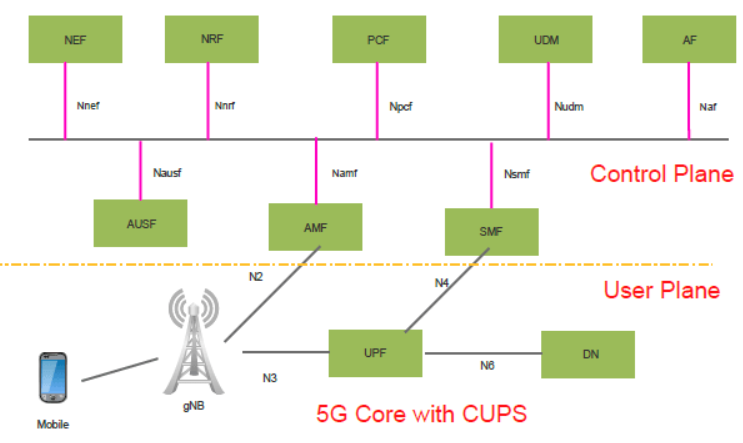
What is 5G core and CUPS
5G core uses network virtualized functions (NVF) to provide connectivity and services. Control and user plane separation (CUPS) is important architecture enhancement that separates control plane and user plane inside 5G core. User plane function (UPF) is the "decapsulating and routing" function that extracts user plane traffic from GPRS tunneling protocol (GTP) and route it to the public data network or local network via the best available path.
Quick start guide
Super fast & simple way is to download and run our docker image. It will start standalone eBPF with the default configuration:
docker run --name your-eupf-def ghcr.io/edgecomllc/eupf:main
The defaults are
- UPF_INTERFACE_NAME=lo network interfaces handling N3 (GTP) & N6 (SGi) traffic.
- UPF_N3_ADDRESS=127.0.0.1 IPv4 address for N3 interface
- UPF_XDP_ATTACH_MODE=generic Kernel-level implementation. For evaluation purpose.
- UPF_API_ADDRESS=:8080 Local address:portTCP for serving REST API server
- UPF_PFCP_ADDRESS=:8805 Local address:portTCP that PFCP server will listen to
- UPF_METRICS_ADDRESS=:9090 Local address:portTCP for serving Prometheus mertrics endpoint.
- UPF_PFCP_NODE_ID=127.0.0.1 Local NodeID for PFCP protocol. Format is IPv4 address.
In a real-world scenario, you would likely need to replace the interface names and IP addresses with values that are applicable to your environment. You can do so with the -e option, for example:
docker run --name your-eupf-custom -e UPF_INTERFACE_NAME="[eth0, n6]" -e UPF_XDP_ATTACH_MODE=generic -e UPF_API_ADDRESS=:8081 -e UPF_PFCP_ADDRESS=:8806 -e UPF_METRICS_ADDRESS=:9091 -e UPF_PFCP_NODE_ID=10.100.50.241 -e UPF_N3_ADDRESS=10.100.50.233 ghcr.io/edgecomllc/eupf:main
To go further, see the eUPF installation guide with Open5GS or Free5GC core to check how it works from end-to-end, deploying in three simple steps for you to choose: in Kubernetes cluster or as a docker-compose.
More about parameters read in the eUPF configuration guide
For statistics you can gather, see the eUPF metrics and monitoring guide
eUPF details
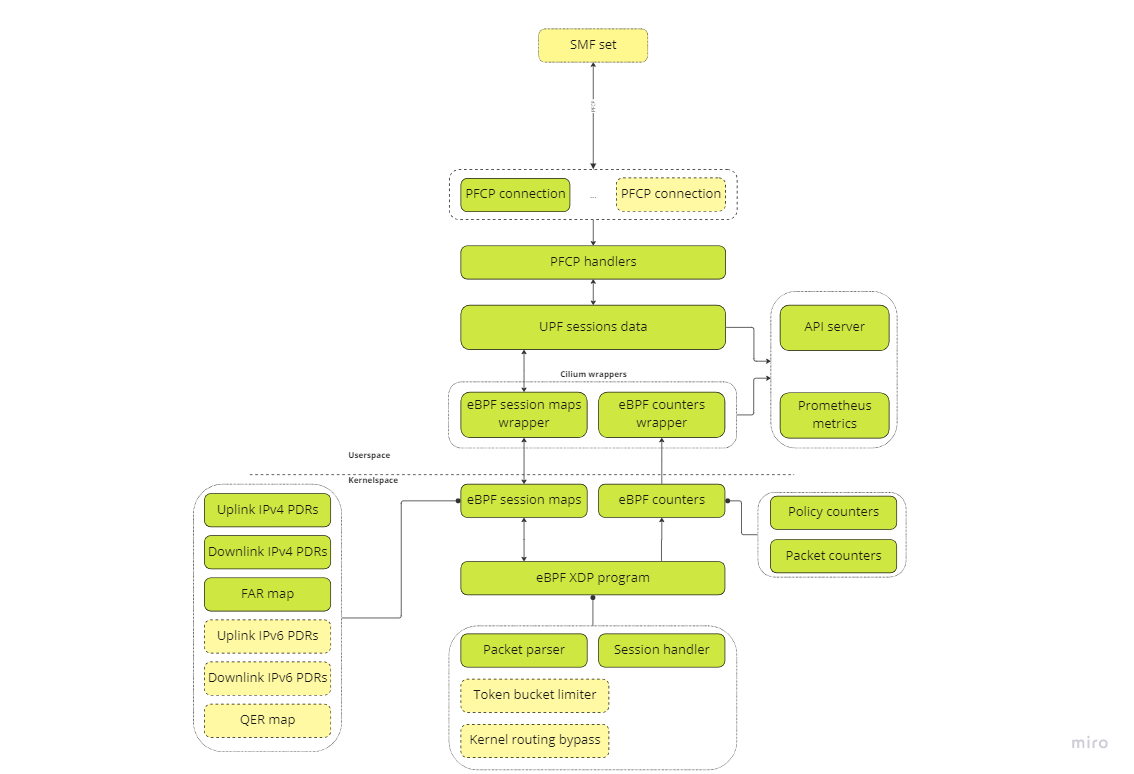
eUPF as a part of 5G mobile core network implements data network gateway function. It communicates with SMF via PFCP protocol (N4 interface) and forwards packets between core and data networks(N3 and N6 interfaces correspondingly). These two main UPF parts are implemented in two separate components: control plane and forwarding plane.
The eUPF control plane is an userspace application which receives packet processing rules from SMF and configures forwarding plane for proper forwarding.
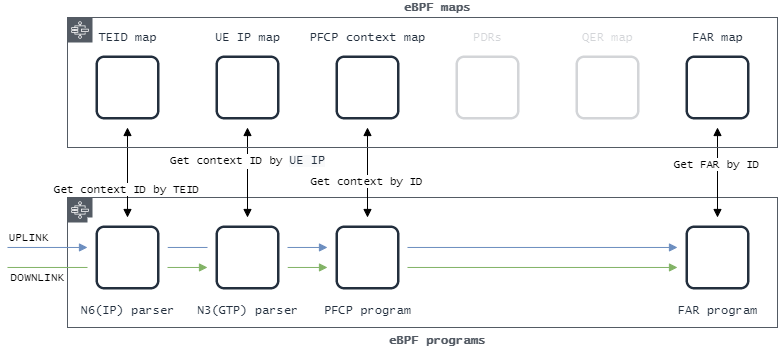
The eUPF forwarding plane is based on eBPF packet processing. When started eUPF adds eBPF XDP hook program in order to process network packets as close to NIC as possible. eBPF program consists of several pipeline steps: determine PDR, apply gating, qos and forwarding rules.
eUPF relies on kernel routing when making routing decision for incoming network packets. When it is not possible to determine packet route via kernel FIB lookup, eUPF passes such packet to kernel as a fallback path. This approach obviously affects performance but allows maintaining correct kernel routing process (ex., filling arp tables).
eUPF architecture
Show me
Eagle-eye overview

Detailed architecture
Current limitation
- Only one PDR in PFCP session per direction
- Only single FAR supported
- Only XDP generic mode
Packet forwarding pipeline
eUPF roadmap
Show me
Control plane
- PFCP Association Setup/Release and Heartbeats
- Session Establishment/Modification with support for PFCP entities such as Packet Detection Rules (PDRs), Forwarding Action Rules (FARs), QoS Enforcement Rules (QERs).
- UPF-initiated PFCP association
- UPF-based UE IP address assignment
Data plane
- IPv4 support
- N3, N4, N6 interfaces
- Single & Multi-port support
- Static IP routing
- Basic QoS support with per-session rate limiting
- I-UPF/A-UPF ULCL/Branching (N9 interface)
Management plane
- Free5gc compatibility
- Open5gs compatibility
- Integration with Prometheus for exporting PFCP and data plane-level metrics
- Monitoring/Debugging capabilities using tcpdump and cli
3GPP specs compatibility
-
FTUPF-TEID allocation / release in the UP function is supported by the UP function. -
UEIPAllocating UE IP addresses or prefixes. -
SSETPFCP sessions successively controlled by different SMFs of a same SMF Set. -
MPASMultiple PFCP associations to the SMFs in an SMF set. -
QFQMPer QoS flow per UE QoS monitoring. -
GPQMPer GTP-U Path QoS monitoring. -
RTTWPRTT measurements towards the UE Without PMF.
Building and running from sources
Prerequisites:
- Git
- Golang
- Clang
- LLVM
- gcc
- libbpf-dev
On Ubuntu 22.04, you can install these using the following command:
sudo apt install git golang clang llvm gcc-multilib libbpf-dev
On Rocky Linux 9, use the following command:
sudo dnf install git golang clang llvm gcc libbpf libbpf-devel libxdp libxdp-devel xdp-tools bpftool kernel-headers
Steps:
- Install the Swag command line tool for Golang. This is used to automatically generate RESTful API documentation.
go install github.com/swaggo/swag/cmd/swag@v1.8.12
- Clone the eUPF repository and change to the directory:
git clone https://github.com/edgecomllc/eupf.git
cd eupf
- Run the code generators:
go generate -v ./cmd/eupf
- Build eUPF:
go build -v -o bin/eupf ./cmd/eupf
-
Run the application:
Run binary with privileges allowing to increase memory-ulimits
sudo ./bin/eupf
This should start application with the default configuration. Please adjust the contents of the configuration file and the command-line arguments as needed for your application and environment.
Contribution
Please create an issue to report a bug or share an idea.
License
This project is licensed under the Apache-2.0 Creative Commons License - see the LICENSE file for details
 Directories