

 README

README

mcp2skill



A CLI tool that converts Model Context Protocol (MCP) servers into agent skills. It automatically generates SKILL.md and tool references from MCP server metadata, and provides a CLI tool to interact with the MCP server.
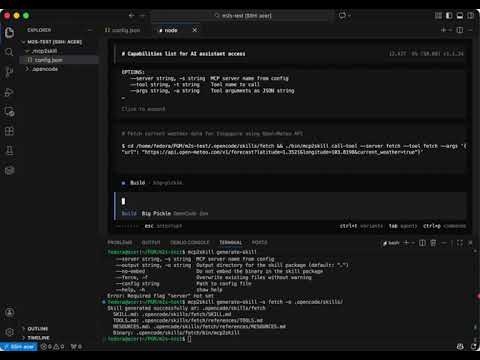
Demo
Installation
Quick Install
Linux/macOS
curl -sSL https://raw.githubusercontent.com/fenwei-dev/mcp2skill/main/install.sh | bash
To uninstall: rm ~/.local/bin/mcp2skill
Windows
- Download the binary
mcp2skill_windows_{arch}.tar.gzfrom GitHub Releases: - Extract the archive and add
mcp2skill.exeto your PATH.
From Source
go install github.com/fenwei-dev/mcp2skill/cmd/mcp2skill@latest
Development Build
git clone https://github.com/fenwei-dev/mcp2skill.git
cd mcp2skill
go build ./cmd/mcp2skill
The compiled binary will be ./mcp2skill.
Quick Start
- Configure your MCP servers in
~/.mcp2skill/config.json:
{
  "mcp": {
    "fetch": {
      "type": "stdio",
      "command": "docker",
      "args": [
        "run",
        "-i",
        "--rm",
        "mcp/fetch"
      ]
    },
    "github": {
      "type": "http",
      "url": "https://api.githubcopilot.com/mcp/",
      "headers": {
        "Authorization": "Bearer {github_pat}"
      }
    }
  }
}
- Generate a skill package:
mcp2skill generate-skill --server github --output ~/.claude/skills
- Use the generated skill in your coding agents:
Configuration
Config File Locations
The tool looks for configuration in the following order (project overrides global):
- Custom config: Path specified via
--configflag - Project config:
.mcp2skill/config.jsonin current directory or any parent - Global config:
~/.mcp2skill/config.json
Config Schema
{
  "mcp": {
    "server-name": {
      "type": "stdio|http",
      // For stdio transport:
      "command": "path/to/executable",
      "args": ["arg1", "arg2"],
      "env": {
        "VAR_NAME": "value"
      },
      // For http transport:
      "url": "https://api.example.com/mcp",
      "headers": {
        "Authorization": "Bearer token"
      }
    }
  }
}
Transport Types
stdio
For MCP servers that communicate via standard input/output.
{
  "type": "stdio",
  "command": "uvx",
  "args": ["mcp-server-fetch"],
  "env": {
    "FETCH_API_KEY": "sk-..."
  }
}
http
For MCP servers accessible via HTTP/S.
{
  "type": "http",
  "url": "https://api.githubcopilot.com/mcp/",
  "headers": {
    "Authorization": "Bearer ghp_..."
  }
}
Not yet implemented.
Commands
See docs/commands.md for detailed command documentation.
Generated Skill Package Structure
my-skill/
├── SKILL.md              # Main skill documentation with frontmatter
├── references/
│   ├── TOOLS.md          # Generated tool reference (if applicable)
│   └── RESOURCES.md      # Generated resource reference (if applicable)
└── bin/
    └── mcp2skill         # Embedded binary (if applicable)
SKILL.md
The generated SKILL.md follows the Agent Skills specification with standard frontmatter:
---
name: my-server
description: Provides access to My MCP Server (v1.0.0) MCP server with tools: tool1, tool2. Use when the user requests My MCP Server functionality.
---

# My MCP Server

This skill provides access to the My MCP Server MCP server.

## MCP Server Info

- **MCP Server:** my-server
- **Server Version:** 1.0.0
- **Server Title:** My MCP Server Title
- **Protocol Version:** 2024-11-05

## Available Tools

This skill provides the following tools:

- **tool1**: Description of tool1
- **tool2**: Description of tool2

## Usage

This skill is automatically invoked when tools from this MCP server are required.

For detailed documentation on each tool's parameters and usage, see [TOOLS.md](references/TOOLS.md).
Common Use Cases
Creating a skill from an stdio MCP server
# Configure
cat > ~/.mcp2skill/config.json <<'EOF'
{
  "mcp": {
    "fetch": {
      "type": "stdio",
      "command": "uvx",
      "args": ["mcp-server-fetch"],
      "env": {
        "TAVILY_API_KEY": "your-key"
      }
    }
  }
}
EOF

# Generate
mcp2skill generate-skill --server fetch --output ./skills/fetch
Creating a skill from an HTTP MCP server
# Configure
cat > ~/.mcp2skill/config.json <<'EOF'
{
  "mcp": {
    "github": {
      "type": "http",
      "url": "https://api.githubcopilot.com/mcp/",
      "headers": {
        "Authorization": "Bearer ghp_..."
      }
    }
  }
}
EOF

# Generate
mcp2skill generate-skill --server github --output ./skills/github
Updating a skill when the MCP server changes
# Check for updates
mcp2skill update-skill --skill ./skills/fetch

# Review changes in ./skills/fetch/update/

# Apply if satisfied
mcp2skill update-skill --skill ./skills/fetch --confirm
Creating a skill without embedded binary
mcp2skill generate-skill --server fetch --output ./skills/fetch --no-embed
This generates a skill that references your globally installed mcp2skill binary instead of embedding it.
Development
Project Structure
mcp2skill/
├── cmd/
│   └── mcp2skill/         # Main CLI entry point
├── internal/
│   ├── cliapp/            # CLI command implementations
│   ├── config/            # Configuration management
│   ├── mcp/               # MCP client wrapper
│   └── skill/             # Skill generation logic
├── go.mod
└── README.md
Building
# Standard build
go build ./cmd/mcp2skill

# Static binary for distribution
CGO_ENABLED=0 go build -ldflags="-s -w" ./cmd/mcp2skill
Testing
# Run all tests
go test ./...

# Run tests with coverage
go test -cover ./...

# Run specific package tests
go test ./internal/config
go test ./internal/mcp
go test ./internal/cliapp
Troubleshooting
"server not found in config"
Ensure your MCP server is defined in your config file at one of these locations:
~/.mcp2skill/config.json(global).mcp2skill/config.jsonin your project directory- Path specified via
--configflag
"failed to connect to MCP server"
Common causes:
- Incorrect command path for stdio transport
- Missing required environment variables
- Invalid URL or headers for http transport
- Network connectivity issues (for http)
Use --verbose flag for more detailed error messages:
mcp2skill generate-skill --server my-server --verbose
"output directory is not empty"
The target directory already contains files. Use --force to overwrite:
mcp2skill generate-skill --server my-server --output ./skills/my-server --force
Updates not available
If update-skill reports "No updates available", the skill is already synchronized with the MCP server's current state.
Warning about existing update directory
This indicates a previous update was started but not completed. Either:
- Run with
--confirmto apply the pending updates - Run with
--discardto cancel them and start fresh
License
See LICENSE for details.
 Directories