

 README

README

🚀 go-tecton - Next-Generation Database Migration & Seeding CLI


go-tecton is an enterprise-grade database migration tool built for modern engineering teams. Born out of the frustration with cryptic error messages and "dirty database states", go-tecton brings safety, static analysis, and world-class Developer Experience (DX) to your schema management right inside your terminal.
🆚 Why go-tecton? (Head-to-Head Comparison)
While tools like golang-migrate and goose are great at executing SQL, they lack modern Quality Assurance (QA) and Developer Experience (DX) features. go-tecton isn't just a runner; it's a safety net for your database.
| Feature | go-tecton |
golang-migrate |
goose |
|---|---|---|---|
| Anti-Dirty State (Transactional) | 🟢 Yes | 🔴 No (Manual fix needed) | 🟢 Yes |
| Visual Error DX (Line Highlighting) | 🟢 Yes | 🔴 No (Raw DB errors) | 🔴 No (Raw DB errors) |
| Visual Status Engine (Lipgloss) | 🟢 Yes | 🔴 No | 🟡 Text |
| Smart Batch Rollback (Laravel Style) | 🟢 Yes | 🔴 No | 🔴 No |
| Fresh Reset with Safeguards | 🟢 Yes | 🔴 No | 🔴 No |
| Static SQL Linter (Pre-flight QA) | 🟢 Yes | 🔴 No | 🔴 No |
| Dry-Run Engine (Simulate first) | 🟢 Yes | 🔴 No | 🟡 Partial |
| Dedicated Stateless Seeder | 🟢 Yes | 🔴 No | 🔴 No |
✨ Key Innovations
- 🛡️ Anti-Dirty State Engine: Migrations are wrapped in strict transactions. If a query fails halfway, the engine automatically rolls back. Your database will never be left in a broken, unrecoverable state again.
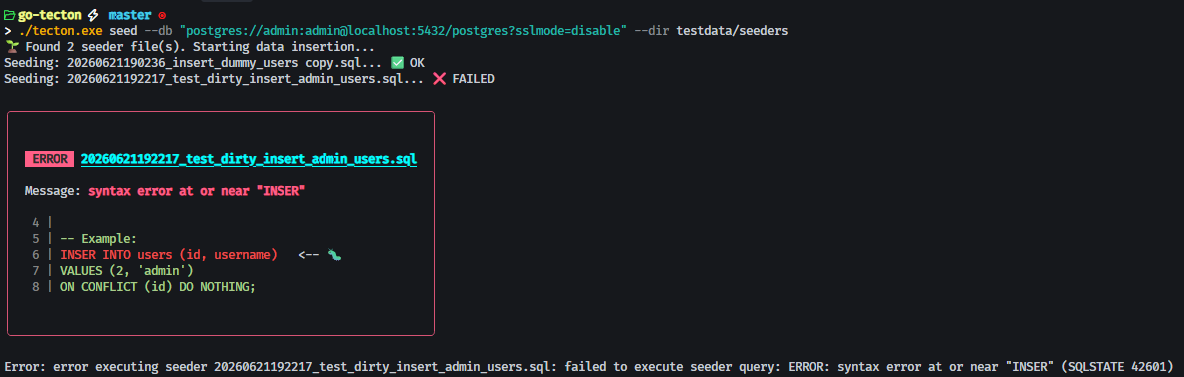
- 🎨 Beautiful Visual Error DX: Say goodbye to generic SQL syntax errors.
go-tectonpinpoints the exact line of your broken SQL file, rendering a beautiful error box in your terminal with a🐛pointer. - 📊 Visual Status Board: A beautiful, highly scannable terminal table powered by
lipglossthat dynamically calculates execution time and links migrations to their respective execution batches. - 🔄 Laravel-Style Batch Rollback: Roll back migrations in groups (batches) instead of one-by-one. When you revert,
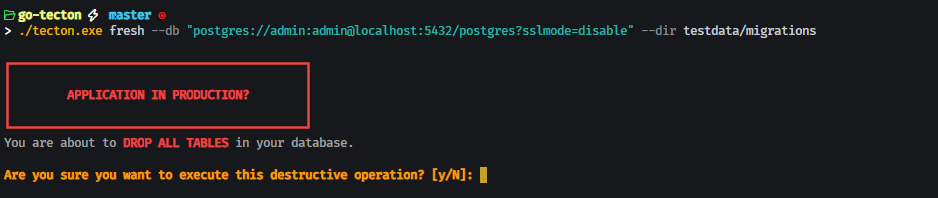
go-tectonsmart-targets only the latest deployed batch in reverse chronological order (LIFO). - 💥 Fresh Database Reset & Safeguards: Instantly wipe your entire database schema and re-run all migrations from scratch for seamless local development. Secured by a highly visible terminal alert block and an interactive verification safeguard to prevent accidental data destruction in production.
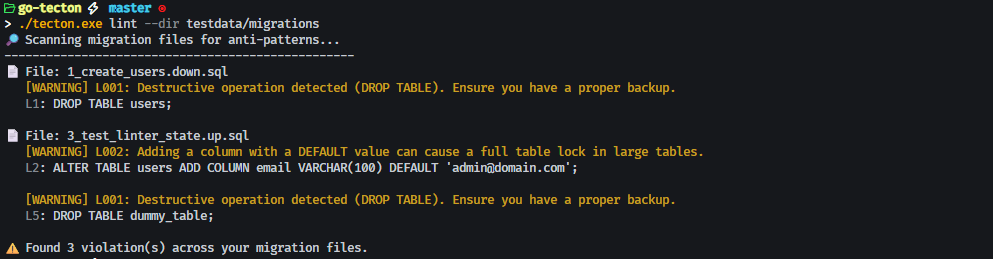
- 🚦 Built-in QA & Linter: Catch dangerous operations before they hit production. The static Linter detects anti-patterns (like accidental
DROP TABLEor locking queries), while thedry-runengine dynamically tests your queries without saving changes. - 🌱 Dedicated Stateless Seeder: Keep your schema definitions (Migrations) strictly separated from your dummy data (Seeders). Comes with idempotent templates to prevent primary-key collision errors.
📸 Preview
Beautiful Error DX
Linter Output
Migrations Status

Safeguard for Fresh command
📦 Installation & Supported Platforms
Ensure you have Go installed on your machine. You can install go-tecton directly via go install:
👉 go install github.com/fresmaa/go-tecton/cmd/tecton@latest
Alternatively, you can pull pre-compiled cross-platform native binaries compiled via our automated CI/CD engine directly from the Releases page:
| Platform | Architecture | Binary Name |
|---|---|---|
| 🪟 Windows | amd64 (64-bit) | tecton-windows-amd64.exe |
| 🐧 Linux | amd64 (64-bit) | tecton-linux-amd64 |
| 🍏 macOS | amd64 (Intel Core) | tecton-darwin-amd64 |
| 🍏 macOS | arm64 (Apple Silicon M1/M2/M3) | tecton-darwin-arm64 |
🛠️ Quick Start Guide
1. Managing Migrations & Tracking Status
Generate a new migration pair (.up.sql and .down.sql):
tecton create create_users_table --dir migrations
View a beautifully structured table showing migration files, execution times, status, and batch IDs:
tecton status --db "postgres://user:pass@localhost:5432/dbname?sslmode=disable" --dir migrations
Apply pending migrations to the database (automatically grouped into the next consecutive batch):
tecton up --db "postgres://user:pass@localhost:5432/dbname?sslmode=disable" --dir migrations
Roll back the entire last batch of applied migrations simultaneously (LIFO):
tecton down --db "postgres://user:pass@localhost:5432/dbname?sslmode=disable" --dir migrations
2. Nuking & Resetting the Schema
Wipe the whole schema clean and execute every migration file again from scratch (ideal for hot-reloading local databases):
tecton fresh --db "postgres://user:pass@localhost:5432/dbname?sslmode=disable" --dir migrations
Production Safeguard Notice: In interactive terminals, 'fresh' will halt and demand a confirmation inside a bright warning box. In automated CI/CD workflows, you must explicitly provide the --force flag to skip validation:
tecton fresh --db "..." --dir migrations --force
3. Quality Assurance (CI/CD Ready)
Run the static analysis Linter to catch dangerous queries:
tecton lint --dir migrations
Simulate pending migrations dynamically to ensure syntax validity without committing changes:
tecton dry-run --db "postgres://user:pass@localhost:5432/dbname?sslmode=disable" --dir migrations
4. Data Seeding
Generate a new idempotent seeder file:
tecton create-seed insert_dummy_admin --dir seeders
Execute all seeder files to populate your database:
tecton seed --db "postgres://user:pass@localhost:5432/dbname?sslmode=disable" --dir seeders
Optionally, you can run seeders automatically immediately after executing a fresh reset:
tecton fresh --db "..." --dir migrations --seeder-dir seeders --seed
🏗️ Architecture & Stack
- CLI Framework: Cobra
- Terminal UI: Lipgloss
- Database Driver: PostgreSQL (extensible driver interface)
- CI/CD Build System: GitHub Actions Matrix Engine
🤝 Support & Feedback
If you encounter any bugs, have feature requests, or need help setting up the CLI, please feel free to reach out or contribute!
- Bug Reports & Feature Requests: Please open an issue on our 📁 GitHub Issues page.
- Contributions: Pull Requests are welcome! Feel free to fork the repo and submit your improvements.
📄 License
This project is licensed under the MIT License - see the LICENSE file for details.
 Directories