

 README

README

🤖 LangGraphGo Swarm
A Go implementation of multi-agent swarm systems using LangGraphGo. This is a Go port of the Python LangGraph Swarm library.
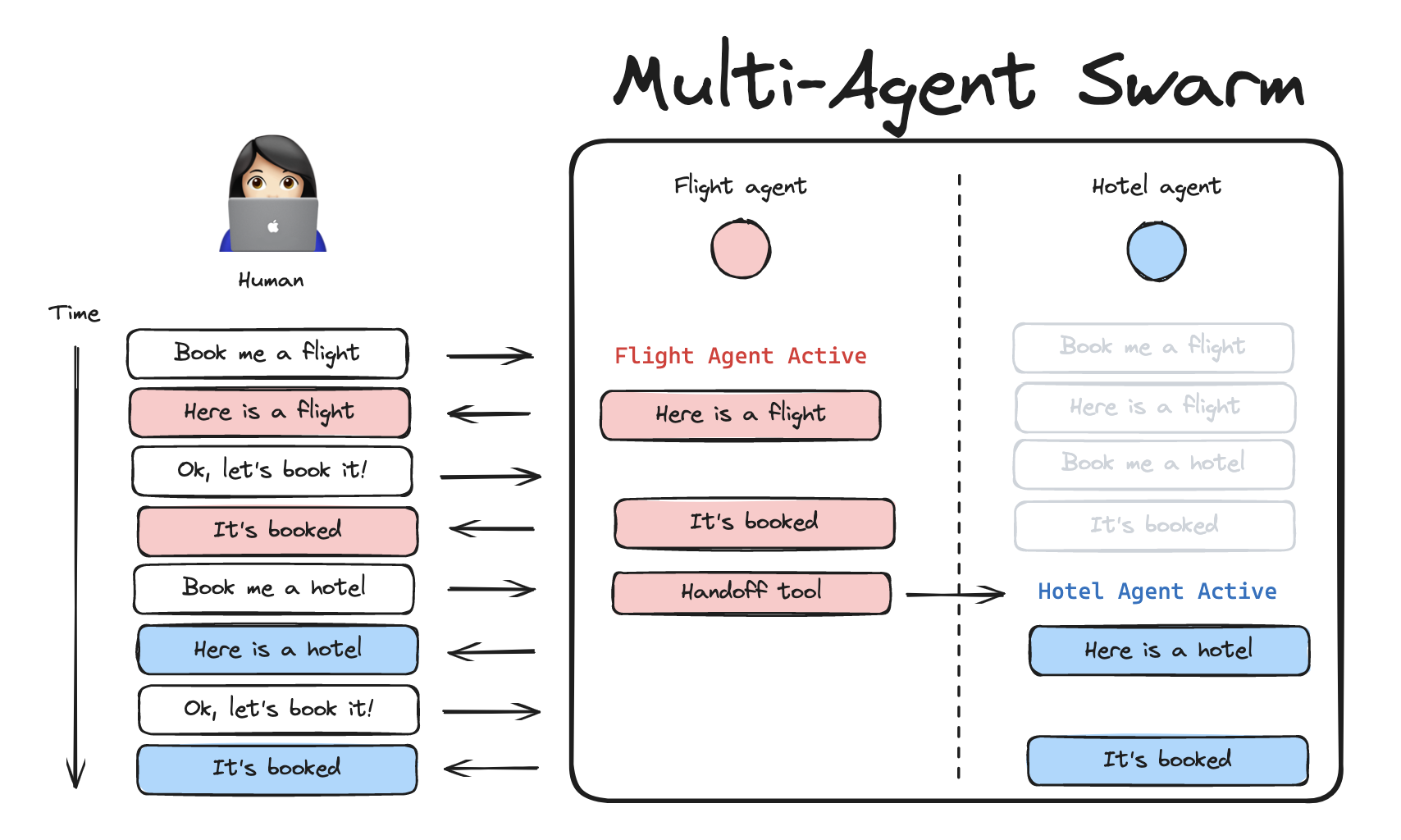
A swarm is a type of multi-agent architecture where agents dynamically hand off control to one another based on their specializations. The system remembers which agent was last active, ensuring that on subsequent interactions, the conversation resumes with that agent.
✨ Features
- 🤖 Multi-agent collaboration - Enable specialized agents to work together and hand off context to each other
- 🛠️ Customizable handoff tools - Built-in tools for communication between agents
- 🔄 State management - Automatic tracking of active agents and conversation history
- 💾 Memory support - Compatible with LangGraphGo's checkpointing and persistence
- 🎯 Type-safe - Leverages Go's type system for robust agent implementations
Built on top of LangGraphGo, featuring support for streaming, memory, and human-in-the-loop workflows.
📦 Installation
go get github.com/go-hare/langchaingo_swarm
🚀 Quick Start
package main

import (
    "context"
    "fmt"
    "log"

    "github.com/smallnest/langgraphgo/graph"
    "github.com/tmc/langchaingo/llms"
    "github.com/tmc/langchaingo/llms/openai"
    "github.com/go-hare/langchaingo_swarm/swarm"
)

func main() {
    ctx := context.Background()

    // Initialize model
    model, _ := openai.New(openai.WithModel("gpt-4"))

    // Create handoff tools
    transferToBob := swarm.CreateHandoffTool(swarm.HandoffToolConfig{
        AgentName:   "Bob",
        Description: "Transfer to Bob",
    })

    transferToAlice := swarm.CreateHandoffTool(swarm.HandoffToolConfig{
        AgentName:   "Alice",
        Description: "Transfer to Alice, she can help with math",
    })

    // Create Alice agent (addition expert)
    aliceGraph := createAgent(model, "You are Alice, an addition expert.", transferToBob)
    alice, _ := aliceGraph.Compile()

    // Create Bob agent (pirate speaker)
    bobGraph := createAgent(model, "You are Bob, you speak like a pirate.", transferToAlice)
    bob, _ := bobGraph.Compile()

    // Create swarm
    workflow, _ := swarm.CreateSwarm(swarm.SwarmConfig{
        Agents: []swarm.Agent{
            {Name: "Alice", Runnable: alice, Destinations: []string{"Bob"}},
            {Name: "Bob", Runnable: bob, Destinations: []string{"Alice"}},
        },
        DefaultActiveAgent: "Alice",
    })

    // Compile and run
    app, _ := workflow.Compile()

    // Turn 1: Ask to speak to Bob
    state1 := swarm.SwarmState{
        Messages: []llms.MessageContent{
            llms.TextParts("user", "i'd like to speak to Bob"),
        },
    }
    result1, _ := app.Invoke(ctx, state1)
    fmt.Println(result1)

    // Turn 2: Ask for math (Bob will transfer to Alice)
    state2 := result1.(swarm.SwarmState)
    state2.Messages = append(state2.Messages,
        llms.TextParts("user", "what's 5 + 7?"))
    result2, _ := app.Invoke(ctx, state2)
    fmt.Println(result2)
}
📚 Core Concepts
SwarmState
The state structure that tracks messages and the active agent:
type SwarmState struct {
    Messages    []llms.MessageContent  // Conversation history
    ActiveAgent string                  // Currently active agent
}
Creating Agents
Agents are LangGraphGo compiled graphs:
agentGraph := graph.NewStateGraph(swarm.SwarmState{})
agentGraph.AddNode("process", func(ctx context.Context, state swarm.SwarmState) (swarm.SwarmState, error) {
    // Agent logic here
    return state, nil
})
agentGraph.SetEntryPoint("process")
agentGraph.AddEdge("process", graph.END)
agent, _ := agentGraph.Compile()
Handoff Tools
Create tools that allow agents to transfer control:
transferTool := swarm.CreateHandoffTool(swarm.HandoffToolConfig{
    AgentName:   "TargetAgent",
    Name:        "optional_custom_name",  // Default: "transfer_to_targetagent"
    Description: "When to use this agent",
})
Creating a Swarm
Combine multiple agents into a swarm:
workflow, err := swarm.CreateSwarm(swarm.SwarmConfig{
    Agents: []swarm.Agent{
        {Name: "Agent1", Runnable: agent1, Destinations: []string{"Agent2"}},
        {Name: "Agent2", Runnable: agent2, Destinations: []string{"Agent1"}},
    },
    DefaultActiveAgent: "Agent1",
})

app, _ := workflow.Compile()
🎯 Examples
Basic Example
See examples/basic/main.go for a simple two-agent swarm with Alice (math expert) and Bob (pirate speaker).
cd examples/basic
go run main.go
Customer Support Example
See examples/customer_support/main.go for a realistic customer support system with flight and hotel booking agents.
cd examples/customer_support
go run main.go
This example demonstrates:
- Multiple specialized agents (Flight Assistant, Hotel Assistant)
- Agent handoff between services
- Maintaining user context across handoffs
- Mock data for flights and hotels
🔧 Advanced Usage
Command API (Dynamic Routing)
Use the Command API for dynamic agent handoffs with full control:
import "github.com/smallnest/langgraphgo/graph"

// In your agent node function
func agentNode(ctx context.Context, state swarm.SwarmState) (any, error) {
    // ... process messages, call tools ...

    // Check if tool result indicates a handoff
    if targetAgent, isHandoff := swarm.ParseHandoffResult(toolResult); isHandoff {
        // Return Command for dynamic routing
        return swarm.CreateHandoffCommand(targetAgent, toolCallID), nil
    }

    // Normal state return
    return state, nil
}
The graph.Command struct provides:
- Goto: Dynamically route to specific agent(s)
- Update: Update state (messages, active_agent) atomically
Example Command usage:
cmd := swarm.CreateHandoffCommand("Bob", "tool_call_123")
// Equivalent to:
// &graph.Command{
//     Goto: "Bob",
//     Update: map[string]any{
//         "messages":     []llms.MessageContent{toolMessage},
//         "active_agent": "Bob",
//     },
// }
Helper functions:
ParseHandoffResult(result string) (targetAgent string, isHandoff bool)- Detect handoff markersCreateHandoffCommand(targetAgent, toolCallID string) *graph.Command- Create handoff command
Memory & Persistence
Add checkpointing for conversation persistence:
import "github.com/smallnest/langgraphgo/memory"

checkpointer := memory.NewMemorySaver()
app, _ := workflow.Compile(graph.WithCheckpointer(checkpointer))

// Use with config to maintain state across invocations
config := &graph.RunnableConfig{
    Configurable: map[string]interface{}{
        "thread_id": "user_123",
    },
}
result, _ := app.InvokeWithConfig(ctx, state, config)
Custom State Schema
Extend the state with custom fields:
type CustomSwarmState struct {
    swarm.SwarmState
    UserID        string
    SessionData   map[string]interface{}
}
Manual Routing
Add active agent routing to a custom graph:
g := graph.NewStateGraph(swarm.SwarmState{})
g.AddNode("Agent1", agent1Handler)
g.AddNode("Agent2", agent2Handler)

err := swarm.AddActiveAgentRouter(g, []string{"Agent1", "Agent2"}, "Agent1")
🧪 Testing
Run the test suite:
go test ./swarm -v
Tests cover:
- Swarm creation and validation
- Agent routing
- Handoff tool creation and execution
- State management
- Message merging
📖 API Reference
Functions
CreateSwarm(config SwarmConfig) (*graph.StateGraph, error)
Creates a multi-agent swarm graph.
Parameters:
config: Configuration including agents and default active agent
Returns:
- StateGraph ready to be compiled
- Error if validation fails
CreateHandoffTool(config HandoffToolConfig) tools.Tool
Creates a tool for agent handoffs.
Parameters:
config: Configuration for the handoff tool
Returns:
- A LangChain-compatible tool
AddActiveAgentRouter(g *graph.StateGraph, agentNames []string, defaultActiveAgent string) error
Adds routing logic to an existing graph.
Parameters:
g: StateGraph to modifyagentNames: List of all agent namesdefaultActiveAgent: Default agent to route to
Returns:
- Error if validation fails
CreateHandoffCommand(targetAgent, toolCallID string) *graph.Command
Creates a Command for dynamically handing off to another agent.
Parameters:
targetAgent: Name of the agent to handoff totoolCallID: Tool call ID (can be empty string)
Returns:
- Command object with Goto and Update fields
ParseHandoffResult(result string) (targetAgent string, isHandoff bool)
Parses a tool result to check if it's a handoff marker.
Parameters:
result: Tool execution result string
Returns:
targetAgent: Name of the target agent (if handoff)isHandoff: True if result is a handoff marker
Types
SwarmState
type SwarmState struct {
    Messages    []llms.MessageContent
    ActiveAgent string
}
SwarmConfig
type SwarmConfig struct {
    Agents             []Agent
    DefaultActiveAgent string
    StateSchema        interface{}  // Optional
}
Agent
type Agent struct {
    Name         string
    Runnable     *graph.CompiledGraph
    Destinations []string
}
HandoffToolConfig
type HandoffToolConfig struct {
    AgentName   string
    Name        string  // Optional
    Description string  // Optional
}
🔄 Differences from Python Version
This Go implementation maintains feature parity with the Python version while leveraging Go's strengths:
- Type Safety: Uses Go's type system for compile-time safety
- Concurrency: Built on Go's goroutines for efficient parallel execution
- Performance: Native compiled performance
- Idiomatic Go: Follows Go conventions and best practices
Key differences:
- Function signatures use Go idioms (e.g.,
errorreturn values) - Configuration uses structs instead of keyword arguments
- State management uses Go's type system
🤝 Contributing
Contributions are welcome! Please feel free to submit a Pull Request.
- Fork the repository
- Create your feature branch (
git checkout -b feature/amazing-feature) - Commit your changes (
git commit -m 'Add amazing feature') - Push to the branch (
git push origin feature/amazing-feature) - Open a Pull Request
📄 License
MIT License - see LICENSE file for details.
🙏 Acknowledgments
- LangGraphGo - The underlying graph execution engine
- LangGraph Swarm (Python) - Original Python implementation
- LangChainGo - LangChain for Go
📚 Resources
🐛 Issues
If you encounter any issues or have questions, please file an issue on the GitHub issue tracker.
 Documentation

Documentation

Overview 
Package langgraphgo_swarm provides a multi-agent swarm system implementation for Go.
LangGraphGo Swarm is a Go port of the Python LangGraph Swarm library, enabling creation of swarm-style multi-agent systems where agents dynamically hand off control to one another based on their specializations.
Key Concepts 
A swarm consists of multiple specialized agents that can transfer control between each other. The system maintains state including conversation history and tracks which agent is currently active.
Basic Usage 
import (
    "context"
    "github.com/smallnest/langgraphgo/graph"
    "github.com/tmc/langchaingo/llms/openai"
    "github.com/yourusername/langgraphgo_swarm/swarm"
)

func main() {
    ctx := context.Background()
    model, _ := openai.New()

    // Create agents
    agent1 := createAgent(model, "Agent 1")
    agent2 := createAgent(model, "Agent 2")

    // Create swarm
    workflow, _ := swarm.CreateSwarm(swarm.SwarmConfig{
        Agents: []swarm.Agent{
            {Name: "Agent1", Runnable: agent1, Destinations: []string{"Agent2"}},
            {Name: "Agent2", Runnable: agent2, Destinations: []string{"Agent1"}},
        },
        DefaultActiveAgent: "Agent1",
    })

    // Compile and run
    app, _ := workflow.Compile()
    result, _ := app.Invoke(ctx, swarm.SwarmState{
        Messages: []llms.MessageContent{
            llms.TextParts("user", "Hello!"),
        },
    })
}
Features 
- Multi-agent collaboration with dynamic handoffs - Customizable handoff tools for agent communication - State management with conversation history tracking - Integration with LangGraphGo's persistence and memory - Type-safe agent definitions
Agent Creation 
Agents are created as LangGraphGo compiled graphs:
g := graph.NewStateGraph(swarm.SwarmState{})
g.AddNode("process", func(ctx context.Context, state swarm.SwarmState) (swarm.SwarmState, error) {
    // Agent logic
    return state, nil
})
g.SetEntryPoint("process")
g.AddEdge("process", graph.END)
agent, _ := g.Compile()
Handoff Tools 
Create tools that allow agents to transfer control:
transferTool := swarm.CreateHandoffTool(swarm.HandoffToolConfig{
    AgentName:   "TargetAgent",
    Description: "When to transfer to this agent",
})
The tool can then be used by an agent to hand off control to another agent.
State Management 
The SwarmState tracks conversation messages and the currently active agent:
type SwarmState struct {
    Messages    []llms.MessageContent
    ActiveAgent string
}
State is automatically managed by the swarm and updated during handoffs.
Examples 
See the examples directory for complete working examples:
- examples/basic - Simple two-agent system - examples/customer_support - Multi-agent customer support system
More Information 
For more details, see: - GitHub: https://github.com/yourusername/langgraphgo_swarm - LangGraphGo: https://github.com/smallnest/langgraphgo - Documentation: https://lango.rpcx.io
 Source Files
 Directories