

 README

README

herald-help
Themed CLI help pages powered by herald typography.


When to use | Installation | Quick Start | Styles | Types | Rendering | Options | Examples | Structure
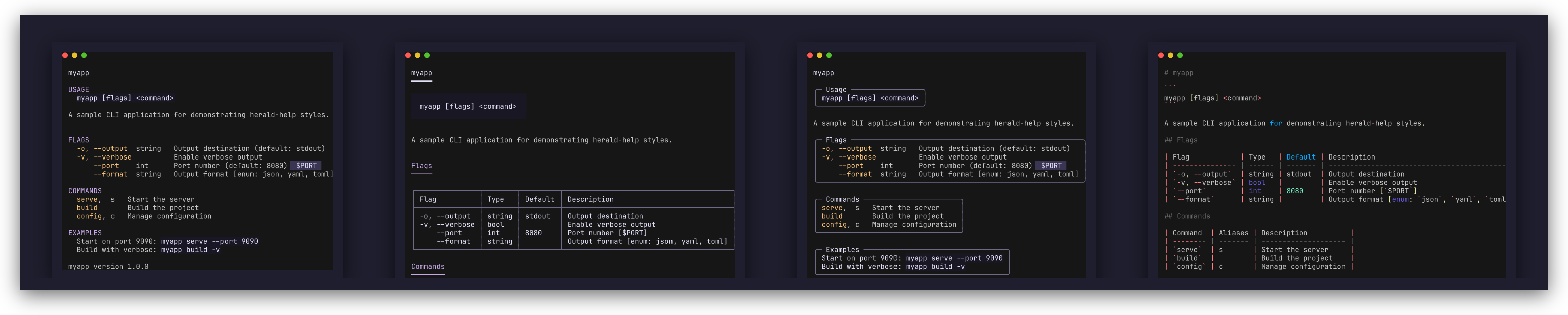
herald-help generates themed CLI help pages through herald's typography system. Works with cobra, urfave/cli, kong, and stdlib flag.
When to use herald-help
Cobra, Kong, and urfave/cli all generate plain-text help output with basic formatting. herald-help takes a different approach. Paired with herald, it gives you themed help pages that match the rest of your CLI output. Use it when:
- You want one theme for your entire CLI - pick a built-in theme (Dracula, Catppuccin, Base16, Charm) or define your own, and help pages use it automatically.
- You need structured, composable help -
Renderreturns a plain string you can pass to herald'sComposealongside other output. - You want framework-agnostic help rendering - define your help structure once with
Command, then use adapters to convert from any CLI framework.
Installation
Requires Go 1.25+.
go get github.com/indaco/herald-help@latest
Quick Start
Framework adapters are sub-modules — each has its own go.mod, so importing one does not pull in the others.
| Framework | Install | Package |
|---|---|---|
| cobra | go get github.com/indaco/herald-help/cobra@latest |
heraldcobra |
| urfave/cli/v3 | go get github.com/indaco/herald-help/urfave@latest |
heraldurfave |
| kong | go get github.com/indaco/herald-help/kong@latest |
heraldkong |
The stdlib flag adapter (FromFlagSet) is included in the core module — no extra install needed.
Standalone
See examples/compact/000_manual for a full runnable example. For stdlib flag integration, see examples/compact/001_flag.
[!NOTE] The Go module path is
github.com/indaco/herald-helpbut the package name isheraldhelp. Use an import alias:heraldhelp "github.com/indaco/herald-help".
import (
    "fmt"
    "github.com/indaco/herald"
    heraldhelp "github.com/indaco/herald-help"
)

ty := herald.New()

cmd := heraldhelp.Command{
    Name:        "myapp",
    Synopsis:    "myapp [flags] <command>",
    Description: "A sample application.",
    Flags: []heraldhelp.Flag{
        {Long: "--output", Short: "-o", Type: "string", Default: "stdout", Desc: "Output destination"},
        {Long: "--verbose", Short: "-v", Type: "bool", Default: "false", Desc: "Enable verbose output"},
    },
    Commands: []heraldhelp.CommandRef{
        {Name: "serve", Desc: "Start the server"},
        {Name: "build", Desc: "Build the project"},
    },
    Footer: heraldhelp.FormatVersion("myapp", "1.0.0"),
}

fmt.Println(heraldhelp.Render(ty, cmd))
With cobra
See examples/compact/002_cobra for a full runnable example.
import (
    "github.com/indaco/herald"
    heraldhelp "github.com/indaco/herald-help"
    heraldcobra "github.com/indaco/herald-help/cobra"
    "github.com/spf13/cobra"
)

rootCmd.SetHelpFunc(func(cmd *cobra.Command, args []string) {
    ty := herald.New()
    heraldhelp.RenderTo(cmd.OutOrStdout(), ty, heraldcobra.FromCobra(cmd))
})
With urfave/cli
See examples/compact/003_urfave for a full runnable example.
import (
    "io"
    heraldhelp "github.com/indaco/herald-help"
    heraldurfave "github.com/indaco/herald-help/urfave"
    "github.com/urfave/cli/v3"
)

cli.HelpPrinter = func(w io.Writer, _ string, data any) {
    cmd, ok := data.(*cli.Command)
    if !ok {
        return
    }
    ty := herald.New()
    heraldhelp.RenderTo(w, ty, heraldurfave.FromUrfave(cmd))
}
With kong
See examples/compact/004_kong for a full runnable example.
import (
    heraldhelp "github.com/indaco/herald-help"
    heraldkong "github.com/indaco/herald-help/kong"
)

parser, _ := kong.New(&cli,
    kong.Help(func(_ kong.HelpOptions, ctx *kong.Context) error {
        ty := herald.New()
        return heraldhelp.RenderTo(os.Stdout, ty, heraldkong.FromKong(ctx.Kong))
    }),
)
Styles
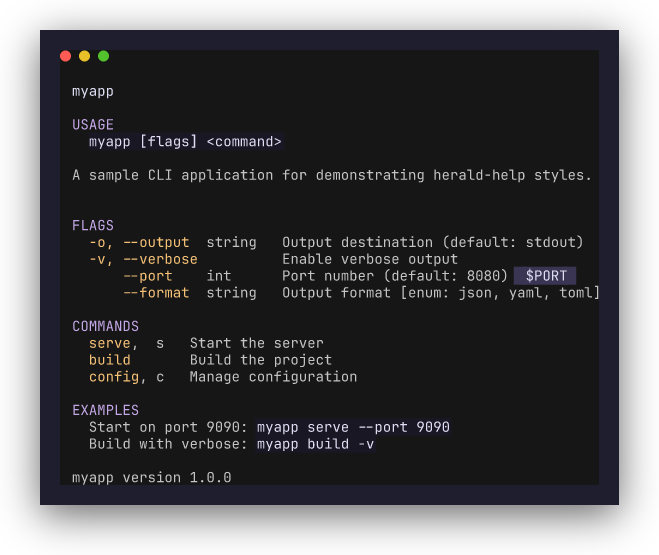
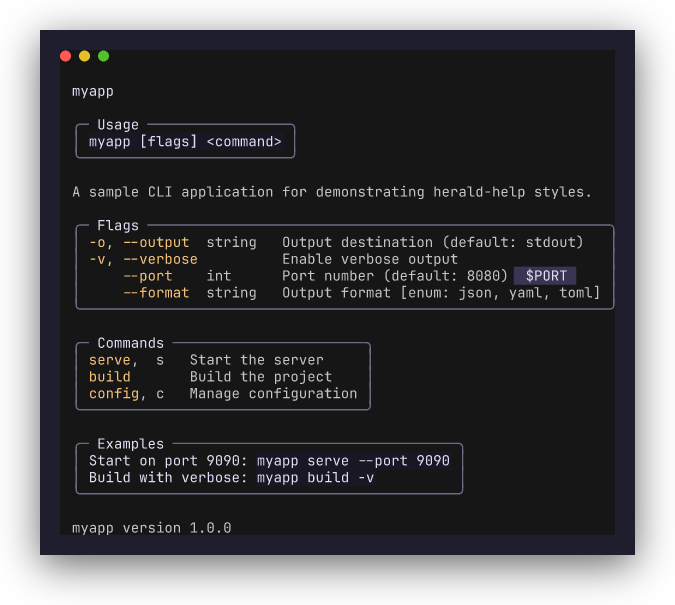
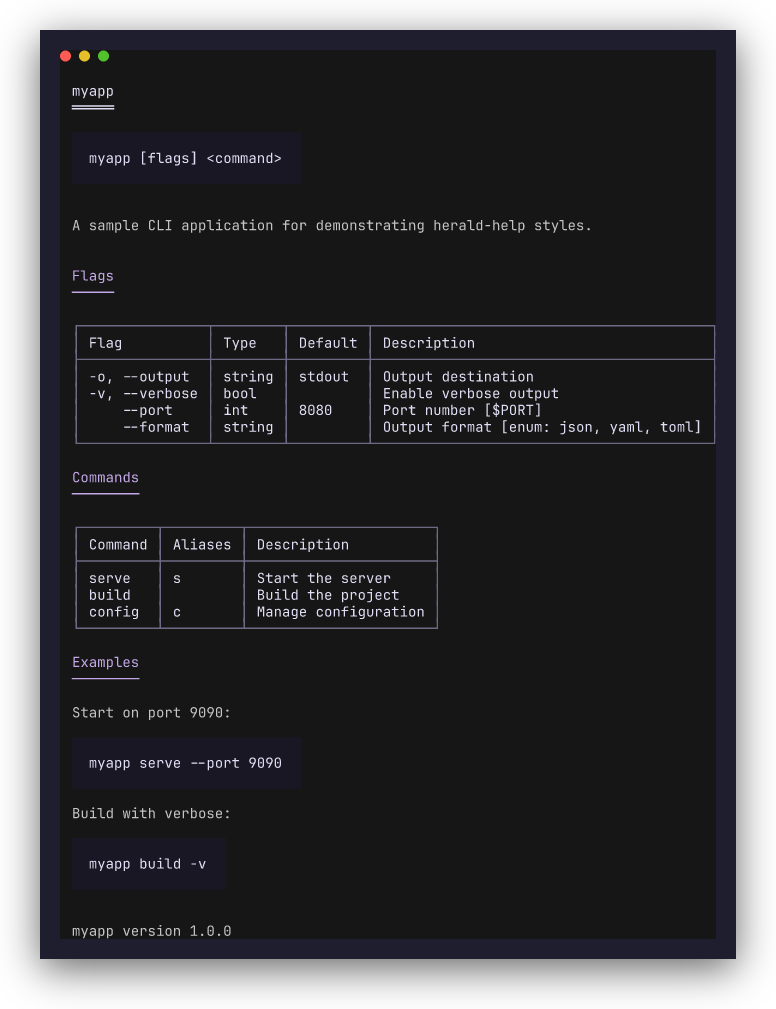
herald-help supports four rendering styles, controlled by the WithStyle option.
| Style | Description |
|---|---|
StyleCompact |
Default. Uppercase colored headings, indented two-column lists, no borders. Closest to traditional CLI help. |
StyleRich |
Decorated headings (H1/H2/H3), bordered tables, code blocks, and alert panels. |
StyleGrouped |
Each section wrapped in a bordered fieldset with the section name as legend. |
StyleMarkdown |
Valid Markdown text. Pipe to glow/bat, save to file, or render via herald-md. |
 StyleCompact (default) |
 StyleGrouped |
 StyleRich |
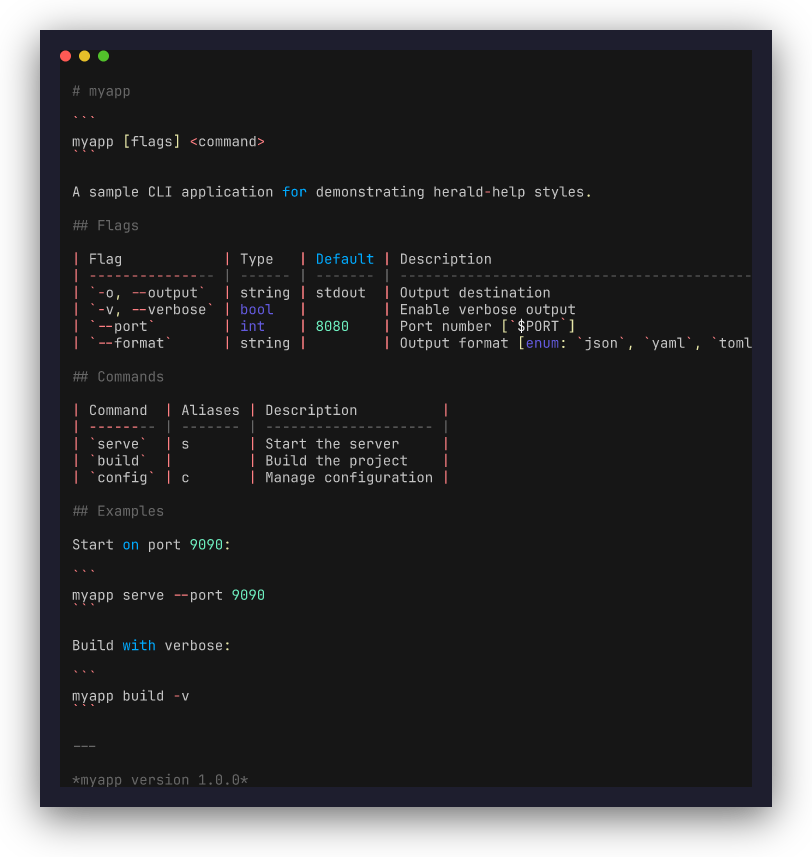 StyleMarkdown |
To use a non-default style, pass WithStyle to Render or RenderTo:
// Rich style with bordered tables
heraldhelp.RenderTo(os.Stdout, ty, cmd, heraldhelp.WithStyle(heraldhelp.StyleRich))

// Grouped style with fieldset borders
heraldhelp.RenderTo(os.Stdout, ty, cmd, heraldhelp.WithStyle(heraldhelp.StyleGrouped))

// Markdown output — pipe to glow or render via herald-md
md := heraldhelp.Render(ty, cmd, heraldhelp.WithStyle(heraldhelp.StyleMarkdown))
Types
| Type | Description |
|---|---|
Command |
Top-level struct: name, synopsis, description, flags, args, subcommands, examples, footer |
Flag |
A CLI flag with long/short names, type, default, description, env vars, enum values |
FlagGroup |
Named group of flags (cobra groups, urfave categories, kong groups) |
Arg |
Positional argument with name, description, required/default |
CommandRef |
Subcommand summary: name, aliases, description |
CommandGroup |
Named group of subcommands |
Example |
Usage example with description and command string |
Rendering
Each Command field maps to a section in the output. The exact herald method used depends on the active style (see Styles above). The table below shows the StyleRich mapping as reference:
| Section | Herald method (StyleRich) | Condition |
|---|---|---|
| Command name | H1 |
Always |
| Deprecated notice | Alert(AlertWarning) |
If Deprecated != "" |
| Synopsis | CodeBlock |
If Synopsis != "" |
| Description | P |
If Description != "" |
| Positional args | H2("Arguments") + Table |
If args present |
| Flags | H2("Flags") + Table |
If flags present |
| Inherited flags | H3("Inherited Flags") + Table |
If inherited flags present |
| Subcommands | H2("Commands") + Table |
If commands present |
| Examples | H2("Examples") + P + CodeBlock |
If examples present |
| See Also | H2("See Also") + UL |
If see-also present |
| Footer | Small |
If Footer != "" |
Flags are displayed in GNU-style format (-o, --output). Environment variables are shown inline ([$PORT]).
Functions:
Render(ty, cmd, opts...) string- render to stringRenderTo(w, ty, cmd, opts...) error- render toio.WriterFormatVersion(name, version) string- format a version footer string
Options
| Option | Description |
|---|---|
WithStyle(style) |
Set rendering style (StyleCompact, StyleRich, StyleGrouped, StyleMarkdown) |
WithWidth(n) |
Set output width (default: auto-detect terminal width) |
WithSectionOrder(sections...) |
Customize section ordering; omitted sections are hidden |
WithShowHidden(bool) |
Show hidden flags (default: false) |
WithEnvVarDisplay(bool) |
Show environment variable bindings (default: true) |
Examples
Runnable examples are in the examples/ directory, organized by style. The 0xx examples run directly; the adapter examples (002+) are separate modules.
Compact style (default — uppercase headings, indented two-column lists, no borders):
| Example | Description | Run |
|---|---|---|
| 000_manual | Manual Command construction |
go run ./examples/compact/000_manual/ |
| 001_flag | stdlib flag.FlagSet adapter |
go run ./examples/compact/001_flag/ |
| 002_cobra | Real cobra CLI with themed --help |
cd examples/compact/002_cobra && go run . --help |
| 003_urfave | Real urfave/cli app with themed --help |
cd examples/compact/003_urfave && go run . --help |
| 004_kong | Real kong CLI with themed --help |
cd examples/compact/004_kong && go run . --help |
| 005_custom-theme | Dracula theme applied via herald | go run ./examples/compact/005_custom-theme/ |
Rich style (decorated headings, bordered tables, code blocks):
| Example | Description | Run |
|---|---|---|
| 000_manual | Manual Command construction |
go run ./examples/rich/000_manual/ |
| 001_flag | stdlib flag.FlagSet adapter |
go run ./examples/rich/001_flag/ |
| 002_cobra | Real cobra CLI with themed --help |
cd examples/rich/002_cobra && go run . --help |
| 003_urfave | Real urfave/cli app with themed --help |
cd examples/rich/003_urfave && go run . --help |
| 004_kong | Real kong CLI with themed --help |
cd examples/rich/004_kong && go run . --help |
Grouped style (each section in a bordered fieldset):
| Example | Description | Run |
|---|---|---|
| 000_manual | Manual Command construction |
go run ./examples/grouped/000_manual/ |
Markdown style (valid Markdown text, pipeable to glow/bat):
| Example | Description | Run |
|---|---|---|
| 000_manual | Markdown output | go run ./examples/markdown/000_manual/ --help |
| 001_heraldmd-pipeline | Markdown rendered through herald-md | cd examples/markdown/001_heraldmd-pipeline && go run . |
Repository structure
This is a multi-module Go repository. The core module lives at the root; framework adapters are sub-modules in their own directories, each with a separate go.mod:
herald-help/
  go.mod            # github.com/indaco/herald-help (core types + renderer + flag adapter)
  cobra/go.mod      # github.com/indaco/herald-help/cobra
  urfave/go.mod     # github.com/indaco/herald-help/urfave
  kong/go.mod       # github.com/indaco/herald-help/kong
  examples/
    compact/        # StyleCompact examples (default; 002-004 are separate modules)
    rich/           # StyleRich examples (002-004 are separate modules)
    grouped/        # StyleGrouped examples
    markdown/       # StyleMarkdown examples (001 is a separate module with herald-md)
Use just test-all, just lint-all, just check-all to run across all modules.
License
This project is licensed under the MIT License - see the LICENSE file for details.
 Documentation

Documentation

Overview 
Package heraldhelp renders CLI help/usage output using herald typography.
It provides a Command model that captures the full structure of a CLI command (flags, arguments, subcommands, examples) and renders it with herald's styled typography methods.
Quick start (manual):
ty := herald.New()
cmd := heraldhelp.Command{
    Name:     "myapp",
    Synopsis: "myapp [flags] <subcommand>",
}
fmt.Println(heraldhelp.Render(ty, cmd))
With the flag adapter:
cmd := heraldhelp.FromFlagSet("myapp", flag.CommandLine)
fmt.Println(heraldhelp.Render(herald.New(), cmd))
Index 
- Variables
- func FormatVersion(name, version string) string
- func Render(ty *herald.Typography, cmd Command, opts ...RenderOption) string
- func RenderTo(w io.Writer, ty *herald.Typography, cmd Command, opts ...RenderOption) error
- type Arg
- type Command
- type CommandGroup
- type CommandRef
- type Example
- type Flag
- type FlagGroup
- type RenderConfig
- type RenderOption
- type Section
- type Style
Constants 
This section is empty.
Variables 
var DefaultSectionOrder = []Section{
	SectionName,
	SectionDeprecated,
	SectionSynopsis,
	SectionDescription,
	SectionArgs,
	SectionFlags,
	SectionInheritedFlags,
	SectionCommands,
	SectionExamples,
	SectionSeeAlso,
	SectionFooter,
}
DefaultSectionOrder defines the default ordering of help sections.
Functions 
func FormatVersion 
FormatVersion returns a formatted version string suitable for the Footer field.
func Render 
func Render(ty *herald.Typography, cmd Command, opts ...RenderOption) string
Render renders the help output for a Command using the given Typography instance and returns it as a string. If ty is nil, an empty string is returned.
func RenderTo 
func RenderTo(w io.Writer, ty *herald.Typography, cmd Command, opts ...RenderOption) error
RenderTo renders the help output and writes it to w.
Types 
type Command 
type Command struct {
Name string // command name, e.g. "myapp"
Synopsis string // one-line usage, e.g. "myapp [flags] <subcommand>"
Description string // long description (may be multi-paragraph)
Aliases []string
Deprecated string // if non-empty, command is deprecated
Flags []Flag
FlagGroups []FlagGroup // cobra flag groups, kong groups, urfave categories
Args []Arg // positional arguments
Commands []CommandRef // subcommands (summary only, not recursive)
CommandGroups []CommandGroup // grouped subcommands
Examples []Example
SeeAlso []string
}
Command describes a CLI command for help rendering. It captures all the information typically shown in a --help page: name, synopsis, flags, subcommands, examples, etc.
type CommandGroup 
type CommandGroup struct {
	Name     string
	Commands []CommandRef
}
CommandGroup groups related subcommands under a heading.
type CommandRef 
CommandRef is a summary reference to a subcommand. It does not recurse into the subcommand's own flags or children.
type Flag 
type Flag struct {
	Long       string   // e.g. "--output"
	Short      string   // e.g. "-o" (empty if none)
	Type       string   // e.g. "string", "bool"
	Default    string   // default value
	Desc       string   // description
	Required   bool     // whether the flag is required
	Hidden     bool     // adapters skip hidden flags by default
	EnvVars    []string // environment variable bindings
	Enum       []string // enum values (kong)
	Deprecated string   // deprecation notice
	Inherited  bool     // inherited/persistent flag (rendered in separate section)
}
Flag describes a single CLI flag.
type RenderConfig 
type RenderConfig struct {
	Style         Style     // visual style (StyleRich or StyleCompact)
	Width         int       // explicit terminal width override (0 = auto-detect)
	SectionOrder  []Section // section rendering order (nil = DefaultSectionOrder)
	ShowHidden    bool      // include hidden flags in output
	EnvVarDisplay bool      // show environment variable bindings inline
}
RenderConfig holds configuration for help rendering. Use RenderOption functional options to customise the defaults.
type RenderOption 
type RenderOption func(*RenderConfig)
RenderOption is a functional option for Render/RenderTo.
func WithEnvVarDisplay 
func WithEnvVarDisplay(show bool) RenderOption
WithEnvVarDisplay enables inline display of environment variable bindings in flag descriptions (e.g. "Port number [$PORT]").
func WithSectionOrder 
func WithSectionOrder(order ...Section) RenderOption
WithSectionOrder sets the order of help sections. Sections not listed are omitted from the output.
func WithShowHidden 
func WithShowHidden(show bool) RenderOption
WithShowHidden includes hidden flags in the help output.
func WithStyle 
func WithStyle(s Style) RenderOption
WithStyle sets the visual style for help rendering. The default is StyleRich (decorated headings, bordered tables). Use StyleCompact for a minimal, terminal-native layout with colored text and indented columns.
func WithWidth 
func WithWidth(w int) RenderOption
WithWidth sets an explicit terminal width, overriding auto-detection.
type Section 
type Section int
Section identifies a renderable section of the help output.
const ( // SectionName renders the command name as H1. SectionName Section = iota // SectionDeprecated renders a deprecation warning alert. SectionDeprecated // SectionSynopsis renders the usage synopsis as a code block. SectionSynopsis // SectionDescription renders the long description as a paragraph. SectionDescription // SectionArgs renders positional arguments as a table. SectionArgs // SectionFlags renders flags (flat or grouped) as tables. SectionFlags // SectionInheritedFlags renders inherited/persistent flags as a table. SectionInheritedFlags // SectionCommands renders subcommands (flat or grouped) as tables. SectionCommands // SectionExamples renders usage examples with descriptions and code blocks. SectionExamples // SectionSeeAlso renders related commands/resources as a list. SectionSeeAlso SectionFooter )
type Style 
type Style int
Style controls the visual style of the rendered help output.
const (
	// StyleCompact renders a minimal, terminal-native layout: uppercase
	// colored section headings, indented two-column lists for flags and
	// commands, and no table borders. Closer to traditional CLI help output
	// but with themed colors applied. This is the default style.
	StyleCompact Style = iota

	// StyleRich uses herald's full typography: bordered tables, decorated
	// headings (H1/H2/H3), code blocks, and alert panels.
	StyleRich

	// StyleGrouped wraps each section in a herald Fieldset with the section
	// name as the legend. Content inside uses compact-style KV layout.
	StyleGrouped

	// StyleMarkdown renders help as valid Markdown text. The output can be
	// piped to tools like glow or bat, saved to a file, or rendered back
	// through herald-md for themed terminal output.
	StyleMarkdown
)
 Source Files

Source Files

 Directories

Directories

| Path | Synopsis |
|---|---|
|
examples
|
|
|
compact/000_manual
command
A real CLI with a "greet" command and compact-style themed help via herald.
|
A real CLI with a "greet" command and compact-style themed help via herald. |
|
compact/001_flag
command
A real CLI using stdlib flag with compact-style themed help via herald.
|
A real CLI using stdlib flag with compact-style themed help via herald. |
|
compact/005_custom-theme
command
Themed help using a built-in herald theme (Dracula).
|
Themed help using a built-in herald theme (Dracula). |
|
demos
Package demos provides a shared Command for demo screenshots.
|
Package demos provides a shared Command for demo screenshots. |
|
demos/compact
command
StyleCompact demo for screenshot capture.
|
StyleCompact demo for screenshot capture. |
|
demos/grouped
command
StyleGrouped demo for screenshot capture.
|
StyleGrouped demo for screenshot capture. |
|
demos/markdown
command
StyleMarkdown demo for screenshot capture.
|
StyleMarkdown demo for screenshot capture. |
|
demos/rich
command
StyleRich demo for screenshot capture.
|
StyleRich demo for screenshot capture. |
|
grouped/000_manual
command
Render help with each section in a bordered fieldset.
|
Render help with each section in a bordered fieldset. |
|
markdown/000_manual
command
Render help as valid Markdown text.
|
Render help as valid Markdown text. |
|
rich/000_manual
command
A real CLI with a "greet" command and themed help via herald.
|
A real CLI with a "greet" command and themed help via herald. |
|
rich/001_flag
command
A real CLI using stdlib flag with themed help via herald.
|
A real CLI using stdlib flag with themed help via herald. |
|
urfave
module
|