

 README

README

sbommv: Sbom transfers made easy


sbommv is the primary tool for transferring SBOMs between systems — designed to fetch SBOMs from input sources, translate and validates them, enrich metadata, and push them to output destinations. At its core, sbommv uses a modular, adapter-based architecture that makes it flexible, scalable, and ready for the future to easily plug in and plug out new systems or platforms.

With its modular architecture, sbommv today supports a range of input and output systems:
Input Systems:
- GitHub (via API, releases, and repository cloning)
- Local Folders
- AWS S3 Buckets (new)
Output Systems:
- Dependency-Track
- Interlynk Platform
- Local Folders
- AWS S3 Buckets (new)
This setup allows SBOMs to move seamlessly across different systems, abstracting away the complexities of each system's internal workings.
Interlynk Free Tier — Full SBOM Compliance, Zero Friction
Get started with SBOM compliance in under two minutes — no credit card, no time limit. Interlynk's free plan includes a guided setup where you pick your compliance standard (CRA/EU, FDA Cybersecurity, NTIA, or Telecom), upload your SBOM, and instantly see your compliance score with actionable gaps highlighted. You get compliance scoring against one standard, up to 5 products with 5 versions each, unlimited users, built-in vulnerability detection, API access for CI/CD integration, weekly compliance digests, and ShareLynk — a public link to share your compliance posture with customers and partners. Everything beyond the free tier is visible with a clear upgrade path, and you can start a 15-day Enterprise trial anytime to unlock unlimited products, SBOM automation, RBAC, analytics, license management, and workflow integrations. Get Started Free →
📊 Check your SBOM compliance instantly directly from your browser in just one click: https://demo.interlynk.io/
Getting Started
Installation
Using Prebuilt binaries
https://github.com/interlynk-io/sbommv/releases
Using Homebrew
brew tap interlynk-io/interlynk
brew install sbommv
Using Go install
go install github.com/interlynk-io/sbommv@latest
Developer Installation
This approach involves cloning the repo and building it.
- Clone the repo
git clone git@github.com:interlynk-io/sbommv.git cdintosbommvfolder- make; make build
- To test if the build was successful run the following command
./build/sbommv version
Quick Start
- Fetch/Pull SBOM from Github and save it to a local folder
$ sbommv transfer --input-adapter=github \
--in-github-url="https://github.com/interlynk-io/sbomqs" \
--in-github-method="release"  --output-adapter=folder \
--out-folder-path="demo"
- Fetch/Pull SBOM from Github and push it to a Dependency-Track
$ sbommv transfer  --input-adapter=github  \
--in-github-url="https://github.com/interlynk-io/sbommv"  \
--output-adapter=dtrack  \
--out-dtrack-url="http://localhost:8080"
NOTE: Make sure dependency-track is running locally, if not, refer for setup.
If you have found it interesting soo far, you can show your support via starring ⭐ it.
What's next 🚀 ??
- Get started with sbommv.
sbommv features
- It allows to fetch SBOMs from github API, Github Release Pages, and folder, refer here for more..
- It allows to send SBOMs to Dependency-Track, Interlynk, Folde, refer here for more.
- It allows continous folder monitoring and transferring SBOMs continously by running into daemon mode, refer here for more.
- Internally it uses Protobom library forinter-format conver, read more about it here.
Data Flow
+---------------------+     +------------------------------+     +----------------------+
|    Input Adapter    | --> |    Enrichment/Translation    | --> |   Output Adapter     |
|-------------------- |     |------------------------------|     |----------------------|
|  - GitHub           |     |  - SBOM Translation*         |     |  - Interlynk         |
|  - BitBucket*       |     |  - Enrichment*               |     |  - Dependency-Track  |
|  - Dependency-Track*|     +------------------------------+     |  - Folder            |
|  - Folder           |                                          |  - GUAC*             |
|  - S3*              |                                          |  - S3*               |
+---------------------+                                          +----------------------+

* Coming Soon
If you are looking to integrate more such systems, raise an issue, would love to add them.
Contributions
We look forward to your contributions, below are a few guidelines on how to submit them
- Fork the repo
- Create your feature/bug branch (
git checkout -b feature/bug) - Commit your changes (
git commit -aSm "awesome new feature") - commits must be signed - Push your changes (
git push origin feature/new-feature) - Create a new pull-request
Other Open Source Software tools for SBOMs
- SBOM Quality Score - Quality & Compliance tool
- SBOM Assembler - A tool to compose a single SBOM by combining other SBOMs or parts of them
- SBOM Search Tool - A tool to grep style semantic search in SBOMs
- SBOM Explorer - A tool for discovering and downloading SBOMs from a public repository
Contact
We appreciate all feedback. The best ways to get in touch with us:
- ❓& 🅰️ Slack
- ☎ Live Chat
- 📫 Email Us
- 🐛 Report a bug or enhancement
- ❌ Follow us on X
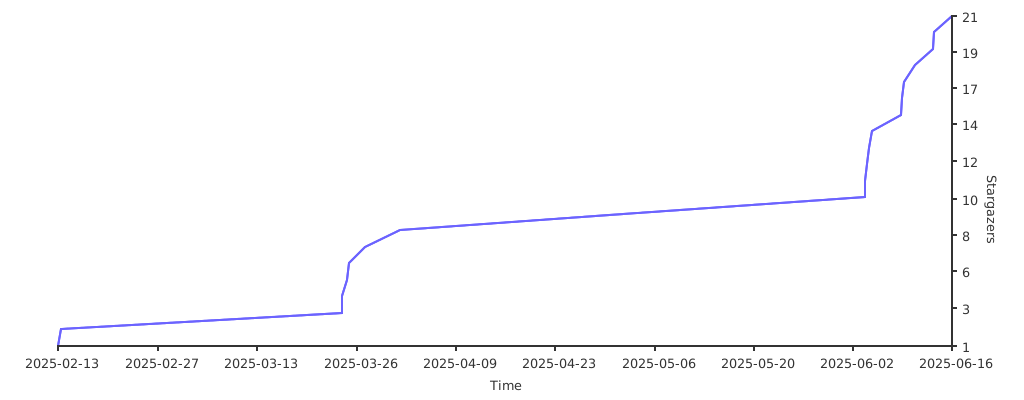
Stargazers
If you like this project, please support us by starring ⭐ it.
 Documentation

Documentation


There is no documentation for this package.
 Source Files
 Directories