

 README

README

Echo Debug Monitor


This repository is still under active development. Documentation is incomplete and breaking changes may occur.
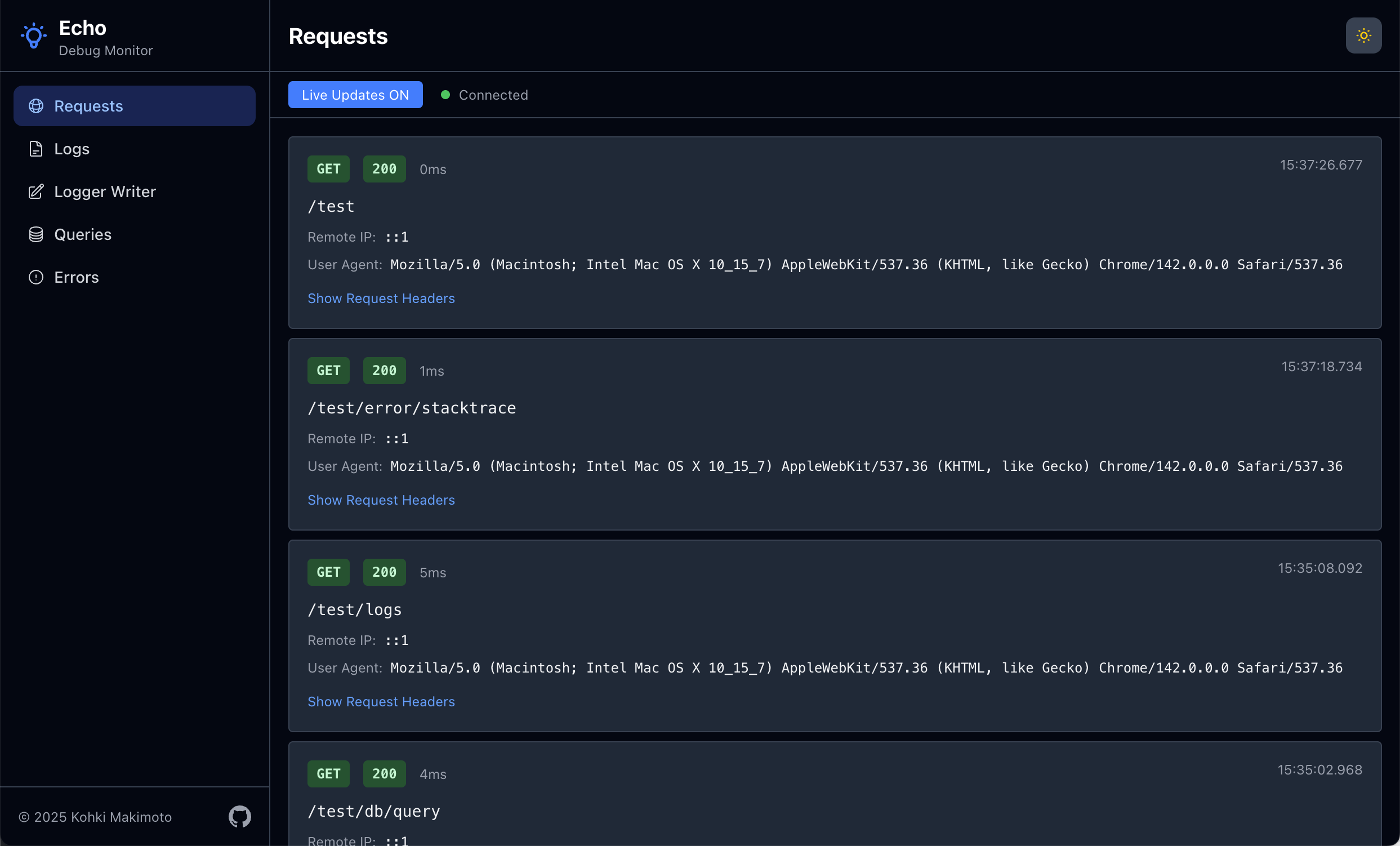
A debugging and monitoring dashboard for Go applications using the Echo web framework. Provides real-time visibility into application behavior through multiple specialized monitors.
[!WARNING] This tool is intended for debugging and development purposes only. Do not activate it in production environments as it may expose sensitive information and impact performance.
Getting Started
Installation
go get github.com/kohkimakimoto/echo-debugmonitor
Basic Usage
Here's a simple example to get started with Echo Debug Monitor:
package main

import (
    "github.com/labstack/echo/v4"
    debugmonitor "github.com/kohkimakimoto/echo-debugmonitor"
    "github.com/kohkimakimoto/echo-debugmonitor/monitors"
)

func main() {
    e := echo.New()

    // Create the debug monitor manager
    m := debugmonitor.New()

    // Add requests monitor
    requestsMonitor, requestsMonitorMiddleware := monitors.NewRequestsMonitor(&monitors.RequestsMonitorConfig{
        Skipper: func(c echo.Context) bool {
            return c.Path() == "/monitor" // Skip monitoring the monitor endpoint itself
        },
    })
    e.Use(requestsMonitorMiddleware)
    m.AddMonitor(requestsMonitor)

    // Add logs monitor
    logsMonitor, wrappedLogger := monitors.NewLogsMonitor(monitors.LogsMonitorConfig{
        Logger: e.Logger,
    })
    e.Logger = wrappedLogger
    m.AddMonitor(logsMonitor)

    // Register the dashboard route
    e.GET("/monitor", m.Handler())

    // Your application routes
    e.GET("/", func(c echo.Context) error {
        e.Logger.Info("Home page accessed")
        return c.String(200, "Hello, World!")
    })

    e.Start(":8080")
}
Then access the monitoring dashboard at http://localhost:8080/monitor.
Monitors
Monitors are the core units in Echo Debug Monitor. Each monitor tracks a specific aspect of your application and displays it in the dashboard.
A monitor is an independent component that:
- Captures specific types of data (requests, logs, errors, etc.)
- Stores captured data in an in-memory buffer.
- Provides a real-time view in the web interface
Each monitor operates independently and can be added or removed. You can also implement custom monitors for your specific needs.
Built-in Monitors
Echo Debug Monitor includes several ready-to-use monitors in the github.com/kohkimakimoto/echo-debugmonitor/monitors package:
- Requests Monitor: Tracks incoming HTTP requests, response statuses, latencies, etc.
- Logs Monitor: Captures application logs and displays them in real-time.
- Writer Monitor: Monitors output written to
io.Writerinterfaces. - Errors Monitor: Records application errors and stack traces.
- Queries Monitor: Tracks database queries.
Implementing Custom Monitors
WIP
License
The MIT License (MIT)
Author
Kohki Makimoto kohki.makimoto@gmail.com
 Documentation

Documentation

Index 
- Constants
- func ExtractSequence(id int64) int64
- func ExtractTimestamp(id int64) time.Time
- func HandleDataJSON(c echo.Context, store *Store) error
- func HandleSSEStream(c echo.Context, store *Store) error
- func RenderTemplate(c echo.Context, tmpl *template.Template, data any) error
- type AddEvent
- type ClearEvent
- type DataEntry
- type IDGenerator
- type Manager
- type Monitor
- type MonitorActionHandler
- type Store
- func (s *Store) Add(payload any)
- func (s *Store) Clear()
- func (s *Store) GetById(id int64) *DataEntry
- func (s *Store) GetLatest() []*DataEntry
- func (s *Store) GetLatestWithLimit(n int) []*DataEntry
- func (s *Store) GetSince(sinceID int64) []*DataEntry
- func (s *Store) Len() int
- func (s *Store) NewAddEvent() *AddEvent
- func (s *Store) NewClearEvent() *ClearEvent
Constants 
const (
	IconExclamationCircle template.HTML = `` /* 304-byte string literal not displayed */
	IconCircleStack       template.HTML = `` /* 586-byte string literal not displayed */
	IconGlobeAlt          template.HTML = `` /* 704-byte string literal not displayed */
	IconPencilSquare      template.HTML = `` /* 485-byte string literal not displayed */
	IconDocumentText      template.HTML = `` /* 511-byte string literal not displayed */
)
Variables 
This section is empty.
Functions 
func ExtractSequence 
ExtractSequence extracts the sequence number component from an ID.
func ExtractTimestamp 
ExtractTimestamp extracts the timestamp component from an ID and returns the actual time.Time value.
func HandleDataJSON ¶ added in v0.0.2
HandleDataJSON returns store entries as JSON for polling mode. It accepts a "since" query parameter to return only entries with ID greater than the specified value.
Types 
type AddEvent 
type AddEvent struct {
	C <-chan *DataEntry // Channel to receive Add events
	// contains filtered or unexported fields
}
AddEvent represents a subscription to Add events. Use the C channel to receive notifications when new data is added. Call Close() when done to clean up resources.
type ClearEvent 
type ClearEvent struct {
	C <-chan struct{} // Channel to receive Clear events
	// contains filtered or unexported fields
}
ClearEvent represents a subscription to Clear events. Use the C channel to receive notifications when the store is cleared. Call Close() when done to clean up resources.
func (*ClearEvent) Close 
func (e *ClearEvent) Close()
Close unsubscribes from the Store and closes the event channel. After calling Close, the C channel will be closed and no more events will be received.
type IDGenerator 
type IDGenerator struct {
	// contains filtered or unexported fields
}
IDGenerator generates unique int64 IDs using a Snowflake-like algorithm. The ID structure: - 1 bit: sign (always 0 for positive values) - 45 bits: timestamp in milliseconds since custom epoch (provides ~1,115 years range) - 18 bits: sequence number (allows 262,144 IDs per millisecond)
This provides roughly time-ordered IDs with high throughput capacity.
func (*IDGenerator) Generate 
func (g *IDGenerator) Generate() int64
Generate generates a new unique int64 ID. This method is thread-safe and blocks if called more than maxSequence times within the same millisecond, or if the clock moves backwards, waiting for the appropriate time to generate a valid ID.
type Manager 
type Manager struct {
	// contains filtered or unexported fields
}
func (*Manager) AddMonitor 
func (*Manager) Handler 
func (m *Manager) Handler() echo.HandlerFunc
type Monitor 
type Monitor struct {
	// Name is the name of this monitor.
	// It must be unique among all monitors.
	Name string
	// DisplayName is the display name of this monitor.
	DisplayName string
	// MaxRecords is the maximum number of records to keep in the data storage.
	MaxRecords int
	// Icon is an HTML element string representing the icon for this monitor.
	// Typically, it is an SVG string.
	Icon template.HTML
	//
	ActionHandler MonitorActionHandler
	// contains filtered or unexported fields
}
type MonitorActionHandler 
type Store 
type Store struct {
	// contains filtered or unexported fields
}
Store is an in-memory data store that provides O(1) access by ID while maintaining insertion order like a linked hash map. It automatically removes old records when the maximum capacity is reached. It uses Snowflake-style int64 IDs to guarantee uniqueness and ordering. Store supports channel-based event subscriptions for Add and Clear events.
func NewStore 
NewStore creates a new Store with the specified maximum number of records. When the limit is reached, the oldest records are automatically removed.
func (*Store) Add 
Add adds a new record to the store with a Snowflake-style int64 ID. The ID is generated using a time-based algorithm for uniqueness and ordering. If the store is at capacity, the oldest record is removed. After adding, all registered listeners are notified with the new entry.
func (*Store) Clear 
func (s *Store) Clear()
Clear removes all records from the store. After clearing, all registered clear listeners are notified.
func (*Store) GetById 
GetById returns a single data entry by its ID. Returns nil if the entry is not found. Time complexity: O(1).
func (*Store) GetLatest 
GetLatest returns all data entries in reverse chronological order (newest first).
func (*Store) GetLatestWithLimit 
GetLatestWithLimit returns the N most recent data entries in reverse chronological order (newest first). If n is greater than the number of records, all records are returned.
func (*Store) GetSince 
GetSince returns all data entries with ID greater than the specified ID, in chronological order (oldest first). This is optimized for cursor-based pagination in log streaming. Time complexity: O(m) where m is the number of results.
func (*Store) NewAddEvent 
NewAddEvent creates a new subscription to Add events. The returned AddEvent provides a channel that will receive notifications when new data is added to the Store. Call Close() on the returned AddEvent when done to clean up resources.
func (*Store) NewClearEvent 
func (s *Store) NewClearEvent() *ClearEvent
NewClearEvent creates a new subscription to Clear events. The returned ClearEvent provides a channel that will receive notifications when the Store is cleared. Call Close() on the returned ClearEvent when done to clean up resources.
 Source Files
 Directories