

 README

README


Build integration and end-to-end tests in minutes, instead of days, using OpenTelemetry and trace-based testing.
Docs | Tutorials | Recipes | Examples | Discord | Blog | Website










Tracetest lets you build integration and end-to-end tests 98% faster with distributed traces.
No plumbing, no mocks, no fakes. Test against real data.
You can:
- Assert against both the response and trace data at every point of a request transaction.
- Assert on the timing of trace spans.
- Eg. A database span executes within
100ms.
- Eg. A database span executes within
- Wildcard assertions across common types of activities.
- Eg. All gRPC return codes should be
0. - Eg. All database calls should happen in less than
100ms.
- Eg. All gRPC return codes should be
- Assert against side-effects in your distributed system.
- Eg. Message queues, async API calls, external APIs, etc.
- Integrate with your existing distributed tracing solution.
- Define multiple test triggers:
- HTTP requests
- gRPC requests
- Trace IDs
- and many more...
- Save and run tests manually and via CI build jobs.
- Verify and analyze the quality of your OpenTelemetry instrumentation to enforce rules and standards.
- Test long-running processes.
Build tests in minutes.
-
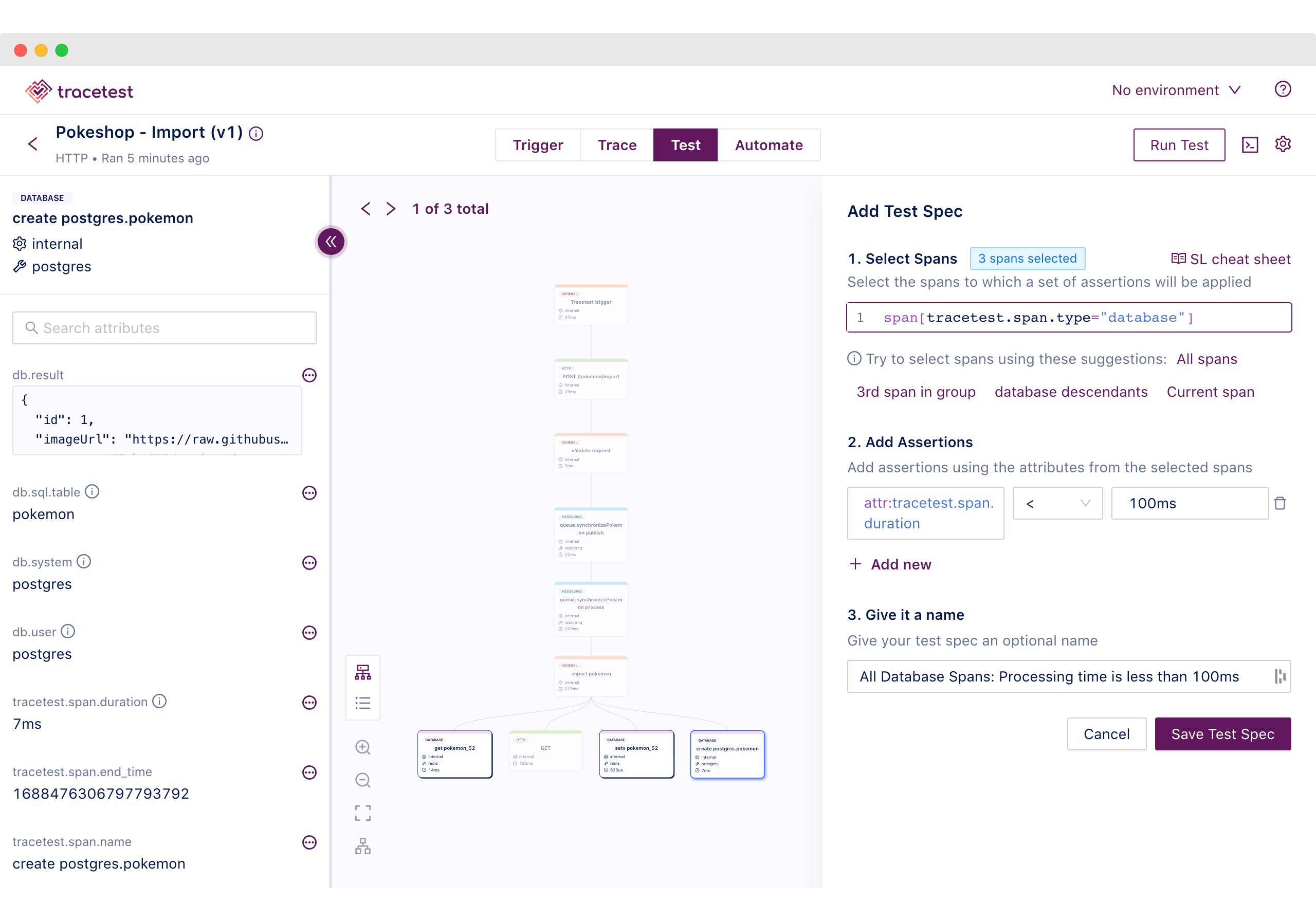
Visually - in the Web UI
-
Programmatically - in YAML
type: Test
spec:
  id: Yg9sN-94g
  name: Pokeshop - Import
  description: Import a Pokemon
  trigger:
    type: http
    httpRequest:
      url: http://demo-api:8081/pokemon/import
      method: POST
      headers:
      - key: Content-Type
        value: application/json
      body: '{"id":52}'
  specs:
  - name: 'All Database Spans: Processing time is less than 100ms'
    selector: span[tracetest.span.type="database"]
    assertions:
    - attr:tracetest.span.duration < 100ms
🔥 Features
- Works out of the box with your existing OpenTelemetry instrumentation, supporting numerous trace data stores, including:
- Jeager
- Grafana Tempo
- OpenSearch
- Elastic
- And, many more...
- Tell us which other trace data stores you want supported!
- Works out of the box by adding Tracetest as an additional pipeline via your OpenTelemetry Collector config.
- Supporting multiple ways of creating a test, including HTTP, GRPC and Postman Collections.
- Visualize the changes you are making to your trace as you develop, enabling Observability-Driven Development.
- Add assertions based on response data from the trigger request and all trace data contained in the spans of your distributed trace.
- Specify which spans to check in assertions via the selector language.
- Define checks against the attributes in these spans, including properties, return status, or timing.
- Create tests visually in the Tracetest Web UI or programatically via YAML-based test definition files.
- Use test definition files and the Tracetest CLI to enable Gitops flows and CI/CD automation.
- Tracetest CLI allows importing & exporting tests, running tests, and more.
- Version tests as the definition of the test is altered.
- The guided install can include an example "Pokeshop" microservice that is instrumented with OpenTelemetry to use as an example application under test.
- Create environment variables to assert the same behavior across multiple environments (dev, staging, and production, for example)
- Create test outputs by defining a variable based on the information contained in a particular span's attributes.
- Run ad-hoc tests by using undefined variables to enable supplying variables at runtime.
- Define test suites/transactions to chain tests together and use variables obtained from a test in a subsequent test. These variables can also be loaded from the environment.
- Run comprehensive trace analysis and validation to adhere to OpenTelemetry rules and standards.
- Configure test runner behavior with required gates used when executing your tests to determine whether to mark the test as passed or failed.
🚀 Getting Started

Click on the image or this link to watch the "Tracetest Intro Video" video (< 2 minutes)
1️⃣ Install the Tracetest CLI
curl -L https://raw.githubusercontent.com/kubeshop/tracetest/main/install-cli.sh | bash -s
⚙ Read the CLI installation docs for more options and instructions.
2️⃣ Install the Tracetest Server
tracetest server install
This command will launch an install wizard that automatically installs Tracetest and a sample Pokeshop Demo app into either Docker or Kubernetes based on your selection.
Or, install Tracetest with Helm. The Tracetest Helm charts are located here.
helm install tracetest kubeshop/tracetest --namespace=tracetest --create-namespace
⚙ Read the Server installation docs for more options and instructions.
3️⃣ Open Tracetest
Once you've installed Tracetest Server, access the Tracetest Web UI on http://localhost:11633.
Check out the Opening Tracetest guide to start creating and running tests!
🤔 How does Tracetest work?
- Pick an endpoint to test.
- Run a test, and get the trace.
- The trace is the blueprint of your system under test. It shows all the steps the system has taken to execute the request.
- Use this blueprint to define assertions in the Tracetest Web UI.
- Add assertions on different services, checking return statuses, data, or even execution times of a system.
- Run the tests.
Once the test is built, it can be run automatically as part of a build process. Every test has a trace attached, allowing you to immediately see what worked, and what did not, reducing the need to reproduce the problem to see the underlying issue.
📂 What does the test definition file look like?
The Tracetest test definition files are written in a simple YAML format. You can write them directly or build them graphically via the UI. Here is an example of a test which:
- Executes
POSTagainst thepokemon/importendpoint. - Verifies that the HTTP blocks return a
200status code. - Verifies all database calls execute in less than
50ms.
type: Test
spec:
  id: 5dd03dda-fad2-49f0-b9d9-5143b746c1d0
  name: DEMO Pokemon - Import - Import a Pokemon
  description: "Import a pokemon"

  # Configure how tracetest triggers the operation on your application
  # triggers can be http, grpc, etc
  trigger:
      type: http
      httpRequest:
          method: POST
          url: http://demo-pokemon-api.demo.svc.cluster.local/pokemon/import
          headers:
              - key: Content-Type
                value: application/json
          body: '{"id":52}'

  # Definition of the test specs which is a combination of a selector
  # and an assertion
  specs:
      # the selector defines which spans will be targeted by the assertions
      selector: span[tracetest.span.type = "http"]
      # the assertions define the checks to be run. In this case, all
      # http spans will be checked for a status code = 200
      - assertions:
          - http.status_code = 200
      # this next test ensures all the database spans execute in less
      # than 50 ms
      selector: span[tracetest.span.type = "database"]
      - assertions:
          - tracetest.span.duration < "50ms"
🤖 How to run an automated test?
Save a test definition file above as pokeshop_import.yaml. Use the CLI to run a test.
tracetest run test --file /path/to/pokeshop_import.yaml
Check out the CI/CD docs to learn more about test automation.
🧪 Tests
We strive to produce quality code and improve Tracetest rapidly and safely. Therefore, we have a full suite of both front-end and back-end tests. Cypress tests are running against the front-end code and (surprise, surprise) Tracetest against the back-end code. You can see the test runs here, and a blog post describing our testing pipelines here.
🎤 Feedback
Have an idea to improve Tracetest?
You can:
- Create an issue here!
- Join our Discord, and ask us any questions there.
- Follow us on Twitter at @tracetest_io for updates.
- Give us a ⭐️ on Github if you like what we're doing!
🌱 Contributing & Community
Whether it's big or small, we love contributions.
Not sure where to get started? You can:
- Visit our Community Page.
- See our contributing guidelines here.
 Directories