

 README

README

Settle Backend


A real-time chat backend built with Go — exclusively for serious Steam gamers. Only users with 500+ hours on Steam can join the conversation.
Overview
Settle Backend is the API and real-time service behind Settle, a chat platform that gates access via Steam playtime. Authentication is handled through Steam's OpenID flow; messaging runs over Socket.IO; media and attachments live in S3; and everything is observed with Prometheus + Grafana.
The codebase follows Clean Architecture with strict separation between delivery → usecase → repository → domain.
Features
- Steam OpenID authentication with a 500-hour playtime gate
- Real-time messaging via Socket.IO (rooms, presence, typing)
- JWT auth with separate access & refresh token expiries
- File attachments uploaded to Amazon S3
- Rooms & direct messages with persistent history (MongoDB)
- Observability — Prometheus metrics, Grafana dashboards, Node Exporter
- Containerized stack with Docker Compose
- Input validation with
go-playground/validator
Tech Stack
| Layer | Technology |
|---|---|
| Language | Go 1.23+ |
| HTTP Framework | Gin |
| Real-time | Socket.IO (Go) |
| Database | MongoDB (official driver v2) |
| Object Storage | Amazon S3 (AWS SDK v2) |
| Auth | Steam OpenID, JWT (access + refresh) |
| Config | Viper |
| Validation | go-playground/validator |
| Monitoring | Prometheus, Grafana, Node Exporter |
| Containerization | Docker & Docker Compose |
Architecture

This project follows the Clean Architecture pattern — the dependency rule always points inward, from delivery toward the domain.
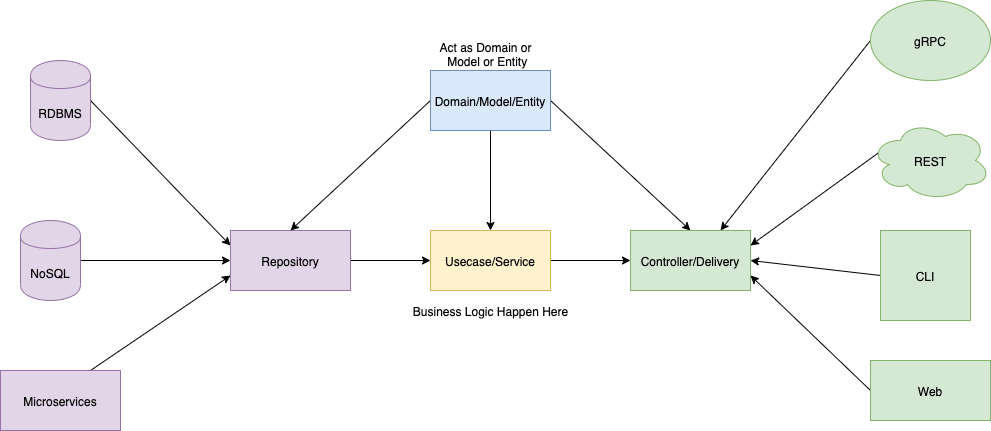
Layout
cmd/— application entry point (main.go)api/— HTTP delivery, middleware, route registration, Socket.IO gatewaydomain/— core entities and repository / usecase interfacesusecase/— business logicrepository/— MongoDB & S3 implementationsbootstrap/— dependency wiring and service initializationmonitoring/— Prometheus & Grafana configurationutils/— shared helpers
Getting Started
Prerequisites
- Docker & Docker Compose
- A Steam Web API key
- AWS credentials with S3 access
- MongoDB connection (a containerized one is included in
compose.yaml)
1. Clone the repository
git clone https://github.com/kwa0x2/Settle-Backend.git
cd Settle-Backend
2. Configure environment variables
Copy .env.example to .env and fill in your credentials:
cp .env.example .env
APP_ENV=development
SERVER_ADDRESS=:9090

# Steam OpenID
STEAM_API_KEY=
STEAM_REDIRECT_URL=http://localhost:9090/api/v1/auth/login/steam/callback
REDIRECT_LOGIN_URL=http://localhost:3000/en/auth/login

# MongoDB
MONGO_URI=
MONGO_DB_NAME=settle

# AWS S3
AWS_ACCESS_KEY_ID=
AWS_SECRET_ACCESS_KEY=
AWS_REGION=
S3_BUCKET_NAME=

# JWT
ACCESS_TOKEN_EXPIRY_HOUR=2
REFRESH_TOKEN_EXPIRY_HOUR=168
ACCESS_TOKEN_SECRET=
REFRESH_TOKEN_SECRET=
3. Start the stack
docker compose up -d --build
| Service | URL |
|---|---|
| API Server | http://localhost:9090 |
| Prometheus | http://localhost:9091 |
| Grafana | http://localhost:3001 |
API
All endpoints are prefixed with /api/v1. Route groups:
| Group | Purpose |
|---|---|
/auth |
Steam OpenID login, token refresh |
/rooms |
Create, list and manage chat rooms |
/messages |
Message history |
/attachments |
Upload files to S3 |
/socket.io |
Real-time gateway |
Project Structure
Settle-Backend/
├── api/
│   ├── http/          # Gin HTTP handlers
│   ├── middleware/    # Auth, CORS, rate-limit, metrics
│   ├── route/         # Route registration
│   └── socket/        # Socket.IO gateway & adapters
├── bootstrap/         # App initialization & DI
├── cmd/               # Entry point
├── domain/            # Entities and contracts
├── monitoring/        # Prometheus & Grafana configs
├── repository/        # MongoDB & S3 implementations
├── usecase/           # Business logic
├── utils/             # Helpers
├── compose.yaml       # Docker Compose stack
└── Dockerfile         # API image
License
Distributed under the MIT License. See LICENSE for more information.
 Directories