

 README

README

Forq - Simple Message Queue powered by SQLite
Forq is a simple single-binary message queue on top of SQLite, designed for small to medium workloads. Shipped with the Admin UI for easy management.
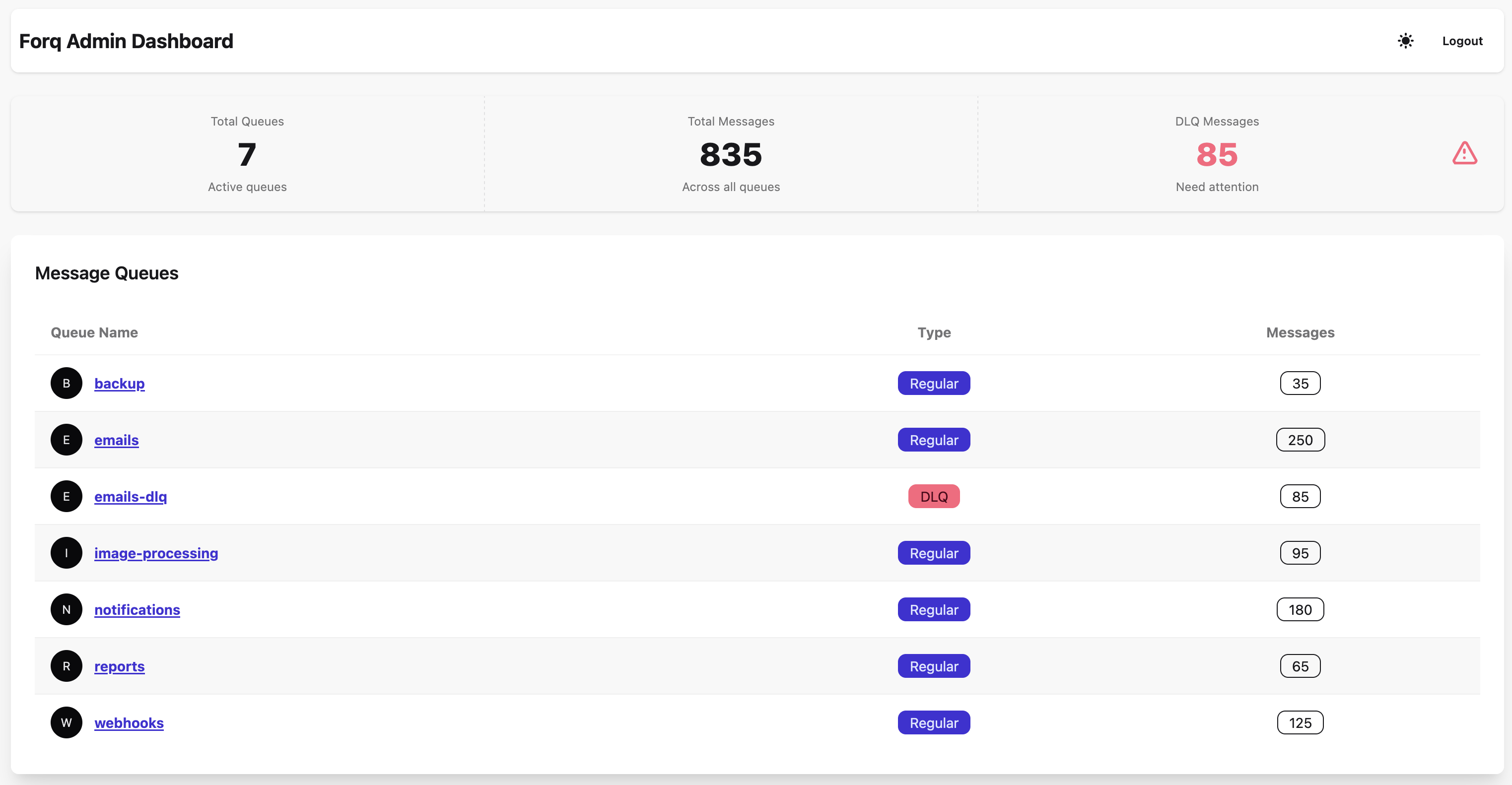
The assumption is that you will self-host Forq on a VPS or a small cloud instance, and use it for background jobs, task queues, or inter-service communication.
While Forq has a limited set of features compared to more complex systems like RabbitMQ or Kafka, it is extremely easy to set up and use, has a very low resource footprint, and easy to maintain. No external dependencies are required, as SQLite is embedded.
Open-source but closed-contribution
Forq is open-source, but I do not accept external contributions. This is a personal project, and I want to keep full control over the codebase and direction of the project. Also, I don't feel I have enough free time to review and manage contributions (if any).
Therefore, please do not open PRs.
If you find any bugs, have questions or suggestions, use the Discussions section for that.
Quick Start
Prerequisites
- Go 1.26+ (for building from source)
- Or use Docker
Installation
Build from Source
git clone https://github.com/n0rdy/forq.git
cd forq
go build -o forq ./main.go
Docker
docker run -d \
  --name forq \
  --restart unless-stopped \
  -e FORQ_AUTH_SECRET=your-auth-secret-min-32-chars-long \
  -e FORQ_DB_PATH=/app/data/forq/forq.db \
  -e FORQ_API_ADDR=0.0.0.0:8080 \
  -e FORQ_UI_ADDR=0.0.0.0:8081 \
  -p 8080:8080 \
  -p 8081:8081 \
  -v ~/forq-data:/app/data/forq \
  mykonordy/forq:latest
For Docker, these env vars must be set:
FORQ_DB_PATH- Sets explicit database location inside containerFORQ_API_ADDR=0.0.0.0:8080- Binds API to all interfaces (required for Docker port mapping)FORQ_UI_ADDR=0.0.0.0:8081- Binds UI to all interfaces (required for Docker port mapping)
Please, note that if you are running Forq via Docker on macOS, the performance will be significantly worse due to Docker's filesystem performance issues on macOS. I'd advise against running Forq on macOS via Docker in production. Binary always gives the best performance.
Configuration
Forq uses environment variables for configuration:
# Required
export FORQ_AUTH_SECRET=your-auth-secret-min-32-chars-long                # to use for API and Admin UI authentication
export FORQ_DB_PATH=./data/forq.db                                        # path to the SQLite database file

# Optional
export FORQ_METRICS_ENABLED=false                                         # true|false (default: false)
export FORQ_METRICS_AUTH_SECRET=your-metrics-secret-min-32-chars-long     # required if FORQ_METRICS_ENABLED is true
export FORQ_ENV=pro                                                       # local|pro (default: pro)
export FORQ_QUEUE_TTL_HOURS=24                                            # Default: 24 hours
export FORQ_DLQ_TTL_HOURS=168                                             # Default: 168 hours (7 days)
export FORQ_API_ADDR=localhost:8080                                       # Default: localhost:8080
export FORQ_UI_ADDR=localhost:8081                                        # Default: localhost:8081
export FORQ_TRUST_PROXY_HEADERS=false                                     # true|false (default: false) - only enable behind a trusted proxy that strips/replaces client X-Forwarded-For
Running Forq
./forq
# Server starts on :8080 (API) and :8081 (UI) by default
First Message
Send your first message:
curl -X POST http://localhost:8080/api/v1/queues/emails/messages \
  -H "X-API-Key: your-auth-secret-min-32-chars-long" \
  -H "Content-Type: application/json" \
  -d '{"content": "I am going on an adventure!"}'
where emails is the queue name. If the queue does not exist, it will be created automatically.
Receive the message:
curl -X GET http://localhost:8080/api/v1/queues/emails/messages \
  -H "X-API-Key: your-auth-secret-min-32-chars-long"
Acknowledge the message:
curl -X POST http://localhost:8080/api/v1/queues/emails/messages/{message_id}/ack \
  -H "X-API-Key: your-auth-secret-min-32-chars-long"
where {message_id} is the id of the message received in the previous step.
SDKs
I implemented simple Forq SDKs for the ecosystems that I use most often:
Those are very simple, and basically just wrap the HTTP API.
If your platform of choice is not listed here, you can generate the client code using the Forq OpenAPI specification, or just use the HTTP API directly. The whole API consists of 4 endpoint and 3 models, no big deal.
Next Steps
- Philosophy - A very short read about philosophy behind Forq. Helps to understand the design decisions.
- Specification - Overview of Forq features and design, do check it out!
- Configurations - All configuration options
- Producing Messages - How to send messages to queues
- Consuming Messages - How to receive and acknowledge messages
- Metrics - Setting up monitoring with Prometheus
- Admin UI Guide - Using the admin interface
- API Reference - Complete API documentation
- SDKs - Client libraries for various languages
- Forq vs Other MQs - Comparison with other message queue systems
- Forq Internals - How (and why) Forq works under the hood for fellow nerds
 Documentation

Documentation


There is no documentation for this package.
 Source Files
 Directories