

 README

README

oauth2-noserver
Simplifying the oauth2 auth flow for desktop / cli apps that have no server side.
While oauth works fine for apps the have a server side, I personally find it a pain to use when developing simple desktop or cli applications.
That's why needed something to turn a complete oauth flow into a one-liner (well, that's clearly exaggerated, but it's barely more).
So here's how it works !
Installation
Run go get -u github.com/nmrshll/oauth2-noserver
Try out the included example with make example
Usage
1. Create an oauth app on the website/service you want to authenticate into
You must set the redirection URL to http://127.0.0.1:14565/oauth/callback for this library to function properly.
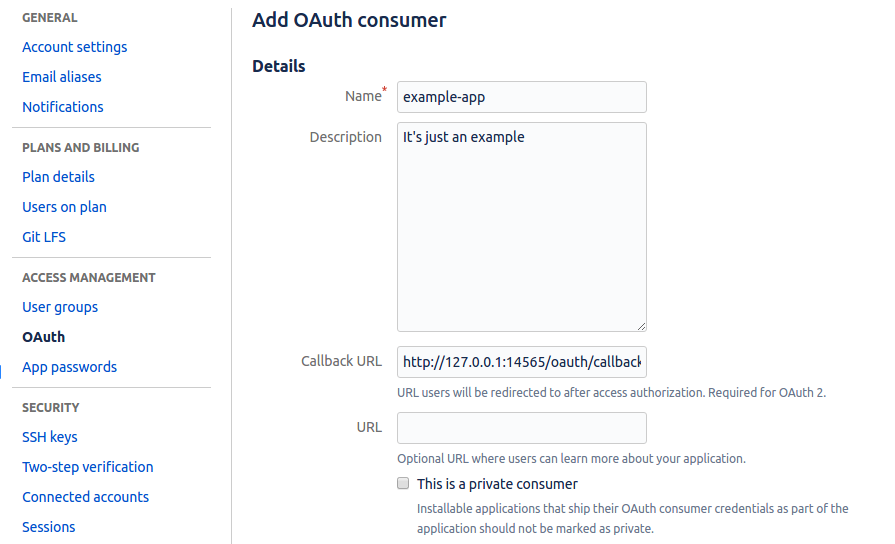
Once done you should get credentials (client id and client secret) to use in your code.
2. From your Go program, authenticate your user like this :
func main() {
	conf := &oauth2.Config{
		ClientID:     "________________",            // also known as client key sometimes
		ClientSecret: "___________________________", // also known as secret key
		Scopes:       []string{"account"},
		Endpoint: oauth2.Endpoint{
			AuthURL:  "https://bitbucket.org/site/oauth2/authorize",
			TokenURL: "https://bitbucket.org/site/oauth2/access_token",
		},
	}

	client, err := oauth2ns.AuthenticateUser(conf)
	if err != nil {
		log.Fatal(err)
	}

	// use client.Get / client.Post for further requests, the token will automatically be there
	_, _ = client.Get("/auth-protected-path")
}
The AuthURL and TokenURL can be found in the service's oauth documentation.
Contributing
Have improvement ideas or want to help ? Please start by opening an issue
Related
Used in:
License: MIT
 Documentation

Documentation

Index 
Constants 
const (
	// IP is the ip of this machine that will be called back in the browser. It may not be a hostname.
	// If IP is not 127.0.0.1 DEVICE_NAME must be set. It can be any short string.
	IP          = "127.0.0.1"
	DEVICE_NAME = ""
	// PORT is the port that the temporary oauth server will listen on
	PORT = 14565
)
Variables 
This section is empty.
Functions 
This section is empty.
Types 
type AuthenticateUserOption 
type AuthenticateUserOption func(*AuthenticateUserFuncConfig) error
func WithAuthCallHTTPParams 
func WithAuthCallHTTPParams(values url.Values) AuthenticateUserOption
type AuthorizedClient 
func AuthenticateUser 
func AuthenticateUser(oauthConfig *oauth2.Config, options ...AuthenticateUserOption) (*AuthorizedClient, error)
AuthenticateUser starts the login process
 Source Files