

 README

README

opwire-agent
Program opwire-agent is a simple command line wrapper. It receives a request from a REST API client or a message queue broker and transports this request to a command line process (that is developed by any programming language).
Architecture
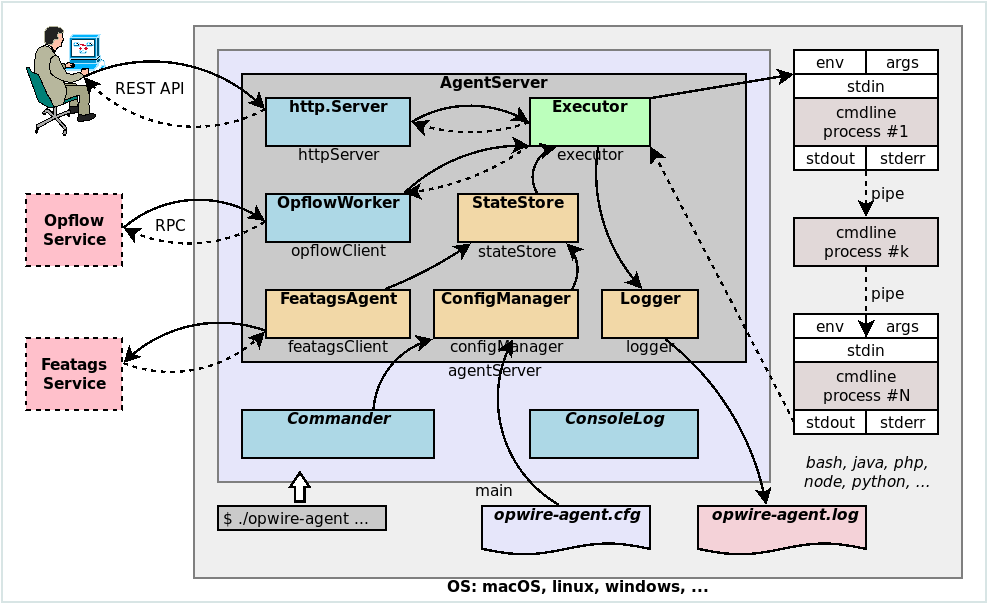
Configuration
Location
Support configuration file (opwire-agent.cfg or opwire-agent.conf) from (priority in top-down order):
--configcommand line argument,OPWIRE_AGENT_CONFIG_DIRenvironment variable,- current binary directory (i.e the folder that contained
opwire-agent), - current working directory,
- XDG configuration directory (i.e
$HOME/.config/opwire-agent.conf), - Hidden configuration file in home directory (i.e
$HOME/.opwire-agent.conf), /etcdirectory (i.e/etc/opwire-agent.conf).
Structure
Configuration in JSON pseudo-code:
{
  "version": "<VERSION_OF_OPWIRE_AGENT>",
  "main-resource": {
    "default": {
      "command": "<COMMAND LINE>",
      "timeout": 0 // no timeout by default
    }
  },
  "resources": {
    "<NAME_OF_RESOURCE>": {
      "default": {
        "command": "<COMMAND LINE>",
        "timeout": 30 // seconds
      }
    },
    // ...
  }
}
Example:
{
  "version": "v1.0.3",
  "main-resource": {
    "default": {
      "command": "echo 'Hello opwire-agent'"
    }
  },
  "resources": {
    "spawn": {
      "default": {
        "command": "bash",
        "timeout": 5
      }
    },
    "ps-all": {
      "default": {
        "command": "ps -All"
      }
    }
  }
}
Command line programs
Command line programs use 5 technical mechanism to communicate with outer service (i.e opwire-agent):
- Environment variables;
- Command arguments;
- Standard I/O: stdin, stdout, stderr;
- JSON encoding, decoding;
- Message logs (to log files);
Opwire development team provides a collection of command line examples in several programming languges:
- Command line example in Bash
- Command line example in Java
- Command line example in Node.js
- Command line example in PHP
- Command line example in Python
- Command line example in Perl
- Command line example in R
- Command line example in .NET
Contributing
- Fork it
- Create your feature branch (
git checkout -b your-new-feature) - Commit your changes (
git commit -am "Add some feature") - Push to the branch (
git push origin your-new-feature) - Create new Pull Request
License
MIT
See LICENSE to see the full text.
 Documentation

Documentation


There is no documentation for this package.
 Source Files
 Directories
Click to show internal directories.
Click to hide internal directories.