

 README

README

opwire-testa
Testing toolkit for building opwire-agent modules
Usage
Download opwire-testa
To download the latest opwire-testa on Linux/macOS/BSD systems, run:
curl https://opwire.org/opwire-testa/install.sh | bash
For other systems:
- Download the relevant
opwire-testarelease, - Extract the
opwire-testaoropwire-testa.exebinary from the archive to project home folder (current directory).
Executing tests
Command line syntax
./opwire-testa run \
  --test-dirs=... \
  --test-dirs=... \
  --incl-files=file-name-pattern-or-regexp \
  --excl-files=file-name-pattern-or-regexp \
  --tags="+tag1,+tag2,-pending-case1,-pending-case2"
Use --help flag to see more details for arguments:
./opwire-testa run --help
Generating a testcase from a curl command
Illustration
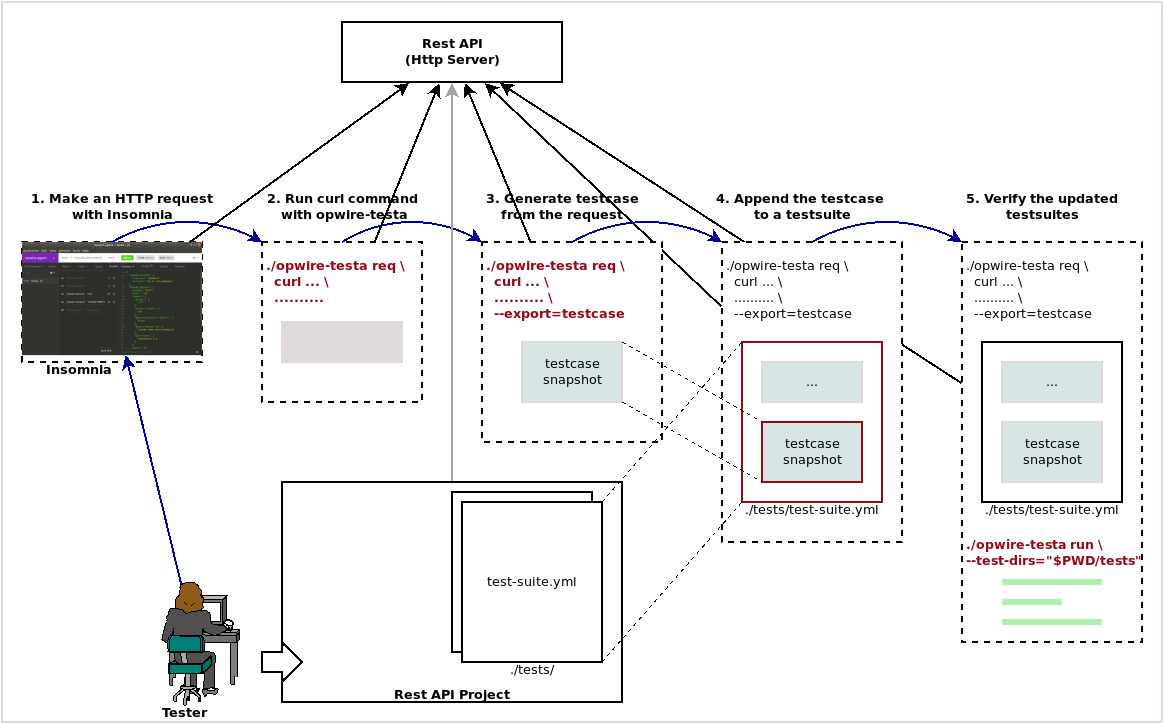
Step 1. Make an HTTP request with Insomnia
Step 2. Run curl command with opwire-testa
Step 3. Generate testcase from the request
Step 4. Append the testcase to a testsuite
Step 5. Verify the updated testsuite
Command line syntax
./opwire-testa req curl \
--request POST \
--url "http://localhost:17779/-"
--header "name1: value1" \
--header "name2: value2" \
--data '{
  "name": "opwire",
  "url": "https://opwire.org"
}'
--export "testcase"
Use --help flag to see more details for arguments:
./opwire-testa req curl --help
Extracting curl command from a testcase
Command line syntax
./opwire-testa gen curl \
    --test-dirs=... \
    --test-dirs=... \
    --test-file=file-name-pattern \
    --test-name=test-case-name-pattern
Use --help flag to see more details for arguments:
./opwire-testa gen curl --help
License
MIT
See LICENSE to see the full text.
 Documentation

Documentation


There is no documentation for this package.
 Source Files
 Directories
Click to show internal directories.
Click to hide internal directories.