

 README

README

opwire-testa
opwire-testa is a simple API testing tool written in golang. It is originally developed to test APIs built by opwire-agent. The opwire-testa is the most convenient one to work with opwire-agent, but is also able to be used with other API services easily.
Developed by a programmer for other programmers
Usage
Download opwire-testa
To download the latest opwire-testa on Linux/macOS/BSD systems, run:
curl https://opwire.org/opwire-testa/install.sh | bash
For other systems:
- Download the relevant
opwire-testarelease, - Extract the
opwire-testaoropwire-testa.exebinary from the archive to the home folder of your project.
Executing tests
Command line syntax
./opwire-testa run \
  --test-dirs=... \
  --test-dirs=... \
  --incl-files=tests/feature-1/*/*.yml \
  --incl-files=tests/feature-2/.* \
  --excl-files=tests/demo/* \
  --excl-files=tests/examples/* \
  --tags="+label1,+label2,-pending-case1,-pending-case2"
Command line options:
--test-dirs(-d): Directories contain test suite files.--incl-files(-i): File inclusion patterns.--excl-files(-e): File exclusion patterns.--test-name(-n): Test title/name matching pattern.--tags(-g): Conditional tags for selecting test cases. In the above example,label1,label2are the two tags which include test cases, whilepending-case1,pending-case2exclude test cases. To include test cases, the mandantory is not having anypending-case1orpending-case2selected.
Use --help flag to see more details for arguments:
./opwire-testa run --help
Generating a testcase from a curl command
Illustration
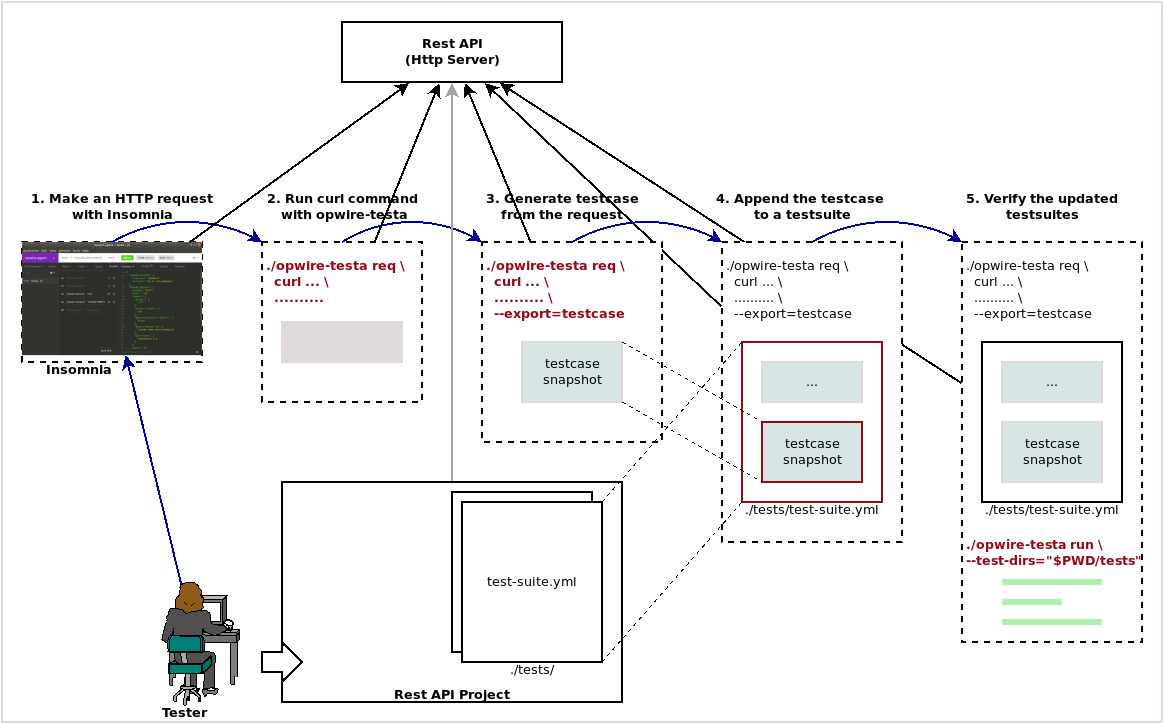
Step 1. Make an HTTP request with Insomnia
Step 2. Run curl command with opwire-testa
Step 3. Generate testcase from the request
Step 4. Append the testcase to a testsuite
Step 5. Verify the updated testsuite
Command line syntax
./opwire-testa req curl \
--request POST \
--url "http://localhost:17779/-"
--header "name1: value1" \
--header "name2: value2" \
--data '{
  "name": "opwire",
  "url": "https://opwire.org"
}'
--export "testcase"
Command line options:
--request(-X): Specifies a customized request method to use when communicating with the HTTP server.--url: Specifies a URL to fetch.--header(-H): Specifies an extra header to include in the request when sending HTTP to the server.--data(-d): Specifies HTTP body in a POST/PUT/PATCH request to the HTTP server.--export: Renders thisrequestin a specific format instead of executing. The only one format supported, currently istestcase.--snapshot: Alias of--export=testcase.
Use --help flag to see more details for arguments:
./opwire-testa req curl --help
Extracting curl command from a testcase
Command line syntax
./opwire-testa gen curl \
  --test-dirs=... \
  --test-dirs=... \
  --incl-files=file-inclusion-pattern \
  --excl-files=file-exclusion-pattern \
  --test-name=test-case-name-pattern
Use --help flag to see more details for arguments:
./opwire-testa gen curl --help
License
MIT
Refer to LICENSE to see the full text.
 Documentation

Documentation


There is no documentation for this package.
 Source Files
 Directories
Click to show internal directories.
Click to hide internal directories.