

 README

README

Pali


Open memory for your LLM.
Pre-release, close to usable
Pali is open memory infrastructure for LLM and agent systems. It gives you a local API server, MCP server, operator dashboard, and configurable retrieval stack behind one runtime.
Demo
Quickstart
Install on macOS or Linux
curl -fsSL https://raw.githubusercontent.com/pali-mem/pali/main/scripts/install.sh | sh
Install on Windows PowerShell
irm https://raw.githubusercontent.com/pali-mem/pali/main/scripts/install.ps1 | iex
Initialize and run
pali init
pali serve
Health:
curl http://127.0.0.1:8080/health
Dashboard:
open http://127.0.0.1:8080/dashboard
If you prefer a source checkout instead of a release binary:
git clone https://github.com/pali-mem/pali.git
cd pali
make setup
make run
Docs Center
Start here for the full guides:
- Published docs: https://pali-mem.github.io/pali/
- Local docs map:
docs/README.md - Getting started:
docs/getting-started.md - Configuration:
docs/configuration.md - Deployment:
docs/deployment.md - Operations:
docs/operations.md - MCP:
docs/mcp.md - API:
docs/api.md
What Pali Does
- Multi-tenant memory APIs with tenant-scoped isolation
- Hybrid retrieval across lexical, dense, reranking, and optional multi-hop expansion
- MCP server with memory-first tools
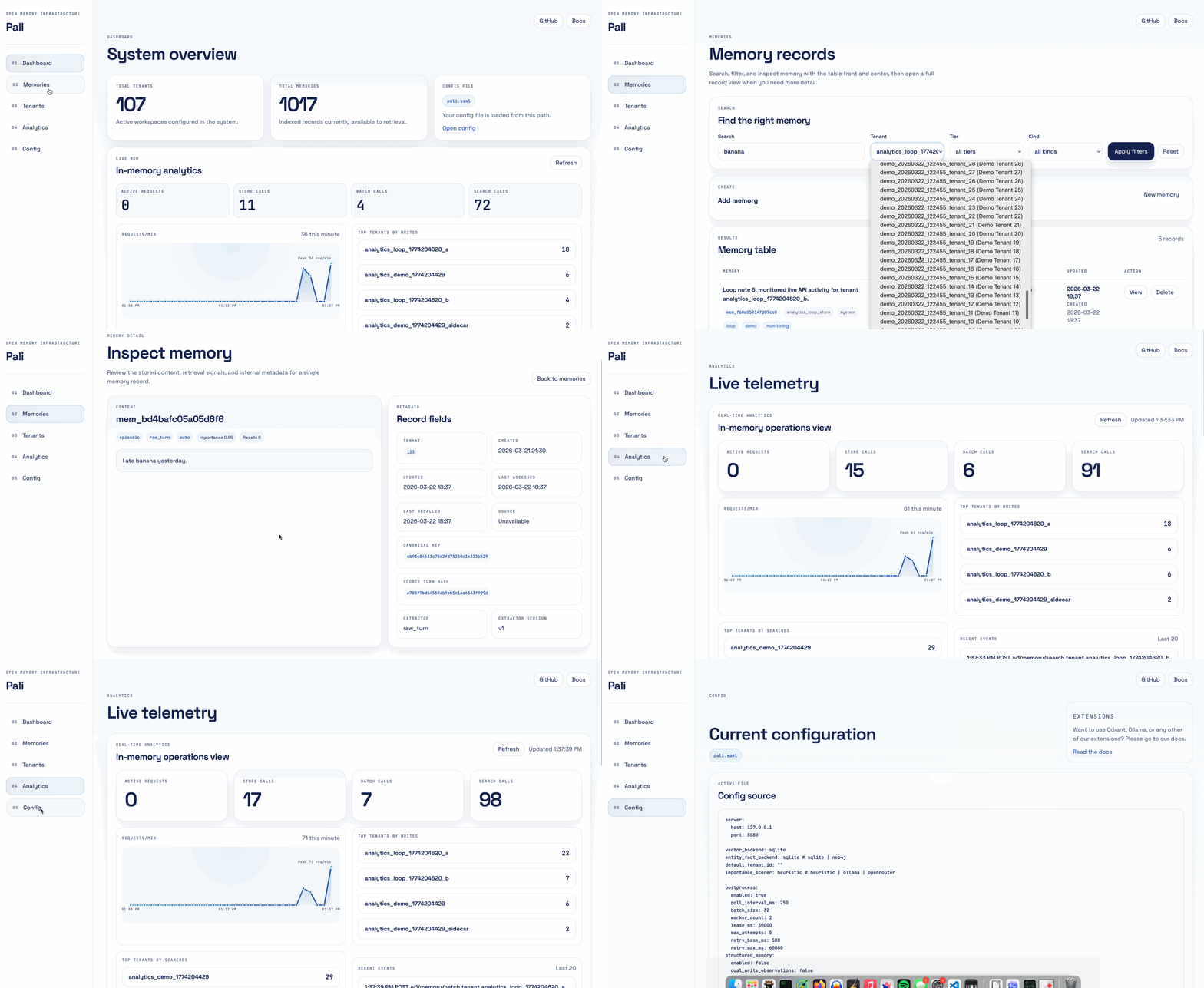
- Operator dashboard for tenants, memories, and system state
- Configurable backends for vectors, entity facts, embeddings, and scoring
Current v0.1 core capabilities:
- Memory CRUD and batch ingest APIs
- Async post-processing pipeline with job tracking
- Lexical plus dense candidate fusion via RRF
- WMR reranking
- Tenant statistics and routing support
- Tier auto-resolution (
episodicvssemantic) - Optional JWT tenant-scoped auth
Install and Run Options
Release binary
The install scripts download the latest GitHub Release asset for your platform, verify checksums, and place pali on your machine.
Manual release downloads are also available from GitHub Releases:
- Linux/macOS archives:
pali_<version>_<os>_<arch>.tar.gz - Windows archives:
pali_<version>_windows_<arch>.zip
After install:
pali init
pali serve
Docker
Build:
docker build -t pali:local .
Run:
docker run --rm -p 8080:8080 -v pali-data:/var/lib/pali pali:local
The image uses deploy/docker/pali.container.yaml, which binds to 0.0.0.0:8080 and stores SQLite data under /var/lib/pali.
Compose files live under deploy/docker/:
docker compose -f deploy/docker/compose.yaml up --build
docker compose -f deploy/docker/compose.yaml -f deploy/docker/compose.qdrant.yaml up --build
docker compose -f deploy/docker/compose.yaml -f deploy/docker/compose.neo4j.yaml up --build
docker compose -f deploy/docker/compose.yaml -f deploy/docker/compose.ollama.yaml up --build
Source checkout
Prerequisite: Go 1.25+
git clone https://github.com/pali-mem/pali.git
cd pali
make setup
make run
CLI
pali init
pali serve
pali mcp serve
Useful init flags:
pali init -config /path/to/pali.yaml
pali init -download-model
pali init -skip-model-download
pali init -skip-runtime-check
pali init -skip-ollama-check
The init flow creates pali.yaml from pali.yaml.example when missing, prepares runtime directories, and checks optional ONNX/Ollama prerequisites based on the current config.
Config and Auth
- Config template:
pali.yaml.example - Config guide:
docs/configuration.md - Multitenancy and JWT auth:
docs/multitenancy.md - ONNX setup notes:
docs/onnx.md
JWT example:
auth:
  enabled: true
  jwt_secret: "change-me"
  issuer: "pali"
JWTs must include tenant_id, and /v1 requests stay tenant-scoped.
MCP and Client
MCP tools include:
memory_storememory_store_preferencememory_searchmemory_listmemory_deletetenant_createtenant_listtenant_statstenant_existshealth_checkpali_capabilities
Go client example:
import (
  "context"
  "log"

  "github.com/pali-mem/pali/pkg/client"
)

func main() {
  c, err := client.NewClient("http://127.0.0.1:8080")
  if err != nil {
    log.Fatal(err)
  }

  if _, err := c.CreateTenant(context.Background(), client.CreateTenantRequest{
    ID:   "tenant_1",
    Name: "Tenant One",
  }); err != nil {
    log.Fatal(err)
  }
}
More:
- MCP docs:
docs/mcp.md - Go client docs:
docs/client/README.md
Build and Release
Build locally:
make build
Install locally from source:
make install PREFIX="$HOME/.local"
Tests:
make testmake test-integrationmake test-e2emake test-all
Release assets:
VERSION=v0.1.0 make release-assets
The release workflow at .github/workflows/release.yml publishes GitHub Release binaries and a multi-arch container image to ghcr.io/pali-mem/pali.
Production Notes
- Keep
pali.yamloutside the repo in non-dev environments. - Enable JWT auth before exposing
/v1outside a trusted network. - Persist
database.sqlite_dsnacross restarts. - Put Pali behind TLS termination and a restart supervisor.
- Monitor
/healthand validate config before deploy.
Full runbook: docs/operations.md
Module Path
github.com/pali-mem/pali
 Directories

Directories

| Path | Synopsis |
|---|---|
|
cmd
|
|
|
configrender
command
|
|
|
evalidmap
command
|
|
|
evaltrace
command
|
|
|
genfix
command
|
|
|
jwt
command
|
|
|
mcp
command
|
|
|
pali
command
|
|
|
setup
command
|
|
|
internal
|
|
|
pkg
|
|
|
client
Package client provides a typed Go SDK for the Pali HTTP API.
|
Package client provides a typed Go SDK for the Pali HTTP API. |
|
test
|
|