

 README

README

PasarGuard-Node




Attention ⚠️
This project is in the testing and development stage. The code may undergo major changes during this phase, so use it at your own risk.
Table of Contents
Overview
The PasarGuard Node is developed by the PasarGuard team. It aims to be stable, scalable, and efficient.
Why use the PasarGuard Node?
We designed this project to be usable in any project, even without PasarGuard panel. You can run nodes with a simple script and the help of official libraries.
We plan to expand supported cores after the testing stage, allowing you to use any core you want.
Supported Cores
| Core | Support |
|---|---|
| xray-core | ✅ |
| sing-box | ❌ |
| v2ray-core | ❌ |
Documentation
Installation
One Click
run the following command in your shell and use node
sudo bash -c "$(curl -sL https://github.com/PasarGuard/scripts/raw/main/pg-node.sh)" @ install
Docker
Install docker on your machine
curl -fsSL https://get.docker.com | sh
Download a docker compose file
wget https://raw.githubusercontent.com/PasarGuard/node/refs/heads/main/docker-compose.yml
Configure your .env file and run node with the following command
docker compose up -d
Manual (Not Recommended For Beginners)
Install go on your system (https://go.dev/dl/) Clone the project
git clone https://github.com/PasarGuard/node.git
Generate a binary file for your system
make deps
make
Install xray
make install_xray
Generate certificate based on your system network ip or domain
make generate_server_cert CN=example.com SAN="DNS:example.com,IP:your server ip"
Configure your .env file and run the binary
Configuration
You can set the settings below using environment variables or by placing them in a
.envfile.
| Variable | Description |
|---|---|
SERVICE_PORT |
Bind application to this port (default: 62050). |
NODE_HOST |
Bind application to this host (default: 127.0.0.1). |
XRAY_EXECUTABLE_PATH |
Path of Xray binary (default: /usr/local/bin/xray). |
XRAY_ASSETS_PATH |
Path of Xray assets (default: /usr/local/share/xray). |
SSL_CERT_FILE |
SSL certificate file to secure the application between master and node (better to use a real SSL with a domain). |
SSL_KEY_FILE |
SSL key file to secure the application between master and node (better to use a real SSL with a domain). |
API_KEY |
Api Key to ensure only allowed clients can connect (type: UUID). |
SERVICE_PROTOCOL |
Protocol to use: grpc or rest (recommended: grpc). |
MAX_LOG_PER_REQUEST |
Maximum number of logs per request (only for long polling in REST connections). |
DEBUG |
Debug mode for development; prints core logs in the node server (default: False). |
GENERATED_CONFIG_PATH |
Path to the generated config by the node (default: /var/lib/pasarguard/generated). |
SSL Configuration
SSL Certificates
You can use SSL certificates issued by Let's Encrypt or other certificate authorities.
Make sure to set both SSL_CERT_FILE and SSL_KEY_FILE environment variables.
Use fullchain for SSL_CERT_FILE and cert as server_ca in client side.
self-signed certificate
If you don't have access to a real domain or tools like ACME, you can use self-signed certificate to connect to a node.
Just replace the CN and subjectAltName values with your server information:
openssl req -x509 -newkey rsa:4096 -keyout /var/lib/pasarguard/certs/ssl_key.pem \
  -out /var/lib/pasarguard/certs/ssl_cert.pem -days 36500 -nodes \
  -subj "/CN={replace with your server IP or domain}" \
  -addext "subjectAltName = {replace with alternative names you need}"
API
PasarGuard Node supports two types of connection protocols: gRPC and REST API.
We recommend using gRPC, with REST always available as a fallback option (in case there is a problem with gRPC).
Data Structure
The node uses the common/service.proto file messages for both protocols.
| Message | Description |
|---|---|
Empty |
Used when no input is required. Can replace null with Empty. |
BaseInfoResponse |
Contains: - started (bool): Indicates if the service is started.- core_version (string): Version of the core.- node_version (string): Version of the node.- session_id (string): Session ID.- extra (string): Additional information. |
Vmess |
Contains: - id (string): UUID for Vmess configuration. |
Vless |
Contains: - id (string): UUID for Vless configuration.- flow (string): Currently only supports xtls-rprx-vision. |
Trojan |
Contains: - password (string): Password for Trojan configuration. |
Shadowsocks |
Contains: - password (string): Password for Shadowsocks.- method (string): Encryption method. Supported methods: aes-128-gcm, aes-256-gcm, chacha20-poly1305, xchacha20-poly1305. |
Proxy |
Contains: - vmess (Vmess): Vmess configuration.- vless (Vless): Vless configuration.- trojan (Trojan): Trojan configuration.- shadowsocks (Shadowsocks): Shadowsocks configuration. |
User |
Contains: - email (string): User's email.- proxies (Proxy): Proxy configurations.- inbounds ([]string): List of inbounds. |
BackendType |
Enum: - XRAY = 0: Represents the Xray backend type. |
Backend |
Contains: - type (BackendType): Type of backend.- config (string): Configuration for the backend.- users ([]User): List of users.- keepAlive (uint64): hold backend alive for x second after last connection |
Log |
Contains: - detail (string): Log details. |
Stat |
Contains: - name (string): Stat name.- type (string): Stat type.- link (string): Link associated with the stat.- value (int64): Stat value. |
StatResponse |
Contains: - stats ([]Stat): List of stats. |
StatType |
Enum: - Outbounds = 0: Return Outbounds stats- Outbound = 1: Return single Outbound stats.- Inbounds = 2: Return Inbounds stats- Inbound = 3: Return single Inbound stats.- UsersStat = 4: Return Users stats- UserStat = 5: Return single User stats. |
StatRequest |
Contains: - name (string): Name of the stat to request, user email or inbound \ outbound tag.- reset (bool) Whether to reset traffic stats.- type (StatType) Define which stat you need. |
OnlineStatResponse |
Contains: - name (string): User's email.- value (int64): Online connection number. |
OnlineStatResponse |
Contains: - name (string): User's email.- value (map<string, int64>): Online stat value. |
BackendStatsResponse |
Contains: - num_goroutine (uint32): Number of goroutines.- num_gc (uint32): Number of garbage collections.- alloc (uint64): Allocated memory.- total_alloc (uint64): Total allocated memory.- sys (uint64): System memory.- mallocs (uint64): Number of mallocs.- frees (uint64): Number of frees.- live_objects (uint64): Number of live objects.- pause_total_ns (uint64): Total pause time in nanoseconds.- uptime (uint32): Uptime in seconds. |
SystemStatsResponse |
Contains: - mem_total (uint64): Total memory.- mem_used (uint64): Used memory.- cpu_cores (uint64): Number of CPU cores.- cpu_usage (double): CPU usage percentage.- incoming_bandwidth_speed (uint64): Incoming bandwidth speed.- outgoing_bandwidth_speed (uint64): Outgoing bandwidth speed. |
Users |
Contains: - users ([]User): List of users. |
Note: The node receives data with x-protobuf as the content type in the REST API.
Methods
- Add
address:portat the beginning of the REST API URL. - Use
Authorization Bearer <session_id>in the header for authentication with the REST API. - Use
authorization Bearer <session_id>in metadata for authentication with gRPC.
| gRPC | REST | Input | Output | Description |
|---|---|---|---|---|
Start() |
POST,/start |
Backend |
BaseInfoResponse |
This is the only method called before creating a connection. |
Stop() |
PUT,/stop |
Empty |
Empty |
Stops the backend and deactivates the connection with the client. |
GetBaseInfo() |
GET,/info |
Empty |
BaseInfoResponse |
Returns base info; can be used to check the connection between the node and client. |
GetLogs() |
GET,/logs |
Empty |
gRPC: (stream Log)REST API: ( SSE) |
This method is a SSE connection in the REST protocol, but in gRPC, it provides a stream connection. |
GetSystemStats() |
GET,/stats/system |
Empty |
SystemStatsResponse |
Retrieves system statistics. |
GetBackendStats() |
GET,/stats/backend |
Empty |
BackendStatsResponse |
Retrieves backend statistics. |
GetStats() |
GET,/stats |
StatRequest |
StatResponse |
Retrieves statistics based on type. The name field will be ignored for Outbounds, Inbounds and UsersStat. |
GetUserOnlineStats() |
GET,/stats/user/online |
StatRequest |
OnlineStatResponse |
Retrieves online statistics for a specific user. The reset field in the request will be ignored |
GetUserOnlineIpListStats() |
GET,/stats/user/online_ip |
StatRequest |
StatsOnlineIpListResponse |
Retrieves ip list statistics for a specific user. The reset field in the request will be ignored |
SyncUser() |
PUT,/user/sync |
User |
Empty |
Adds/updates/removes a user in the core. To remove a user, ensure you send empty inbounds. Provides a stream in gRPC but must be called for each user in the REST API. |
SyncUsers() |
PUT,/users/sync |
Users |
Empty |
Removes all old users and replaces them with the provided users. |
Official library
We create some library for you so make your job easier
Go
To add bridge to your project use:
go get github.com/PasarGuard/node_bridge
Python
pip install pasarguard-node-bridge
Donation
You can help PasarGuard team with your donations, Click Here
Contributors
We ❤️🔥 contributors! If you'd like to contribute, please check out our Contributing Guidelines and feel free to submit a pull request or open an issue. We also welcome you to join our Telegram group for either support or contributing guidance.
Check open issues to help the progress of this project.
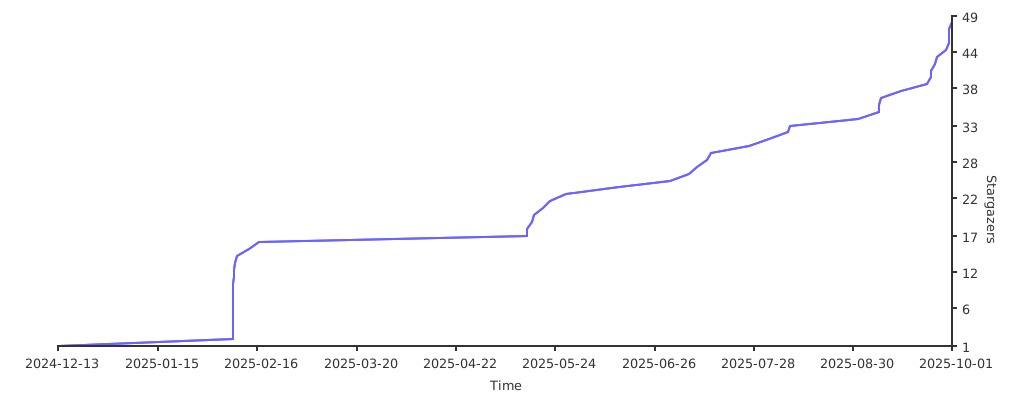
Stargazers over time
Thanks to the all contributors who have helped improve PasarGuard Node:
Made with contrib.rocks
 Documentation

Documentation


There is no documentation for this package.
 Source Files
 Directories