

 README

README


p4prometheus
Utility which integrates Perforce (Helix Core) with Prometheus. If performs real-time analysis of p4d log files feeding to a dashboard and for system alerting.
It continuously parses p4d log files and writes a summary to
a specified Prometheus compatible metrics file which can be handled via the node_exporter
textfile collector module.
Uses go-libp4dlog for actual log file parsing.
Support Status
This is currently a Community Supported Perforce tool.
Overview
This is part of a solution consisting of the following components:
- Prometheus - time series metrics management system: https://prometheus.io/
- VictoriaMetrics - (optional) high performing storage management which is Prometheus compatible: https://github.com/VictoriaMetrics/VictoriaMetrics
- Grafana - The leading open source software for time series analytics - https://grafana.com/
- node_exporter - Prometheus collector for basic Linux metrics - https://github.com/prometheus/node_exporter
Two custom components:
- p4prometheus - This component.
- monitor_metrics.sh - SDP compatible bash script to generate simple supplementary metrics - monitor_metrics.sh
Check out the 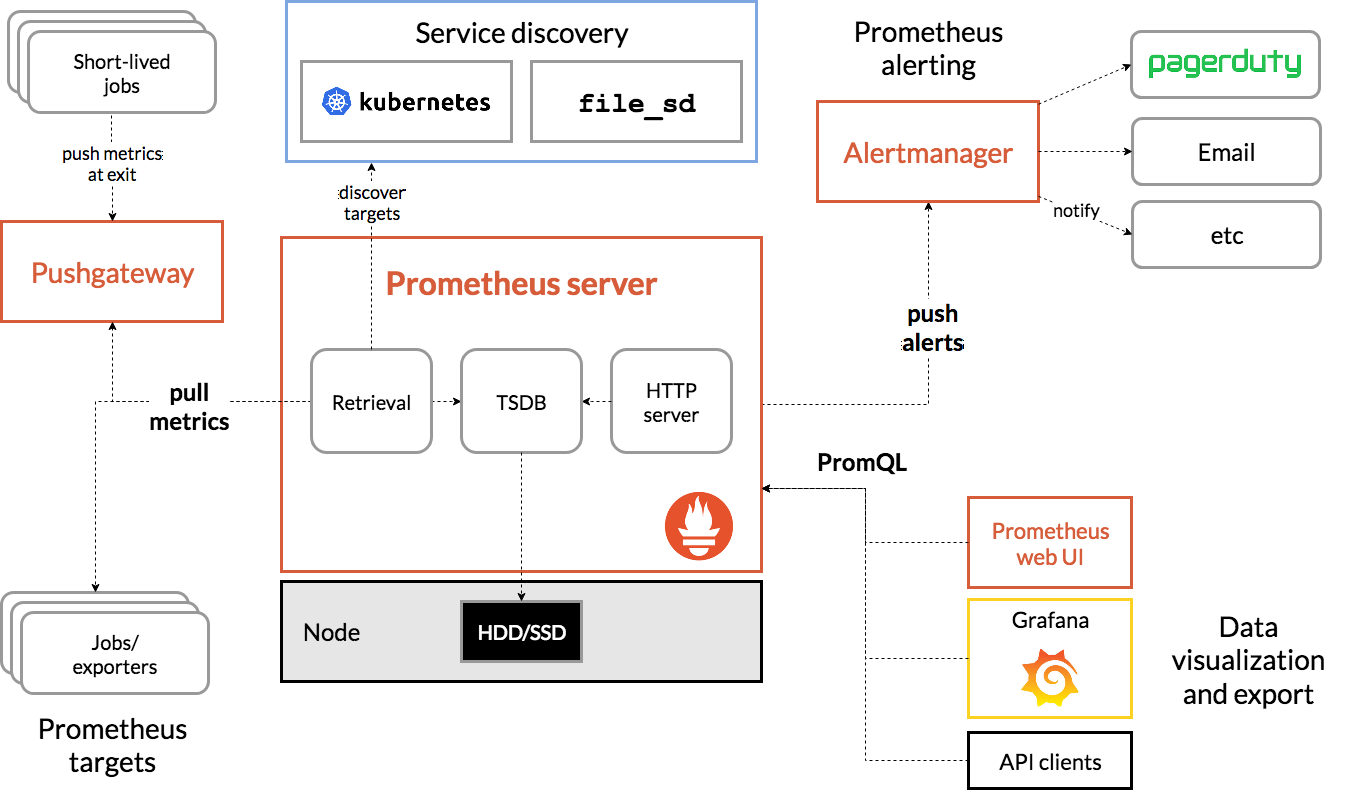 The custom components referred to above are "Prometheus targets".
Grafana Dashboards
When installed and setup, you can get dashboards such as the following:
Commands Summary:

Rates for command durations and count:

Active commands (monitor):

Replication status:

Read/write locks held/waiting status:

Dashboard alerts can be defined, as well as alert rules which are actioned by alertmanager - see installation link below for examples.
Detailed Installation
You need to install Prometheus and Grafana using standard methods. This is typically done on a seperate VM/machine to the Perforce server itself (for security and HA reasons).
Note that all the components do run on Windows but you will need an appropriate Service wrapper.
See Detailed Installation Instructions (INSTALL.md) in this project.
Metrics Available
P4Prometheus
The basic metrics are those implemented in P4D Log Parsing library which it calls.
| Metric Name | Description |
|---|---|
| p4_prom_log_lines_read | A count of log lines read - useful to make sure p4prometheus is working as expected |
| p4_prom_cmds_processed | A count of all cmds processed - a key metric to show as a rate |
| p4_prom_cmds_pending | A count of all current cmds (not completed) - too high a value indicates issues with log commands |
| p4_cmd_running | The number of running commands at any one time - a high value indicates concurrent jobs and/or locks |
| p4_prom_cpu_user | User CPU used by p4prometheus |
| p4_prom_cpu_system | System CPU used by p4prometheus |
| p4_sync_files_added | The number of files added to workspaces by syncs |
| p4_sync_files_updated | The number of files updated in workspaces by syncs |
| p4_sync_files_deleted | The number of files deleted in workspaces by syncs |
| p4_sync_bytes_added | The number of bytes added to workspaces by syncs |
| p4_sync_bytes_updated | The number of bytes updated in workspaces by syncs |
| p4_cmd_counter | A count of completed p4 cmds (by cmd) |
| p4_cmd_cumulative_seconds | The total in seconds (by cmd) |
| p4_cmd_cpu_user_cumulative_seconds | The total in user CPU seconds (by cmd) |
| p4_cmd_cpu_system_cumulative_seconds | The total in system CPU seconds (by cmd) |
| p4_cmd_error_counter | A count of cmd errors (by cmd) |
| p4_cmd_user_counter | A count of completed p4 cmds (by user) |
| p4_cmd_user_cumulative_seconds | The total in seconds (by user) |
| p4_cmd_ip_counter | A count of completed p4 cmds (by IP) - can be turned off for large sites |
| p4_cmd_ip_cumulative_seconds | The total in seconds (by IP) - can be turned off for large sites |
| p4_cmd_user_detail_counter | A count of completed p4 cmds (by user and cmd) - can be turned off for large sites or specify only named automation users |
| p4_cmd_user_detail_cumulative_seconds | The total in seconds (by user and cmd) - as above |
| p4_cmd_replica_counter | A count of completed p4 cmds (by broker/replica/proxy) |
| p4_cmd_replica_cumulative_seconds | The total in seconds (by broker/replica/proxy) |
| p4_cmd_program_counter | A count of completed p4 cmds (by program) - identifies program/app versions, e.g. p4 or p4v or API |
| p4_cmd_program_cumulative_seconds | The total in seconds (by program) |
| p4_total_read_wait_seconds | The total waiting for read locks in seconds (by table) |
| p4_total_read_held_seconds | The total read locks held in seconds (by table) |
| p4_total_write_wait_seconds | The total waiting for write locks in seconds (by table) |
| p4_total_write_held_seconds | The total write locks held in seconds (by table) |
| p4_total_trigger_lapse_seconds | The total lapse time for triggers in seconds (by trigger) |
Monitor_metrics.sh
| Metric Name | Description |
|---|---|
| p4_server_uptime | P4D Server uptime (seconds) |
| p4_change_counter | P4D change counter - monitor normal activity for submits etc |
| p4_monitor_by_cmd | P4 running processes - counted by cmd |
| p4_monitor_by_user | P4 running processes - counted by user |
| p4_process_count | P4 running processes - counted via 'ps' |
| p4_completed_cmds | Completed p4 commands - simple grep of log file (turned off for large logs) |
| p4_sdp_checkpoint_log_time | Time of last checkpoint log - helps check if automated jobs are running |
| p4_sdp_checkpoint_duration | Time taken for last checkpoint/restore action - check for sudden increases |
| p4_replica_curr_jnl | Current journal for server |
| p4_replica_curr_pos | Current journal for server - key measure of replication lag |
| p4_error_count | Server errors by id - for sudden spurts of errors |
| p4_pull_errors | P4 pull transfers failed count - to monitor replication status |
| p4_pull_queue | P4 pull files in queue count - for replication |
Locks
This is only available on Linux and requires the lslocks utility to be installed.
These are generated by monitor_wrapper.sh which calls monitor_metrics.py.
 Documentation

Documentation


There is no documentation for this package.
 Source Files
 Directories