 The highest tagged major version is


 README

README

baur 


Content
About
baur is a build management tool for Git based monolithic repositories.
Developers specify configuration in a TOML file:
- what the inputs for the build process are
- which command must be run to build the application
- which outputs are generated by the build
- where the output artifacts should be uploaded to
baur detects which applications need to be built by calculating a digest of the application's build inputs and comparing them with digests from previous builds. If a build with the same build input digest was done previously, a build is not necessary. If the build input digest differs from the stored ones, baur runs a user-specified command to build the application.

Quickstart
This chapter describes a quick way to setup baur for experimenting with it without using the Example Repository.
For setting it up in a production environment see the chapter Production Setup.
Installation
The recommended version to use is the latest from the release page.
The master branch is the development branch and might be in an unstable state.
After downloading a release archive, extract the baur binary from the archive
(tar xJf <FILENAME>) and move it to a directory that is listed in your $PATH
environment variable.
Setup
baur uses a PostgreSQL database to store information about builds, the quickest way to setup a PostgreSQL for local testing is with docker:
docker run -p 5432:5432 -e POSTGRES_DB=baur postgres:latest
Afterwards your are ready to create your baur repository configuration.
In the root directory of your Git repository run:
baur init repo
Next, follow the printed steps to create the database and application config files.
First Steps
Some commands to start with are:
| command | action |
|---|---|
baur ls apps |
List applications in the repository with their build status |
baur build |
Build all applications with pending builds, upload their artifacts and records the result |
baur ls all |
List recorded builds |
baur show currency-service |
Show information about an application called "currency-service" |
baur ls inputs --digests shop-api |
Show inputs with their digests of an application called "shop-api" |
To get more information about a command pass the --help parameter to baur.
Key Features
-
Detecting Changed Applications The inputs of applications are specified in the
.app.tomlconfig file for each application. baur calculates a SHA384 digest for all inputs and stores the digest in the database when an application was built and its artifacts uploaded (baur build). The digest is used to detect if a previous build for the same input files exists. If a build exist, the application does not need to be rebuilt, otherwise a build is done. This allows specific applications to be run through a CI pipeline that changed in a given commit. This approach also prevents applications from unnecessarily being rebuilt if commits are reverted in the Git repository. -
Artifact Upload to S3 and Docker Registries baur supports uploading built File artifacts to S3 buckets and produced docker images to docker registries.
-
Managing Applications baur can be used as management tool in monorepositories to list applications and find their locations.
-
CI Optimized: baur is aimed to be run in CI environments and allows to print relevant output in CSV format to be easily parsed by scripts.
-
Build Statistics: The data that baur stores in its PostgreSQL database enables the graphing of statistics about builds such as which application changes most, which produces the biggest build artifacts, which build runs the longest.
Why?
Monorepositories come with new challenges in CI environments. When a Git repository contains only a single application, every commit can trigger the whole CI workflow of builds, checks, tests and deployments. This is not effective in Monorepositories when a repository can contain hundreds of different applications. Running the whole CI flow for all applications on every commit takes a lot of time and wastes resources. Therefore the CI environment has to detect which applications changed to only run those through the CI flow.
When all build inputs per applications are isolated in directories and CI artifacts are always produced for the reference branches, the git-history can be used to determine which files changed. Simple Shell-Scripts or the mbt build tool can be used for it.
When applications in the monorepository share libraries (Protobuf or other files), standard solutions are not sufficient anymore. Full-fledged build tools like Bazel and pants exist to address those issues in Monorepositories but they come with complex configurations and complex usage. Developers have to get used to defining the build steps in those tools instead of relying on their more favorite build tools.
baur solves these problems by concentrating on tracking build inputs and build outputs while enabling to use the build tool of your choice.
Documentation
Documentation is available in the wiki.
Example Repository
You can find an example monorepository that uses baur at: https://github.com/simplesurance/baur-example. Please follow the quickstart guide for the example repository.
Grafana Dashboard
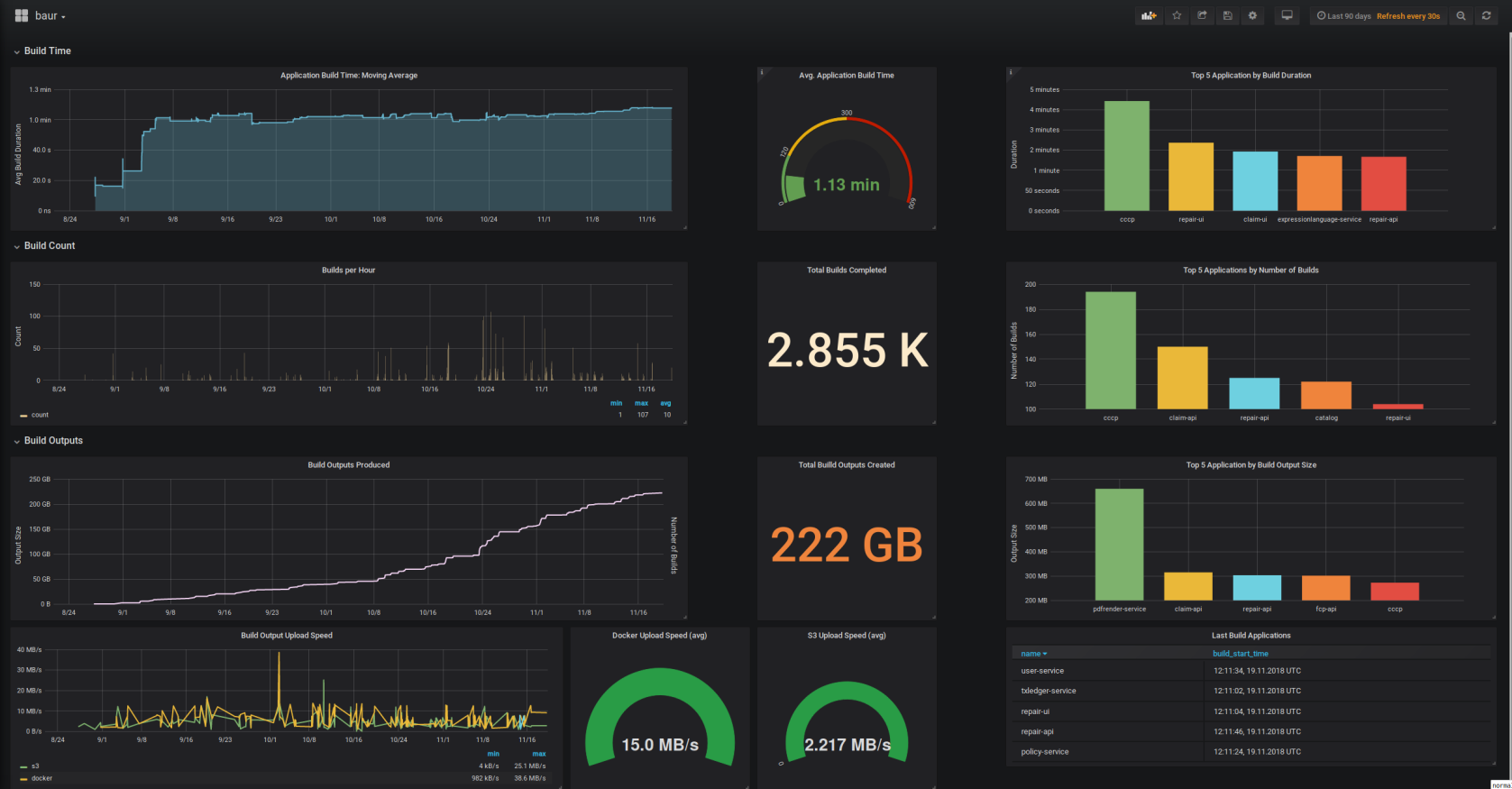
The dashboard is available at: https://grafana.com/dashboards/8835
Project Status
baur is used in production CI setups since the first version. It's not considered as API-Stable yet, interface breaking changes can happen in any release.
We are happy to receive Pull Requests, Feature Requests and Bug Reports to further improve baur.
 Directories

Directories

| Path | Synopsis |
|---|---|
|
cmd
|
|
|
baur
command
|
|
|
internal
|
|
|
exec
Package exec runs external commands
|
Package exec runs external commands |
|
format
Package format outputs data in formatted table structures
|
Package format outputs data in formatted table structures |
|
testutils/fstest
Package fstest provides test utilties to operate with files and directories
|
Package fstest provides test utilties to operate with files and directories |
|
testutils/strtest
Package strtest provides test utilties to operate with strings
|
Package strtest provides test utilties to operate with strings |
|
pkg
|
|