

 README
¶
README
¶
vtui
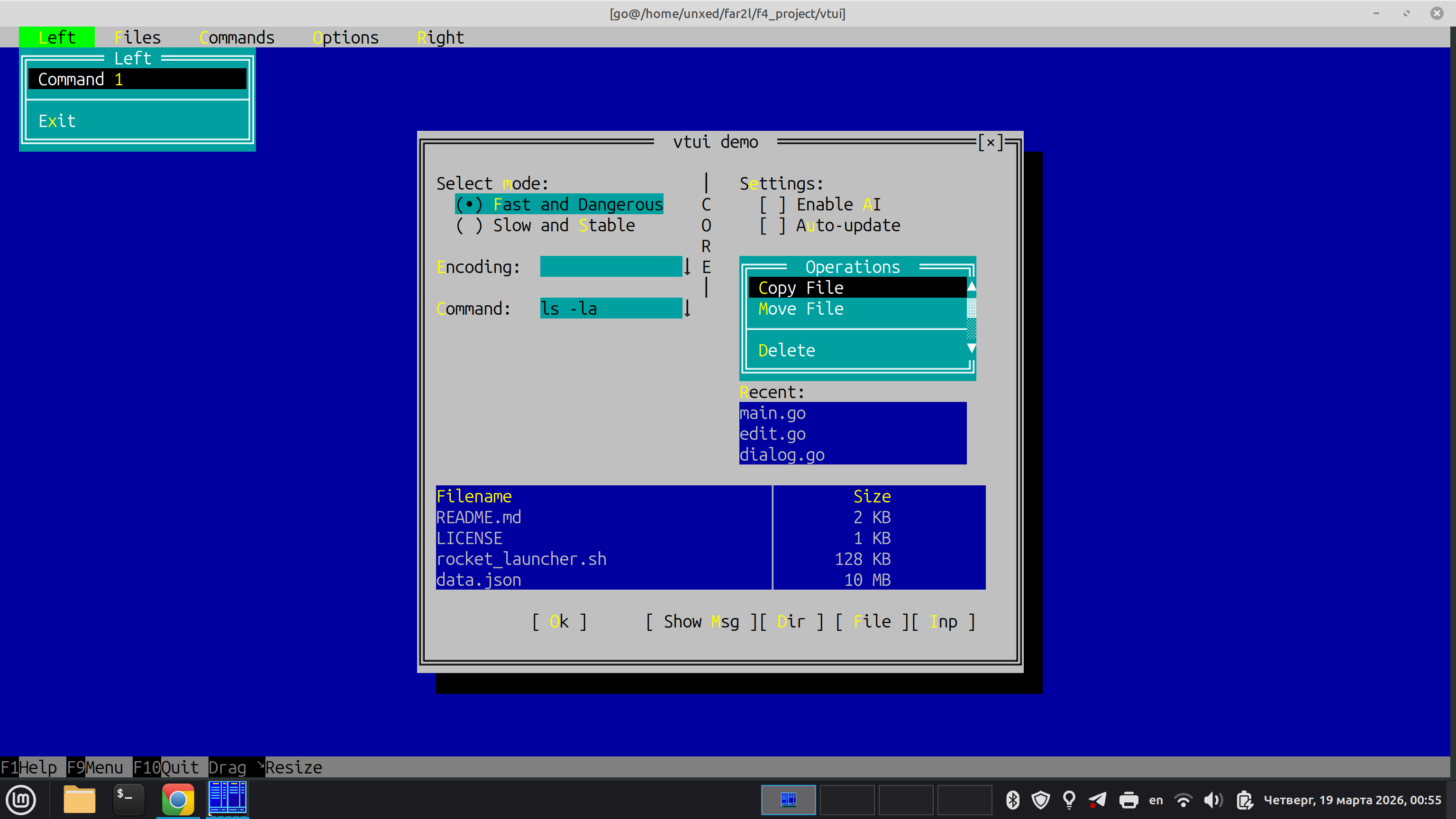
A Stateful, Desktop-Class TUI Framework for Go
vtui is a modern, cross-platform Terminal User Interface (TUI) framework for Go. It is heavily inspired by classic desktop UI paradigms—specifically Turbo Vision (Borland) and the Far Manager internal UI kit.
Unlike modern web-inspired TUI libraries that use Flexbox or Grid layouts, vtui is designed from the ground up for building complex, stateful applications: file managers, database clients, IDEs, and heavy-duty text editors.
Why vtui? (Comparison with tcell/tview)
While tcell is an excellent low-level terminal driver and tview is a great high-level component library, vtui is built with a fundamentally different philosophy:
| Feature | tcell + tview / cview | vtui (this project) |
|---|---|---|
| Abstractions | Driver + Widgets. Low-level canvas with Flexbox-like layout containers. | Application Framework. Full-featured OOP hierarchy (Dialogs, Menus, Focus cycles). |
| Layout Mode | Flexbox/Grid. Modern web-like proportions. | GrowMode (Turbo Vision style). "Rubber" layout with anchors, perfect for pixel-perfect TUI dialogs. |
| Input | Standard Terminfo-based mapping. | vtinput integration. Native support for Kitty/Win32 protocols (distinguishes Ctrl+Enter, Shift+Tab, etc.). |
| Rendering | Full-widget declarative redraw. | ScreenBuf + ShadowBuf. Bitwise diffing. Only changed cells are sent via minimal ANSI sequences. |
| Memory/GC | Standard Go allocations during redraws. | Zero-allocation rendering. Designed to stay GC-silent during the Flush() cycle to eliminate micro-stutters. |
| Input Lag | Standard parsing (can be sensitive to fast bursts). | Event Draining. Optimized for "instant" feel and bracketed paste without flickering. |
When to use vtui:
- You are building a heavy-duty tool where the user spends hours (File Manager, Spreadsheet, Hex Editor).
- You need perfect keyboard support (all modifiers, key-up/key-down events).
- You want the classic UX of Far Manager or Turbo Vision (Movable Windows, Modal Dialogs, Dropdown Menus).
- You need an application architecture that manages Z-ordering and focus cycles automatically.
Core Architecture
1. The Screen Buffer (ScreenBuf)
At the lowest level, vtui uses a strict double-buffering approach.
- The application logic draws to a logical grid of
CharInfocells (which hold 24-bit TrueColor attributes and Unicode characters). - When
Flush()is called,vtuicompares the logical buffer with a "shadow" buffer representing the physical terminal state. - It generates and writes the absolute minimum ANSI escape sequences needed to transition the terminal to the new state. This step is allocation-free.
2. The Frame Manager (FrameManager)
The heart of vtui. It manages a stack (Z-order) of Frame objects.
- Desktop: The bottom layer.
- Panels/Windows: User-defined workspaces.
- Dialogs: Modal popups that trap focus.
- Menus: Context menus or dropdowns that automatically close when losing focus.
The
FrameManagerroutesvtinput.InputEvents to the top-most active frame, handles background repainting viaSaveScreen(saving the content under a dialog to restore them instantly when it closes), and manages global components like theMenuBarandStatusLine.
3. GrowMode Layout
Instead of containers and flex-ratios, widgets within a Dialog are positioned using absolute coordinates and GrowMode flags.
If a dialog is resized, a widget can:
GrowNone: Stay exactly where it is.GrowHiX: Stretch its right edge (e.g., anEditfield expanding to fill width).GrowLoX | GrowHiX | GrowLoY | GrowHiY: Keep its relative distance from the bottom-right corner (e.g., an "OK" button anchored to the bottom).
4. Pluggable Renderers (SurfaceRenderer)
The framework abstracts the physical output through the SurfaceRenderer interface. This allows the same UI code to run in different environments:
- AnsiRenderer: The default backend. Translates buffer changes into optimized ANSI escape sequences for standard terminals.
- Win32GuiRenderer: A lightweight, pure-Go native Win32/GDI backend using standard Windows API (CreateWindowEx, BitBlt, SetDIBitsToDevice). Works across all Windows versions and runs out of the box under Wine without GPU or CGO dependencies.
- GogpuRenderer: A hardware-accelerated backend that draws directly to a GPU-backed window using the
gogpulibrary. Provides crisp text rendering and high FPS. - EbitenRenderer: A cgo-free backend built on Ebitengine. The grid is rasterised on the CPU and uploaded as a single GPU texture per frame; an unchanged screen costs neither an upload nor a blit. Supports HiDPI and shares the geometric frame rasteriser with the X11 and Wayland backends. Its reason to exist is dependency independence: it needs neither cgo nor the gogpu stack, so
CGO_ENABLED=0cross-compilation keeps working on Linux, Windows and macOS. - X11/Wayland Renderers: Native Unix backends that draw to software bitmapped windows without requiring a terminal emulator.
- PureX11Renderer: A 100% pure Go X11 backend using the XGB library and SHM. Experimental and requires further testing.
You can select a backend at startup by passing the desired driver to vtui.RunInGUIWindow.
Built-in Widgets
vtui comes with a standard library of controls that look and feel exactly like Far Manager:
Dialog,BorderedFrame(Single/Double line Win32-style boxes)Button,Checkbox,RadioButtonEdit(Single-line input with scrolling, history, password masking, and text selection)ListBox,ComboBoxTable(Multi-column list with alignment and scrollbars)VMenu(Context menus),MenuBar(Top-level dropdown menus)KeyBar(F1-F12 function key hints at the bottom),StatusLine- Common Dialogs:
ShowMessage,InputBox,SelectFileDialog,SelectDirDialog
Visual Integrity & Testing
vtui uses an automated Layout Validator to ensure that all dialogs follow strict design guidelines: no overlapping elements, proper spacing ("air"), and correct padding from window borders. Every new dialog or window component must include a unit test that calls vtui.AssertLayout. See UI_TESTING.md for detailed instructions and test boilerplate.
Quick Start Example
package main

import (
	"os"
	"github.com/unxed/vtinput"
	"github.com/unxed/vtui"
	"golang.org/x/term"
)

func main() {
	// 1. Enable advanced terminal input
	restore, _ := vtinput.Enable()
	defer restore()

	// 2. Initialize the Screen Buffer
	width, height, _ := term.GetSize(int(os.Stdin.Fd()))
	scr := vtui.NewScreenBuf()
	scr.AllocBuf(width, height)

	// 3. Boot the Frame Manager
	vtui.FrameManager.Init(scr)
	vtui.FrameManager.Push(vtui.NewDesktop())

	// 4. Create a Dialog
	dlg := vtui.NewDialog(0, 0, 40, 10, " Hello vtui ")
	dlg.Center(width, height)
	dlg.ShowClose = true

	// Add an Edit field
	edit := vtui.NewEdit(dlg.X1+2, dlg.Y1+3, 36, "Type here...")
	dlg.AddItem(vtui.NewLabel(dlg.X1+2, dlg.Y1+2, "&Name:", edit))
	dlg.AddItem(edit)

	// Add an OK button
	btn := vtui.NewButton(dlg.X1+16, dlg.Y1+7, "&Ok")
	btn.OnClick = func() {
		vtui.ShowMessage(" Result ", "You typed:\n"+edit.GetText(), []string{"&Close"})
	}
	dlg.AddItem(btn)

	vtui.FrameManager.Push(dlg)

	// 5. Start the event loop
	vtui.FrameManager.Run()
}
Demo app
The repository includes a demo app that showcases widgets and layout features. You can run it directly in the terminal or test different GUI backends using command-line flags:
go run ./cmd/test-app                 # Default terminal mode
go run ./cmd/test-app --gui=gogpu     # Hardware-accelerated GPU window
go run ./cmd/test-app --gui=x11       # Native X11 window
go run ./cmd/test-app --gui=wayland   # Native Wayland window
go run ./cmd/test-app --gui=ebiten    # Ebitengine window, no cgo required
Building the ebiten backend without cgo
CGO_ENABLED=0 go build ./...
Cgo-free builds of this backend need Ebitengine main (v2.10.0-alpha or later).
The last tagged release, v2.9.9, still requires cgo on Linux and macOS: the
purego ports of GLFW and of the Metal driver landed after it. On 32-bit ARM and
on the BSDs the backend is compiled out and --gui=ebiten reports that the
platform is unsupported.
 Documentation
¶
Documentation
¶
Index ¶
- Constants
- Variables
- func ActiveBackend() string
- func AddStrings(m map[string]string)
- func AnsiIndexToWin32Color(idx uint8) uint16
- func ApplyLayoutTree(container UIElement, layoutType string, spacing int, margins Margins, ...)
- func AssertLayout(t interface{ ... }, c Container)
- func AssertLayoutInLanguages(t interface{ ... }, packs []LanguagePack, build func() Container)
- func AssertLayoutWithRules(t interface{ ... }, c Container, rules LayoutRules)
- func AttrToWin32Attr(attr uint64, activePal *[256]uint32) uint16
- func BackendAbout() string
- func CalcScrollBar(length, topItem, itemsCount int) (caretPos, caretLength int)
- func CellBaseRune(ch uint64) rune
- func CellRunes(ch uint64) []rune
- func CellSpanAt(buf []CharInfo, width, x, y int) (startX, span int)
- func CellString(ch uint64) string
- func CleanupStderrLog()
- func ClusterWidth(cluster string) int
- func ComputeContainerSizeHint(children []UIElement, layoutType string, spacing int, margins Margins) (hSpec SizeSpec, vSpec SizeSpec)
- func ConfigDiskLogging(enabled bool)
- func DebugLog(format string, a ...any)
- func DefaultConsoleBackend() string
- func DialogIndicatorAttr(normal uint64, focused bool) uint64
- func DimColor(attr uint64) uint64
- func DisableTerminalClipboard()
- func Distribute1D(length int, items []SizeSpec, spacing int, marginBefore, marginAfter int) (sizes []int, positions []int)
- func DragOutSupported() bool
- func DrawScrollBar(scr *ScreenBuf, x, y, length int, topItem, itemsCount int, attr uint64) bool
- func DropSupported() bool
- func DumpLogsToFile(filename string)
- func ExtractHotkey(s string) rune
- func Far2lInteract(stk *vtinput.Far2lStack, wait bool) *vtinput.Far2lStack
- func Far2lInteractTimeout(stk *vtinput.Far2lStack, wait bool, timeout time.Duration) *vtinput.Far2lStack
- func FitInside(srcW, srcH, boxW, boxH int) (int, int)
- func ForEachCluster(s string, fn func(cluster string, width int, offset int))
- func ForEachClusterAt(s string, fn func(cluster string, width, offset, runeIndex int))
- func ForEachVisualCluster(s string, fn func(cluster string, width, offset, runeIndex int))
- func FormatURIList(paths []string) string
- func GetClipboard() string
- func GetCurrentLogs() []string
- func GetFar2lClipboard() (string, bool)
- func GetIndexBack(attr uint64) uint8
- func GetIndexFore(attr uint64) uint8
- func GetOSClipboard() string
- func GetRGBBack(attr uint64) uint32
- func GetRGBFore(attr uint64) uint32
- func GetVersionInfo() string
- func GetWheelScrollLines() int
- func GetWindowPosition() (x, y int, ok bool)
- func HasRTL(s string) bool
- func InvertColors(attr uint64) uint64
- func IsCompChar(ch uint64) bool
- func IsMousePress(e *vtinput.InputEvent) bool
- func IsMouseRelease(e *vtinput.InputEvent) bool
- func IsPrepared() bool
- func IsWine() bool
- func JoinsConjunct(prev, next string) bool
- func LocalPathToURI(path string) string
- func LogAndRepanic(where string)
- func MathRound(x, y uint64) uint64
- func Max(a, b uint64) uint64
- func Min(a, b uint64) uint64
- func MirrorRune(r rune) (mirrored rune, ok bool)
- func Msg(key string) string
- func NewTableDialog(width, height int, title string, columns []TableColumn, buttons ...*Button) (*Window, *Table)
- func NextCluster(s string) (cluster string, width int, size int)
- func ParseAmpersandString(s string) (clean string, hotkey rune, hotkeyPos int)
- func PrepareTerminal() (func(), error)
- func QueryCellSize() (cw, ch int, ok bool)
- func RecordCrash(panicVal any, stack []byte) string
- func RecordEvent(ev string)
- func RedirectStderr(f *os.File) error
- func RegisterCluster(cluster string) uint64
- func RegisterHighlighter(p HighlighterProvider)
- func RegisterType(typeName string, ctor func() UIElement)
- func ReplaceStrings(m map[string]string)
- func ResetFar2lNegotiation()
- func Resume() error
- func ResumeWithoutAltScreen() error
- func ReverseLookup(val string) string
- func RunEbitenHost(cols, rows int, fontName string, fontSize float64, setupApp func()) error
- func RunGogpuHost(cols, rows int, fontName string, fontSize float64, setupApp func()) error
- func RunInGUIWindow(cols, rows int, backend string, fontName string, fontSize float64, ...) error
- func RunWin32GuiHost(cols, rows int, fontName string, fontSize float64, setupApp func()) error
- func SanitizeCluster(cluster string) (string, int)
- func SanitizeRune(r rune) (rune, int)
- func ScreenRow(scr *ScreenBuf, y, x1, x2 int) string
- func SemanticID(v any) string
- func SetActiveBackend(name string, details ...string)
- func SetAltScreen(enable bool)
- func SetAutoCompleteMaxVisible(n int)
- func SetAutoCompletePerCategory(on bool)
- func SetClipboard(text string)
- func SetCursorStyleOS(visible bool, shape CursorShape)
- func SetDefaultPalette()
- func SetDragBackend(b DragBackend)
- func SetDropTarget(t DropTarget)
- func SetFar2lClipboard(text string) bool
- func SetIndexBack(attr uint64, idx uint8) uint64
- func SetIndexBoth(attr uint64, idxFore, idxBack uint8) uint64
- func SetIndexFore(attr uint64, idx uint8) uint64
- func SetOSClipboard(text string) bool
- func SetRGBBack(attr uint64, rgb uint32) uint64
- func SetRGBBoth(attr uint64, rgbFore uint32, rgbBack uint32) uint64
- func SetRGBFore(attr uint64, rgb uint32) uint64
- func SetTestLogger(logger func(string, ...any)) func()
- func SetWheelAreaLines(area WheelArea, up, down int)
- func SetWindowPosition(x, y int)
- func SetWindowTitle(title string)
- func SetupStderrLog()
- func ShowToast(msg string, dur time.Duration)
- func ShowToastStyled(msg string, dur time.Duration, style ToastStyle)
- func SkipOSClipboard(skip bool)
- func SnapshotStrings() map[string]string
- func StringWidth(s string) int
- func Suspend()
- func TerminalClipboardDisabled() bool
- func TruncateMiddle(s string, maxLen int) string
- func TruncateString(s string, w int, tail string) string
- func URIToLocalPath(uri string) (string, bool)
- func UseWindowClipboard()
- func ValidateLayout(c Container) []error
- func ValidateLayoutInLanguages(packs []LanguagePack, build func() Container) []error
- func ValidateLayoutInLanguagesWithRules(packs []LanguagePack, rules LayoutRules, build func() Container) []error
- func ValidateLayoutWithRules(c Container, rules LayoutRules) []error
- func VisualString(s string) string
- func VisualStringWithMap(s string) (string, []int)
- func VisualStringWithRuneMap(s string) (string, []int)
- func WheelLinesPerNotch() int
- func WindowTitleWithBackend(title string) string
- func WrapText(text string, maxWidth int) []string
- func WritePassthrough(p []byte)
- type Alignment
- type AnsiRenderer
- func (r *AnsiRenderer) Flush()
- func (r *AnsiRenderer) PrepareFlush() func()
- func (r *AnsiRenderer) Render(buf, shadow []CharInfo, w, h int, force bool)
- func (r *AnsiRenderer) RenderGraphics(layer *GraphicsLayer, buf, shadow []CharInfo, w, h int, force bool)
- func (r *AnsiRenderer) SetCursor(x, y int, vis bool, shape CursorShape)
- func (r *AnsiRenderer) SetPalette(pal *[256]uint32)
- func (r *AnsiRenderer) SetWindowTitle(title string)
- type AppScreen
- type AutoCompleteItem
- type AutoCompleteMenu
- func (ac *AutoCompleteMenu) HasMatches() bool
- func (ac *AutoCompleteMenu) HasShadow() bool
- func (ac *AutoCompleteMenu) IsBusy() bool
- func (ac *AutoCompleteMenu) ProcessKey(e *vtinput.InputEvent) bool
- func (ac *AutoCompleteMenu) ProcessMouse(e *vtinput.InputEvent) bool
- func (ac *AutoCompleteMenu) SelectPos() int
- func (ac *AutoCompleteMenu) SetPosition(x1, y1, x2, y2 int)
- func (ac *AutoCompleteMenu) Show(scr *ScreenBuf)
- func (ac *AutoCompleteMenu) UpdateMatches()
- type AutoLayout
- func (al *AutoLayout) AddConstraint(cn *kiwi.Constraint) *AutoLayout
- func (al *AutoLayout) AlignBottom(elements ...UIElement) *AutoLayout
- func (al *AutoLayout) AlignLeft(elements ...UIElement) *AutoLayout
- func (al *AutoLayout) AlignRight(elements ...UIElement) *AutoLayout
- func (al *AutoLayout) AlignTop(elements ...UIElement) *AutoLayout
- func (al *AutoLayout) Apply()
- func (al *AutoLayout) ApportionHeights(targetHeightVarOrConst any, elements ...UIElement) *AutoLayout
- func (al *AutoLayout) ApportionWidths(targetWidthVarOrConst any, elements ...UIElement) *AutoLayout
- func (al *AutoLayout) CenterHorizontal(el UIElement) *AutoLayout
- func (al *AutoLayout) CenterHorizontalGroup(first, last UIElement) *AutoLayout
- func (al *AutoLayout) CenterVertical(el UIElement) *AutoLayout
- func (al *AutoLayout) Constraint(lhs any, op kiwi.Operator, rhsAndStrength ...any) *AutoLayout
- func (al *AutoLayout) DiscreteSolver() *kiwi.DiscreteSolver
- func (al *AutoLayout) EqualizeWidthsGroup(elements ...UIElement) *AutoLayout
- func (al *AutoLayout) FillHeight(el UIElement, marginTop, marginBottom int) *AutoLayout
- func (al *AutoLayout) FillWidth(el UIElement, marginLeft, marginRight int) *AutoLayout
- func (al *AutoLayout) MoveRelative(dx, dy int)
- func (al *AutoLayout) PinBottom(el UIElement, margin int) *AutoLayout
- func (al *AutoLayout) PinEdges(el UIElement, m Margins) *AutoLayout
- func (al *AutoLayout) PinLeft(el UIElement, margin int) *AutoLayout
- func (al *AutoLayout) PinRight(el UIElement, margin int) *AutoLayout
- func (al *AutoLayout) PinTop(el UIElement, margin int) *AutoLayout
- func (al *AutoLayout) SameHeight(elements ...UIElement) *AutoLayout
- func (al *AutoLayout) SameWidth(elements ...UIElement) *AutoLayout
- func (al *AutoLayout) SetMinHeight(el UIElement, minH int) *AutoLayout
- func (al *AutoLayout) SetMinWidth(el UIElement, minW int) *AutoLayout
- func (al *AutoLayout) SetPosition(x1, y1, x2, y2 int)
- func (al *AutoLayout) Show(scr *ScreenBuf)
- func (al *AutoLayout) SnapWidthToGrid(el UIElement, step int) *AutoLayout
- func (al *AutoLayout) Solver() *kiwi.Solver
- func (al *AutoLayout) StackHorizontal(spacing int, elements ...UIElement) *AutoLayout
- func (al *AutoLayout) StackVertical(spacing int, elements ...UIElement) *AutoLayout
- func (al *AutoLayout) Var(el UIElement) *ElementVars
- type Bar
- type BaseFrame
- func (bf *BaseFrame) Close()
- func (bf *BaseFrame) GetKeyLabels() *KeySet
- func (bf *BaseFrame) GetMenuBar() *MenuBar
- func (bf *BaseFrame) GetProgress() int
- func (bf *BaseFrame) GetTitle() string
- func (bf *BaseFrame) GetWindowNumber() int
- func (bf *BaseFrame) HasShadow() bool
- func (bf *BaseFrame) IsAttentionSuppressed() bool
- func (bf *BaseFrame) IsBusy() bool
- func (bf *BaseFrame) IsDone() bool
- func (bf *BaseFrame) IsModal() bool
- func (bf *BaseFrame) RequestFocus() bool
- func (bf *BaseFrame) ResizeConsole(w, h int)
- func (bf *BaseFrame) SetBusy(b bool)
- func (bf *BaseFrame) SetExitCode(code int)
- func (bf *BaseFrame) SetWindowNumber(n int)
- type BaseWindow
- func (bw *BaseWindow) AddItem(item UIElement)
- func (bw *BaseWindow) AddLink(src, target UIElement, action LinkAction)
- func (bw *BaseWindow) Center(scrW, scrH int)
- func (bw *BaseWindow) ChangeSize(nw, nh int)
- func (bw *BaseWindow) GetBorderThickness() int
- func (bw *BaseWindow) GetChildren() []UIElement
- func (bw *BaseWindow) GetData(record any)
- func (bw *BaseWindow) GetFocusedItem() UIElement
- func (bw *BaseWindow) GetPaletteIndex(baseIdx int) int
- func (bw *BaseWindow) GetTitle() string
- func (bw *BaseWindow) HandleBroadcast(cmd int, args any) bool
- func (bw *BaseWindow) HandleCommand(cmd int, args any) bool
- func (bw *BaseWindow) HasShadow() bool
- func (bw *BaseWindow) MoveRelative(dx, dy int)
- func (bw *BaseWindow) ProcessKey(e *vtinput.InputEvent) bool
- func (bw *BaseWindow) ProcessMouse(e *vtinput.InputEvent) bool
- func (bw *BaseWindow) ReleaseMouseCapture()
- func (bw *BaseWindow) ResizeConsole(w, h int)
- func (bw *BaseWindow) SetData(record any)
- func (bw *BaseWindow) SetFocus(f bool)
- func (bw *BaseWindow) SetFocusedItem(item UIElement)
- func (bw *BaseWindow) SetPosition(x1, y1, x2, y2 int)
- func (bw *BaseWindow) SetTitle(title string)
- func (bw *BaseWindow) Show(scr *ScreenBuf)
- func (bw *BaseWindow) ToggleZoom()
- func (bw *BaseWindow) Valid(cmd int) bool
- type BidiLayout
- type BidiMode
- type BidiParagraph
- type BorderedContainer
- type BorderedFrame
- func (f *BorderedFrame) DisplayObject(scr *ScreenBuf)
- func (f *BorderedFrame) GetBorderThickness() int
- func (o *BorderedFrame) GetProperty(name string) (PropValue, bool)
- func (f *BorderedFrame) GetTitle() string
- func (f *BorderedFrame) IsBorderClick(x, y int) bool
- func (o *BorderedFrame) SetProperty(name string, v PropValue) error
- func (f *BorderedFrame) SetTitle(title string)
- func (f *BorderedFrame) Show(scr *ScreenBuf)
- type Button
- func (b *Button) DisplayObject(scr *ScreenBuf)
- func (b *Button) GetCaption() string
- func (o *Button) GetProperty(name string) (PropValue, bool)
- func (b *Button) HandleSemanticAction(action map[string]any) bool
- func (b *Button) ProcessKey(e *vtinput.InputEvent) bool
- func (b *Button) ProcessMouse(e *vtinput.InputEvent) bool
- func (b *Button) SemanticNode(ctx *SemanticContext) map[string]any
- func (b *Button) SetDisabled(d bool)
- func (o *Button) SetProperty(name string, v PropValue) error
- func (b *Button) SetText(text string)
- func (b *Button) Show(scr *ScreenBuf)
- func (b *Button) SizeSpecH() SizeSpec
- func (b *Button) SizeSpecV() SizeSpec
- type CaretMap
- type CellColorableRow
- type CharInfo
- func AppendCluster(target []CharInfo, cluster string, width int, attr uint64) []CharInfo
- func FillCharInfo(target []CharInfo, data []byte, attr uint64) []CharInfo
- func FillCharInfoAligned(target []CharInfo, text string, width int, align Alignment, attr uint64) []CharInfo
- func FillCharInfoString(target []CharInfo, s string, attr uint64) []CharInfo
- func FillCharInfoWithSelection(target []CharInfo, data []byte, defaultAttr, selAttr uint64, ...) []CharInfo
- func RunesToCharInfo(runes []rune, attr uint64) []CharInfo
- func StringToCharInfo(s string, attr uint64) []CharInfo
- func StringToCharInfoHighlighted(s string, normalAttr, highAttr uint64) ([]CharInfo, rune)
- func StringToCharInfoWithAttrs(s string, attrs []uint64, baseAttr uint64) []CharInfo
- type CheckGroup
- func (cg *CheckGroup) DisplayObject(scr *ScreenBuf)
- func (cg *CheckGroup) GetData() any
- func (o *CheckGroup) GetProperty(name string) (PropValue, bool)
- func (cg *CheckGroup) HandleSemanticAction(action map[string]any) bool
- func (cg *CheckGroup) ProcessKey(e *vtinput.InputEvent) bool
- func (cg *CheckGroup) ProcessMouse(e *vtinput.InputEvent) bool
- func (cg *CheckGroup) SemanticNode(ctx *SemanticContext) map[string]any
- func (cg *CheckGroup) SetData(val any)
- func (o *CheckGroup) SetProperty(name string, v PropValue) error
- func (cg *CheckGroup) Show(scr *ScreenBuf)
- type Checkbox
- func (cb *Checkbox) DisplayObject(scr *ScreenBuf)
- func (cb *Checkbox) GetData() any
- func (o *Checkbox) GetProperty(name string) (PropValue, bool)
- func (cb *Checkbox) HandleSemanticAction(action map[string]any) bool
- func (cb *Checkbox) ProcessKey(e *vtinput.InputEvent) bool
- func (cb *Checkbox) ProcessMouse(e *vtinput.InputEvent) bool
- func (cb *Checkbox) SemanticNode(ctx *SemanticContext) map[string]any
- func (cb *Checkbox) SetData(val any)
- func (o *Checkbox) SetProperty(name string, v PropValue) error
- func (cb *Checkbox) Show(scr *ScreenBuf)
- func (cb *Checkbox) Toggle()
- type ClipboardAccessManager
- type CloseVetoer
- type ClusterSpan
- type ColorProfile
- type ColorStyleProvider
- type ComboBox
- func (cb *ComboBox) DisplayObject(scr *ScreenBuf)
- func (o *ComboBox) GetProperty(name string) (PropValue, bool)
- func (cb *ComboBox) HandleSemanticAction(action map[string]any) bool
- func (cb *ComboBox) MoveRelative(dx, dy int)
- func (cb *ComboBox) Open()
- func (cb *ComboBox) ProcessKey(e *vtinput.InputEvent) bool
- func (cb *ComboBox) ProcessMouse(e *vtinput.InputEvent) bool
- func (cb *ComboBox) SemanticNode(ctx *SemanticContext) map[string]any
- func (cb *ComboBox) SetDisabled(d bool)
- func (cb *ComboBox) SetFocus(f bool)
- func (cb *ComboBox) SetPosition(x1, y1, x2, y2 int)
- func (o *ComboBox) SetProperty(name string, v PropValue) error
- func (cb *ComboBox) Show(scr *ScreenBuf)
- func (cb *ComboBox) WantsChars() bool
- type CommandHandler
- type CommandSet
- type Container
- type ContentClipper
- type ContentSizer
- type Coord
- type CursorShape
- type DataControl
- type Desktop
- func (d *Desktop) Close()
- func (d *Desktop) GetProgress() int
- func (d *Desktop) GetTitle() string
- func (d *Desktop) GetType() FrameType
- func (d *Desktop) GetWindowNumber() int
- func (d *Desktop) HandleCommand(cmd int, args any) bool
- func (d *Desktop) HasShadow() bool
- func (d *Desktop) IsBusy() bool
- func (d *Desktop) IsDone() bool
- func (d *Desktop) IsModal() bool
- func (d *Desktop) ProcessKey(e *vtinput.InputEvent) bool
- func (d *Desktop) ProcessMouse(e *vtinput.InputEvent) bool
- func (d *Desktop) RequestFocus() bool
- func (d *Desktop) ResizeConsole(w, h int)
- func (d *Desktop) SetExitCode(code int)
- func (d *Desktop) SetWindowNumber(n int)
- func (d *Desktop) Show(scr *ScreenBuf)
- type DownMessage
- type DragBackend
- type DragEvent
- type DragPayload
- type DragPhase
- type DragSource
- type DropAction
- type DropTarget
- type DropTargetFunc
- type DynamicText
- type EbitenHost
- type EbitenRenderer
- func (r *EbitenRenderer) Flush()
- func (r *EbitenRenderer) Render(buf, shadow []CharInfo, w, h int, forceRedraw bool)
- func (r *EbitenRenderer) RenderGraphics(layer *GraphicsLayer, buf, shadow []CharInfo, w, h int, force bool)
- func (r *EbitenRenderer) ResizeWindow(cols, rows int)
- func (r *EbitenRenderer) SetCursor(x, y int, visible bool, shape CursorShape)
- func (r *EbitenRenderer) SetPalette(pal *[256]uint32)
- func (r *EbitenRenderer) SetWindowPosition(x, y int)
- func (r *EbitenRenderer) SetWindowTitle(title string)
- func (r *EbitenRenderer) WindowPosition() (x, y int, ok bool)
- type Edit
- func (e *Edit) AddHistory(text string)
- func (e *Edit) ClearSelection()
- func (e *Edit) DeleteBlock()
- func (e *Edit) DisplayObject(scr *ScreenBuf)
- func (e *Edit) GetData() any
- func (o *Edit) GetProperty(name string) (PropValue, bool)
- func (e *Edit) GetText() string
- func (e *Edit) HandleSemanticAction(action map[string]any) bool
- func (e *Edit) HistoryDown()
- func (e *Edit) HistoryUp()
- func (e *Edit) InsertString(text string)
- func (e *Edit) NotifyChange()
- func (e *Edit) OpenHistory()
- func (e *Edit) ProcessKey(event *vtinput.InputEvent) bool
- func (e *Edit) ProcessMouse(ev *vtinput.InputEvent) bool
- func (e *Edit) SelectAll()
- func (e *Edit) SemanticNode(ctx *SemanticContext) map[string]any
- func (e *Edit) SetData(val any)
- func (o *Edit) SetProperty(name string, v PropValue) error
- func (e *Edit) SetText(text string)
- func (e *Edit) Show(scr *ScreenBuf)
- func (e *Edit) SizeSpecH() SizeSpec
- func (e *Edit) SizeSpecV() SizeSpec
- func (e *Edit) Valid(cmd int) bool
- func (e *Edit) WantsChars() bool
- func (e *Edit) WordUnderCursor() (from, to int, text string)
- type ElementVars
- type ExternalGraphics
- type FSItem
- type FSProvider
- type FilterValidator
- type FocusContainer
- type FocusDirectionSetter
- type Frame
- type FrameManagerType
- type FrameType
- type FuzzyMatcher
- type GogpuHost
- type GogpuRenderer
- func (r *GogpuRenderer) DrawToScreen(ctx *gogpu.Context)
- func (r *GogpuRenderer) Flush()
- func (r *GogpuRenderer) Render(buf, shadow []CharInfo, w, h int, force bool)
- func (r *GogpuRenderer) RenderGraphics(layer *GraphicsLayer, buf, shadow []CharInfo, w, h int, force bool)
- func (r *GogpuRenderer) ResizeWindow(cols, rows int)
- func (r *GogpuRenderer) SetCursor(x, y int, visible bool, shape CursorShape)
- func (r *GogpuRenderer) SetFallbackFontChain(chain *fontFallbackChain)
- func (r *GogpuRenderer) SetPalette(pal *[256]uint32)
- func (r *GogpuRenderer) SetWindowTitle(title string)
- type GraphicsLayer
- func (g *GraphicsLayer) Add(p ImagePlacement) uint32
- func (g *GraphicsLayer) BeginFrame()
- func (g *GraphicsLayer) CellSize() (int, int)
- func (g *GraphicsLayer) Clear()
- func (g *GraphicsLayer) DirtyRowsUnder(buf, shadow []CharInfo, width, height int) bool
- func (g *GraphicsLayer) DirtyUnder(buf, shadow []CharInfo, width, height int) bool
- func (g *GraphicsLayer) DrawImage(key string, p ImagePlacement) uint32
- func (g *GraphicsLayer) EffectiveCellSize() (int, int)
- func (g *GraphicsLayer) EndFrame()
- func (g *GraphicsLayer) External() ExternalGraphics
- func (g *GraphicsLayer) Generation() uint64
- func (g *GraphicsLayer) Invalidate()
- func (g *GraphicsLayer) Len() int
- func (g *GraphicsLayer) Protocol() GraphicsProtocol
- func (g *GraphicsLayer) Remove(id uint32) bool
- func (g *GraphicsLayer) SetCellSize(w, h int)
- func (g *GraphicsLayer) SetExternalGraphics(r ExternalGraphics)
- func (g *GraphicsLayer) SetProtocol(p GraphicsProtocol)
- func (g *GraphicsLayer) Snapshot(dst []ImagePlacement) ([]ImagePlacement, uint64)
- func (g *GraphicsLayer) Supported() bool
- func (g *GraphicsLayer) TakeRepaintRequest() bool
- func (g *GraphicsLayer) Update(id uint32, mutate func(*ImagePlacement)) bool
- type GraphicsProtocol
- type GraphicsRenderer
- type Group
- func (g *Group) ActivateHotkey(hk rune) bool
- func (g *Group) AddItem(item UIElement)
- func (g *Group) AddLink(src, target UIElement, action LinkAction)
- func (g *Group) CanFocus() bool
- func (g *Group) DisplayObject(scr *ScreenBuf)
- func (g *Group) GetBorderThickness() int
- func (g *Group) GetChildren() []UIElement
- func (g *Group) GetData(record any)
- func (g *Group) GetElementAt(x, y int) UIElement
- func (g *Group) GetFocusedItem() UIElement
- func (g *Group) HandleBroadcast(cmd int, args any) bool
- func (g *Group) HandleSemanticAction(action map[string]any) bool
- func (g *Group) IsMouseCaptured() bool
- func (g *Group) MoveRelative(dx, dy int)
- func (g *Group) OnElementChange(el UIElement)
- func (g *Group) ProcessKey(e *vtinput.InputEvent) bool
- func (g *Group) ProcessMouse(e *vtinput.InputEvent) bool
- func (g *Group) ReleaseMouseCapture()
- func (g *Group) Resize(dx, dy int)
- func (g *Group) SemanticNode(ctx *SemanticContext) map[string]any
- func (g *Group) SetData(record any)
- func (g *Group) SetDisabled(d bool)
- func (g *Group) SetFocus(f bool)
- func (g *Group) SetFocusDirection(direction int)
- func (g *Group) SetFocusedItem(item UIElement)
- func (g *Group) Show(scr *ScreenBuf)
- func (g *Group) TriggerDefaultAction() bool
- func (g *Group) Valid(cmd int) bool
- type GroupBox
- type GrowMode
- type HBoxLayout
- type HelpEngine
- type HelpLink
- type HelpTopic
- type HelpVFS
- type HelpView
- func (hv *HelpView) GetType() FrameType
- func (hv *HelpView) PopTopic()
- func (hv *HelpView) ProcessKey(e *vtinput.InputEvent) bool
- func (hv *HelpView) ProcessMouse(e *vtinput.InputEvent) bool
- func (hv *HelpView) ResizeConsole(w, h int)
- func (hv *HelpView) Show(scr *ScreenBuf)
- func (hv *HelpView) SwitchTopic(name string)
- type Highlighter
- type HighlighterProvider
- type HistoryProvider
- type ImagePlacement
- type ImageSurface
- func (s *ImageSurface) Crop(x, y, w, h int) *ImageSurface
- func (s *ImageSurface) Hash() uint64
- func (s *ImageSurface) Invalidate()
- func (s *ImageSurface) PixelAt(x, y int) (r, g, b, a byte)
- func (s *ImageSurface) SetPixel(x, y int, r, g, b, a byte)
- func (s *ImageSurface) ToRGBA() *image.RGBA
- func (s *ImageSurface) Valid() bool
- type IntRangeValidator
- type KeyBar
- type KeyBarLabels
- type KeySet
- type LangState
- type LanguagePack
- type LayoutContainerElement
- type LayoutError
- type LayoutItem
- type LayoutRules
- type LinkAction
- type ListBox
- func (o *ListBox) GetProperty(name string) (PropValue, bool)
- func (lb *ListBox) GetSelectedIndices() []int
- func (lb *ListBox) ProcessKey(e *vtinput.InputEvent) bool
- func (lb *ListBox) SelectName(name string)
- func (lb *ListBox) SetPosition(x1, y1, x2, y2 int)
- func (o *ListBox) SetProperty(name string, v PropValue) error
- func (lb *ListBox) SetRowProvider(p RowProvider)
- func (lb *ListBox) UpdateRows()
- type LookupValidator
- type Margins
- type MaskValidator
- type MenuBar
- func (mb *MenuBar) ActivateSubMenu(index int)
- func (mb *MenuBar) DisplayObject(scr *ScreenBuf)
- func (mb *MenuBar) GetItemX(index int) int
- func (mb *MenuBar) HandleCommand(cmd int, args any) bool
- func (mb *MenuBar) ProcessKey(e *vtinput.InputEvent) bool
- func (mb *MenuBar) ProcessMouse(e *vtinput.InputEvent) bool
- func (mb *MenuBar) SetSubMenu(f Frame)
- func (mb *MenuBar) Show(scr *ScreenBuf)
- type MenuBarItem
- type MenuItem
- type MessageKind
- type MultiColSelectableRow
- type MultiLineEdit
- func (m *MultiLineEdit) CopySelection() string
- func (m *MultiLineEdit) CursorPos() (int, int)
- func (m *MultiLineEdit) DeleteSelection()
- func (m *MultiLineEdit) DisplayObject(scr *ScreenBuf)
- func (m *MultiLineEdit) GetData() any
- func (m *MultiLineEdit) GetLines() []string
- func (o *MultiLineEdit) GetProperty(name string) (PropValue, bool)
- func (m *MultiLineEdit) GetText() string
- func (m *MultiLineEdit) LineCount() int
- func (m *MultiLineEdit) ProcessKey(event *vtinput.InputEvent) bool
- func (m *MultiLineEdit) ProcessMouse(event *vtinput.InputEvent) bool
- func (m *MultiLineEdit) SelectAll()
- func (m *MultiLineEdit) SetCursorPos(row, col int)
- func (m *MultiLineEdit) SetData(v any)
- func (m *MultiLineEdit) SetLines(lines []string)
- func (o *MultiLineEdit) SetProperty(name string, v PropValue) error
- func (m *MultiLineEdit) SetText(text string)
- func (m *MultiLineEdit) Show(scr *ScreenBuf)
- func (m *MultiLineEdit) WantsChars() bool
- type OctalValidator
- type Painter
- func (p *Painter) DrawBox(x1, y1, x2, y2 int, attr uint64, boxType int)
- func (p *Painter) DrawCloseButton(x2, y1 int, offset int, attr uint64)
- func (p *Painter) DrawControlText(x, y int, text string, normAttr, highAttr uint64)
- func (p *Painter) DrawHighlightedText(x, y int, cleanText string, hkPos int, normAttr, highAttr uint64)
- func (p *Painter) DrawLine(x1, y1, x2, y2 int, char rune, attr uint64, connectLeft, connectRight bool)
- func (p *Painter) DrawString(x, y int, text string, attr uint64)
- func (p *Painter) DrawStringHighlighted(x, y int, text string, normAttr, highAttr uint64)
- func (p *Painter) DrawTitle(x1, y1, x2 int, title string, attr uint64)
- func (p *Painter) Fill(x1, y1, x2, y2 int, char rune, attr uint64)
- type PatchOp
- type Policy
- type ProgressBar
- func (pb *ProgressBar) DisplayObject(scr *ScreenBuf)
- func (o *ProgressBar) GetProperty(name string) (PropValue, bool)
- func (pb *ProgressBar) SemanticNode(ctx *SemanticContext) map[string]any
- func (pb *ProgressBar) SetPercent(p int)
- func (o *ProgressBar) SetProperty(name string, v PropValue) error
- func (pb *ProgressBar) Show(scr *ScreenBuf)
- type PropKind
- type PropValue
- type PropertyAccess
- type ProtocolSession
- type RadioButton
- func (rb *RadioButton) DisplayObject(scr *ScreenBuf)
- func (rb *RadioButton) GetData() any
- func (o *RadioButton) GetProperty(name string) (PropValue, bool)
- func (rb *RadioButton) ProcessKey(e *vtinput.InputEvent) bool
- func (rb *RadioButton) ProcessMouse(e *vtinput.InputEvent) bool
- func (rb *RadioButton) Select()
- func (rb *RadioButton) SetData(val any)
- func (o *RadioButton) SetProperty(name string, v PropValue) error
- func (rb *RadioButton) Show(scr *ScreenBuf)
- type RadioGroup
- func (rg *RadioGroup) DisplayObject(scr *ScreenBuf)
- func (rg *RadioGroup) GetData() any
- func (o *RadioGroup) GetProperty(name string) (PropValue, bool)
- func (rg *RadioGroup) HandleSemanticAction(action map[string]any) bool
- func (rg *RadioGroup) ProcessKey(e *vtinput.InputEvent) bool
- func (rg *RadioGroup) ProcessMouse(e *vtinput.InputEvent) bool
- func (rg *RadioGroup) SemanticNode(ctx *SemanticContext) map[string]any
- func (rg *RadioGroup) SetData(val any)
- func (o *RadioGroup) SetProperty(name string, v PropValue) error
- func (rg *RadioGroup) Show(scr *ScreenBuf)
- type Rect
- type RegexValidator
- type RowProvider
- type ScreenBuf
- func (s *ScreenBuf) AllocBuf(width, height int)
- func (s *ScreenBuf) ApplyColor(x1, y1, x2, y2 int, attributes uint64)
- func (s *ScreenBuf) ApplyShadow(x1, y1, x2, y2 int)
- func (s *ScreenBuf) ClearBuf()
- func (s *ScreenBuf) Dump(w io.Writer)
- func (s *ScreenBuf) FillRect(x1, y1, x2, y2 int, char rune, attributes uint64)
- func (s *ScreenBuf) Flush()
- func (s *ScreenBuf) GetCell(x, y int) CharInfo
- func (s *ScreenBuf) GetCursorPos() (int, int)
- func (s *ScreenBuf) GetCursorStateForTesting() (x, y int, visible bool, shape CursorShape)
- func (s *ScreenBuf) Graphics() *GraphicsLayer
- func (s *ScreenBuf) HardReset()
- func (s *ScreenBuf) Height() int
- func (s *ScreenBuf) InvalidateHostPalette()
- func (s *ScreenBuf) PopClipRect()
- func (s *ScreenBuf) PushClipRect(x1, y1, x2, y2 int)
- func (s *ScreenBuf) SetCursorPos(x, y int)
- func (s *ScreenBuf) SetCursorShape(shape CursorShape)
- func (s *ScreenBuf) SetCursorVisible(visible bool)
- func (s *ScreenBuf) SetOutput(w io.Writer)
- func (s *ScreenBuf) SetOverlayMode(overlay bool)
- func (s *ScreenBuf) SupportsGraphics() bool
- func (s *ScreenBuf) Width() int
- func (s *ScreenBuf) Write(x, y int, text []CharInfo)
- func (s *ScreenBuf) WritePassthrough(p []byte)
- type ScreenDump
- type ScreenDumpRow
- type ScreenObject
- func (so *ScreenObject) CanFocus() bool
- func (so *ScreenObject) FireAction(callback func(), args any) bool
- func (so *ScreenObject) GetFocusLink() UIElement
- func (so *ScreenObject) GetGrowMode() GrowMode
- func (so *ScreenObject) GetHelp() string
- func (so *ScreenObject) GetHotkey() rune
- func (so *ScreenObject) GetId() string
- func (so *ScreenObject) GetKeyLabels() *KeySet
- func (so *ScreenObject) GetMenuBar() *MenuBar
- func (so *ScreenObject) GetOwner() CommandHandler
- func (so *ScreenObject) GetPosition() (int, int, int, int)
- func (so *ScreenObject) GetProperty(name string) (PropValue, bool)
- func (so *ScreenObject) GetStateAttr(normIdx, focIdx int) uint64
- func (so *ScreenObject) GetStateAttrs(normIdx, focIdx, highIdx, focHighIdx int) (uint64, uint64)
- func (so *ScreenObject) GetText() string
- func (so *ScreenObject) HandleBroadcast(cmd int, args any) bool
- func (so *ScreenObject) HandleCommand(cmd int, args any) bool
- func (so *ScreenObject) HasShadow() bool
- func (so *ScreenObject) Hide(scr *ScreenBuf)
- func (so *ScreenObject) HitTest(x, y int) bool
- func (so *ScreenObject) ID() string
- func (so *ScreenObject) IsDisabled() bool
- func (so *ScreenObject) IsFocused() bool
- func (so *ScreenObject) IsLocked() bool
- func (so *ScreenObject) IsVisible() bool
- func (so *ScreenObject) Lock()
- func (so *ScreenObject) MoveRelative(dx, dy int)
- func (so *ScreenObject) NotifyChange()
- func (so *ScreenObject) ProcessKey(key *vtinput.InputEvent) bool
- func (so *ScreenObject) ProcessMouse(mouse *vtinput.InputEvent) bool
- func (so *ScreenObject) ResizeConsole()
- func (so *ScreenObject) SetCanFocus(c bool)
- func (so *ScreenObject) SetDisabled(d bool)
- func (so *ScreenObject) SetFocus(f bool)
- func (so *ScreenObject) SetGrowMode(gm GrowMode)
- func (so *ScreenObject) SetHelp(topic string)
- func (so *ScreenObject) SetID(id string)
- func (so *ScreenObject) SetId(id string)
- func (so *ScreenObject) SetOwner(owner CommandHandler)
- func (so *ScreenObject) SetPosition(x1, y1, x2, y2 int)
- func (so *ScreenObject) SetProperty(name string, v PropValue) error
- func (so *ScreenObject) SetSizeSpecH(s SizeSpec)
- func (so *ScreenObject) SetSizeSpecV(s SizeSpec)
- func (so *ScreenObject) SetText(s string)
- func (so *ScreenObject) SetVisible(v bool)
- func (so *ScreenObject) Show(scr *ScreenBuf)
- func (so *ScreenObject) ShowHelp()
- func (so *ScreenObject) SizeSpecH() SizeSpec
- func (so *ScreenObject) SizeSpecV() SizeSpec
- func (so *ScreenObject) Unlock()
- func (so *ScreenObject) Valid(cmd int) bool
- func (so *ScreenObject) WantsChars() bool
- type ScrollBar
- func (sb *ScrollBar) HandleSemanticAction(action map[string]any) bool
- func (sb *ScrollBar) IsMouseCaptured() bool
- func (sb *ScrollBar) ProcessMouse(e *vtinput.InputEvent) bool
- func (sb *ScrollBar) SemanticNode(ctx *SemanticContext) map[string]any
- func (sb *ScrollBar) SetParams(val, min, max int)
- func (sb *ScrollBar) Show(scr *ScreenBuf)
- type ScrollView
- func (sv *ScrollView) DrawScrollBar(scr *ScreenBuf)
- func (sv *ScrollView) EnsureVisible()
- func (sv *ScrollView) GetClickIndex(my int) int
- func (sv *ScrollView) GetContentWidth() int
- func (sv *ScrollView) GetRowProvider() RowProvider
- func (sv *ScrollView) HandleKey(e *vtinput.InputEvent) bool
- func (sv *ScrollView) HandleMouse(e *vtinput.InputEvent) bool
- func (sv *ScrollView) HandleMouseScroll(e *vtinput.InputEvent) bool
- func (sv *ScrollView) HandleNavKey(vk uint16) bool
- func (sv *ScrollView) InitScrollBar(owner CommandHandler)
- func (sv *ScrollView) InvalidateRows(from, to int)
- func (sv *ScrollView) MoveRelative(dx, dy int)
- func (sv *ScrollView) MoveSelection(delta int) bool
- func (sv *ScrollView) PageBy(dir int)
- func (sv *ScrollView) ScrollBy(delta int)
- func (sv *ScrollView) SetPosition(x1, y1, x2, y2 int)
- func (sv *ScrollView) SetRowProvider(p RowProvider)
- func (sv *ScrollView) SetSelectPos(pos int)
- type SelectableRow
- type SemanticActionHandler
- type SemanticContext
- type SemanticProvider
- type SemanticSceneAdapter
- type SemanticSceneRenderer
- type Separator
- type SessionConfig
- type SizeSpec
- type SmallRect
- type Spacer
- type StatusItem
- type StatusLine
- type SurfaceRenderer
- type Table
- func (t *Table) ClearSearch()
- func (t *Table) ClearSort()
- func (t *Table) DisplayObject(scr *ScreenBuf)
- func (o *Table) GetProperty(name string) (PropValue, bool)
- func (t *Table) ProcessKey(e *vtinput.InputEvent) bool
- func (t *Table) ProcessMouse(e *vtinput.InputEvent) bool
- func (t *Table) RowAt(pos int) int
- func (t *Table) SearchText() string
- func (t *Table) SetCellProvider(p TableCellProvider)
- func (t *Table) SetPosition(x1, y1, x2, y2 int)
- func (o *Table) SetProperty(name string, v PropValue) error
- func (t *Table) SetRowCount(n int)
- func (t *Table) SetRowProvider(p RowProvider)
- func (t *Table) SetRows(rows []TableRow)
- func (t *Table) SetSearchText(text string)
- func (t *Table) SetSort(col int, ascending bool)
- func (t *Table) Show(scr *ScreenBuf)
- type TableCellAttrProvider
- type TableCellColSelectProvider
- type TableCellProvider
- type TableCellSelectProvider
- type TableColumn
- type TableRow
- type TaskContext
- type Text
- type Toast
- type ToastStyle
- type TreeNode
- type TreeView
- type UIElement
- type UIEvent
- type UpMessage
- type VBoxLayout
- type VMenu
- func (m *VMenu) AddItem(item MenuItem)
- func (m *VMenu) AddSeparator()
- func (m *VMenu) BeginMouseSelection()
- func (m *VMenu) ClearDone()
- func (m *VMenu) Close()
- func (m *VMenu) CloseSubMenu()
- func (m *VMenu) DisplayObject(scr *ScreenBuf)
- func (m *VMenu) GetItemCount() int
- func (m *VMenu) GetProgress() int
- func (o *VMenu) GetProperty(name string) (PropValue, bool)
- func (m *VMenu) GetTitle() string
- func (m *VMenu) GetType() FrameType
- func (m *VMenu) GetWindowNumber() int
- func (m *VMenu) HandleSemanticAction(action map[string]any) bool
- func (m *VMenu) HasShadow() bool
- func (m *VMenu) HasSubMenu(index int) bool
- func (m *VMenu) IsBusy() bool
- func (m *VMenu) IsDone() bool
- func (m *VMenu) IsModal() bool
- func (m *VMenu) OpenSubMenu(index int) bool
- func (m *VMenu) ProcessKey(e *vtinput.InputEvent) bool
- func (m *VMenu) ProcessMouse(e *vtinput.InputEvent) bool
- func (m *VMenu) RequestFocus() bool
- func (m *VMenu) ResizeConsole(w, h int)
- func (m *VMenu) SetExitCode(code int)
- func (o *VMenu) SetProperty(name string, v PropValue) error
- func (m *VMenu) SetWindowNumber(n int)
- func (m *VMenu) Show(scr *ScreenBuf)
- type VText
- type Validator
- type VuiConnection
- type VuiDocument
- type VuiLayoutDef
- type VuiNode
- type WaylandHost
- func (h *WaylandHost) Axis(w *window.Widget, i *window.Input, time uint32, axis uint32, value float32)
- func (h *WaylandHost) AxisDiscrete(w *window.Widget, input *window.Input, axis uint32, discrete int32)
- func (h *WaylandHost) AxisSource(w *window.Widget, i *window.Input, source uint32)
- func (h *WaylandHost) AxisStop(w *window.Widget, i *window.Input, time uint32, axis uint32)
- func (h *WaylandHost) AxisValue120(w *window.Widget, input *window.Input, axis uint32, value120 int32)
- func (h *WaylandHost) Button(w *window.Widget, input *window.Input, time uint32, button uint32, ...)
- func (h *WaylandHost) Close()
- func (h *WaylandHost) Enter(w *window.Widget, input *window.Input, x float32, y float32)
- func (h *WaylandHost) Focus(w *window.Window, device *window.Input)
- func (h *WaylandHost) HandleCallbackDone(event wl.CallbackDoneEvent)
- func (h *WaylandHost) Key(win *window.Window, input *window.Input, timeMs uint32, key uint32, ...)
- func (h *WaylandHost) Leave(w *window.Widget, input *window.Input)
- func (h *WaylandHost) Motion(w *window.Widget, input *window.Input, time uint32, x float32, y float32) int
- func (h *WaylandHost) PointerFrame(w *window.Widget, input *window.Input)
- func (h *WaylandHost) Redraw(widget *window.Widget)
- func (h *WaylandHost) Resize(widget *window.Widget, width int32, height int32, pwidth int32, pheight int32)
- func (h *WaylandHost) TouchCancel(w *window.Widget, width int32, height int32)
- func (h *WaylandHost) TouchDown(w *window.Widget, i *window.Input, serial uint32, time uint32, id int32, ...)
- func (h *WaylandHost) TouchFrame(w *window.Widget, i *window.Input)
- func (h *WaylandHost) TouchMotion(w *window.Widget, i *window.Input, time uint32, id int32, x float32, y float32)
- func (h *WaylandHost) TouchUp(w *window.Widget, i *window.Input, serial uint32, time uint32, id int32)
- type WaylandRenderer
- func (r *WaylandRenderer) Flush()
- func (r *WaylandRenderer) Render(buf, shadow []CharInfo, w, h int, forceRedraw bool)
- func (r *WaylandRenderer) RenderGraphics(layer *GraphicsLayer, buf, shadow []CharInfo, w, h int, force bool)
- func (r *WaylandRenderer) ResizeWindow(cols, rows int)
- func (r *WaylandRenderer) SetCursor(x, y int, visible bool, shape CursorShape)
- func (r *WaylandRenderer) SetPalette(pal *[256]uint32)
- func (r *WaylandRenderer) SetWindowTitle(title string)
- type WheelArea
- type Win32ConsoleRenderer
- func (r *Win32ConsoleRenderer) Flush()
- func (r *Win32ConsoleRenderer) Render(buf, shadow []CharInfo, w, h int, forceRedraw bool)
- func (r *Win32ConsoleRenderer) SetCursor(x, y int, visible bool, shape CursorShape)
- func (r *Win32ConsoleRenderer) SetPalette(pal *[256]uint32)
- func (r *Win32ConsoleRenderer) SetWindowTitle(title string)
- type Win32GuiHost
- type Win32GuiRenderer
- func (r *Win32GuiRenderer) Flush()
- func (r *Win32GuiRenderer) Render(buf, shadow []CharInfo, w, h int, forceRedraw bool)
- func (r *Win32GuiRenderer) RenderGraphics(layer *GraphicsLayer, buf, shadow []CharInfo, w, h int, force bool)
- func (r *Win32GuiRenderer) ResizeWindow(cols, rows int)
- func (r *Win32GuiRenderer) SetCursor(x, y int, visible bool, shape CursorShape)
- func (r *Win32GuiRenderer) SetPalette(pal *[256]uint32)
- func (r *Win32GuiRenderer) SetWindowTitle(title string)
- type Window
- func InputBox(title, prompt, defaultText string, onOk func(string)) *Window
- func InputBoxOn(anchor Frame, title, prompt, defaultText string, onOk func(string)) *Window
- func LoadDialog(r io.Reader) (*Window, error)
- func LoadDialogFile(path string) (*Window, error)
- func LoadVuiDocument(doc *VuiDocument) (*Window, error)
- func NewCenteredDialog(width, height int, title string) *Window
- func NewDialog(x1, y1, x2, y2 int, title string) *Window
- func NewWindow(x1, y1, x2, y2 int, title string) *Window
- func SelectDirDialog(title string, initialPath string, vfs FSProvider) *Window
- func SelectFileDialog(title string, initialPath string, vfs FSProvider, onOk func(string)) *Window
- func ShowMessage(title string, text string, buttons []string) *Window
- func ShowMessageEx(title string, text string, buttons []string, kind MessageKind) *Window
- func ShowMessageOn(anchor Frame, title string, text string, buttons []string) *Window
- func ShowMessageOnEx(anchor Frame, title string, text string, buttons []string, kind MessageKind) *Window
- func (w *Window) GetChildren() []UIElement
- func (w *Window) GetElementAt(x, y int) UIElement
- func (w *Window) GetProgress() int
- func (o *Window) GetProperty(name string) (PropValue, bool)
- func (w *Window) GetType() FrameType
- func (w *Window) HandleSemanticAction(action map[string]any) bool
- func (w *Window) ProcessKey(e *vtinput.InputEvent) bool
- func (w *Window) ProcessMouse(e *vtinput.InputEvent) bool
- func (w *Window) ResizeConsole(screenW, screenH int)
- func (w *Window) SemanticNode(ctx *SemanticContext) map[string]any
- func (w *Window) SetProgress(p int)
- func (o *Window) SetProperty(name string, v PropValue) error
- func (w *Window) Show(scr *ScreenBuf)
- type WorkspaceCtrlTabMode
- type WorkspaceMenuInfo
- type WorkspaceMenuInfoProvider
- type WorkspaceTabMarkerProvider
- type WorkspaceTabMode
- type WorkspaceTabTitleProvider
- type X11Host
- type X11Renderer
- func (r *X11Renderer) Flush()
- func (r *X11Renderer) Render(buf, shadow []CharInfo, w, h int, forceRedraw bool)
- func (r *X11Renderer) RenderGraphics(layer *GraphicsLayer, buf, shadow []CharInfo, w, h int, force bool)
- func (r *X11Renderer) ResizeWindow(cols, rows int)
- func (r *X11Renderer) SetCursor(x, y int, visible bool, shape CursorShape)
- func (r *X11Renderer) SetPalette(pal *[256]uint32)
- func (r *X11Renderer) SetWindowTitle(title string)
- type XLatLayoutConfig
- type Xlator
Constants ¶
const (
	IsFgRGB uint64 = 0x0100 // Flag: Foreground is 24-bit RGB. If false, it's an 8-bit index.
	IsBgRGB uint64 = 0x0200 // Flag: Background is 24-bit RGB. If false, it's an 8-bit index.

	ForegroundIntensity uint64 = 0x0008 // Retained for SGR Bold style
	BackgroundIntensity uint64 = 0x0080 // Retained for style flags

	ExplicitLineBreak uint64 = 0x0400 // Don't concatenate next line if this char is last
	ImportantLineChar uint64 = 0x0800 // Dont skip this character when recomposing

	ForegroundDim       uint64 = 0x1000 // Extra flag for dim text
	CommonLvbStrikeout  uint64 = 0x2000 // Strikeout.
	CommonLvbReverse    uint64 = 0x4000 // Reverse fore/back ground attribute.
	CommonLvbUnderscore uint64 = 0x8000 // Underscore.

	// Deprecated aliases for compatibility
	ForegroundTrueColor = IsFgRGB
	BackgroundTrueColor = IsBgRGB
)
Basic color and attribute constants (matching WinCompat.h)
const (
	CmValid         = iota // 0
	CmQuit                 // Выход из приложения
	CmOK                   // Подтверждение (ОК)
	CmCancel               // Отмена
	CmYes                  // Да
	CmNo                   // Нет
	CmDefault              // Действие по умолчанию (Enter в диалоге)
	CmClose                // Закрыть окно
	CmZoom                 // Развернуть/свернуть окно (F5)
	CmResize               // Изменить размер
	CmNext                 // Следующее окно
	CmPrev                 // Предыдущее окно
	CmHelp                 // Вызов справки (F1)
	CmReceivedFocus        // Фрейм получил focus
	CmReleasedFocus        // Фрейм потерял focus

	CmMenuLeft  = 302
	CmMenuRight = 303
	CmMenuClose = 304

	// CmApp is the starting offset for application-specific commands.
	CmApp = 1000
)
Стандартные идентификаторы команд, общие для всего фреймворка.
const (
	ColMenuText = iota
	ColMenuSelectedText
	ColMenuHighlight
	ColMenuSelectedHighlight
	ColMenuBox
	ColMenuTitle

	ColTableText
	ColTableSelectedText
	ColTableTitle
	ColTableBox
	ColTableColumnTitle
	ColScrollBar

	ColDialogText
	ColDialogHighlightText
	ColDialogBox
	ColDialogBoxTitle
	ColDialogHighlightBoxTitle
	ColDialogEdit
	ColDialogButton
	ColDialogSelectedButton
	ColDialogHighlightButton
	ColDialogHighlightSelectedButton

	ColDesktopBackground
	ColDialogEditUnchanged
	ColDialogEditSelected

	ColKeyBarNum
	ColKeyBarText
	ColMenuBarItem
	ColMenuBarSelected
	ColMenuBarHighlight
	ColMenuBarSelectedHighlight
	ColShadow
	ColHelpText
	ColHelpBold
	ColHelpLink
	ColHelpSelectedLink
	ColHelpBox
	ColHelpBoxTitle

	ColWarnText
	ColWarnHighlightText
	ColWarnBox
	ColWarnBoxTitle
	ColWarnHighlightBoxTitle
	ColWarnEdit
	ColWarnButton
	ColWarnSelectedButton
	ColWarnHighlightButton
	ColWarnHighlightSelectedButton

	// Combo box dropdowns carry their own set so that a dropdown does not
	// vanish into the dialog behind it. Names follow far2l's Dialog.Combo.*
	// group (COL_DIALOGCBOX*).
	ColDialogComboText
	ColDialogComboSelectedText
	ColDialogComboHighlight
	ColDialogComboSelectedHighlight
	ColDialogComboBox
	ColDialogComboTitle
	ColDialogComboScrollbar

	// The help viewer draws its scrollbar inside its own window, so it needs a
	// slot of its own instead of the shared list color: far2l splits the same
	// way (Help.Scrollbar next to Menu.Scrollbar and Dialog.List.Scrollbar).
	ColHelpScrollbar

	// Tree lines are drawn by TreeView only. Keeping them apart from
	// ColTableBox lets that slot mean exactly one thing, the column separator
	// of a table.
	ColTreeLine

	// Background only for checkbox/radio indicators. Zero inherits the
	// normal control background, preserving themes that omit this slot.
	ColDialogIndicatorBackground

	// Helper for array size
	LastPaletteColor
)
Palette indices (mapped to far2l's enum PaletteColors)
const (
	NoBox = iota
	SingleBox
	DoubleBox
)
BoxType defines the frame style.
const (
	CompCharFlag uint64 = 1 << 63
	// MaxCompChar is the largest index the registry may hand out. It stays
	// far below WideCharFiller (all bits set) so the two can never collide.
	MaxCompChar uint64 = CompCharFlag | 0x00FFFFFF
)
Composite grapheme clusters (a base character plus combining marks, an emoji ZWJ sequence, a flag) do not fit into a rune, so CharInfo.Char keeps an index into a process wide registry instead of a code point. Indices are marked with CompCharFlag; anything below it is a plain rune. This mirrors far2l's COMP_CHAR, which is why CharInfo.Char is 64 bit wide.
const (
	Win32FgBlue      uint16 = 0x0001
	Win32FgGreen     uint16 = 0x0002
	Win32FgRed       uint16 = 0x0004
	Win32FgIntensity uint16 = 0x0008

	Win32BgBlue      uint16 = 0x0010
	Win32BgGreen     uint16 = 0x0020
	Win32BgRed       uint16 = 0x0040
	Win32BgIntensity uint16 = 0x0080

	Win32CommonLvbLeadingByte    uint16 = 0x0100
	Win32CommonLvbTrailingByte   uint16 = 0x0200
	Win32CommonLvbGridHorizontal uint16 = 0x0400
	Win32CommonLvbGridLVertical  uint16 = 0x0800
	Win32CommonLvbGridRVertical  uint16 = 0x1000
	Win32CommonLvbReverseVideo   uint16 = 0x4000
	Win32CommonLvbUnderscore     uint16 = 0x8000
)
Win32 Console color attribute flags (WinCompat/Windows Console API).
const DefaultWordDiv = "~!%^&*()+|{}:\"<>?`-=\\[];',./"
DefaultWordDiv repeats the default value of Opt.strWordDiv in far2l.
const ScreenDumpVersion = "VTUI_SCREEN_DUMP_V1"
ScreenDumpVersion identifies the text format emitted by ScreenBuf.Dump.
const SemanticSceneVersion = 2
const TripleClick uint32 = 0x0010
TripleClick is a VTUI mouse event flag generated for the third consecutive click at the same position. The native console flags only define DoubleClick.
const WideCharFiller = ^uint64(0)
WideCharFiller is a special marker indicating that this cell in ScreenBuf is occupied by the right half of a full-width character (like CJK or Emoji).
Variables ¶
var (
	GlobalClipboardAccessManager ClipboardAccessManager
	Far2lEnabled                 bool
)
var (
	ErrUnknownProperty = errors.New("vtui: unknown property")
	ErrPropertyType    = errors.New("vtui: property type mismatch")
)
var (
	ScrollUpArrow    uint64 = '▲' // 0x25B2
	ScrollDownArrow  uint64 = '▼' // 0x25BC
	ScrollBlockLight uint64 = '░' // 0x2591 (BS_X_B0)
	ScrollBlockDark  uint64 = '▓' // 0x2593 (BS_X_B2)
)
Symbols for the scrollbar, similar to Oem2Unicode from far2l
var (
	ManageCursorStyle bool = true

	// CursorColor is the color the terminal is asked to paint the cursor
	// with, packed as 0xRRGGBB. A negative value leaves the terminal's own
	// cursor color alone. It is honored on the ANSI backend only: the GUI
	// renderers draw the caret themselves.
	CursorColor int = -1
)
var (
	AppName = "vtui_app"
)
var AutoCompleteEnabled = true
AutoCompleteEnabled gates the completion menu that opens while typing. It mirrors Opt.Dialogs.AutoComplete in Far: a subtractive switch only. A field still has to qualify on its own -- history entries, or path hints with a provider installed, matching DIF_HISTORY and DIF_EDITPATH -- and turning this on can never bring the menu to a field that does not.
var CrashDirBase string
var CrashDirFull string
var DefaultBidiMode = BidiDisplay
var DefaultBidiParagraph = BidiParagraphLTR
DefaultBidiParagraph is the base direction used when a caller does not specify one. An application localized into a right to left language may set it to BidiParagraphRTL or BidiParagraphAuto.
var DefaultLayoutRules = LayoutRules{
	FrameClearanceX:   1,
	FrameClearanceY:   1,
	GroupClearanceX:   1,
	GroupClearanceY:   0,
	MaxWidth:          78,
	CheckContentWidth: true,
}
DefaultLayoutRules is used by ValidateLayout and AssertLayout.
var DefaultXLatConfigs = []XLatLayoutConfig{
	{
		Name:  "ru:qwerty-йцукен",
		Latin: "qwertyuiop[]asdfghjkl;'zxcvbnm,./QWERTYUIOP{}ASDFGHJKL:\"ZXCVBNM<>?`~@#$^&|",
		Local: "йцукенгшщзхъфывапролджэячсмитьбю.ЙЦУКЕНГШЩЗХЪФЫВАПРОЛДЖЭЯЧСМИТЬБЮ,ёЁ\"№;:?/",

		AfterLatin: map[rune]rune{'/': '.', '?': ','},
		AfterLocal: map[rune]rune{'.': '/', ',': '?'},
	},
}
DefaultXLatConfigs содержит встроенные раскладки по умолчанию. В будущем эту структуру можно будет дополнять из внешнего ini-файла.
var DragDeliverTimeout = 250 * time.Millisecond
DragDeliverTimeout bounds how long a backend waits for the UI thread to answer. A display server expects a status reply quickly; a UI busy with a modal dialog must not stall the whole desktop's drag.
var DragDeliverToUI = true
DragDeliverToUI routes drag events through the UI thread, which is what a real backend needs, since it runs its event loop in its own goroutine. Tests set it to false to call the target directly.
var EmojiPresentationWide = true
EmojiPresentationWide tells the layout engine how wide a character that carries an emoji presentation selector (U+FE0F) is on screen. Terminals disagree: wcwidth based ones keep the width of the base character, while most modern emulators advance two columns. Two columns is the common case, so it is the default; set this to false for a strictly wcwidth terminal.
var ErrDragBusy = errors.New("a drag is already in progress")
ErrDragBusy is returned when a drag is started while one is in flight. There is one pointer, so there is one gesture.
var ErrDragNoData = errors.New("nothing to drag")
ErrDragNoData is returned when the payload holds nothing we can offer.
var ErrDragUnsupported = errors.New("drag and drop is not supported by this backend")
ErrDragUnsupported is returned when a drag is started on a backend that has no drag and drop protocol (every terminal, for now).
var ErrUnknownType = errors.New("vtui: unknown type name")
var FrameManager = &frameManager{}
FrameManager is the global instance of the frame manager.
var GetTerminalSize = func() (int, int, error) {
	w, h, _ := term.GetSize(int(os.Stdout.Fd()))
	if w <= 0 || h <= 0 {
		w, h, _ = term.GetSize(int(os.Stdin.Fd()))
	}
	if w <= 0 || h <= 0 {
		if cols, errC := strconv.Atoi(os.Getenv("COLUMNS")); errC == nil && cols > 0 {
			w = cols
		}
		if lines, errL := strconv.Atoi(os.Getenv("LINES")); errL == nil && lines > 0 {
			h = lines
		}
	}
	if w <= 0 || h <= 0 {
		w, h = 80, 25
	}
	return w, h, nil
}
GetTerminalSize is a variable to allow mocking terminal size in tests.
var IsFreeBSDConsole bool
var IsFreeBSDSyscons bool
IsFreeBSDSyscons narrows IsFreeBSDConsole to the syscons driver, the only one that aliases a bright background onto the VGA blink bit. See console_freebsd.go for the driver sources this is based on.
var Palette = make([]uint64, LastPaletteColor)
Palette holds the current color attributes for all UI elements.
var PathHintProvider func(edit *Edit, word string, from, to int) []AutoCompleteItem
PathHintProvider is installed by the host application (f4) to contribute file path suggestions to the autocomplete menu. word is the whitespace bounded token under the cursor, from/to its rune span in the edit text. Returning nil or an empty slice means "no path suggestions".
var SubMenuMarker = "►"
SubMenuMarker is drawn where a shortcut would go on a menu item that opens a nested menu.
var ThemePalette [256]uint32
ThemePalette is the host application's 256-color palette for UI indexing.
var UIStrings = struct {
	ButtonBrackets [2]rune
	CloseBrackets  [2]rune
	CloseSymbol    rune
	ZoomSymbol     rune
	DefaultHelp    string
}{
	ButtonBrackets: [2]rune{'[', ']'},
	CloseBrackets:  [2]rune{'[', ']'},
	CloseSymbol:    '×',
	ZoomSymbol:     '↕',
	DefaultHelp:    "Contents",
}
UIStrings holds default strings used by the UI framework itself. The application can overwrite these during initialization for localization.
var XTerm256Palette = [256]uint32{}/* 256 elements not displayed */
XTerm256Palette is the standard 256-color lookup table.
Functions ¶
func ActiveBackend ¶ added in v0.1.154
func ActiveBackend() string
ActiveBackend returns the name of the backend in use, or "" before a host has claimed one, which is the case in a plain terminal.
func AddStrings ¶
AddStrings allows an application to add or override strings in the UI.
func AnsiIndexToWin32Color ¶ added in v0.1.199
AnsiIndexToWin32Color converts an ANSI 16-color index (0-15) to Win32 Console IRGB attribute.
func ApplyLayoutTree ¶ added in v0.1.194
func ApplyLayoutTree(container UIElement, layoutType string, spacing int, margins Margins, align string, children []UIElement)
ApplyLayoutTree recursively calculates positions for an element tree given its bounding box.
func AssertLayout ¶
AssertLayout is a helper for tests to panic or fail if layout is invalid.
func AssertLayoutInLanguages ¶ added in v0.1.109
func AssertLayoutInLanguages(t interface{ Errorf(string, ...any) }, packs []LanguagePack, build func() Container)
AssertLayoutInLanguages fails the test if the layout breaks in any of the supplied languages.
func AssertLayoutWithRules ¶ added in v0.1.109
func AssertLayoutWithRules(t interface{ Errorf(string, ...any) }, c Container, rules LayoutRules)
AssertLayoutWithRules is AssertLayout with a custom rule set.
func AttrToWin32Attr ¶ added in v0.1.219
AttrToWin32Attr exports attrToWin32Attr for renderers outside this package that need to paint using the Windows Console API directly (e.g. f4's console-view popup overlay, which draws with WriteConsoleOutputW instead of going through ScreenBuf) and want colors that match the active theme instead of hardcoded attribute bytes.
func BackendAbout ¶ added in v0.1.154
func BackendAbout() string
BackendAbout returns a short human readable description of what the process is running on, in the spirit of far2l's about box: the backend, the platform and whatever the backend chose to report about itself.
func CalcScrollBar ¶
CalcScrollBar calculates the position and size of the scrollbar thumb. Returns caretPos (offset from the top arrow, from 0) and caretLength (thumb size).
func CellBaseRune ¶ added in v0.1.142
CellBaseRune returns the base character of a cell, ignoring any combining marks. Backends that can only draw one glyph per cell use this.
func CellRunes ¶ added in v0.1.142
CellRunes returns the runes a cell carries, base character first.
func CellSpanAt ¶ added in v0.1.143
CellSpanAt reports which character occupies the cell at (x, y) and how many columns it claims. startX is the column that character begins at, which is x itself unless x landed on the filler half of a double width character, and span is never less than one. Out of range coordinates answer as a plain one column cell so that callers need no second bounds check.
Renderers use this instead of measuring the character they are about to draw: the layout engine has already decided how many cells the cluster gets, and a renderer that measures again can disagree with it.
func CellString ¶ added in v0.1.142
CellString returns the text a cell carries. Fillers and empty cells render as nothing and a space respectively, which is what every backend wants.
func CleanupStderrLog ¶
func CleanupStderrLog()
CleanupStderrLog deletes the stderr log file if it is empty.
func ClusterWidth ¶ added in v0.1.142
ClusterWidth returns how many terminal columns a grapheme cluster occupies.
The rule is the one Windows Terminal and ConPTY apply in their "grapheme clusters" measurement mode, and it lands on the same number a wcwidth terminal (VTE, xterm, foot, ...) reaches by treating every non spacing mark as zero: the columns of the code points are summed and the sum is clamped to two. Non spacing marks, enclosing marks and format characters are zero, spacing marks one, East Asian wide and fullwidth characters two, and U+FE0F two. Summing reproduces every emoji convention without naming it (a ZWJ sequence, a keycap, a flag and a skin tone all sum past two) and gives an Indic spacing mark or conjunct the columns the terminal really advances by: का is two cells and so is स्कृ, however one glyph the font makes of them. Counting such a cluster as one cell, as an earlier version did, is exactly what made every dialog drawn over Hindi text lean (unxed/f4#546).
func ComputeContainerSizeHint ¶ added in v0.1.194
func ComputeContainerSizeHint(children []UIElement, layoutType string, spacing int, margins Margins) (hSpec SizeSpec, vSpec SizeSpec)
ComputeContainerSizeHint computes bottom-up SizeSpec for container and layout.
func ConfigDiskLogging ¶
func ConfigDiskLogging(enabled bool)
ConfigDiskLogging allows enabling or disabling writing to debug.log on disk. If disabled, logs are still kept in the in-memory ring buffer for crash reports.
func DebugLog ¶
DebugLog writes a timestamped message to debug.log file. If the file exists at the start of the session, it is rotated (up to 3 files: debug.log, debug.1.log, debug.2.log).
func DefaultConsoleBackend ¶ added in v0.1.199
func DefaultConsoleBackend() string
DefaultConsoleBackend returns the default console backend name ("winapi" or "ansi"). Under Wine and legacy Windows (Windows 7/8/8.1 without VT support): - If running inside a Win32 Console, it defaults to "winapi". - If running directly from a terminal with VT processing support, it defaults to "ansi".
func DialogIndicatorAttr ¶ added in v0.1.330
DialogIndicatorAttr changes only the background of the three-character mark. Focus retains the normal selection palette; zero means legacy inheritance.
func DimColor ¶
DimColor reduces the brightness of the foreground color to visually indicate a disabled state.
func DisableTerminalClipboard ¶ added in v0.1.153
func DisableTerminalClipboard()
DisableTerminalClipboard tells the clipboard layer that no terminal is attached to this process.
SetClipboard ends with an OSC 52 escape sequence written to stdout, which is the right last resort in a terminal and the wrong one in a GUI window: there the sequence reaches either the shell the application was launched from, where it prints as garbage, or on Windows nothing at all. A GUI host calls this at startup so the internal buffer becomes the last resort instead, which GetClipboard already falls back to, keeping copy and paste working inside the application even where no OS clipboard helper is installed.
func Distribute1D ¶ added in v0.1.194
func Distribute1D(length int, items []SizeSpec, spacing int, marginBefore, marginAfter int) (sizes []int, positions []int)
Distribute1D implements Section 7.4 deterministic 1D integer distribution.
func DragOutSupported ¶ added in v0.1.110
func DragOutSupported() bool
DragOutSupported reports whether we can hand a payload to other applications. It is the same condition today, but the two directions are separate protocols and one may well arrive before the other.
func DrawScrollBar ¶
DrawScrollBar draws a vertical scrollbar. x, y - coordinates of the top character (up arrow). length - total scrollbar length (including 2 arrows). topItem - index of the first visible element. itemsCount - total number of elements in the list. attr - color attribute for drawing.
func DropSupported ¶ added in v0.1.110
func DropSupported() bool
DropSupported reports whether drops from other applications can arrive.
func DumpLogsToFile ¶
func DumpLogsToFile(filename string)
DumpLogsToFile exports memory logs to a file if a test fails.
func ExtractHotkey ¶
ExtractHotkey quickly finds the hotkey rune in a string without allocating memory.
func Far2lInteract ¶
func Far2lInteract(stk *vtinput.Far2lStack, wait bool) *vtinput.Far2lStack
Far2lInteract sends a request to the terminal emulator and optionally waits for a reply.
func Far2lInteractTimeout ¶
func Far2lInteractTimeout(stk *vtinput.Far2lStack, wait bool, timeout time.Duration) *vtinput.Far2lStack
func FitInside ¶ added in v0.1.91
FitInside returns the largest size with the aspect ratio of srcW x srcH that still fits into boxW x boxH. Both the viewer and the thumbnails need it.
func ForEachCluster ¶ added in v0.1.142
ForEachCluster walks s cluster by cluster, handing the callback the sanitized text, its width and the byte offset the cluster started at in s. Clusters that must not be drawn are skipped.
func ForEachClusterAt ¶ added in v0.1.142
ForEachClusterAt is ForEachCluster with the index of the cluster's first rune in s as well. Positions coming from code that counts runes, such as the hotkey position of an ampersand string, need it.
Strings that cannot form multi-rune clusters (no combining marks, ZWJ, emoji sequences, Hangul jamo) take a rune-by-rune path that skips the uniseg state machine entirely; the full segmentation is reserved for the strings that need it.
func ForEachVisualCluster ¶ added in v0.1.299
ForEachVisualCluster walks the terminal clusters of s in the order they are drawn, left to right, handing the callback the text to draw (mirrored where the cluster reads right to left), its width in columns, and the byte offset and rune index it had in the logical string. It is the one place widgets should get visual order from: reordering the runs of a bidi paragraph by hand is what put a line's words in the wrong order in unxed/f4#546, three times over, once in each widget that had copied the code.
func FormatURIList ¶ added in v0.1.110
FormatURIList encodes local paths back into a text/uri-list body.
func GetClipboard ¶
func GetClipboard() string
GetClipboard retrieves text from the system clipboard.
func GetCurrentLogs ¶
func GetCurrentLogs() []string
func GetFar2lClipboard ¶
GetFar2lClipboard attempts to read the clipboard using far2l extensions.
func GetIndexBack ¶
GetIndexBack extracts the 8-bit background index from attributes.
func GetIndexFore ¶
func GetOSClipboard ¶
func GetOSClipboard() string
GetOSClipboard bypasses terminal extensions and reads directly from the OS clipboard.
func GetRGBBack ¶
GetRGBBack extracts 24-bit RGB background color from attributes (bits 40-63).
func GetRGBFore ¶
GetRGBFore extracts 24-bit RGB text color from attributes (bits 16-39).
func GetVersionInfo ¶
func GetVersionInfo() string
GetVersionInfo returns a string containing Git revision and Go version.
func GetWheelScrollLines ¶ added in v0.1.175
func GetWheelScrollLines() int
GetWheelScrollLines returns the operating system's "lines per wheel notch" setting, or 3 on platforms that have no such setting.
func GetWindowPosition ¶ added in v0.1.257
GetWindowPosition returns the active GUI window's top-left screen position.
func InvertColors ¶ added in v0.1.130
InvertColors swaps the foreground and background colors of the attribute, preserving each color's mode (palette index vs 24-bit RGB). Style flags (bold, underscore, etc.) are kept as-is.
func IsCompChar ¶ added in v0.1.142
IsCompChar reports whether a CharInfo.Char value is a registry index rather than a plain rune. WideCharFiller shares the high bit and is not one.
func IsMousePress ¶ added in v0.1.330
func IsMousePress(e *vtinput.InputEvent) bool
IsMousePress distinguishes a new press from held-button motion reports.
func IsMouseRelease ¶ added in v0.1.330
func IsMouseRelease(e *vtinput.InputEvent) bool
IsMouseRelease accepts both console releases (no buttons) and ANSI/SGR releases (the released button remains named, but KeyDown is false).
func IsPrepared ¶ added in v0.1.226
func IsPrepared() bool
Suspend fully restores the terminal state (exits raw mode, alternate screen, etc.). Useful when temporarily returning control to the shell or an external program. IsPrepared reports whether the terminal is currently in the raw/alt-screen state (between Resume and Suspend). Frame flushes must not reach the host terminal outside that window: Suspend has already reset the palette and attributes, and a late frame would repaint the theme palette (OSC 4) right over the user's restored shell.
func IsWine ¶ added in v0.1.199
func IsWine() bool
IsWine reports whether the current process is running under Wine.
func JoinsConjunct ¶ added in v0.1.298
JoinsConjunct reports whether a terminal draws prev and next as one cell level unit: prev ends in a virama that Unicode classes as Indic_Conjunct_Break=Linker and next starts with a consonant of the same script (Devanagari, Bengali, Gujarati, Oriya, Telugu or Malayalam in the 16.0 tables). That is UAX #29 rule GB9c the way Windows Terminal and ConPTY apply it, pairwise, from their Unicode 16.0 tables; uniseg's older tables split the pair, so the walkers here glue it back together. Viramas of the other Indic scripts (Kannada, Tamil, Sinhala, ...) do not join under GB9c, and the terminal keeps them apart too, so neither does this.
func LocalPathToURI ¶ added in v0.1.110
LocalPathToURI is the other direction, escaping whatever needs escaping.
func LogAndRepanic ¶ added in v0.1.140
func LogAndRepanic(where string)
LogAndRepanic records the stack of a panic that is about to cross a goroutine boundary, and then lets it continue.
It exists because of how gogpu calls us back. Draw and update callbacks run on a dedicated render thread; gogpu's internal/thread.(*Thread).CallVoid recovers whatever they panic with and re-panics that value on the calling goroutine. The value survives, the stack does not, so the crash report shows the re-panic site inside gogpu and says nothing at all about the fault. A nil dereference three frames deep in our own renderer looks exactly like a nil dereference in gogpu's threading code.
Deferring this at the top of every callback that a foreign thread invokes costs nothing and puts the real stack in the debug log before the value is handed over.
Use it as the deferred call itself — recover only works one frame deep:
defer LogAndRepanic("gogpu OnDraw")
func MirrorRune ¶ added in v0.1.298
MirrorRune returns the Bidi_Mirroring_Glyph of r: the code point drawn in its place when r is read right to left (UAX #9 L4). ok is false when r has no mirrored form.
func NewTableDialog ¶ added in v0.1.175
func NewTableDialog(width, height int, title string, columns []TableColumn, buttons ...*Button) (*Window, *Table)
NewTableDialog creates a centered modal dialog whose body is a single elastic table with a button row underneath: the recurring "table with a toolbar" pattern. The table stretches with the window; the button row stays centered and anchored to the bottom edge, even after resizes.
At least one column must be flexible (Width 0), otherwise the table cannot follow the window width and the function panics. The window is not allowed to shrink narrower than the button row.
Behavioral options (Sortable, QuickSearch, colors, rows, handlers) stay with the caller.
func NextCluster ¶ added in v0.1.142
NextCluster splits off the first grapheme cluster of s. It returns the cluster, its width in columns and its size in bytes; size is zero only for an empty string.
func ParseAmpersandString ¶
ParseAmpersandString parses a string with ampersands, removes utility &, processes && as &, and returns the clean string, the hotkey, and its position (in runes).
func PrepareTerminal ¶
func PrepareTerminal() (func(), error)
PrepareTerminal puts the terminal into raw mode, enables advanced input, and switches to the alternate screen buffer. Returns a restore function.
func QueryCellSize ¶ added in v0.1.193
QueryCellSize asks the terminal (CSI 16 t) for the pixel size of one cell.
func RecordCrash ¶
RecordCrash writes the crash details and the in-memory log buffer to a file.
func RecordEvent ¶
func RecordEvent(ev string)
func RedirectStderr ¶
func RegisterCluster ¶ added in v0.1.142
RegisterCluster turns a grapheme cluster into a CharInfo.Char value. Single rune clusters are stored as the rune itself, so the common path allocates nothing and old code comparing a cell against a rune keeps working. Longer ones go into the registry. If the registry is ever exhausted the base rune is returned, which loses the marks but never corrupts the screen.
func RegisterHighlighter ¶
func RegisterHighlighter(p HighlighterProvider)
func RegisterType ¶ added in v0.1.194
RegisterType registers a constructor factory for a widget type name.
func ReplaceStrings ¶ added in v0.1.109
ReplaceStrings atomically replaces the whole localization table with a copy of m. Unlike AddStrings it does not merge: keys missing from m are dropped.
func ResetFar2lNegotiation ¶ added in v0.1.325
func ResetFar2lNegotiation()
ResetFar2lNegotiation forgets that a terminal acknowledged the extensions. A process that changes the terminal under itself -- a session daemon taking over a new client's PTY -- calls this before re-announcing the protocols, so a client that never answers is not talked to in far2l anyway.
func Resume ¶
func Resume() error
Resume re-enables raw mode, advanced input, and returns to the alternate screen.
func ResumeWithoutAltScreen ¶ added in v0.1.224
func ResumeWithoutAltScreen() error
ResumeWithoutAltScreen re-enables raw mode and advanced input exactly like Resume, but never touches which screen buffer is active (no AltScreen enter, no setAltScreenOS call, no forced FrameManager redraw).
Resume() unconditionally switches to f4's own alternate screen buffer as its first step, on the assumption that "resuming" means "going back to showing our own UI". That assumption is wrong for a caller who suspended only to hand the terminal to a child process while deliberately staying on the *other* buffer (e.g. f4's no-PTY console view, ConsoleMode=own / ConsoleViewFar: WriteConsoleOutputW painted its overlay directly onto the host buffer and wants to keep that buffer visible). Such a caller used to have to call Resume() anyway just to get vtinput re-enabled, then immediately call SetAltScreen(false) to undo the unwanted switch -- producing two SetConsoleActiveScreenBuffer calls (host buffer -> f4's own buffer -> host buffer again) within a handful of milliseconds. Real Windows consoles handle that synchronously and it is invisible; Wine's console frontends have a documented history of mishandling rapid active- screen-buffer switches with an async/stale-snapshot repaint (see f4's WINE.md §2f-§2g and the "single-line command output vanishes after Ctrl+O under Wine" report this function was added for). Since the caller already knows the correct buffer is showing, skip the switch entirely instead of doing it and immediately undoing it.
func ReverseLookup ¶ added in v0.1.86
ReverseLookup attempts to find the translation key for a given localized string. This is used exclusively by the developer/translator tools.
func RunEbitenHost ¶ added in v0.1.152
RunEbitenHost opens an Ebitengine window and runs the application in it. It blocks until the window closes, and must be called from the main goroutine because that is where Ebitengine insists on running its loop.
func RunGogpuHost ¶
func RunInGUIWindow ¶
func RunInGUIWindow(cols, rows int, backend string, fontName string, fontSize float64, setupApp func()) error
RunInGUIWindow detects the available display server (Wayland or X11) and launches the TUI within a native graphical window.
func RunWin32GuiHost ¶ added in v0.1.200
func SanitizeCluster ¶ added in v0.1.142
SanitizeCluster makes a cluster safe to put on screen. Line breaks are dropped. Other control characters (C0, DEL, the C1 range, the Unicode line and paragraph separators) and lone format characters become a visible dot: a terminal either swallows them or executes them (U+0085 is a line feed, U+009B starts a control sequence) and in no case advances one column for them, which is what vtui has to count. A replacement character becomes a question mark, as before. A cluster with no base character (a lone combining mark) gets a dotted circle to sit on, so that it really occupies the one column it is given. The returned width is zero when the cluster must not be emitted at all.
func SanitizeRune ¶
SanitizeRune ensures the rune is printable and handles its visual width. It looks at one rune in isolation, so a combining mark reaching it has already been separated from the character it belongs to and can only be shown as a placeholder. Code that has the surrounding text should call SanitizeCluster instead.
func SemanticID ¶ added in v0.1.6
SemanticID генерирует уникальный ID для элемента.
func SetActiveBackend ¶ added in v0.1.154
SetActiveBackend records which rendering backend the process ended up in and logs it.
With four GUI backends and an automatic fallback chain, the one actually in use is not obvious from the outside: a machine where gogpu fails quietly lands on another and looks identical. The name goes into the window title and into the debug log, so a bug report says what it was running on without anyone having to reproduce it first.
details are optional extra facts about the backend, shown by BackendAbout.
func SetAltScreen ¶
func SetAltScreen(enable bool)
SetAltScreen allows the application to temporarily switch between the alternate and main screen buffers without leaving raw mode.
func SetAutoCompleteMaxVisible ¶ added in v0.1.175
func SetAutoCompleteMaxVisible(n int)
SetAutoCompleteMaxVisible sets the visible row cap. Values below 1 are ignored.
func SetAutoCompletePerCategory ¶ added in v0.1.175
func SetAutoCompletePerCategory(on bool)
SetAutoCompletePerCategory switches between one shared window and a per-category row budget (see autoCompletePerCategory).
func SetClipboard ¶
func SetClipboard(text string)
SetClipboard copies text to the system clipboard.
func SetCursorStyleOS ¶ added in v0.1.70
func SetCursorStyleOS(visible bool, shape CursorShape)
func SetDefaultPalette ¶
func SetDefaultPalette()
SetDefaultPalette initializes the palette with standard Far Manager colors.
func SetDragBackend ¶ added in v0.1.110
func SetDragBackend(b DragBackend)
SetDragBackend is called by a graphical backend once its window exists.
func SetDropTarget ¶ added in v0.1.110
func SetDropTarget(t DropTarget)
SetDropTarget installs the application's drop target, or removes it when t is nil.
func SetFar2lClipboard ¶
func SetIndexBack ¶
SetIndexBack sets the 8-bit background index, clearing the IsBgRGB flag.
func SetIndexBoth ¶
SetIndexBoth sets both foreground and background 8-bit indices at once.
func SetIndexFore ¶
SetIndexFore sets the 8-bit foreground index, clearing the IsFgRGB flag.
func SetOSClipboard ¶
SetOSClipboard bypasses terminal extensions and writes directly to the OS clipboard.
func SetRGBBack ¶
SetRGBBack sets 24-bit RGB background color into attributes, adding BackgroundTrueColor flag.
func SetRGBBoth ¶
SetRGBBoth sets both RGB colors into attributes at once.
func SetRGBFore ¶
SetRGBFore sets 24-bit RGB text color into attributes, adding ForegroundTrueColor flag.
func SetTestLogger ¶ added in v0.1.267
SetTestLogger installs the callback used by DebugLog when VTUI_DEBUG=test. It returns a restore function so a test can scope the global logger safely:
restore := SetTestLogger(t.Logf)
defer restore()
The callback may be called from any goroutine, just like DebugLog itself.
func SetWheelAreaLines ¶ added in v0.1.175
SetWheelAreaLines overrides the wheel scroll speed (lines per notch) for a widget area, separately for the up and down directions. A value of 0 restores the default behavior (follow WheelLinesPerNotch).
func SetWindowPosition ¶ added in v0.1.257
func SetWindowPosition(x, y int)
SetWindowPosition moves the active GUI window when its backend supports it.
func SetWindowTitle ¶ added in v0.1.12
func SetWindowTitle(title string)
SetWindowTitle changes the terminal or GUI window title globally.
func SetupStderrLog ¶
func SetupStderrLog()
SetupStderrLog redirects standard error to a file in the crash directory. This allows capturing low-level Go runtime fatal errors (like Out Of Memory).
func ShowToast ¶
ShowToast displays a non-blocking popup message at the top of the screen that disappears after the duration.
func ShowToastStyled ¶ added in v0.1.208
func ShowToastStyled(msg string, dur time.Duration, style ToastStyle)
ShowToastStyled is ShowToast with an explicit style (colours and row).
func SkipOSClipboard ¶ added in v0.1.234
func SkipOSClipboard(skip bool)
SkipOSClipboard routes Set/GetClipboard past the OS clipboard helpers so all traffic stays in the process-local buffer. Test suites set it (together with DisableTerminalClipboard to silence the OSC 52 fallback): the real path shells out to pbcopy/xclip and reads back a clipboard that is global to the machine — slow and racy on a shared CI runner, and clobbering the developer's clipboard locally. Set it once before spawning goroutines; a test that genuinely targets the OS clipboard can switch it back off.
func SnapshotStrings ¶ added in v0.1.109
SnapshotStrings returns a copy of the currently loaded localization table. It is mainly used by tooling that needs to temporarily switch languages (for example the layout validator) and restore the original state after.
func StringWidth ¶ added in v0.1.142
StringWidth returns the width of a string in terminal columns, counting terminal display clusters rather than runes.
func TerminalClipboardDisabled ¶ added in v0.1.153
func TerminalClipboardDisabled() bool
TerminalClipboardDisabled reports whether the OSC 52 fallback is suppressed.
func TruncateMiddle ¶
and replacing them with "...".
func TruncateString ¶ added in v0.1.142
TruncateString shortens s so that it plus tail fits into w columns. It never cuts a grapheme cluster in half and never leaves a wide character with only one of its two columns on screen.
func URIToLocalPath ¶ added in v0.1.110
URIToLocalPath converts a file: URI into a path on this machine. A URI with a foreign authority names a file somewhere else and is refused, so the caller can pass it on as a URI instead of pretending it is local.
func UseWindowClipboard ¶ added in v0.1.328
func UseWindowClipboard()
UseWindowClipboard is what a GUI host calls at startup instead of reaching for DisableTerminalClipboard itself.
The escape is turned off only where it has nothing to offer. With an OS clipboard driver present SetClipboard returns before ever reaching the fallback, so suppressing it changes nothing; with no terminal on standard output the escape goes into a pipe or a log and helps nobody. What is left is the one case where it still works: a window with no clipboard helper installed, started from a terminal. There the escape reaches that terminal and the copy arrives in the system clipboard after all -- a Wayland session with neither wl-copy nor XWayland behind it is exactly that case, and turning the fallback off for it was a real loss.
func ValidateLayout ¶
ValidateLayout checks a container for common TUI design mistakes.
func ValidateLayoutInLanguages ¶ added in v0.1.109
func ValidateLayoutInLanguages(packs []LanguagePack, build func() Container) []error
ValidateLayoutInLanguages rebuilds the UI once per language pack and validates the result each time. Captions differ in length between languages, so a dialog that fits in English may well overflow elsewhere.
build must construct a fresh container every time it is called; it is invoked after the localization table has been switched.
func ValidateLayoutInLanguagesWithRules ¶ added in v0.1.109
func ValidateLayoutInLanguagesWithRules(packs []LanguagePack, rules LayoutRules, build func() Container) []error
ValidateLayoutInLanguagesWithRules is ValidateLayoutInLanguages with a custom rule set.
func ValidateLayoutWithRules ¶ added in v0.1.109
func ValidateLayoutWithRules(c Container, rules LayoutRules) []error
ValidateLayoutWithRules is ValidateLayout with a custom rule set.
func VisualString ¶ added in v0.1.146
VisualString reorders s from logical to visual order.
func VisualStringWithMap ¶ added in v0.1.146
VisualStringWithMap does the same and returns, for each cluster in visual order, the byte offset it had in the logical string.
func VisualStringWithRuneMap ¶ added in v0.1.146
VisualStringWithRuneMap does the same and returns, for each cluster in visual order, the logical rune index it had in the original string.
func WheelLinesPerNotch ¶ added in v0.1.175
func WheelLinesPerNotch() int
WheelLinesPerNotch returns how many text lines one wheel notch scrolls. Applications embedding vtui widgets should use this value for their own wheel handling so the behavior stays consistent with the widgets.
func WindowTitleWithBackend ¶ added in v0.1.154
WindowTitleWithBackend appends the backend name to a window title.
This is the far2l habit: the title says what is drawing it, so a screenshot carries that information too.
func WrapText ¶
WrapText splits a string into an array of strings not exceeding maxWidth. Respects \n line breaks and tries to split by spaces.
func WritePassthrough ¶ added in v0.1.203
func WritePassthrough(p []byte)
WritePassthrough writes raw bytes directly to the active ScreenBuf's output, bypassing the shadow buffer and serializing with frame rendering.
Types ¶
type Alignment ¶
type Alignment int
Alignment defines how an element is positioned within its layout container.
type AnsiRenderer ¶
type AnsiRenderer struct {
	// contains filtered or unexported fields
}
AnsiRenderer implements SurfaceRenderer via ESC sequences.
func (*AnsiRenderer) Flush ¶
func (r *AnsiRenderer) Flush()
Flush composes the frame and writes it out immediately.
func (*AnsiRenderer) PrepareFlush ¶ added in v0.1.185
func (r *AnsiRenderer) PrepareFlush() func()
PrepareFlush appends the cursor state and mode 2026 termination to the pending frame.
func (*AnsiRenderer) Render ¶
func (r *AnsiRenderer) Render(buf, shadow []CharInfo, w, h int, force bool)
func (*AnsiRenderer) RenderGraphics ¶ added in v0.1.91
func (r *AnsiRenderer) RenderGraphics(layer *GraphicsLayer, buf, shadow []CharInfo, w, h int, force bool)
RenderGraphics implements GraphicsRenderer for the ANSI text backend.
func (*AnsiRenderer) SetCursor ¶
func (r *AnsiRenderer) SetCursor(x, y int, vis bool, shape CursorShape)
func (*AnsiRenderer) SetPalette ¶
func (r *AnsiRenderer) SetPalette(pal *[256]uint32)
func (*AnsiRenderer) SetWindowTitle ¶ added in v0.1.12
func (r *AnsiRenderer) SetWindowTitle(title string)
type AppScreen ¶
type AppScreen struct {
	Number        int // Stable workspace number; never changes during its lifetime.
	Frames        []Frame
	CapturedFrame Frame
	Transparent   bool // Если true, под этим экраном будет рисоваться предыдущий
}
AppScreen represents an isolated workspace with its own frame stack.
func (*AppScreen) GetMenuInfo ¶ added in v0.1.149
func (s *AppScreen) GetMenuInfo() WorkspaceMenuInfo
func (*AppScreen) GetProgress ¶
func (*AppScreen) GetTabMarker ¶ added in v0.1.177
func (*AppScreen) GetTabTitle ¶ added in v0.1.149
func (*AppScreen) GetWorkspaceTitle ¶ added in v0.1.177
GetWorkspaceTitle returns the title of the active non-modal frame. Menus and dialogs are transient overlays and must not replace the host terminal's tab title while they are open.
func (*AppScreen) NeedsAttention ¶
type AutoCompleteItem ¶ added in v0.1.175
type AutoCompleteItem struct {
	Text string
	// Display is shown instead of Text when non-empty (e.g. the final path
	// element instead of the full path). MatchStart/MatchEnd then refer to
	// Display. Text is still what gets inserted on accept.
	Display string
	// Cells renders the item as multiple columns (panel-style). Cells[0] is
	// the main text (falls back to Display/Text when shorter); extra cells
	// get fixed columns sized to their widest content.
	Cells []string
	// Attr overrides the item foreground (file-highlight colors); 0 uses the
	// default list colors.
	Attr uint64
	// Separator draws a non-selectable divider line between item groups.
	Separator bool
	// MatchStart/MatchEnd mark the needle span in the displayed string (rune
	// indices, end inclusive) that gets highlighted. MatchStart -1 means no
	// highlight.
	MatchStart int
	MatchEnd   int
	// ReplaceFrom/ReplaceTo define the rune span of the Edit text replaced
	// when the item is accepted. The zero span (both 0) keeps the legacy
	// behavior: the whole text is replaced.
	ReplaceFrom int
	ReplaceTo   int
}
AutoCompleteItem is a single entry of the autocomplete list.
type AutoCompleteMenu ¶
type AutoCompleteMenu struct {
	Window
	Edit *Edit

	Matches []string // texts of items ("" for separators), kept for API compatibility
	// contains filtered or unexported fields
}
func NewAutoCompleteMenu ¶
func NewAutoCompleteMenu(edit *Edit) *AutoCompleteMenu
func (*AutoCompleteMenu) HasMatches ¶
func (ac *AutoCompleteMenu) HasMatches() bool
func (*AutoCompleteMenu) HasShadow ¶
func (ac *AutoCompleteMenu) HasShadow() bool
func (*AutoCompleteMenu) IsBusy ¶ added in v0.1.215
func (ac *AutoCompleteMenu) IsBusy() bool
IsBusy reports true if the underlying frame is busy (e.g. PanelsFrame in console view), suppressing full-screen Flush passes that would otherwise overwrite host console history.
func (*AutoCompleteMenu) ProcessKey ¶
func (ac *AutoCompleteMenu) ProcessKey(e *vtinput.InputEvent) bool
func (*AutoCompleteMenu) ProcessMouse ¶
func (ac *AutoCompleteMenu) ProcessMouse(e *vtinput.InputEvent) bool
func (*AutoCompleteMenu) SelectPos ¶ added in v0.1.214
func (ac *AutoCompleteMenu) SelectPos() int
SelectPos returns the index of the currently selected item, or -1 while the user has not picked one. Renderers use it to paint the cursor row, so an unconfirmed list must report no selection.
func (*AutoCompleteMenu) SetPosition ¶
func (ac *AutoCompleteMenu) SetPosition(x1, y1, x2, y2 int)
func (*AutoCompleteMenu) Show ¶
func (ac *AutoCompleteMenu) Show(scr *ScreenBuf)
func (*AutoCompleteMenu) UpdateMatches ¶
func (ac *AutoCompleteMenu) UpdateMatches()
type AutoLayout ¶ added in v0.1.189
type AutoLayout struct {
	ScreenObject

	BoundsLeft   *kiwi.Variable
	BoundsTop    *kiwi.Variable
	BoundsWidth  *kiwi.Variable
	BoundsHeight *kiwi.Variable
	BoundsRight  *kiwi.Variable
	BoundsBottom *kiwi.Variable
	// contains filtered or unexported fields
}
AutoLayout is a Cassowary constraint layout engine powered by Discrete Cassowary (kiwi-go). It allows declaring complex, proportional, aligned, and grid-hinted TUI layouts without manual coordinate math.
func NewAutoLayout ¶ added in v0.1.189
func NewAutoLayout(x, y, w, h int) *AutoLayout
NewAutoLayout creates a new AutoLayout container anchored at (x, y) with size (w, h).
func (*AutoLayout) AddConstraint ¶ added in v0.1.189
func (al *AutoLayout) AddConstraint(cn *kiwi.Constraint) *AutoLayout
AddConstraint adds a Cassowary constraint directly to the layout solver.
func (*AutoLayout) AlignBottom ¶ added in v0.1.189
func (al *AutoLayout) AlignBottom(elements ...UIElement) *AutoLayout
AlignBottom aligns the bottom edges of all specified elements.
func (*AutoLayout) AlignLeft ¶ added in v0.1.189
func (al *AutoLayout) AlignLeft(elements ...UIElement) *AutoLayout
AlignLeft aligns the left edges of all specified elements.
func (*AutoLayout) AlignRight ¶ added in v0.1.189
func (al *AutoLayout) AlignRight(elements ...UIElement) *AutoLayout
AlignRight aligns the right edges of all specified elements.
func (*AutoLayout) AlignTop ¶ added in v0.1.189
func (al *AutoLayout) AlignTop(elements ...UIElement) *AutoLayout
AlignTop aligns the top edges of all specified elements.
func (*AutoLayout) Apply ¶ added in v0.1.189
func (al *AutoLayout) Apply()
Apply solves constraints and updates positions of all registered UIElements.
func (*AutoLayout) ApportionHeights ¶ added in v0.1.189
func (al *AutoLayout) ApportionHeights(targetHeightVarOrConst any, elements ...UIElement) *AutoLayout
ApportionHeights registers an ApportionGroup in DiscreteSolver to distribute rounding remainders across elements so that sum(Heights) == targetHeight with zero gaps or overflows (FreeType autohinting).
func (*AutoLayout) ApportionWidths ¶ added in v0.1.189
func (al *AutoLayout) ApportionWidths(targetWidthVarOrConst any, elements ...UIElement) *AutoLayout
ApportionWidths registers an ApportionGroup in DiscreteSolver to distribute rounding remainders across elements so that sum(Widths) == targetWidth with zero gaps or overflows (FreeType autohinting).
func (*AutoLayout) CenterHorizontal ¶ added in v0.1.189
func (al *AutoLayout) CenterHorizontal(el UIElement) *AutoLayout
CenterHorizontal centers el horizontally within the layout bounds.
func (*AutoLayout) CenterHorizontalGroup ¶ added in v0.1.189
func (al *AutoLayout) CenterHorizontalGroup(first, last UIElement) *AutoLayout
CenterHorizontalGroup centers a block of elements (from first's Left to last's Right) horizontally.
func (*AutoLayout) CenterVertical ¶ added in v0.1.189
func (al *AutoLayout) CenterVertical(el UIElement) *AutoLayout
CenterVertical centers el vertically within the layout bounds.
func (*AutoLayout) Constraint ¶ added in v0.1.189
func (al *AutoLayout) Constraint(lhs any, op kiwi.Operator, rhsAndStrength ...any) *AutoLayout
Constraint creates and adds a constraint using Cassowary syntax.
func (*AutoLayout) DiscreteSolver ¶ added in v0.1.189
func (al *AutoLayout) DiscreteSolver() *kiwi.DiscreteSolver
DiscreteSolver returns the underlying DiscreteSolver.
func (*AutoLayout) EqualizeWidthsGroup ¶ added in v0.1.189
func (al *AutoLayout) EqualizeWidthsGroup(elements ...UIElement) *AutoLayout
EqualizeWidthsGroup adds an EqualizeGroup hinting directive forcing elements to equal integer widths.
func (*AutoLayout) FillHeight ¶ added in v0.1.189
func (al *AutoLayout) FillHeight(el UIElement, marginTop, marginBottom int) *AutoLayout
FillHeight pins el.Top and el.Bottom to the layout bounds with margins.
func (*AutoLayout) FillWidth ¶ added in v0.1.189
func (al *AutoLayout) FillWidth(el UIElement, marginLeft, marginRight int) *AutoLayout
FillWidth pins el.Left and el.Right to the layout bounds with margins.
func (*AutoLayout) MoveRelative ¶ added in v0.1.189
func (al *AutoLayout) MoveRelative(dx, dy int)
MoveRelative shifts container and re-solves layout.
func (*AutoLayout) PinBottom ¶ added in v0.1.189
func (al *AutoLayout) PinBottom(el UIElement, margin int) *AutoLayout
PinBottom constrains el.Bottom == BoundsBottom - margin.
func (*AutoLayout) PinEdges ¶ added in v0.1.189
func (al *AutoLayout) PinEdges(el UIElement, m Margins) *AutoLayout
PinEdges pins all four edges of el to the layout bounds with margins.
func (*AutoLayout) PinLeft ¶ added in v0.1.189
func (al *AutoLayout) PinLeft(el UIElement, margin int) *AutoLayout
PinLeft constrains el.Left == BoundsLeft + margin.
func (*AutoLayout) PinRight ¶ added in v0.1.189
func (al *AutoLayout) PinRight(el UIElement, margin int) *AutoLayout
PinRight constrains el.Right == BoundsRight - margin.
func (*AutoLayout) PinTop ¶ added in v0.1.189
func (al *AutoLayout) PinTop(el UIElement, margin int) *AutoLayout
PinTop constrains el.Top == BoundsTop + margin.
func (*AutoLayout) SameHeight ¶ added in v0.1.189
func (al *AutoLayout) SameHeight(elements ...UIElement) *AutoLayout
SameHeight forces all specified elements to have equal height.
func (*AutoLayout) SameWidth ¶ added in v0.1.189
func (al *AutoLayout) SameWidth(elements ...UIElement) *AutoLayout
SameWidth forces all specified elements to have equal width.
func (*AutoLayout) SetMinHeight ¶ added in v0.1.189
func (al *AutoLayout) SetMinHeight(el UIElement, minH int) *AutoLayout
SetMinHeight sets the minimum character height for el.
func (*AutoLayout) SetMinWidth ¶ added in v0.1.189
func (al *AutoLayout) SetMinWidth(el UIElement, minW int) *AutoLayout
SetMinWidth sets the minimum character width for el.
func (*AutoLayout) SetPosition ¶ added in v0.1.189
func (al *AutoLayout) SetPosition(x1, y1, x2, y2 int)
SetPosition updates container bounds and solves layout.
func (*AutoLayout) Show ¶ added in v0.1.189
func (al *AutoLayout) Show(scr *ScreenBuf)
Show is an invisible container.
func (*AutoLayout) SnapWidthToGrid ¶ added in v0.1.189
func (al *AutoLayout) SnapWidthToGrid(el UIElement, step int) *AutoLayout
SnapWidthToGrid adds a TrueType-style SnapToGrid hinting directive for element's width.
func (*AutoLayout) Solver ¶ added in v0.1.189
func (al *AutoLayout) Solver() *kiwi.Solver
Solver returns the underlying Cassowary Solver.
func (*AutoLayout) StackHorizontal ¶ added in v0.1.189
func (al *AutoLayout) StackHorizontal(spacing int, elements ...UIElement) *AutoLayout
StackHorizontal positions elements left-to-right: el[i+1].Left == el[i].Right + 1 + spacing.
func (*AutoLayout) StackVertical ¶ added in v0.1.189
func (al *AutoLayout) StackVertical(spacing int, elements ...UIElement) *AutoLayout
StackVertical positions elements top-to-bottom: el[i+1].Top == el[i].Bottom + 1 + spacing.
func (*AutoLayout) Var ¶ added in v0.1.189
func (al *AutoLayout) Var(el UIElement) *ElementVars
Var returns or creates the ElementVars structure for the given UIElement.
type Bar ¶
type Bar struct {
	ScreenObject
}
Bar — базовый структурный примитив для однострочных горизонтальных панелей.
func (*Bar) DrawBackground ¶
DrawBackground заполняет всю полосу бара указанным атрибутом.
func (*Bar) SetPosition ¶
SetPosition переопределяет метод ScreenObject, чтобы гарантировать высоту в 1 строку.
type BaseFrame ¶
type BaseFrame struct {
	ScreenObject
	Done                bool
	ExitCode            int
	Modal               bool
	Number              int
	OnResult            func(int)
	Busy                bool
	AttentionSuppressed bool
}
BaseFrame provides a default implementation for the Frame interface. Other frames should embed this to avoid boilerplate.
func (*BaseFrame) GetKeyLabels ¶
func (*BaseFrame) GetMenuBar ¶
func (*BaseFrame) GetProgress ¶
func (*BaseFrame) GetWindowNumber ¶
func (*BaseFrame) IsAttentionSuppressed ¶
func (*BaseFrame) RequestFocus ¶
func (*BaseFrame) ResizeConsole ¶
func (*BaseFrame) SetExitCode ¶
func (*BaseFrame) SetWindowNumber ¶
type BaseWindow ¶
type BaseWindow struct {
	BaseFrame

	MinW        int
	MinH        int
	ShowClose   bool
	ShowZoom    bool
	SavedBounds *Rect

	IsWarning          bool
	ColorBoxIdx        int
	ColorTitleIdx      int
	ColorBackgroundIdx int
	// contains filtered or unexported fields
}
BaseWindow provides generic windowing logic (moving, resizing, focus cycle).
func NewBaseWindow ¶
func NewBaseWindow(x1, y1, x2, y2 int, title string) *BaseWindow
func (*BaseWindow) AddItem ¶
func (bw *BaseWindow) AddItem(item UIElement)
func (*BaseWindow) AddLink ¶
func (bw *BaseWindow) AddLink(src, target UIElement, action LinkAction)
AddLink delegates the automation link to the root group.
func (*BaseWindow) Center ¶
func (bw *BaseWindow) Center(scrW, scrH int)
func (*BaseWindow) ChangeSize ¶
func (bw *BaseWindow) ChangeSize(nw, nh int)
func (*BaseWindow) GetBorderThickness ¶ added in v0.1.109
func (bw *BaseWindow) GetBorderThickness() int
GetBorderThickness reports how many cells of the window bounds are taken by its own frame. It implements BorderedContainer for the layout validator and is inherited by every application type embedding BaseWindow.
func (*BaseWindow) GetChildren ¶
func (bw *BaseWindow) GetChildren() []UIElement
func (*BaseWindow) GetData ¶
func (bw *BaseWindow) GetData(record any)
GetData populates a struct from UI elements using field names or `vtui` tags.
func (*BaseWindow) GetFocusedItem ¶
func (bw *BaseWindow) GetFocusedItem() UIElement
func (*BaseWindow) GetPaletteIndex ¶ added in v0.1.73
func (bw *BaseWindow) GetPaletteIndex(baseIdx int) int
func (*BaseWindow) GetTitle ¶
func (bw *BaseWindow) GetTitle() string
func (*BaseWindow) HandleBroadcast ¶
func (bw *BaseWindow) HandleBroadcast(cmd int, args any) bool
func (*BaseWindow) HandleCommand ¶
func (bw *BaseWindow) HandleCommand(cmd int, args any) bool
HandleCommand implements Turbo Vision style command routing for Windows/Dialogs.
func (*BaseWindow) HasShadow ¶
func (bw *BaseWindow) HasShadow() bool
func (*BaseWindow) MoveRelative ¶
func (bw *BaseWindow) MoveRelative(dx, dy int)
func (*BaseWindow) ProcessKey ¶
func (bw *BaseWindow) ProcessKey(e *vtinput.InputEvent) bool
func (*BaseWindow) ProcessMouse ¶
func (bw *BaseWindow) ProcessMouse(e *vtinput.InputEvent) bool
func (*BaseWindow) ReleaseMouseCapture ¶ added in v0.1.330
func (bw *BaseWindow) ReleaseMouseCapture()
func (*BaseWindow) ResizeConsole ¶
func (bw *BaseWindow) ResizeConsole(w, h int)
func (*BaseWindow) SetData ¶
func (bw *BaseWindow) SetData(record any)
SetData populates UI elements from a struct using field names or `vtui` tags.
func (*BaseWindow) SetFocus ¶
func (bw *BaseWindow) SetFocus(f bool)
func (*BaseWindow) SetFocusedItem ¶
func (bw *BaseWindow) SetFocusedItem(item UIElement)
func (*BaseWindow) SetPosition ¶ added in v0.1.122
func (bw *BaseWindow) SetPosition(x1, y1, x2, y2 int)
func (*BaseWindow) SetTitle ¶ added in v0.1.88
func (bw *BaseWindow) SetTitle(title string)
func (*BaseWindow) Show ¶
func (bw *BaseWindow) Show(scr *ScreenBuf)
func (*BaseWindow) ToggleZoom ¶
func (bw *BaseWindow) ToggleZoom()
func (*BaseWindow) Valid ¶
func (bw *BaseWindow) Valid(cmd int) bool
type BidiLayout ¶ added in v0.1.298
type BidiLayout struct {
	// Level is the resolved embedding level of each logical cluster (UAX
	// #9); odd levels read right to left.
	Level []int
	// VisualToLogical lists the logical cluster indices in the order the
	// clusters appear on screen, left to right.
	VisualToLogical []int
	// LogicalToVisual is the inverse: the screen position of each logical
	// cluster.
	LogicalToVisual []int
	// Mirrored holds, for the clusters whose glyph is mirrored because they
	// read right to left (a bracket, a guillemet), the text to draw in
	// place of the stored one. It is nil when nothing is mirrored.
	Mirrored map[int]string
}
BidiLayout is the visual arrangement of the clusters of one line, as computed by LayoutBidi.
func LayoutBidi ¶ added in v0.1.298
func LayoutBidi(text string, clusters []ClusterSpan, dir BidiParagraph) BidiLayout
LayoutBidi runs the Unicode Bidirectional Algorithm (UAX #9) over one line and tells where each of its grapheme clusters goes on screen. text is the line in logical order and clusters its grapheme clusters, in order, covering it; they may come from any walker (a terminal cluster, a UAX #29 cluster), the algorithm only needs their byte ranges. A cluster takes the level of its first code point, rules L1 and L2 are applied over whole clusters, and L4 mirroring is recorded per cluster, so a mark never parts from its base. Lines that contain no right to left text come back as the identity without running the algorithm.
func (*BidiLayout) CaretLogical ¶ added in v0.1.298
func (l *BidiLayout) CaretLogical(v int) int
CaretLogical is the inverse of CaretVisual for hit testing: the logical caret position that a click at visual boundary v (0 to Len) selects. The cluster to the right of the boundary decides: its logical start if it reads left to right, its logical end if it reads right to left; past the last cluster the one to the left decides the other way round.
func (*BidiLayout) CaretVisual ¶ added in v0.1.298
func (l *BidiLayout) CaretVisual(b int) int
CaretVisual maps a logical caret position, the boundary b between clusters b-1 and b (0 to Len), to the visual boundary the caret is drawn at. The caret stands at the trailing edge of the cluster it follows: the right edge of a left to right cluster, the left edge of a right to left one. So the caret moves visually right across Latin, jumps to the far right of a right to left word on entering it and walks left through it, and after the last letter of a right to left word it sits at that word's left edge, which is where the next letter of it will appear. That is the convention of Notepad and of the Windows edit controls. At the start of the line the caret takes the leading edge of the first cluster.
func (*BidiLayout) IsRTL ¶ added in v0.1.298
func (l *BidiLayout) IsRTL(i int) bool
IsRTL reports whether logical cluster i reads right to left.
func (*BidiLayout) Len ¶ added in v0.1.298
func (l *BidiLayout) Len() int
Len returns the number of clusters.
type BidiParagraph ¶ added in v0.1.298
type BidiParagraph int
BidiParagraph is the base direction a line is laid out in, the "higher level protocol" of UAX #9 HL1.
const (
	// BidiParagraphLTR lays every line out left to right: a right to left
	// word is reversed in place, the line as a whole is not. This is what
	// Notepad, a browser text field and every left to right user interface
	// do, and it is the default. Detecting the direction from the text
	// instead (P2, P3) turns a line that merely starts with a right to left
	// word inside out, which is what unxed/f4#546 reported as "f4 changed
	// the word order".
	BidiParagraphLTR BidiParagraph = iota
	// BidiParagraphRTL lays every line out right to left.
	BidiParagraphRTL
	// BidiParagraphAuto takes the direction of the first strong character
	// of each line (UAX #9 P2, P3), falling back to left to right.
	BidiParagraphAuto
)
type BorderedContainer ¶ added in v0.1.109
type BorderedContainer interface {
	GetBorderThickness() int
}
BorderedContainer is implemented by containers that paint a border on their own bounds. The layout validator uses it to tell how many cells of the container are taken by the frame itself. Containers that do not implement it are treated as borderless, so their bounds are the content area.
BaseWindow, GroupBox, BorderedFrame and Group implement it out of the box, which also covers every application type embedding them.
type BorderedFrame ¶
type BorderedFrame struct {
	ScreenObject

	ColorBoxIdx        int
	ColorTitleIdx      int
	ColorBackgroundIdx int
	ShowClose          bool
	// contains filtered or unexported fields
}
BorderedFrame represents a frame container that can have a title. It embeds ScreenObject for position and visibility management.
func NewBorderedFrame ¶
func NewBorderedFrame(x1, y1, x2, y2 int, boxType int, title string) *BorderedFrame
NewBorderedFrame creates a new BorderedFrame instance.
func (*BorderedFrame) DisplayObject ¶
func (f *BorderedFrame) DisplayObject(scr *ScreenBuf)
DisplayObject renders the frame and title using a Painter.
func (*BorderedFrame) GetBorderThickness ¶ added in v0.1.109
func (f *BorderedFrame) GetBorderThickness() int
GetBorderThickness reports how many cells of the frame bounds are taken by the border itself. It implements BorderedContainer.
func (*BorderedFrame) GetProperty ¶ added in v0.1.194
func (o *BorderedFrame) GetProperty(name string) (PropValue, bool)
GetProperty retrieves a property value from BorderedFrame.
func (*BorderedFrame) GetTitle ¶
func (f *BorderedFrame) GetTitle() string
func (*BorderedFrame) IsBorderClick ¶
func (f *BorderedFrame) IsBorderClick(x, y int) bool
IsBorderClick returns true if the coordinates hit the frame border.
func (*BorderedFrame) SetProperty ¶ added in v0.1.194
func (o *BorderedFrame) SetProperty(name string, v PropValue) error
SetProperty sets a property value on BorderedFrame.
func (*BorderedFrame) SetTitle ¶
func (f *BorderedFrame) SetTitle(title string)
SetTitle sets the title for the frame.
func (*BorderedFrame) Show ¶
func (f *BorderedFrame) Show(scr *ScreenBuf)
Show saves the background and calls the object's drawing method.
type Button ¶
type Button struct {
	ScreenObject
	OnClick   func()
	IsDefault bool
	// contains filtered or unexported fields
}
Button represents an interactive button.
func (*Button) DisplayObject ¶
func (*Button) GetCaption ¶ added in v0.1.89
GetCaption returns the button caption without the decorating brackets and without the ampersand hotkey marker.
func (*Button) GetProperty ¶ added in v0.1.194
GetProperty retrieves a property value from Button.
func (*Button) HandleSemanticAction ¶ added in v0.1.7
func (*Button) ProcessKey ¶
func (b *Button) ProcessKey(e *vtinput.InputEvent) bool
func (*Button) ProcessMouse ¶
func (b *Button) ProcessMouse(e *vtinput.InputEvent) bool
func (*Button) SemanticNode ¶ added in v0.1.7
func (b *Button) SemanticNode(ctx *SemanticContext) map[string]any
func (*Button) SetDisabled ¶ added in v0.1.108
func (*Button) SetProperty ¶ added in v0.1.194
SetProperty sets a property value on Button.
type CaretMap ¶ added in v0.1.146
type CaretMap struct {
	VisualToLogical []int // maps visual boundary (0..N) to logical rune index (0..len(text))
	LogicalToVisual []int // maps logical rune index (0..len(text)) to visual boundary (0..N)
}
CaretMap translates caret positions of a string between its logical rune indices and the visual cluster boundaries of its displayed form.
func BuildCaretMap ¶ added in v0.1.146
BuildCaretMap computes the CaretMap of s. See BidiLayout.CaretVisual for where a caret is placed at a change of direction.
type CellColorableRow ¶
CellColorableRow is an optional interface allowing rows to define custom colors per cell.
type CharInfo ¶
type CharInfo struct {
	Char       uint64 // Equivalent to union with COMP_CHAR UnicodeChar
	Attributes uint64 // DWORD64 Equivalent Attributes (lower 16 bits are flags, 16-39 are Fore RGB, 40-63 are Back RGB)

} // GrowMode flags for responsive layout resizing (analogous to Turbo Vision)
CharInfo contains a character and its visual attributes (including colors). In far2l, Char (UnicodeChar) is uint64 (COMP_CHAR) to support composite characters. Let's use the same bit length.
func AppendCluster ¶ added in v0.1.142
AppendCluster puts a cluster into a cell slice, following it with as many fillers as the extra columns it claims.
func FillCharInfoAligned ¶ added in v0.1.213
func FillCharInfoAligned(target []CharInfo, text string, width int, align Alignment, attr uint64) []CharInfo
FillCharInfoAligned fills target with CharInfo for s with width and alignment under attr.
func FillCharInfoString ¶ added in v0.1.208
FillCharInfoString fills target with CharInfo for s with attr, reusing target capacity.
func FillCharInfoWithSelection ¶
func FillCharInfoWithSelection(target []CharInfo, data []byte, defaultAttr, selAttr uint64, fragStartOffset, selMin, selMax int) []CharInfo
FillCharInfoWithSelection combines FillCharInfo and selection highlighting in a single pass. Selection bounds are byte offsets into the whole line; a cluster is selected when the byte its first rune starts at falls inside them.
func RunesToCharInfo ¶
func StringToCharInfo ¶
func StringToCharInfoHighlighted ¶
StringToCharInfoHighlighted works like StringToCharInfo but highlights the letter after &.
func StringToCharInfoWithAttrs ¶ added in v0.1.145
StringToCharInfoWithAttrs lays s out into cells and colours them from attrs, the slice a Highlighter returns.
attrs is indexed by rune, as the Highlighter interface documents. Each grapheme cluster takes the attribute of its first rune, and the extra columns of a wide cluster repeat it. Runes past the end of attrs, and a nil attrs, take baseAttr.
The cell count is whatever the layout says it is: StringWidth(s). Attributes never move a character.
type CheckGroup ¶
type CheckGroup struct {
	ScreenObject
	Items  []string
	States []bool

	Columns int
	// contains filtered or unexported fields
}
CheckGroup is a cluster of checkboxes managed as a single widget.
func NewCheckGroup ¶
func NewCheckGroup(x, y, cols int, items []string) *CheckGroup
func (*CheckGroup) DisplayObject ¶
func (cg *CheckGroup) DisplayObject(scr *ScreenBuf)
func (*CheckGroup) GetData ¶
func (cg *CheckGroup) GetData() any
func (*CheckGroup) GetProperty ¶ added in v0.1.194
func (o *CheckGroup) GetProperty(name string) (PropValue, bool)
GetProperty retrieves a property value from CheckGroup.
func (*CheckGroup) HandleSemanticAction ¶ added in v0.1.7
func (cg *CheckGroup) HandleSemanticAction(action map[string]any) bool
func (*CheckGroup) ProcessKey ¶
func (cg *CheckGroup) ProcessKey(e *vtinput.InputEvent) bool
func (*CheckGroup) ProcessMouse ¶
func (cg *CheckGroup) ProcessMouse(e *vtinput.InputEvent) bool
func (*CheckGroup) SemanticNode ¶ added in v0.1.7
func (cg *CheckGroup) SemanticNode(ctx *SemanticContext) map[string]any
func (*CheckGroup) SetData ¶
func (cg *CheckGroup) SetData(val any)
func (*CheckGroup) SetProperty ¶ added in v0.1.194
func (o *CheckGroup) SetProperty(name string, v PropValue) error
SetProperty sets a property value on CheckGroup.
func (*CheckGroup) Show ¶
func (cg *CheckGroup) Show(scr *ScreenBuf)
type Checkbox ¶
type Checkbox struct {
	ScreenObject
	State      int  // 0 - Unchecked, 1 - Checked, 2 - Undefined (3-state)
	ThreeState bool // Enable support for the third state
	OnChange   func(int)
}
Checkbox represents a flag with 2 or 3 states.
func (*Checkbox) DisplayObject ¶
func (*Checkbox) GetProperty ¶ added in v0.1.194
GetProperty retrieves a property value from Checkbox.
func (*Checkbox) HandleSemanticAction ¶ added in v0.1.7
func (*Checkbox) ProcessKey ¶
func (cb *Checkbox) ProcessKey(e *vtinput.InputEvent) bool
func (*Checkbox) ProcessMouse ¶
func (cb *Checkbox) ProcessMouse(e *vtinput.InputEvent) bool
func (*Checkbox) SemanticNode ¶ added in v0.1.7
func (cb *Checkbox) SemanticNode(ctx *SemanticContext) map[string]any
func (*Checkbox) SetProperty ¶ added in v0.1.194
SetProperty sets a property value on Checkbox.
type ClipboardAccessManager ¶
type ClipboardAccessManager interface {
	Authorize(clientID string) int // 1=Allow, 0=Deny, -1=FallbackLocal
}
ClipboardAccessManager interfaces with the host application to determine if the remote terminal is allowed to interact with the clipboard.
type CloseVetoer ¶ added in v0.1.245
type CloseVetoer interface {
	ConfirmClose() bool
}
CloseVetoer lets a frame veto workspace closing. ConfirmClose is consulted before frames are closed; returning false aborts the close, and the frame may have pushed its own confirmation dialog.
type ClusterSpan ¶ added in v0.1.298
type ClusterSpan struct {
	Start, End int
}
ClusterSpan is the byte range of one grapheme cluster in a logical string.
type ColorProfile ¶
type ColorProfile int
const (
	ColorProfileTrueColor ColorProfile = iota
	ColorProfile256
	ColorProfile16
)
func DetectColorProfile ¶
func DetectColorProfile() ColorProfile
type ColorStyleProvider ¶ added in v0.1.73
type ComboBox ¶
type ComboBox struct {
	ScreenObject
	Edit         *Edit
	Menu         *VMenu
	DropdownOnly bool // If true, manual text entry is not allowed
	// contains filtered or unexported fields
}
ComboBox combines an edit field and a dropdown menu.
func NewComboBox ¶
func (*ComboBox) DisplayObject ¶
func (*ComboBox) GetProperty ¶ added in v0.1.194
GetProperty retrieves a property value from ComboBox.
func (*ComboBox) HandleSemanticAction ¶ added in v0.1.7
func (*ComboBox) MoveRelative ¶
func (*ComboBox) ProcessKey ¶
func (cb *ComboBox) ProcessKey(e *vtinput.InputEvent) bool
func (*ComboBox) ProcessMouse ¶
func (cb *ComboBox) ProcessMouse(e *vtinput.InputEvent) bool
func (*ComboBox) SemanticNode ¶ added in v0.1.7
func (cb *ComboBox) SemanticNode(ctx *SemanticContext) map[string]any
func (*ComboBox) SetDisabled ¶
func (*ComboBox) SetPosition ¶
func (*ComboBox) SetProperty ¶ added in v0.1.194
SetProperty sets a property value on ComboBox.
func (*ComboBox) WantsChars ¶
type CommandHandler ¶
type CommandHandler interface {
	HandleCommand(cmd int, args any) bool
	IsLocked() bool
	GetHelp() string
}
CommandHandler defines an object that can process or route commands.
type CommandSet ¶
type CommandSet struct {
	// contains filtered or unexported fields
}
CommandSet is a collection of command IDs, used to enable/disable groups of actions.
func NewCommandSet ¶
func NewCommandSet() CommandSet
func (*CommandSet) Clear ¶
func (cs *CommandSet) Clear()
func (*CommandSet) Disable ¶
func (cs *CommandSet) Disable(cmd int)
func (*CommandSet) Enable ¶
func (cs *CommandSet) Enable(cmd int)
func (*CommandSet) IsDisabled ¶
func (cs *CommandSet) IsDisabled(cmd int) bool
type ContentClipper ¶ added in v0.1.109
type ContentClipper interface {
	ClipsContent() bool
}
ContentClipper may be implemented by a widget that truncates its own content to its bounds instead of painting outside of them.
type ContentSizer ¶ added in v0.1.109
type ContentSizer interface {
	ContentWidth() int
}
ContentSizer may be implemented by a widget to tell the layout validator how many screen columns it really paints for its current content. Widgets that do not implement it are measured by the validator itself.
type CursorShape ¶
type CursorShape int
SurfaceRenderer определяет, как логический буфер CharInfo переносится на экран.
const (
	CursorShapeUnderline CursorShape = iota
	CursorShapeBlock
)
type DataControl ¶
DataControl is an interface for UI elements that can store and return data.
type Desktop ¶
type Desktop struct {
	ScreenObject
	// contains filtered or unexported fields
}
Desktop is the root object that draws the background. It is always at the bottom of the frame stack.
func NewDesktop ¶
func NewDesktop() *Desktop
func (*Desktop) GetProgress ¶
func (*Desktop) GetWindowNumber ¶
func (*Desktop) ProcessKey ¶
func (d *Desktop) ProcessKey(e *vtinput.InputEvent) bool
Desktop doesn't handle any specific keys, but could handle global hotkeys in the future.
func (*Desktop) ProcessMouse ¶
func (d *Desktop) ProcessMouse(e *vtinput.InputEvent) bool
func (*Desktop) RequestFocus ¶
func (*Desktop) ResizeConsole ¶
func (*Desktop) SetExitCode ¶
func (*Desktop) SetWindowNumber ¶
type DownMessage ¶ added in v0.1.194
type DownMessage struct {
	Op       string     `json:"op"`
	Seq      int        `json:"seq,omitempty"`
	Version  int        `json:"version,omitempty"`
	Features []string   `json:"features,omitempty"`
	FrameID  string     `json:"frameId,omitempty"`
	Tree     *VuiNode   `json:"tree,omitempty"`
	Ops      []PatchOp  `json:"ops,omitempty"`
	ID       string     `json:"id,omitempty"`
	Method   string     `json:"method,omitempty"`
	Args     any        `json:"args,omitempty"`
	From     int        `json:"from,omitempty"`
	Rows     [][]string `json:"rows,omitempty"`
	Title    string     `json:"title,omitempty"`
	Text     string     `json:"text,omitempty"`
	Buttons  []string   `json:"buttons,omitempty"`
}
DownMessage represents any command sent from the host application to the vtui kernel.
type DragBackend ¶ added in v0.1.110
type DragBackend interface {
	// AcceptsDrops reports whether payloads from other applications can
	// reach us at all.
	AcceptsDrops() bool
	// StartDrag hands a payload to the display server and blocks until the
	// gesture is over, returning what the receiver did with it.
	StartDrag(payload DragPayload, allowed DropAction) (DropAction, error)
}
DragBackend is implemented by a graphical backend that speaks the drag and drop protocol of its display server. Terminals do not have one, so on them no backend is registered and both directions simply stay unavailable.
func CurrentDragBackend ¶ added in v0.1.110
func CurrentDragBackend() DragBackend
CurrentDragBackend returns the registered backend, if any.
type DragEvent ¶ added in v0.1.110
type DragEvent struct {
	Phase     DragPhase
	X, Y      int
	Modifiers vtinput.ControlKeyState
	Allowed   DropAction
	Suggested DropAction
	Payload   DragPayload
}
DragEvent is one step of a drag gesture over our window. X and Y are cell coordinates, converted by the backend from device pixels, so a target reasons in the same units as a mouse event. Allowed is what the source permits, Suggested is what it would do by default.
type DragPayload ¶ added in v0.1.110
DragPayload is what is being dragged. Paths hold file names on this machine, already decoded from their URIs; URIs hold everything else the source offered (http:, smb:, a remote file: with a foreign host), so a target can still do something useful with them. Kinds lists the MIME types the source announced, for targets that want to look closer.
func ParseURIList ¶ added in v0.1.110
func ParseURIList(data string) DragPayload
ParseURIList decodes a text/uri-list body (RFC 2483): one URI per line, CRLF separated, lines starting with '#' are comments. This is the format every desktop uses for dragged files, so every backend needs it.
func (DragPayload) HasFiles ¶ added in v0.1.110
func (p DragPayload) HasFiles() bool
HasFiles reports whether the payload names files on this machine.
func (DragPayload) IsEmpty ¶ added in v0.1.110
func (p DragPayload) IsEmpty() bool
IsEmpty reports whether there is nothing to drop.
func (DragPayload) OffersFiles ¶ added in v0.1.110
func (p DragPayload) OffersFiles() bool
OffersFiles reports whether the payload either names files or announces that it will. A target has to answer "yes, drop here" while the pointer is still moving, but XDND (and Wayland after it) hand the data over only after the drop, so until then all a target has to go on is the type list.
type DragPhase ¶ added in v0.1.110
type DragPhase uint8
DragPhase is where in the gesture an event arrives. A backend sends DragEnter once when the pointer carrying a payload appears over the window, DragOver while it moves, and then exactly one of DragLeave or DragDrop.
type DragSource ¶ added in v0.1.110
type DragSource interface {
	CanStartDrag() bool
}
DragSource is implemented by a backend that receives drops but cannot start them yet. The two directions are separate protocols and one of them usually lands first, so a backend has to be able to say so.
type DropAction ¶ added in v0.1.110
type DropAction uint8
DropAction says what a drop would do with the payload. The values are bit flags, so a set of actions a source is willing to perform travels in a single value, while a decision taken by a target is a single flag.
const (
	DropNone DropAction = 0
	DropCopy DropAction = 1 << 0
	DropMove DropAction = 1 << 1
	DropLink DropAction = 1 << 2
)
func DeliverDragEvent ¶ added in v0.1.110
func DeliverDragEvent(ev *DragEvent) DropAction
DeliverDragEvent is what a backend calls for every step of a gesture. It moves the call to the UI thread, since backends run their event loops in their own goroutines and a target inspects live UI state.
func StartDrag ¶ added in v0.1.110
func StartDrag(payload DragPayload, allowed DropAction) (DropAction, error)
StartDrag offers payload to the rest of the desktop and blocks until the gesture ends.
func (DropAction) Has ¶ added in v0.1.110
func (a DropAction) Has(other DropAction) bool
Has reports whether every flag of other is present in a.
func (DropAction) String ¶ added in v0.1.110
func (a DropAction) String() string
String renders one action or a set of them, for logs and tests.
type DropTarget ¶ added in v0.1.110
type DropTarget interface {
	HandleDrag(ev *DragEvent) DropAction
}
DropTarget is implemented by the application to answer what a drop at a given place would do. The returned action is reported back to the source, which is how the pointer gets its copy / move cursor. Returning DropNone means "not here".
func CurrentDropTarget ¶ added in v0.1.110
func CurrentDropTarget() DropTarget
CurrentDropTarget returns the installed drop target, if any.
type DropTargetFunc ¶ added in v0.1.110
type DropTargetFunc func(ev *DragEvent) DropAction
DropTargetFunc adapts a plain function to DropTarget.
func (DropTargetFunc) HandleDrag ¶ added in v0.1.110
func (f DropTargetFunc) HandleDrag(ev *DragEvent) DropAction
type DynamicText ¶
DynamicText is a label that updates its content every frame via a callback.
func NewDynamicText ¶
func NewDynamicText(x, y, w int, color uint64, cb func() string) *DynamicText
func (*DynamicText) Show ¶
func (dt *DynamicText) Show(scr *ScreenBuf)
type EbitenHost ¶ added in v0.1.152
type EbitenHost struct {
	// contains filtered or unexported fields
}
EbitenHost drives a vtui application inside an Ebitengine window.
The point of this backend is that it needs no cgo on Linux, Windows and macOS alike, so vtui's GUI mode does not depend on a single graphics stack. Ebitengine reaches the platform through purego, which means the whole thing still cross-compiles with CGO_ENABLED=0.
func (*EbitenHost) AcceptsDrops ¶ added in v0.1.153
func (h *EbitenHost) AcceptsDrops() bool
AcceptsDrops implements DragBackend. Ebitengine delivers files dropped onto the window on every desktop platform this backend builds for.
func (*EbitenHost) StartDrag ¶ added in v0.1.153
func (h *EbitenHost) StartDrag(payload DragPayload, allowed DropAction) (DropAction, error)
StartDrag implements DragBackend. Ebitengine exposes no way to begin a drag out of the window: its drop support is receive-only, so a drag started here has nowhere to go and the honest answer is to say so rather than to appear to start something that will never complete.
type EbitenRenderer ¶ added in v0.1.152
type EbitenRenderer struct {
	// contains filtered or unexported fields
}
EbitenRenderer draws the CharInfo grid into an RGBA framebuffer which the Ebitengine game loop then uploads to the GPU as a single texture.
Rasterising on the CPU and blitting once is a deliberate choice for this backend rather than a shortcut. Ebitengine's own text API would put one draw call behind every glyph, and a full screen of a file manager is a few thousand cells; the batch would be rebuilt every frame for a UI that usually changes two or three rows. Writing whole cells into a byte slice keeps redraw cost proportional to what actually changed, and the single WritePixels at the end is the only GPU traffic. It is the same shape as the X11 and Wayland backends, which is also why the glyph cache below is keyed identically.
Render runs on the FrameManager goroutine and DrawTo runs on Ebitengine's loop, so every field they share sits behind mu.
func NewEbitenRenderer ¶ added in v0.1.152
func NewEbitenRenderer(host *EbitenHost, face font.Face, cellW, cellH, scale int) *EbitenRenderer
NewEbitenRenderer builds a renderer for a font face already measured into cellW by cellH pixels. scale is the display scale factor the face was rasterised at; pass 1 for a non-HiDPI screen.
func (*EbitenRenderer) Flush ¶ added in v0.1.152
func (r *EbitenRenderer) Flush()
Flush is where the other backends push bytes at the display. Ebitengine owns the frame clock, so there is nothing to push: the game loop reads the dirty flag and uploads on its own schedule.
func (*EbitenRenderer) Render ¶ added in v0.1.152
func (r *EbitenRenderer) Render(buf, shadow []CharInfo, w, h int, forceRedraw bool)
Render rasterises the changed rows of buf into the framebuffer.
func (*EbitenRenderer) RenderGraphics ¶ added in v0.1.153
func (r *EbitenRenderer) RenderGraphics(layer *GraphicsLayer, buf, shadow []CharInfo, w, h int, force bool)
RenderGraphics implements GraphicsRenderer, drawing the image layer over the text that Render has just laid down.
It follows the X11 backend: the placements go into the same framebuffer, so images and text share one upload and cannot tear apart from each other. The work is skipped unless the layer changed or the cells beneath it did, since a picture that nothing has disturbed is already on screen.
func (*EbitenRenderer) ResizeWindow ¶ added in v0.1.152
func (r *EbitenRenderer) ResizeWindow(cols, rows int)
ResizeWindow asks Ebitengine for a window that fits the requested grid.
func (*EbitenRenderer) SetCursor ¶ added in v0.1.152
func (r *EbitenRenderer) SetCursor(x, y int, visible bool, shape CursorShape)
func (*EbitenRenderer) SetPalette ¶ added in v0.1.152
func (r *EbitenRenderer) SetPalette(pal *[256]uint32)
SetPalette is a no-op: getCellColors reads ThemePalette directly, so an indexed cell picks up a palette change on the next repaint without the renderer holding a second copy that could drift out of date.
func (*EbitenRenderer) SetWindowPosition ¶ added in v0.1.257
func (r *EbitenRenderer) SetWindowPosition(x, y int)
SetWindowPosition moves the Ebitengine window without changing its size.
func (*EbitenRenderer) SetWindowTitle ¶ added in v0.1.152
func (r *EbitenRenderer) SetWindowTitle(title string)
func (*EbitenRenderer) WindowPosition ¶ added in v0.1.257
func (r *EbitenRenderer) WindowPosition() (x, y int, ok bool)
WindowPosition returns the current desktop position of the Ebitengine window. Ebitengine owns the native window, so the query is delegated to its platform-aware API.
type Edit ¶
type Edit struct {
	ScreenObject

	PasswordMode       bool // Mask text with '*'
	HideCursor         bool // If true, suppress blinking cursor even when focused
	ShowHistoryButton  bool // Show a clickable [v] button
	History            []string
	HistoryPos         int
	HistoryLimit       int
	DeduplicateHistory bool
	Command            int
	OnAction           func()
	ColorTextIdx       int
	Validator          Validator
	ColorUnchangedIdx  int
	ColorSelectedIdx   int
	HistoryID          string
	// NoAutoComplete opts this field out of the completion menu, the
	// equivalent of Far's DIF_NOAUTOCOMPLETE. Far uses it for the editor's
	// go-to-line prompt, where a drop-down over a few digits is only in the
	// way.
	NoAutoComplete bool
	OnTextChange   func(string)
	// PathHintsEnabled lets the autocomplete menu ask PathHintProvider for
	// file path suggestions in addition to history matches.
	PathHintsEnabled bool
	// contains filtered or unexported fields
}
func NewPasswordEdit ¶
NewPasswordEdit creates an Edit control that masks input with asterisks.
func (*Edit) AddHistory ¶
AddHistory adds a string to the beginning of the history, removing duplicates.
func (*Edit) ClearSelection ¶
func (e *Edit) ClearSelection()
ClearSelection removes any active text selection and resets the clear flag.
func (*Edit) DeleteBlock ¶
func (e *Edit) DeleteBlock()
func (*Edit) DisplayObject ¶
func (*Edit) GetProperty ¶ added in v0.1.194
GetProperty retrieves a property value from Edit.
func (*Edit) HandleSemanticAction ¶ added in v0.1.7
func (*Edit) HistoryDown ¶
func (e *Edit) HistoryDown()
func (*Edit) InsertString ¶
InsertString inserts text at the current cursor position.
func (*Edit) NotifyChange ¶ added in v0.1.194
func (e *Edit) NotifyChange()
func (*Edit) OpenHistory ¶
func (e *Edit) OpenHistory()
func (*Edit) ProcessKey ¶
func (e *Edit) ProcessKey(event *vtinput.InputEvent) bool
func (*Edit) ProcessMouse ¶
func (e *Edit) ProcessMouse(ev *vtinput.InputEvent) bool
func (*Edit) SelectAll ¶
func (e *Edit) SelectAll()
SelectAll selects the entire text and sets the clear flag, so the next character typed will replace the content.
func (*Edit) SemanticNode ¶ added in v0.1.7
func (e *Edit) SemanticNode(ctx *SemanticContext) map[string]any
func (*Edit) SetProperty ¶ added in v0.1.194
SetProperty sets a property value on Edit.
func (*Edit) WantsChars ¶
func (*Edit) WordUnderCursor ¶ added in v0.1.175
WordUnderCursor returns the whitespace-bounded token around the cursor as a rune span [from, to) plus its text. The boundary rule is word_nav's character classification: only the space class (space/tab) terminates the token, so path separators and other divider characters stay inside it.
type ElementVars ¶ added in v0.1.189
type ElementVars struct {
	Element UIElement
	Left    *kiwi.Variable
	Top     *kiwi.Variable
	Width   *kiwi.Variable
	Height  *kiwi.Variable
	Right   *kiwi.Variable
	Bottom  *kiwi.Variable
}
ElementVars holds Cassowary layout variables for a single UIElement.
type ExternalGraphics ¶ added in v0.1.276
type ExternalGraphics interface {
	RenderExternal(list []ImagePlacement, cellW, cellH, cols, rows int)
}
ExternalGraphics puts placements on the screen somewhere that is not the terminal. It exists for a terminal with no image protocol at all, where the pictures can still be shown in a window over it.
It is called once per frame, from the render pass, with the whole placement list — which is what makes it different from a caller drawing pictures on its own: quick view, the file viewer and the built-in terminal all declare their images the same way they already do, and none of them has to know.
**It is called with the screen locked.** An implementation must not call back into the ScreenBuf — not Width, not Height, not Graphics — because the mutex is not reentrant and the first frame carrying a picture deadlocks the whole application. That is why the size of a cell and the size of the grid are handed over rather than left to be asked for: everything the renderer needs to place a picture is in the arguments.
type FSProvider ¶
type FSProvider interface {
	GetPath() string
	SetPath(path string) error
	ReadDir(ctx context.Context, path string, onChunk func([]FSItem)) error
	Join(elem ...string) string
	Dir(path string) string
	Base(path string) string
}
FSProvider is a subset of file operations required by UI dialogs. This keeps vtui independent of the actual file manager implementation.
type FilterValidator ¶
func (*FilterValidator) Error ¶
func (v *FilterValidator) Error(owner Frame)
func (*FilterValidator) IsValidInput ¶
func (v *FilterValidator) IsValidInput(s string) bool
func (*FilterValidator) Validate ¶
func (v *FilterValidator) Validate(s string) bool
type FocusContainer ¶
type FocusContainer interface {
	GetFocusedItem() UIElement
}
FocusContainer is an interface for UI elements that manage a focusable child.
type FocusDirectionSetter ¶
type FocusDirectionSetter interface {
	SetFocusDirection(direction int)
}
Group is a container for UI elements, handling layout, focus, and event propagation. It implements the UIElement interface, allowing groups to be nested.
type Frame ¶
type Frame interface {
	ProcessKey(e *vtinput.InputEvent) bool
	ProcessMouse(e *vtinput.InputEvent) bool
	Show(scr *ScreenBuf)
	ResizeConsole(w, h int)
	GetType() FrameType
	SetExitCode(code int)
	IsDone() bool
	GetHelp() string
	IsBusy() bool // If true, FrameManager may skip the rendering phase
	HasShadow() bool
	GetKeyLabels() *KeySet
	HandleCommand(cmd int, args any) bool // Turbo Vision style command routing
	HandleBroadcast(cmd int, args any) bool
	Valid(cmd int) bool
	HitTest(x, y int) bool

	// MDI Methods
	GetMenuBar() *MenuBar
	SetPosition(x1, y1, x2, y2 int)
	GetPosition() (x1, y1, x2, y2 int)
	IsModal() bool
	GetWindowNumber() int
	SetWindowNumber(n int)
	RequestFocus() bool
	Close()
	GetTitle() string
	GetProgress() int // Returns 0-100, or -1 if no progress
}
Frame is the interface that all top-level screen objects (windows, dialogs, menus) must implement.
type FrameManagerType ¶ added in v0.1.194
type FrameManagerType = frameManager
FrameManagerType is the exported type for the frame manager.
func NewFrameManager ¶ added in v0.1.194
func NewFrameManager() *FrameManagerType
NewFrameManager creates a new, independent FrameManager instance.
type FuzzyMatcher ¶ added in v0.1.175
type FuzzyMatcher struct {
	// contains filtered or unexported fields
}
FuzzyMatcher implements approximate substring search using Myers' bit-vector algorithm. For needles of up to 64 runes the edit distance is computed in O(len(haystack)) bit-parallel operations over a single uint64. Longer needles degrade to exact substring search.
The matcher reports the best (lowest) edit distance between the needle and any substring of the haystack, plus the starting position of that match. Case-insensitive matching is done by indexing both cases of every needle character, so the haystack is looked up as-is.
Canonical ranking of match results (guideline for all search UIs, highest priority first):
- exact match — needle equals the whole haystack, score remapped to -1;
- prefix match (score 0, start 0);
- substring match (score 0) — the further left, the better;
- everything else by ascending score.
Sorting by (score, match start) with the exact-match remap implements the whole list. The exact-match test is matcher.IsMatchExact(), called right after matcher.Match(haystack).
func NewFuzzyMatcher ¶ added in v0.1.175
func NewFuzzyMatcher(needle string, caseSensitive bool) *FuzzyMatcher
NewFuzzyMatcher builds a matcher for the given needle. It returns nil for an empty needle. The acceptance threshold is len(needle)/3 errors: exact substring matches always pass (score 0), short needles stay almost strict, longer ones tolerate more typos. Construction precomputes the needle tables once; Match is then linear in the haystack length per candidate.
func (*FuzzyMatcher) IsMatchExact ¶ added in v0.1.292
func (fm *FuzzyMatcher) IsMatchExact() bool
IsMatchExact reports whether the last Match call found the needle equal to the whole haystack (the canonical exact-hit test of the ranking guideline above).
func (*FuzzyMatcher) Match ¶ added in v0.1.175
func (fm *FuzzyMatcher) Match(haystack string) (score, start, end int, ok bool)
Match searches the needle inside haystack. It returns the best edit distance, the span [start, end] (inclusive, in runes) of the best matching substring, and whether the distance is within the acceptance threshold. The results are also stored in the matcher for IsMatchExact.
type GogpuHost ¶
type GogpuHost struct {
	// contains filtered or unexported fields
}
func (*GogpuHost) AcceptsDrops ¶ added in v0.1.113
AcceptsDrops implements DragBackend: a gogpu window is a drop target on every platform gogpu supports, as soon as the window exists.
func (*GogpuHost) CanStartDrag ¶ added in v0.1.113
CanStartDrag implements DragSource: gogpu's drag source needs the window, and nothing else. The protocol below it is a different one on every platform, which is precisely what gogpu is for.
func (*GogpuHost) StartDrag ¶ added in v0.1.113
func (h *GogpuHost) StartDrag(payload DragPayload, allowed DropAction) (DropAction, error)
StartDrag implements DragBackend. It is called from the UI goroutine and blocks until the gesture is over, while the gesture itself runs on the main loop, the only thread gogpu's drag source may be used from.
type GogpuRenderer ¶
type GogpuRenderer struct {
	// contains filtered or unexported fields
}
func NewGogpuRenderer ¶
func NewGogpuRenderer(host *GogpuHost, face text.Face, cw, ch int) *GogpuRenderer
func (*GogpuRenderer) DrawToScreen ¶ added in v0.1.35
func (r *GogpuRenderer) DrawToScreen(ctx *gogpu.Context)
func (*GogpuRenderer) Flush ¶
func (r *GogpuRenderer) Flush()
func (*GogpuRenderer) Render ¶
func (r *GogpuRenderer) Render(buf, shadow []CharInfo, w, h int, force bool)
func (*GogpuRenderer) RenderGraphics ¶ added in v0.1.91
func (r *GogpuRenderer) RenderGraphics(layer *GraphicsLayer, buf, shadow []CharInfo, w, h int, force bool)
RenderGraphics implements GraphicsRenderer. The GPU canvas is rebuilt as a whole whenever it is dirty, so here we only have to remember the snapshot and make sure the next frame is considered dirty.
func (*GogpuRenderer) ResizeWindow ¶ added in v0.1.43
func (r *GogpuRenderer) ResizeWindow(cols, rows int)
func (*GogpuRenderer) SetCursor ¶
func (r *GogpuRenderer) SetCursor(x, y int, visible bool, shape CursorShape)
func (*GogpuRenderer) SetFallbackFontChain ¶ added in v0.1.191
func (r *GogpuRenderer) SetFallbackFontChain(chain *fontFallbackChain)
SetFallbackFontChain installs a lazily loaded fallback chain, consulted for runes the primary font has no glyph for. Passing nil restores primary-only rendering.
func (*GogpuRenderer) SetPalette ¶
func (r *GogpuRenderer) SetPalette(pal *[256]uint32)
func (*GogpuRenderer) SetWindowTitle ¶ added in v0.1.12
func (r *GogpuRenderer) SetWindowTitle(title string)
type GraphicsLayer ¶ added in v0.1.91
type GraphicsLayer struct {
	// contains filtered or unexported fields
}
GraphicsLayer holds every image currently shown on top of the text grid. It is owned by a ScreenBuf and is safe for concurrent use: decoders often finish on a worker goroutine while the UI thread is flushing a frame.
func (*GraphicsLayer) Add ¶ added in v0.1.91
func (g *GraphicsLayer) Add(p ImagePlacement) uint32
Add registers a new placement and returns its identifier.
func (*GraphicsLayer) BeginFrame ¶ added in v0.1.91
func (g *GraphicsLayer) BeginFrame()
BeginFrame starts an immediate mode painting pass: every keyed placement is marked stale, and only the ones re-declared through DrawImage survive EndFrame. This is what ties an image to the frame that paints it, so a window that is not drawn cannot leave its picture on the screen.
func (*GraphicsLayer) CellSize ¶ added in v0.1.91
func (g *GraphicsLayer) CellSize() (int, int)
CellSize returns the pixel size of one character cell, or zeroes if unknown.
func (*GraphicsLayer) Clear ¶ added in v0.1.91
func (g *GraphicsLayer) Clear()
Clear removes every placement.
func (*GraphicsLayer) DirtyRowsUnder ¶ added in v0.1.91
func (g *GraphicsLayer) DirtyRowsUnder(buf, shadow []CharInfo, width, height int) bool
DirtyRowsUnder reports whether any text row overlapped by a placement was repainted. Framebuffer backends redraw a whole row at a time, so a change anywhere in such a row wipes the image pixels sitting in it.
func (*GraphicsLayer) DirtyUnder ¶ added in v0.1.91
func (g *GraphicsLayer) DirtyUnder(buf, shadow []CharInfo, width, height int) bool
DirtyUnder reports whether the text under any placement was repainted in this frame. Terminal protocols draw images above the cell grid, so the image has to be sent again whenever its background changed.
func (*GraphicsLayer) DrawImage ¶ added in v0.1.91
func (g *GraphicsLayer) DrawImage(key string, p ImagePlacement) uint32
DrawImage declares an image for the current painting pass. The key identifies the owner, so the same caller keeps the same placement across frames and only its geometry changes. An unchanged declaration costs nothing: the generation is bumped only when something really moved.
func (*GraphicsLayer) EffectiveCellSize ¶ added in v0.1.193
func (g *GraphicsLayer) EffectiveCellSize() (int, int)
EffectiveCellSize is the cell geometry images are laid out against for the active protocol: sixel on Windows Terminal/conhost uses its fixed 10x20 virtual cell, everything else uses the reported size.
func (*GraphicsLayer) EndFrame ¶ added in v0.1.91
func (g *GraphicsLayer) EndFrame()
EndFrame drops every keyed placement that was not re-declared during the pass. Placements added through Add are untouched.
func (*GraphicsLayer) External ¶ added in v0.1.276
func (g *GraphicsLayer) External() ExternalGraphics
External returns the installed renderer, if any.
func (*GraphicsLayer) Generation ¶ added in v0.1.91
func (g *GraphicsLayer) Generation() uint64
Generation is bumped on every observable change and lets renderers skip work when nothing moved since the previous frame.
func (*GraphicsLayer) Invalidate ¶ added in v0.1.91
func (g *GraphicsLayer) Invalidate()
Invalidate forces the next frame to re-emit everything, for example after the terminal has been reset or re-attached.
func (*GraphicsLayer) Len ¶ added in v0.1.91
func (g *GraphicsLayer) Len() int
Len returns the number of placements.
func (*GraphicsLayer) Protocol ¶ added in v0.1.91
func (g *GraphicsLayer) Protocol() GraphicsProtocol
Protocol returns the active protocol, detecting it on first use.
func (*GraphicsLayer) Remove ¶ added in v0.1.91
func (g *GraphicsLayer) Remove(id uint32) bool
Remove drops a single placement.
func (*GraphicsLayer) SetCellSize ¶ added in v0.1.91
func (g *GraphicsLayer) SetCellSize(w, h int)
SetCellSize records the pixel size of one character cell. Backends need it to convert a desired pixel size into a cell rectangle.
func (*GraphicsLayer) SetExternalGraphics ¶ added in v0.1.276
func (g *GraphicsLayer) SetExternalGraphics(r ExternalGraphics)
SetExternalGraphics installs the renderer and switches the layer to it. Passing nil takes it out again and leaves the protocol alone.
func (*GraphicsLayer) SetProtocol ¶ added in v0.1.91
func (g *GraphicsLayer) SetProtocol(p GraphicsProtocol)
SetProtocol overrides the detected protocol.
func (*GraphicsLayer) Snapshot ¶ added in v0.1.91
func (g *GraphicsLayer) Snapshot(dst []ImagePlacement) ([]ImagePlacement, uint64)
Snapshot copies the placements into dst (which may be reused between frames) sorted back to front, and returns the current generation.
func (*GraphicsLayer) Supported ¶ added in v0.1.91
func (g *GraphicsLayer) Supported() bool
Supported reports whether images can be displayed at all.
func (*GraphicsLayer) TakeRepaintRequest ¶ added in v0.1.91
func (g *GraphicsLayer) TakeRepaintRequest() bool
TakeRepaintRequest reports, and clears, a pending request to repaint the text under the images. A placement that moved or disappeared leaves the pixels of the previous frame behind, and only a full redraw clears them.
func (*GraphicsLayer) Update ¶ added in v0.1.91
func (g *GraphicsLayer) Update(id uint32, mutate func(*ImagePlacement)) bool
Update mutates an existing placement in place.
type GraphicsProtocol ¶ added in v0.1.91
type GraphicsProtocol int
GraphicsProtocol identifies the transport used to get pixel data onto the physical screen. Text backends encode pixels into escape sequences, while GUI backends blit them straight into their own framebuffer.
const (
	GraphicsNone GraphicsProtocol = iota
	GraphicsKitty
	GraphicsITerm2
	GraphicsSixel
	GraphicsFar2l
	GraphicsNative

	// GraphicsExternal means something outside the terminal draws the
	// pictures: an X window over the terminal, for a terminal that has no
	// image protocol of its own. The layer behaves exactly as it does for
	// the protocols, so everything that draws a picture keeps working
	// without knowing which of them is in use.
	GraphicsExternal
)
func DetectGraphicsProtocol ¶ added in v0.1.91
func DetectGraphicsProtocol() GraphicsProtocol
DetectGraphicsProtocol guesses the best available protocol from the environment. Applications that can query the terminal directly should override the result with GraphicsLayer.SetProtocol.
func ParseGraphicsProtocol ¶ added in v0.1.91
func ParseGraphicsProtocol(s string) (GraphicsProtocol, bool)
ParseGraphicsProtocol converts a user supplied name into a protocol value.
func ProbeGraphicsProtocols ¶ added in v0.1.193
func ProbeGraphicsProtocols() []GraphicsProtocol
ProbeGraphicsProtocols resolves the terminal's graphics protocols, best first, combining environment detection with a DA1 query where the environment alone is not conclusive. Call once at startup before the input reader starts, and hand the first entry to SetProtocol.
func (GraphicsProtocol) String ¶ added in v0.1.91
func (p GraphicsProtocol) String() string
type GraphicsRenderer ¶ added in v0.1.91
type GraphicsRenderer interface {
	RenderGraphics(layer *GraphicsLayer, buf, shadow []CharInfo, width, height int, forceRedraw bool)
}
GraphicsRenderer is the optional half of SurfaceRenderer that knows how to put pixels on screen. Renderers without image support simply do not implement it and the layer stays invisible.
type Group ¶
type Group struct {
	ScreenObject

	WrapFocus bool
	// contains filtered or unexported fields
}
func (*Group) ActivateHotkey ¶
ActivateHotkey finds and activates an element by its hotkey recursively.
func (*Group) AddLink ¶
func (g *Group) AddLink(src, target UIElement, action LinkAction)
AddLink establishes a declarative connection between two elements.
func (*Group) DisplayObject ¶
DisplayObject draws all child elements of the group.
func (*Group) GetBorderThickness ¶ added in v0.1.109
GetBorderThickness reports that a plain Group draws no border of its own: its whole bounding box is available to the child elements.
func (*Group) GetChildren ¶
func (*Group) GetElementAt ¶ added in v0.1.86
func (*Group) GetFocusedItem ¶
func (*Group) HandleBroadcast ¶
HandleBroadcast propagates broadcast events to all children recursively.
func (*Group) HandleSemanticAction ¶ added in v0.1.7
func (*Group) IsMouseCaptured ¶ added in v0.1.330
IsMouseCaptured lets clipping containers route a drag before hit-testing.
func (*Group) MoveRelative ¶
MoveRelative moves the group and all its children.
func (*Group) OnElementChange ¶
OnElementChange is called via NotifyChange from children.
func (*Group) ProcessKey ¶
func (g *Group) ProcessKey(e *vtinput.InputEvent) bool
ProcessKey handles keyboard events, delegating to the focused child or managing focus changes.
func (*Group) ProcessMouse ¶
func (g *Group) ProcessMouse(e *vtinput.InputEvent) bool
ProcessMouse handles mouse events by hit-testing child elements.
func (*Group) ReleaseMouseCapture ¶ added in v0.1.330
func (g *Group) ReleaseMouseCapture()
ReleaseMouseCapture transfers a gesture to a popup opened by a child.
func (*Group) SemanticNode ¶ added in v0.1.7
func (g *Group) SemanticNode(ctx *SemanticContext) map[string]any
func (*Group) SetDisabled ¶
func (*Group) SetFocusDirection ¶
func (*Group) SetFocusedItem ¶
func (*Group) TriggerDefaultAction ¶
TriggerDefaultAction recursively searches for a default action element and triggers it.
type GroupBox ¶
type GroupBox struct {
	Group
	Title              string
	ColorBoxIdx        int
	ColorTitleIdx      int
	ColorBackgroundIdx int
}
GroupBox is a decorative titled frame used to visually group elements. It embeds a Group to manage child elements.
func NewGroupBox ¶
func (*GroupBox) DisplayObject ¶
func (*GroupBox) GetBorderThickness ¶ added in v0.1.109
GetBorderThickness reports that a GroupBox does draw a border on its own bounds, overriding the borderless Group it embeds.
func (*GroupBox) GetProperty ¶ added in v0.1.194
GetProperty retrieves a property value from GroupBox.
func (*GroupBox) SetProperty ¶ added in v0.1.194
SetProperty sets a property value on GroupBox.
type HBoxLayout ¶
type HBoxLayout struct {
	ScreenObject
	X, Y, W, H      int
	Items           []LayoutItem
	HorizontalAlign Alignment
	Spacing         int
}
HBoxLayout stacks elements horizontally.
func NewHBoxLayout ¶
func NewHBoxLayout(x, y, w, h int) *HBoxLayout
NewHBoxLayout creates a new horizontal layout manager.
func (*HBoxLayout) Add ¶
func (h *HBoxLayout) Add(el UIElement, m Margins, align Alignment)
Add appends a UIElement to the horizontal layout.
func (*HBoxLayout) Apply ¶
func (h *HBoxLayout) Apply()
Apply calculates and sets the coordinates for all added elements.
func (*HBoxLayout) MoveRelative ¶
func (h *HBoxLayout) MoveRelative(dx, dy int)
func (*HBoxLayout) SetPosition ¶
func (h *HBoxLayout) SetPosition(x1, y1, x2, y2 int)
func (*HBoxLayout) Show ¶
func (h *HBoxLayout) Show(scr *ScreenBuf)
type HelpEngine ¶
type HelpEngine struct {
	// contains filtered or unexported fields
}
HelpEngine manages loading and parsing of help files.
var GlobalHelpEngine *HelpEngine
GlobalHelpEngine is the default engine used by the framework for F1 lookups.
func NewHelpEngine ¶
func NewHelpEngine(v HelpVFS) *HelpEngine
func (*HelpEngine) AddTopic ¶ added in v0.1.31
func (e *HelpEngine) AddTopic(topic *HelpTopic)
AddTopic registers a topic and automatically parses its links.
func (*HelpEngine) GetTopic ¶
func (e *HelpEngine) GetTopic(name string) *HelpTopic
func (*HelpEngine) LoadFile ¶
func (e *HelpEngine) LoadFile(path string) error
LoadFile reads an .hlf file and populates the topic cache.
type HelpTopic ¶
type HelpTopic struct {
	Name       string
	Lines      []string
	Links      []HelpLink
	StickyRows int // Number of lines from the top that don't scroll ($ syntax)
}
HelpTopic contains formatted lines and metadata for a single help page.
type HelpVFS ¶
HelpVFS is a minimal interface needed by HelpEngine to load files. This prevents circular dependencies on the main vfs package.
type HelpView ¶
type HelpView struct {
	BaseWindow
	// contains filtered or unexported fields
}
func NewHelpView ¶
func NewHelpView(engine *HelpEngine, startTopic string) *HelpView
func (*HelpView) ProcessKey ¶
func (hv *HelpView) ProcessKey(e *vtinput.InputEvent) bool
func (*HelpView) ProcessMouse ¶
func (hv *HelpView) ProcessMouse(e *vtinput.InputEvent) bool
func (*HelpView) ResizeConsole ¶ added in v0.1.33
func (*HelpView) SwitchTopic ¶
type Highlighter ¶
type Highlighter interface {
	// Highlight processes a line of text.
	// line: text to highlight.
	// prevState: state returned by the previous line (nil for the first line).
	// baseAttr: default text attributes.
	//
	// attrs is indexed by rune: attrs[i] colours the i-th rune of line,
	// counted the way utf8.DecodeRune walks it. len(attrs) is therefore the
	// rune count of the line, except that a highlighter with nothing to say
	// may return nil, and a short slice is allowed; the rest of the line then
	// takes baseAttr.
	//
	// It is not indexed by byte, and not indexed by screen cell. The three
	// units coincided for plain text and stopped coinciding the moment text
	// carrying emoji or combining marks arrived: a grapheme cluster is one
	// cell, one or two columns, one to seven runes and up to twenty five
	// bytes. A caller that mixes the units up desynchronises at the first such
	// character and stays wrong to the end of the line, which is exactly the
	// artifact that made this contract necessary.
	//
	// The runes of one cluster need not agree on their attribute:
	// StringToCharInfoWithAttrs gives the cell to the first rune of the
	// cluster, so a mark cannot shift anything.
	Highlight(line string, prevState any, baseAttr uint64) (attrs []uint64, nextState any)
}
Highlighter defines a capability to provide syntax coloring.
func GetHighlighter ¶
func GetHighlighter(filename string, content string) Highlighter
type HighlighterProvider ¶
type HighlighterProvider interface {
	Name() string
	// Match returns true if this provider can handle the file.
	Match(filename string, content string) bool
	// Create generates a new Highlighter instance for a specific file.
	Create(filename string, content string) Highlighter
}
HighlighterProvider defines a factory for highlighters.
type HistoryProvider ¶
type HistoryProvider interface {
	LoadHistory(id string) []string
	SaveHistory(id string, history []string)
}
HistoryProvider is an interface for external history persistence (e.g. from f4).
var GlobalHistoryProvider HistoryProvider
type ImagePlacement ¶ added in v0.1.91
type ImagePlacement struct {
	ID      uint32
	Surface *ImageSurface

	Col  int
	Row  int
	Cols int
	Rows int

	// Source rectangle in pixels. A zero SrcW or SrcH means "whole surface".
	SrcX int
	SrcY int
	SrcW int
	SrcH int

	ZIndex int
	Opaque bool
}
ImagePlacement describes one image drawn over a rectangular block of cells. Geometry is expressed in cells so that the same placement works for a terminal protocol and for a GUI backend that knows its own cell metrics.
func (*ImagePlacement) CoversCell ¶ added in v0.1.91
func (p *ImagePlacement) CoversCell(col, row int) bool
CoversCell reports whether the placement paints over the given cell.
func (*ImagePlacement) Source ¶ added in v0.1.91
func (p *ImagePlacement) Source() (x, y, w, h int)
Source resolves the effective source rectangle, clamped to the surface.
type ImageSurface ¶ added in v0.1.91
type ImageSurface struct {
	Width  int
	Height int
	Stride int
	Pix    []byte

	// Opaque reports that every pixel has alpha 255, set by decoders so the
	// block renderer and scaler can skip per-pixel alpha work (99% of
	// pictures have no alpha).
	Opaque bool
	// contains filtered or unexported fields
}
ImageSurface is a plain top-down RGBA8 pixel buffer. It deliberately does not depend on image.Image so that the rendering layer stays free of any decoding concerns: decoders live in the application, vtui only ships bytes.
func NewImageSurface ¶ added in v0.1.91
func NewImageSurface(w, h int) *ImageSurface
NewImageSurface allocates a zeroed (fully transparent) surface.
func NewImageSurfaceFromImage ¶ added in v0.1.91
func NewImageSurfaceFromImage(img image.Image) *ImageSurface
NewImageSurfaceFromImage converts any Go image into a surface. Decoders in the application produce image.Image, the rendering layer consumes surfaces.
func NewImageSurfaceFromPix ¶ added in v0.1.91
func NewImageSurfaceFromPix(w, h, stride int, pix []byte) *ImageSurface
NewImageSurfaceFromPix wraps an existing RGBA buffer without copying it. It returns nil when the buffer is too small for the declared geometry.
func ScaleSurface ¶ added in v0.1.91
func ScaleSurface(src *ImageSurface, w, h int) *ImageSurface
ScaleSurface resamples src to exactly w x h pixels. The filtering runs on premultiplied values, otherwise transparent pixels would bleed their colour into their neighbours. When the size already matches, src is returned unchanged, so callers must not write into the result.
func (*ImageSurface) Crop ¶ added in v0.1.91
func (s *ImageSurface) Crop(x, y, w, h int) *ImageSurface
Crop copies a rectangular region into a fresh tightly packed surface. The rectangle is clamped to the source bounds.
func (*ImageSurface) Hash ¶ added in v0.1.91
func (s *ImageSurface) Hash() uint64
Hash returns a content hash used by the backends to recognise a surface they have already uploaded to the terminal.
func (*ImageSurface) Invalidate ¶ added in v0.1.91
func (s *ImageSurface) Invalidate()
Invalidate marks the cached content hash as stale. Call it after writing into Pix directly instead of through SetPixel.
func (*ImageSurface) PixelAt ¶ added in v0.1.91
func (s *ImageSurface) PixelAt(x, y int) (r, g, b, a byte)
PixelAt reads one RGBA pixel; out of range coordinates read as transparent.
func (*ImageSurface) SetPixel ¶ added in v0.1.91
func (s *ImageSurface) SetPixel(x, y int, r, g, b, a byte)
SetPixel writes one RGBA pixel. Out of range coordinates are ignored.
func (*ImageSurface) ToRGBA ¶ added in v0.1.91
func (s *ImageSurface) ToRGBA() *image.RGBA
ToRGBA exposes the surface as a standard Go image. A fully opaque surface shares its memory, which matters because the GUI backends call this on every frame they repaint.
func (*ImageSurface) Valid ¶ added in v0.1.91
func (s *ImageSurface) Valid() bool
Valid reports whether the surface can be sampled at all.
type IntRangeValidator ¶
IntRangeValidator checks if input is an integer within [Min, Max].
func (*IntRangeValidator) Error ¶
func (v *IntRangeValidator) Error(owner Frame)
func (*IntRangeValidator) IsValidInput ¶
func (v *IntRangeValidator) IsValidInput(s string) bool
func (*IntRangeValidator) Validate ¶
func (v *IntRangeValidator) Validate(s string) bool
type KeyBar ¶
type KeyBar struct {
	Bar
	Normal KeyBarLabels
	Shift  KeyBarLabels
	Ctrl   KeyBarLabels
	Alt    KeyBarLabels
	// contains filtered or unexported fields
}
KeyBar implements the bottom row of function key hints.
func (*KeyBar) DisplayObject ¶
func (*KeyBar) LatchModifiers ¶ added in v0.1.330
LatchModifiers records the state reported by a modifier key's own press or release event.
Such an event is the only proof we ever get that a modifier is physically held down: it arrives when Shift goes down and it arrives again when Shift comes back up, so a row switched on here is guaranteed to be switched off again. Left and right variations of the same modifier (e.g. Left/Right Ctrl) are treated as equivalent (we do not support or require independent left/right states).
func (*KeyBar) ProcessMouse ¶
func (kb *KeyBar) ProcessMouse(e *vtinput.InputEvent) bool
func (*KeyBar) SetModifiers ¶
SetModifiers folds the modifier flags carried by an ordinary event into the bar. It can only clear a modifier, never light one up.
A plain terminal has no key release reporting at all: Shift+F1 arrives as a single F1 keypress with the Shift bit set, and nothing whatsoever follows when the user lets Shift go. Lighting the Shift row from that bit left the bar on a row that is mostly empty -- and empty slots are drawn as filled blocks, so it reads as a band of greyed out keys. It stayed that way until some unrelated keystroke happened along. When the chord itself had nothing visible to show for it (a command that declines to run and opens no dialog), that stuck row was the only thing that changed on screen, which looked exactly like an invisible window opening over the panels: f4 issue #983.
Clearing stays honoured, because the flags of an ordinary event are reliable about what is *not* held. That is what lets go of a modifier whose release was swallowed by a focus change, and what lets a key remapping rule retire the row belonging to the chord it rewrote.
type KeyBarLabels ¶
type KeyBarLabels [12]string
KeyBarLabels stores labels for F1-F12 for a specific modifier state.
type KeySet ¶
type KeySet struct {
	Normal KeyBarLabels
	Shift  KeyBarLabels
	Ctrl   KeyBarLabels
	Alt    KeyBarLabels
}
KeySet represents a full collection of KeyBar labels for all modifier states.
type LangState ¶
type LangState int
LangState представляет текущее предполагаемое состояние раскладки
type LanguagePack ¶ added in v0.1.109
LanguagePack is a named set of localized strings, used to validate a layout against every translation the application ships with.
type LayoutContainerElement ¶ added in v0.1.194
type LayoutContainerElement struct {
	Group
	// contains filtered or unexported fields
}
LayoutContainerElement is an interface for containers that hold child elements with a layout.
func (*LayoutContainerElement) ApplyLayout ¶ added in v0.1.194
func (l *LayoutContainerElement) ApplyLayout()
func (*LayoutContainerElement) SizeSpecH ¶ added in v0.1.194
func (l *LayoutContainerElement) SizeSpecH() SizeSpec
func (*LayoutContainerElement) SizeSpecV ¶ added in v0.1.194
func (l *LayoutContainerElement) SizeSpecV() SizeSpec
type LayoutError ¶
type LayoutError struct {
	Element1 UIElement
	Element2 UIElement // Optional, for overlap/proximity errors
	Message  string
}
LayoutError represents a specific UI design violation.
func (LayoutError) Error ¶
func (e LayoutError) Error() string
type LayoutItem ¶
LayoutItem binds a UIElement to its layout constraints.
type LayoutRules ¶ added in v0.1.109
type LayoutRules struct {
	// FrameClearanceX/FrameClearanceY apply to windows and dialogs.
	// The dialog border must never be touched, so both default to 1.
	FrameClearanceX int
	FrameClearanceY int

	// GroupClearanceX/GroupClearanceY apply to nested bordered containers
	// (GroupBox, BorderedFrame). Vertically a group box is usually only a
	// few rows tall, so the default there is 0: content may live directly
	// under the top border, but still never on it.
	GroupClearanceX int
	GroupClearanceY int

	// MaxWidth is the widest container we consider safe on an 80 column
	// terminal. Set to 0 to disable the check.
	MaxWidth int

	// CheckContentWidth enables detection of widgets that paint more columns
	// than their own box is wide. This is the typical failure mode after a
	// caption has been translated into a longer language.
	CheckContentWidth bool
}
LayoutRules describes how strict the layout validator is.
"Clearance" is the number of completely empty cells that must remain between the border of a container and any element inside it. A clearance of 0 means an element may sit right next to the border (but never on it), a clearance of 1 means at least one empty cell of air is required.
type LinkAction ¶
type LinkAction int
LinkAction defines how a target element reacts to a source element's state change.
const (
	LinkEnableIfChecked LinkAction = iota
	LinkDisableIfChecked
	LinkShowIfChecked
	LinkHideIfChecked
)
type ListBox ¶
type ListBox struct {
	Table
	Items       []string
	SelectedMap map[int]bool
	MultiSelect bool
	OnKeyDown   func(e *vtinput.InputEvent) bool
}
ListBox is a single-column Table for simple string selection.
func NewListBox ¶
func (*ListBox) GetProperty ¶ added in v0.1.194
GetProperty retrieves a property value from ListBox.
func (*ListBox) GetSelectedIndices ¶
func (*ListBox) ProcessKey ¶
func (lb *ListBox) ProcessKey(e *vtinput.InputEvent) bool
func (*ListBox) SelectName ¶
SelectName searches for an item by its string value and moves the cursor to it.
func (*ListBox) SetPosition ¶
func (*ListBox) SetProperty ¶ added in v0.1.194
SetProperty sets a property value on ListBox.
func (*ListBox) SetRowProvider ¶ added in v0.1.194
func (lb *ListBox) SetRowProvider(p RowProvider)
func (*ListBox) UpdateRows ¶
func (lb *ListBox) UpdateRows()
type LookupValidator ¶
LookupValidator checks if input is present in a list of allowed values.
func (*LookupValidator) Error ¶
func (v *LookupValidator) Error(owner Frame)
func (*LookupValidator) IsValidInput ¶
func (v *LookupValidator) IsValidInput(s string) bool
func (*LookupValidator) Validate ¶
func (v *LookupValidator) Validate(s string) bool
type Margins ¶
type Margins struct {
	Left, Top, Right, Bottom int
}
Margins defines the spacing around a layout element.
type MaskValidator ¶
MaskValidator enforces a specific input pattern. # - Digit, ? - Letter, & - Letter (Upper), ! - Any (Upper), @ - Any.
func (*MaskValidator) Error ¶
func (v *MaskValidator) Error(owner Frame)
func (*MaskValidator) IsValidInput ¶
func (v *MaskValidator) IsValidInput(s string) bool
func (*MaskValidator) Validate ¶
func (v *MaskValidator) Validate(s string) bool
type MenuBar ¶
type MenuBar struct {
	Bar
	Items     []MenuBarItem
	SelectPos int
	Active    bool
	// contains filtered or unexported fields
}
func NewMenuBar ¶
func (*MenuBar) ActivateSubMenu ¶
ActivateSubMenu creates and pushes a VMenu for the given top-level item index.
func (*MenuBar) DisplayObject ¶
func (*MenuBar) ProcessKey ¶
func (mb *MenuBar) ProcessKey(e *vtinput.InputEvent) bool
func (*MenuBar) ProcessMouse ¶
func (mb *MenuBar) ProcessMouse(e *vtinput.InputEvent) bool
func (*MenuBar) SetSubMenu ¶
SetSubMenu associates an open VMenu with the bar so it can be auto-closed later.
type MenuBarItem ¶
type MenuItem ¶
type MenuItem struct {
	// AccentPrefix is drawn immediately before Text using the menu highlight
	// color. It is useful for non-hotkey metadata such as stable item numbers.
	AccentPrefix string
	Text         string
	Shortcut     string // Optional right-aligned hotkey hint (e.g. "F3")
	Command      int    // TV-style Command ID to emit when selected
	OnClick      func() // Closure called when selected
	UserData     any
	Separator    bool
	// SubItems turns the item into a nested menu: selecting it opens a
	// second VMenu beside this one instead of firing an action. An item
	// with SubItems is a heading, so its Command and OnClick are never
	// used, and it carries the submenu marker where a Shortcut would go.
	SubItems []MenuItem
}
MenuItem represents a single menu item.
type MessageKind ¶ added in v0.1.131
type MessageKind int
MessageKind selects the visual style of a message dialog.
Message dialogs come in two flavours:
- MessageInfo — the ordinary blue/dialog palette; use for questions, choices, and neutral notifications ("File already open, what now?").
- MessageWarn — the red WarnDialog palette; use for genuinely alarming situations: destructive confirmations ("Delete N files?"), errors, data-loss risks ("Unsaved changes will be lost").
Prefer ShowMessageEx / ShowMessageOnEx when the semantics are known. The legacy ShowMessage / ShowMessageOn keep working — they infer the kind from a small set of well-known titles (see legacyKindFromTitle), which is retained for backward compatibility only.
const (
	MessageInfo MessageKind = iota
	MessageWarn
)
type MultiColSelectableRow ¶
MultiColSelectableRow is an interface for multi-column rows where selection is cell-specific.
type MultiLineEdit ¶ added in v0.1.108
type MultiLineEdit struct {
	ScreenObject

	OnTextChange func(string)
	// ColorTextIdx allows callers to override the default palette entry
	// (e.g. dim inactive field). Falls back to ColDialogEdit.
	ColorTextIdx int
	// contains filtered or unexported fields
}
MultiLineEdit is a rectangular text field with multiple visible lines. It's the natural companion to Edit for dialog fields whose content spans several lines (a stack of commands, a description paragraph, etc.). Model: lines are stored as [][]rune, one row per string; the cursor is (curRow, curCol) in logical rune coordinates. Rendering and navigation use grapheme clusters, and BidiFull maps the logical cursor to the visual order shown on screen. Rendering scrolls horizontally per active row and vertically over the whole buffer.
Not in scope for the initial cut:
- overtype / undo / redo
- word wrap (long lines scroll horizontally on the current row only)
Ctrl+V / Shift+Ins paste (splitting on \n) IS supported so users can bring in multiline chunks from the system clipboard.
func NewMultiLineEdit ¶ added in v0.1.108
func NewMultiLineEdit(x, y, width, height int, defaultText string) *MultiLineEdit
NewMultiLineEdit builds a new multiline edit control anchored at (x, y) with the given visible dimensions (in cells). The default text is split by "\n"; an empty string yields a single empty row.
func (*MultiLineEdit) CopySelection ¶ added in v0.1.179
func (m *MultiLineEdit) CopySelection() string
func (*MultiLineEdit) CursorPos ¶ added in v0.1.108
func (m *MultiLineEdit) CursorPos() (int, int)
CursorPos exposes (row, col) for tests and dialogs that want to restore a saved caret. Zero-indexed.
func (*MultiLineEdit) DeleteSelection ¶ added in v0.1.179
func (m *MultiLineEdit) DeleteSelection()
func (*MultiLineEdit) DisplayObject ¶ added in v0.1.108
func (m *MultiLineEdit) DisplayObject(scr *ScreenBuf)
DisplayObject fills the widget rectangle with background attribute and renders each visible row starting at leftPos.
func (*MultiLineEdit) GetData ¶ added in v0.1.108
func (m *MultiLineEdit) GetData() any
GetData / SetData let dialogs treat the widget as a DataControl.
func (*MultiLineEdit) GetLines ¶ added in v0.1.108
func (m *MultiLineEdit) GetLines() []string
GetLines returns a copy of the buffer as a slice of strings.
func (*MultiLineEdit) GetProperty ¶ added in v0.1.194
func (o *MultiLineEdit) GetProperty(name string) (PropValue, bool)
GetProperty retrieves a property value from MultiLineEdit.
func (*MultiLineEdit) GetText ¶ added in v0.1.108
func (m *MultiLineEdit) GetText() string
GetText returns the buffer content joined with "\n".
func (*MultiLineEdit) LineCount ¶ added in v0.1.108
func (m *MultiLineEdit) LineCount() int
LineCount returns the number of rows in the buffer.
func (*MultiLineEdit) ProcessKey ¶ added in v0.1.108
func (m *MultiLineEdit) ProcessKey(event *vtinput.InputEvent) bool
ProcessKey handles navigation, insertion, deletion and paste. Returns true when the event was consumed so the surrounding dialog knows not to reroute it.
func (*MultiLineEdit) ProcessMouse ¶ added in v0.1.108
func (m *MultiLineEdit) ProcessMouse(event *vtinput.InputEvent) bool
ProcessMouse repositions the cursor on left-click inside the widget. Wheel-scroll adjusts topPos.
func (*MultiLineEdit) SelectAll ¶ added in v0.1.179
func (m *MultiLineEdit) SelectAll()
func (*MultiLineEdit) SetCursorPos ¶ added in v0.1.108
func (m *MultiLineEdit) SetCursorPos(row, col int)
SetCursorPos moves the cursor to the given (row, col), clamping to valid range. Scrolls the viewport so the cursor is visible.
func (*MultiLineEdit) SetData ¶ added in v0.1.108
func (m *MultiLineEdit) SetData(v any)
func (*MultiLineEdit) SetLines ¶ added in v0.1.108
func (m *MultiLineEdit) SetLines(lines []string)
SetLines replaces the buffer with the given rows.
func (*MultiLineEdit) SetProperty ¶ added in v0.1.194
func (o *MultiLineEdit) SetProperty(name string, v PropValue) error
SetProperty sets a property value on MultiLineEdit.
func (*MultiLineEdit) SetText ¶ added in v0.1.108
func (m *MultiLineEdit) SetText(text string)
SetText replaces the entire buffer with the given text, splitting on "\n". An empty text becomes a single empty row so the cursor always has a valid position.
func (*MultiLineEdit) Show ¶ added in v0.1.108
func (m *MultiLineEdit) Show(scr *ScreenBuf)
Show paints the widget onto scr.
func (*MultiLineEdit) WantsChars ¶ added in v0.1.108
func (m *MultiLineEdit) WantsChars() bool
WantsChars — dialog input routing sends printable characters here only when this returns true.
type OctalValidator ¶
type OctalValidator struct {
	MaxDigits int
}
OctalValidator ensures input is a valid octal number (0-7).
func (*OctalValidator) Error ¶
func (v *OctalValidator) Error(owner Frame)
func (*OctalValidator) IsValidInput ¶
func (v *OctalValidator) IsValidInput(s string) bool
func (*OctalValidator) Validate ¶
func (v *OctalValidator) Validate(s string) bool
type Painter ¶
type Painter struct {
	// contains filtered or unexported fields
}
Painter provides high-level drawing primitives on top of a ScreenBuf.
func NewPainter ¶
func (*Painter) DrawCloseButton ¶
DrawCloseButton draws the [x] button on the top right.
func (*Painter) DrawControlText ¶
DrawControlText renders text that may contain an ampersand for hotkey highlighting.
func (*Painter) DrawHighlightedText ¶
func (p *Painter) DrawHighlightedText(x, y int, cleanText string, hkPos int, normAttr, highAttr uint64)
DrawHighlightedText draws a pre-parsed string with a specific hotkey position.
func (*Painter) DrawLine ¶
func (p *Painter) DrawLine(x1, y1, x2, y2 int, char rune, attr uint64, connectLeft, connectRight bool)
DrawLine draws a horizontal line segment, optionally with connectors.
func (*Painter) DrawString ¶
DrawString draws a raw string with given attributes.
func (*Painter) DrawStringHighlighted ¶
DrawStringHighlighted draws a string, highlighting the character after the '&' symbol. This is used for dynamic strings that are not stored in a ScreenObject.
type PatchOp ¶ added in v0.1.194
type PatchOp struct {
	Kind     string         `json:"kind"` // "set" | "insert" | "remove" | "move"
	ID       string         `json:"id,omitempty"`
	Props    map[string]any `json:"props,omitempty"`
	ParentID string         `json:"parentId,omitempty"`
	Index    int            `json:"index,omitempty"`
	Node     *VuiNode       `json:"node,omitempty"`
}
PatchOp represents an atomic mutation operation on the widget tree.
type Policy ¶ added in v0.1.194
type Policy int
Policy defines how a widget behaves when extra space is distributed or deficit occurs.
func ParsePolicy ¶ added in v0.1.194
ParsePolicy parses a policy string name.
type ProgressBar ¶
type ProgressBar struct {
	ScreenObject
	Percent int
}
ProgressBar displays a completion percentage using block characters.
func NewProgressBar ¶
func NewProgressBar(x, y, w int) *ProgressBar
func (*ProgressBar) DisplayObject ¶
func (pb *ProgressBar) DisplayObject(scr *ScreenBuf)
func (*ProgressBar) GetProperty ¶ added in v0.1.194
func (o *ProgressBar) GetProperty(name string) (PropValue, bool)
GetProperty retrieves a property value from ProgressBar.
func (*ProgressBar) SemanticNode ¶ added in v0.1.7
func (pb *ProgressBar) SemanticNode(ctx *SemanticContext) map[string]any
func (*ProgressBar) SetPercent ¶
func (pb *ProgressBar) SetPercent(p int)
func (*ProgressBar) SetProperty ¶ added in v0.1.194
func (o *ProgressBar) SetProperty(name string, v PropValue) error
SetProperty sets a property value on ProgressBar.
func (*ProgressBar) Show ¶
func (pb *ProgressBar) Show(scr *ScreenBuf)
type PropKind ¶ added in v0.1.194
type PropKind int
PropKind enumerates data types supported by the declarative property system.
type PropValue ¶ added in v0.1.194
PropValue represents a typed property value without reflection overhead.
func PropValBool ¶ added in v0.1.194
func PropValColor ¶ added in v0.1.194
func PropValInt ¶ added in v0.1.194
func PropValRect ¶ added in v0.1.194
func PropValString ¶ added in v0.1.194
func PropValStringList ¶ added in v0.1.194
type PropertyAccess ¶ added in v0.1.194
type PropertyAccess interface {
	SetProperty(name string, v PropValue) error
	GetProperty(name string) (PropValue, bool)
}
PropertyAccess allows inspecting and mutating widget properties by name.
type ProtocolSession ¶ added in v0.1.194
type ProtocolSession struct {
	// contains filtered or unexported fields
}
ProtocolSession manages the JSON Lines communication stream with a host application.
func NewProtocolSession ¶ added in v0.1.194
func NewProtocolSession(in io.Reader, out io.Writer, fm *frameManager) *ProtocolSession
NewProtocolSession creates a new protocol session over the given I/O streams.
func (*ProtocolSession) Close ¶ added in v0.1.194
func (ps *ProtocolSession) Close()
Close terminates the protocol session and tears down the UI safely.
func (*ProtocolSession) Serve ¶ added in v0.1.194
func (ps *ProtocolSession) Serve() error
Serve reads and processes lines from the transport until EOF or quit.
type RadioButton ¶ added in v0.1.194
type RadioButton struct {
	ScreenObject
	Selected bool
	OnChange func(bool)
}
RadioButton represents an individual radio button widget.
func NewRadioButton ¶ added in v0.1.194
func NewRadioButton(x, y int, text string, selected bool) *RadioButton
func (*RadioButton) DisplayObject ¶ added in v0.1.194
func (rb *RadioButton) DisplayObject(scr *ScreenBuf)
func (*RadioButton) GetData ¶ added in v0.1.194
func (rb *RadioButton) GetData() any
func (*RadioButton) GetProperty ¶ added in v0.1.194
func (o *RadioButton) GetProperty(name string) (PropValue, bool)
GetProperty retrieves a property value from RadioButton.
func (*RadioButton) ProcessKey ¶ added in v0.1.194
func (rb *RadioButton) ProcessKey(e *vtinput.InputEvent) bool
func (*RadioButton) ProcessMouse ¶ added in v0.1.194
func (rb *RadioButton) ProcessMouse(e *vtinput.InputEvent) bool
func (*RadioButton) Select ¶ added in v0.1.194
func (rb *RadioButton) Select()
func (*RadioButton) SetData ¶ added in v0.1.194
func (rb *RadioButton) SetData(val any)
func (*RadioButton) SetProperty ¶ added in v0.1.194
func (o *RadioButton) SetProperty(name string, v PropValue) error
SetProperty sets a property value on RadioButton.
func (*RadioButton) Show ¶ added in v0.1.194
func (rb *RadioButton) Show(scr *ScreenBuf)
type RadioGroup ¶
type RadioGroup struct {
	ScreenObject
	Items    []string
	Selected int

	OnChange func(int)
	Columns  int
	// contains filtered or unexported fields
}
RadioGroup is a cluster of radio buttons where only one can be selected.
func NewRadioGroup ¶
func NewRadioGroup(x, y, cols int, items []string) *RadioGroup
func (*RadioGroup) DisplayObject ¶
func (rg *RadioGroup) DisplayObject(scr *ScreenBuf)
func (*RadioGroup) GetData ¶
func (rg *RadioGroup) GetData() any
func (*RadioGroup) GetProperty ¶ added in v0.1.194
func (o *RadioGroup) GetProperty(name string) (PropValue, bool)
GetProperty retrieves a property value from RadioGroup.
func (*RadioGroup) HandleSemanticAction ¶ added in v0.1.7
func (rg *RadioGroup) HandleSemanticAction(action map[string]any) bool
func (*RadioGroup) ProcessKey ¶
func (rg *RadioGroup) ProcessKey(e *vtinput.InputEvent) bool
func (*RadioGroup) ProcessMouse ¶
func (rg *RadioGroup) ProcessMouse(e *vtinput.InputEvent) bool
func (*RadioGroup) SemanticNode ¶ added in v0.1.7
func (rg *RadioGroup) SemanticNode(ctx *SemanticContext) map[string]any
func (*RadioGroup) SetData ¶
func (rg *RadioGroup) SetData(val any)
func (*RadioGroup) SetProperty ¶ added in v0.1.194
func (o *RadioGroup) SetProperty(name string, v PropValue) error
SetProperty sets a property value on RadioGroup.
func (*RadioGroup) Show ¶
func (rg *RadioGroup) Show(scr *ScreenBuf)
type Rect ¶
type Rect struct {
	X1, Y1, X2, Y2 int
}
SmallRect defines a rectangular area in the console. Rect defines a generic rectangle with absolute coordinates.
type RegexValidator ¶
RegexValidator checks if input matches a regular expression.
func (*RegexValidator) Error ¶
func (v *RegexValidator) Error(owner Frame)
func (*RegexValidator) IsValidInput ¶
func (v *RegexValidator) IsValidInput(s string) bool
func (*RegexValidator) Validate ¶
func (v *RegexValidator) Validate(s string) bool
type RowProvider ¶ added in v0.1.194
RowProvider supplies row data on demand for virtualized list controls.
type ScreenBuf ¶
type ScreenBuf struct {
	OverlayMode   bool
	ThemePalette  *[256]uint32
	ActivePalette *[256]uint32
	ColorProfile  ColorProfile

	HostPalette      [256]uint32
	HostPaletteValid [256]bool

	Renderer SurfaceRenderer
	Writer   io.Writer // Output destination, defaults to os.Stdout
	// contains filtered or unexported fields
}
ScreenBuf implements double buffering to minimize terminal write operations.
func NewSilentScreenBuf ¶
func NewSilentScreenBuf() *ScreenBuf
NewSilentScreenBuf creates a ScreenBuf that discards all output. Ideal for unit tests to prevent ANSI sequences from polluting the console.
func (*ScreenBuf) ApplyColor ¶
ApplyColor applies specified attributes to a rectangular area.
func (*ScreenBuf) ApplyShadow ¶
ApplyShadow applies a semi-transparent shadow effect to the specified area.
func (*ScreenBuf) ClearBuf ¶ added in v0.1.29
func (s *ScreenBuf) ClearBuf()
ClearBuf resets every cell of the pending buffer to a zero CharInfo. Used by the FrameManager when the bottom of the painted frame stack is transparent: nothing below will paint the background, so cells vacated by moved frames must not retain stale content.
func (*ScreenBuf) Dump ¶
Dump записывает содержимое буфера в поток в формате, оптимизированном для нейросетей. Сначала идет текстовое превью, затем детальные данные атрибутов с RLE-сжатием.
func (*ScreenBuf) FillRect ¶
FillRect fills a rectangular area with specified character and attributes.
func (*ScreenBuf) Flush ¶
func (s *ScreenBuf) Flush()
Flush синхронизирует состояние виртуального буфера с физическим экраном через Renderer.
The frame is composed while holding mu and delivered after releasing it. Writing to a terminal is not a bounded operation: if whatever sits on the other end of the tty stops reading, the write blocks until it resumes, and a full-screen frame on a large terminal (~31 KB on 246x70) is far bigger than a pty buffer. Holding mu across that would freeze every goroutine that touches the screen, not just the render loop.
writeMu is taken first and covers both phases, so concurrent Flushes still reach the terminal whole and in order. Lock order is always writeMu -> mu.
func (*ScreenBuf) GetCell ¶
GetCell returns the character and attributes at the specified coordinates. Used primarily for unit tests.
func (*ScreenBuf) GetCursorPos ¶
GetCursorPos returns the current virtual cursor position.
func (*ScreenBuf) GetCursorStateForTesting ¶ added in v0.1.18
func (s *ScreenBuf) GetCursorStateForTesting() (x, y int, visible bool, shape CursorShape)
GetCursorStateForTesting returns the internal cursor states for verification in unit tests.
func (*ScreenBuf) Graphics ¶ added in v0.1.91
func (s *ScreenBuf) Graphics() *GraphicsLayer
Graphics returns the image layer attached to this screen buffer.
func (*ScreenBuf) HardReset ¶
func (s *ScreenBuf) HardReset()
HardReset clears the shadow buffer and forces a complete redraw of the screen. Essential when re-attaching to a new physical terminal.
func (*ScreenBuf) InvalidateHostPalette ¶ added in v0.1.185
func (s *ScreenBuf) InvalidateHostPalette()
InvalidateHostPalette forgets which colors the terminal was last told to use, so that the next Flush re-sends all 256 OSC 4 sequences.
HostPalette/HostPaletteValid describe the state of the *terminal*, not of this process. Anything that resets that state behind our back — Suspend sending OSC 104, or the daemon re-attaching to a different terminal altogether — must say so here, otherwise SetPalette sees a palette it believes is already loaded, sends nothing, and the session runs with whatever colors the terminal happened to have.
func (*ScreenBuf) PopClipRect ¶
func (s *ScreenBuf) PopClipRect()
PopClipRect removes the top clipping rectangle.
func (*ScreenBuf) PushClipRect ¶
PushClipRect adds a new clipping rectangle by intersecting it with the current one.
func (*ScreenBuf) SetCursorPos ¶
SetCursorPos moves the caret. It deliberately says nothing about whether the caret is visible: that is SetCursorVisible's business, and callers disagree on the order they call the two in (Edit shows then positions, EditorView and MultiLineEdit position then show), so a position setter that also hid the caret produced different results in different widgets for the same out-of-range coordinate. Out-of-range positions are clamped to the screen instead; a caret cannot be placed off-screen, but asking for that no longer silently turns it off. See f4 issue #518.
func (*ScreenBuf) SetCursorShape ¶
func (s *ScreenBuf) SetCursorShape(shape CursorShape)
func (*ScreenBuf) SetCursorVisible ¶
func (*ScreenBuf) SetOutput ¶ added in v0.1.194
SetOutput changes the writer destination for flushed frame output.
func (*ScreenBuf) SetOverlayMode ¶
SetOverlayMode enables or disables Early Binding of indexed colors to RGB.
func (*ScreenBuf) SupportsGraphics ¶ added in v0.1.91
SupportsGraphics reports whether the active renderer can display images.
func (*ScreenBuf) Write ¶
Write writes a slice of CharInfo into the virtual buffer at specified coordinates.
func (*ScreenBuf) WritePassthrough ¶ added in v0.1.203
WritePassthrough writes bytes straight to the terminal output, bypassing the shadow buffer. Takes writeMu so it can never interleave with a frame.
type ScreenDump ¶ added in v0.1.329
type ScreenDump struct {
	Width  int
	Height int
	Rows   []ScreenDumpRow
}
ScreenDump is the decoded logical screen bitmap produced by ScreenBuf.Dump.
Text is intentionally kept as the human-readable row emitted by the dump, rather than split into runes: a terminal cell may contain a grapheme cluster and a wide character occupies a second filler cell that has no text of its own. Attributes, on the other hand, are expanded to exactly one value per screen cell, so callers can align the colour map with the declared width.
func DecodeScreenDump ¶ added in v0.1.329
func DecodeScreenDump(r io.Reader) (*ScreenDump, error)
DecodeScreenDump decodes the VTUI_SCREEN_DUMP_V1 format written by ScreenBuf.Dump. It validates the dimensions, row numbering, RLE syntax and the invariant that every attribute row expands to exactly Width cells.
type ScreenDumpRow ¶ added in v0.1.329
ScreenDumpRow contains one text-preview row and its expanded attribute map.
type ScreenObject ¶
type ScreenObject struct {
	X1, Y1, X2, Y2 int

	Id string

	Command int
	// contains filtered or unexported fields
}
ScreenObject is the base class for all visible UI elements, analog of ScreenObject from scrobj.hpp.
func (*ScreenObject) CanFocus ¶
func (so *ScreenObject) CanFocus() bool
CanFocus returns true if the object can be focused.
func (*ScreenObject) FireAction ¶
func (so *ScreenObject) FireAction(callback func(), args any) bool
FireAction centralizes the logic for executing an optional callback or emitting the internal Command. It gives priority to the callback.
func (*ScreenObject) GetFocusLink ¶
func (so *ScreenObject) GetFocusLink() UIElement
func (*ScreenObject) GetGrowMode ¶
func (so *ScreenObject) GetGrowMode() GrowMode
func (*ScreenObject) GetHelp ¶
func (so *ScreenObject) GetHelp() string
GetHelp returns the help topic for this object. If the topic is empty, it searches in the owner object.
func (*ScreenObject) GetHotkey ¶
func (so *ScreenObject) GetHotkey() rune
GetHotkey returns the assigned hotkey rune for the object.
func (*ScreenObject) GetId ¶
func (so *ScreenObject) GetId() string
func (*ScreenObject) GetKeyLabels ¶
func (so *ScreenObject) GetKeyLabels() *KeySet
func (*ScreenObject) GetMenuBar ¶
func (so *ScreenObject) GetMenuBar() *MenuBar
func (*ScreenObject) GetOwner ¶
func (so *ScreenObject) GetOwner() CommandHandler
func (*ScreenObject) GetPosition ¶
func (so *ScreenObject) GetPosition() (int, int, int, int)
GetPosition returns current object coordinates.
func (*ScreenObject) GetProperty ¶ added in v0.1.194
func (so *ScreenObject) GetProperty(name string) (PropValue, bool)
GetProperty implements base PropertyAccess on ScreenObject.
func (*ScreenObject) GetStateAttr ¶
func (so *ScreenObject) GetStateAttr(normIdx, focIdx int) uint64
GetStateAttr returns the appropriate color attribute based on focus and disabled states.
func (*ScreenObject) GetStateAttrs ¶
func (so *ScreenObject) GetStateAttrs(normIdx, focIdx, highIdx, focHighIdx int) (uint64, uint64)
GetStateAttrs returns a pair of attributes (normal and highlight) based on states.
func (*ScreenObject) GetText ¶
func (so *ScreenObject) GetText() string
func (*ScreenObject) HandleBroadcast ¶
func (so *ScreenObject) HandleBroadcast(cmd int, args any) bool
func (*ScreenObject) HandleCommand ¶
func (so *ScreenObject) HandleCommand(cmd int, args any) bool
HandleCommand is the default implementation for command routing. It bubbles the command up to the owner.
func (*ScreenObject) HasShadow ¶
func (so *ScreenObject) HasShadow() bool
func (*ScreenObject) HitTest ¶
func (so *ScreenObject) HitTest(x, y int) bool
HitTest returns true if the coordinates fall within the object's bounding box.
func (*ScreenObject) ID ¶ added in v0.1.194
func (so *ScreenObject) ID() string
ID returns the stable identifier for the element.
func (*ScreenObject) IsDisabled ¶
func (so *ScreenObject) IsDisabled() bool
IsDisabled returns true if the object is explicitly disabled.
func (*ScreenObject) IsFocused ¶
func (so *ScreenObject) IsFocused() bool
IsFocused returns the focus state of the object.
func (*ScreenObject) IsLocked ¶
func (so *ScreenObject) IsLocked() bool
IsLocked returns true if the object or its owner is locked.
func (*ScreenObject) IsVisible ¶
func (so *ScreenObject) IsVisible() bool
IsVisible returns true if the object is visible.
func (*ScreenObject) Lock ¶
func (so *ScreenObject) Lock()
Lock increases the lock counter. A locked object is not redrawn.
func (*ScreenObject) MoveRelative ¶
func (so *ScreenObject) MoveRelative(dx, dy int)
func (*ScreenObject) NotifyChange ¶
func (so *ScreenObject) NotifyChange()
NotifyChange informs the owner that the element's data or state has changed.
func (*ScreenObject) ProcessKey ¶
func (so *ScreenObject) ProcessKey(key *vtinput.InputEvent) bool
ProcessKey (stub) will be overridden in child classes.
func (*ScreenObject) ProcessMouse ¶
func (so *ScreenObject) ProcessMouse(mouse *vtinput.InputEvent) bool
ProcessMouse is a default empty implementation.
func (*ScreenObject) ResizeConsole ¶
func (so *ScreenObject) ResizeConsole()
ResizeConsole (stub) will be overridden to react to resizing.
func (*ScreenObject) SetCanFocus ¶
func (so *ScreenObject) SetCanFocus(c bool)
SetCanFocus sets whether the object can accept focus.
func (*ScreenObject) SetDisabled ¶
func (so *ScreenObject) SetDisabled(d bool)
SetDisabled enables or disables the object.
func (*ScreenObject) SetFocus ¶
func (so *ScreenObject) SetFocus(f bool)
SetFocus sets or removes focus from the object.
func (*ScreenObject) SetGrowMode ¶
func (so *ScreenObject) SetGrowMode(gm GrowMode)
func (*ScreenObject) SetHelp ¶
func (so *ScreenObject) SetHelp(topic string)
SetHelp sets the help topic for this object.
func (*ScreenObject) SetID ¶ added in v0.1.194
func (so *ScreenObject) SetID(id string)
SetID sets the stable identifier for the element.
func (*ScreenObject) SetId ¶
func (so *ScreenObject) SetId(id string)
func (*ScreenObject) SetOwner ¶
func (so *ScreenObject) SetOwner(owner CommandHandler)
func (*ScreenObject) SetPosition ¶
func (so *ScreenObject) SetPosition(x1, y1, x2, y2 int)
SetPosition sets the object's coordinates. Important: this does not trigger a redraw.
func (*ScreenObject) SetProperty ¶ added in v0.1.194
func (so *ScreenObject) SetProperty(name string, v PropValue) error
SetProperty implements base PropertyAccess on ScreenObject.
func (*ScreenObject) SetSizeSpecH ¶ added in v0.1.194
func (so *ScreenObject) SetSizeSpecH(s SizeSpec)
SetSizeSpecH sets the horizontal size specification.
func (*ScreenObject) SetSizeSpecV ¶ added in v0.1.194
func (so *ScreenObject) SetSizeSpecV(s SizeSpec)
SetSizeSpecV sets the vertical size specification.
func (*ScreenObject) SetText ¶
func (so *ScreenObject) SetText(s string)
func (*ScreenObject) SetVisible ¶
func (so *ScreenObject) SetVisible(v bool)
SetVisible manually sets the visibility flag.
func (*ScreenObject) Show ¶
func (so *ScreenObject) Show(scr *ScreenBuf)
Show makes the object visible.
func (*ScreenObject) ShowHelp ¶
func (so *ScreenObject) ShowHelp()
ShowHelp triggers the help system for this object.
func (*ScreenObject) SizeSpecH ¶ added in v0.1.194
func (so *ScreenObject) SizeSpecH() SizeSpec
SizeSpecH returns the horizontal size specification for the element.
func (*ScreenObject) SizeSpecV ¶ added in v0.1.194
func (so *ScreenObject) SizeSpecV() SizeSpec
SizeSpecV returns the vertical size specification for the element.
func (*ScreenObject) Valid ¶
func (so *ScreenObject) Valid(cmd int) bool
func (*ScreenObject) WantsChars ¶
func (so *ScreenObject) WantsChars() bool
type ScrollBar ¶
type ScrollBar struct {
	ScreenObject
	Value    int
	Min, Max int
	PgStep   int
	OnScroll func(int)
	OnStep   func(int)

	ColorIdx int // Palette index for the scrollbar colors (defaults to ColScrollBar)
	// contains filtered or unexported fields
}
ScrollBar is a standalone UIElement for scrolling (analogous to TScrollBar).
func NewScrollBar ¶
func (*ScrollBar) HandleSemanticAction ¶ added in v0.1.7
func (*ScrollBar) IsMouseCaptured ¶ added in v0.1.330
func (*ScrollBar) ProcessMouse ¶
func (sb *ScrollBar) ProcessMouse(e *vtinput.InputEvent) bool
func (*ScrollBar) SemanticNode ¶ added in v0.1.7
func (sb *ScrollBar) SemanticNode(ctx *SemanticContext) map[string]any
type ScrollView ¶
type ScrollView struct {
	ScreenObject
	TopPos       int
	SelectPos    int
	ItemCount    int
	ViewHeight   int
	Wrap         bool
	IsSelectable func(int) bool

	ShowScrollBar bool
	ScrollBar     *ScrollBar

	MarginTop    int
	MarginBottom int
	MarginLeft   int
	MarginRight  int

	// WheelArea selects which configurable wheel scroll speed applies to
	// this view (see SetWheelAreaLines). Zero value: WheelAreaList.
	WheelArea WheelArea

	OnSelect func(int)
	OnAction func(int)
	// contains filtered or unexported fields
}
ScrollView provides standardized scrolling, positioning, and hit-testing for list-based UI elements. It embeds ScreenObject.
func (*ScrollView) DrawScrollBar ¶
func (sv *ScrollView) DrawScrollBar(scr *ScreenBuf)
func (*ScrollView) EnsureVisible ¶
func (sv *ScrollView) EnsureVisible()
func (*ScrollView) GetClickIndex ¶
func (sv *ScrollView) GetClickIndex(my int) int
GetClickIndex returns the data index that was clicked, or -1 if invalid
func (*ScrollView) GetContentWidth ¶
func (sv *ScrollView) GetContentWidth() int
func (*ScrollView) GetRowProvider ¶ added in v0.1.194
func (sv *ScrollView) GetRowProvider() RowProvider
GetRowProvider returns the active RowProvider, if any.
func (*ScrollView) HandleKey ¶
func (sv *ScrollView) HandleKey(e *vtinput.InputEvent) bool
func (*ScrollView) HandleMouse ¶
func (sv *ScrollView) HandleMouse(e *vtinput.InputEvent) bool
func (*ScrollView) HandleMouseScroll ¶
func (sv *ScrollView) HandleMouseScroll(e *vtinput.InputEvent) bool
func (*ScrollView) HandleNavKey ¶
func (sv *ScrollView) HandleNavKey(vk uint16) bool
func (*ScrollView) InitScrollBar ¶
func (sv *ScrollView) InitScrollBar(owner CommandHandler)
func (*ScrollView) InvalidateRows ¶ added in v0.1.194
func (sv *ScrollView) InvalidateRows(from, to int)
InvalidateRows informs the scroll view that row data or count has changed.
func (*ScrollView) MoveRelative ¶
func (sv *ScrollView) MoveRelative(dx, dy int)
func (*ScrollView) MoveSelection ¶
func (sv *ScrollView) MoveSelection(delta int) bool
MoveSelection shifts the selection by delta and updates TopPos.
func (*ScrollView) PageBy ¶ added in v0.1.301
func (sv *ScrollView) PageBy(dir int)
PageBy moves the view and the selection one screenful up (dir < 0) or down (dir > 0). Repeated presses walk the list a screen at a time, keep the cursor on its row within the view, and stop at the ends without wrapping. Before layout (ViewHeight 0) it degrades to a single-row move so the keys still act.
func (*ScrollView) ScrollBy ¶
func (sv *ScrollView) ScrollBy(delta int)
ScrollBy shifts the view and the selection by the same amount, keeping the cursor vertically stable. If the view hits a boundary, the remaining scroll delta is applied to the cursor. The selection clamps at the list ends even when Wrap is on: wrapping is an arrow-key affordance, and a wheel notch or page jump at the boundary should stop there, not teleport across the list.
func (*ScrollView) SetPosition ¶
func (sv *ScrollView) SetPosition(x1, y1, x2, y2 int)
func (*ScrollView) SetRowProvider ¶ added in v0.1.194
func (sv *ScrollView) SetRowProvider(p RowProvider)
SetRowProvider configures the on-demand data source for the scroll view.
func (*ScrollView) SetSelectPos ¶
func (sv *ScrollView) SetSelectPos(pos int)
SetSelectPos manually sets the selection index and updates TopPos to keep it visible.
type SelectableRow ¶
type SelectableRow interface {
	IsSelected() bool
}
Table is a generic control for displaying tabular data. SelectableRow is an optional interface for rows that can be selected.
type SemanticActionHandler ¶ added in v0.1.6
SemanticActionHandler обрабатывает действия, приходящие от внешнего GUI.
type SemanticContext ¶ added in v0.1.6
SemanticContext содержит контекст для генерации семантического дерева.
type SemanticProvider ¶ added in v0.1.6
type SemanticProvider interface {
	SemanticNode(ctx *SemanticContext) map[string]any
}
SemanticProvider должен быть реализован UI элементами, которые хотят экспортировать свое семантическое состояние для внешних GUI.
type SemanticSceneAdapter ¶ added in v0.1.6
type SemanticSceneAdapter func(ctx *SemanticContext, baseScene map[string]any) map[string]any
SemanticSceneAdapter позволяет приложению (например, f4) модифицировать сгенерированную сцену перед ее отправкой рендереру.
var AppSceneAdapter SemanticSceneAdapter
type SemanticSceneRenderer ¶ added in v0.1.6
type SemanticSceneRenderer interface {
	SurfaceRenderer
	SetSemanticScene(scene map[string]any)
}
SemanticSceneRenderer расширяет SurfaceRenderer возможностью принимать семантическую сцену.
type Separator ¶
type Separator struct {
	ScreenObject
	ConnectLeft  bool
	ConnectRight bool
}
Separator represents a horizontal line used to divide sections in a dialog.
func NewSeparator ¶
func (*Separator) DisplayObject ¶
func (*Separator) GetProperty ¶ added in v0.1.194
GetProperty retrieves a property value from Separator.
func (*Separator) SetProperty ¶ added in v0.1.194
SetProperty sets a property value on Separator.
type SessionConfig ¶ added in v0.1.194
SessionConfig configures I/O streams and initial dimensions for a UI session.
type SizeSpec ¶ added in v0.1.194
SizeSpec defines size hints, minimums, maximums, and policy along one layout axis.
type Spacer ¶ added in v0.1.194
type Spacer struct {
	ScreenObject
}
Spacer represents an expanding layout spacer element.
func (*Spacer) DisplayObject ¶ added in v0.1.194
type StatusItem ¶
StatusItem represents a single hotkey hint in the StatusLine.
type StatusLine ¶
type StatusLine struct {
	Bar
	Items   map[string][]StatusItem
	Default []StatusItem
	// contains filtered or unexported fields
}
StatusLine provides context-sensitive hotkey hints at the bottom of the screen. Analog of TStatusLine from Turbo Vision.
func NewStatusLine ¶
func NewStatusLine() *StatusLine
func (*StatusLine) DisplayObject ¶
func (sl *StatusLine) DisplayObject(scr *ScreenBuf)
func (*StatusLine) Show ¶
func (sl *StatusLine) Show(scr *ScreenBuf)
func (*StatusLine) UpdateContext ¶
func (sl *StatusLine) UpdateContext(topic string)
UpdateContext changes the active topic and redraws if necessary.
type SurfaceRenderer ¶
type SurfaceRenderer interface {
	Render(buf, shadow []CharInfo, width, height int, forceRedraw bool)
	SetCursor(x, y int, visible bool, shape CursorShape)
	SetPalette(palette *[256]uint32)
	SetWindowTitle(title string)
	Flush() // Combined atomic output
}
SurfaceRenderer определяет, как логический буфер CharInfo переносится на экран.
type Table ¶
type Table struct {
	ScrollView
	Columns []TableColumn
	Rows    []TableRow

	SelectCol        int
	CellSelection    bool
	ShowHeader       bool
	ShowSeparators   bool
	AlwaysShowCursor bool

	// Sortable enables click-on-header sorting. Default is false: no sorting
	// and header clicks are ignored, so applications doing their own sorting
	// (e.g. by rewriting column titles) are unaffected.
	Sortable bool
	// SortColumn is the column rows are sorted by; -1 (default) means no
	// sorting. SortAscending controls the direction. SortCompare is an
	// optional comparator; when nil, rows are compared by cell text.
	SortColumn    int
	SortAscending bool
	SortCompare   func(a, b TableRow, col int) int

	// QuickSearch enables type-to-filter: while the table is focused,
	// printable characters go into a search string shown in a line above the
	// table header, and rows are filtered by fuzzy match (Myers' bit-vector
	// algorithm) against all columns, best match wins. The filtered list is
	// ranked by (edit distance, match position), best match at the top —
	// closest to the search line. Default is false.
	QuickSearch bool
	// SearchCaseSensitive makes QuickSearch case-sensitive (default false).
	SearchCaseSensitive bool
	// SearchExactOnHit keeps only exact matches when at least one exact match
	// exists. Fuzzy matches remain available while no exact result is present.
	SearchExactOnHit bool
	// OnSearchChange is called whenever the search string changes.
	OnSearchChange func(text string)

	ColorTextIdx             int
	ColorSelectedTextIdx     int
	ColorItemSelectTextIdx   int
	ColorItemSelectCursorIdx int
	ColorTitleIdx            int
	ColorBoxIdx              int
	// ColorHighlightIdx is the QuickSearch match highlight; applied last, on
	// top of every other cell color. Defaults to ColMenuHighlight.
	ColorHighlightIdx int
	// contains filtered or unexported fields
}
Table is a generic control for displaying tabular data.
func NewTable ¶
func NewTable(x, y, w, h int, columns []TableColumn) *Table
func NewTableWithButtons ¶ added in v0.1.175
func NewTableWithButtons(win *BaseWindow, columns []TableColumn, buttons ...*Button) *Table
NewTableWithButtons is the window-agnostic core of NewTableDialog: it lays out an elastic table with a centered button row at the bottom of an existing window, adds both to it and returns the table.
BaseWindow.AddItem derives the minimum window size from item positions, which for a full-width table would pin the minimum at the initial size. This helper overrides both minima: the window may shrink until the button row no longer fits horizontally and a header plus one data row no longer fits vertically.
func (*Table) ClearSearch ¶ added in v0.1.130
func (t *Table) ClearSearch()
ClearSearch empties the QuickSearch string and restores the full row list.
func (*Table) ClearSort ¶ added in v0.1.130
func (t *Table) ClearSort()
ClearSort disables sorting and restores the original row order.
func (*Table) DisplayObject ¶
func (*Table) GetProperty ¶ added in v0.1.194
GetProperty retrieves a property value from Table.
func (*Table) ProcessKey ¶
func (t *Table) ProcessKey(e *vtinput.InputEvent) bool
func (*Table) ProcessMouse ¶
func (t *Table) ProcessMouse(e *vtinput.InputEvent) bool
func (*Table) RowAt ¶ added in v0.1.130
RowAt maps a display position (e.g. SelectPos) to the index in Rows, accounting for the active sorting. With no sorting it returns pos.
func (*Table) SearchText ¶ added in v0.1.130
SearchText returns the current QuickSearch string.
func (*Table) SetCellProvider ¶ added in v0.1.213
func (t *Table) SetCellProvider(p TableCellProvider)
SetCellProvider configures a direct zero-alloc cell provider.
func (*Table) SetPosition ¶
func (*Table) SetProperty ¶ added in v0.1.194
SetProperty sets a property value on Table.
func (*Table) SetRowCount ¶ added in v0.1.213
SetRowCount sets the total logical row count for cell providers.
func (*Table) SetRowProvider ¶ added in v0.1.194
func (t *Table) SetRowProvider(p RowProvider)
SetRowProvider configures an on-demand data source for virtualized table display.
func (*Table) SetSearchText ¶ added in v0.1.130
SetSearchText replaces the QuickSearch string and refilters the rows.
type TableCellAttrProvider ¶ added in v0.1.213
TableCellAttrProvider allows cell-specific attributes via TableCellProvider.
type TableCellColSelectProvider ¶ added in v0.1.238
TableCellColSelectProvider is the column-aware counterpart of TableCellSelectProvider, for TableCellProvider-backed tables whose cells at the same row but different columns can belong to different, separately selectable data items (grid/multi-column layouts). When a cellProvider implements this, the table calls IsCellSelected(row, col) instead of IsRowSelected(row).
type TableCellProvider ¶ added in v0.1.213
TableCellProvider provides direct cell data without allocating TableRow wrappers.
type TableCellSelectProvider ¶ added in v0.1.213
TableCellSelectProvider allows row/cell selection via TableCellProvider. IsRowSelected(row) only sees a row number, so it cannot tell apart cells in grid layouts where several data items share one row across different columns (e.g. a multi-column file panel). Implementers of such layouts should also implement TableCellColSelectProvider, which the table prefers whenever both are present.
type TableColumn ¶
type TableColumn struct {
	Title string
	// Width in characters. Width <= 0 makes the column flexible: all flexible
	// columns evenly share the space left after fixed-width columns and
	// separators, and are recomputed whenever the table is resized.
	Width int
	// MinWidth is the minimum width of a flexible column (Width <= 0), in
	// characters. If MinWidth <= 0, the title width is used as the minimum.
	// Ignored for fixed-width columns.
	MinWidth  int
	Alignment Alignment
}
TableColumn defines the properties of a single table column.
type TaskContext ¶
type TaskContext struct {
	context.Context
	Cancel context.CancelFunc
	// contains filtered or unexported fields
}
TaskContext provides a safe environment for background operations to interact with the main UI thread.
func RunAsync ¶
func RunAsync(worker func(ctx *TaskContext)) *TaskContext
RunAsync starts a background goroutine and provides it with a TaskContext. This is the foundation for background plugins, VFS operations, and heavy logic.
func (*TaskContext) RunOnUI ¶
func (ctx *TaskContext) RunOnUI(fn func())
RunOnUI safely executes the given function on the main UI thread. This MUST be used for any updates to ScreenObjects (changing text, showing dialogs).
type Text ¶
type Text struct {
	ScreenObject
	FocusLink UIElement // If a hotkey is set, focus will be passed to this element
	// contains filtered or unexported fields
}
Text represents a simple static text label.
func NewLabel ¶
NewLabel creates a Text object and links it to a focusable element. This is a convenience wrapper for NewText(x, y, content, color) + FocusLink.
func (*Text) DisplayObject ¶
func (*Text) GetFocusLink ¶
func (*Text) GetProperty ¶ added in v0.1.194
GetProperty retrieves a property value from Text.
func (*Text) SetProperty ¶ added in v0.1.194
SetProperty sets a property value on Text.
type ToastStyle ¶ added in v0.1.208
type ToastStyle struct {
	// Attr overrides the default toast colours; zero keeps the default.
	Attr uint64
	// Row places the toast vertically: 0 = top (default), a positive value
	// is an absolute row, a negative one counts from the bottom (-1 = last).
	Row int
}
ToastStyle is the optional presentation of a toast: colours and row. The zero value is the default: white on dark grey at the top row.
type TreeNode ¶
type TreeNode struct {
	Text     string
	Children []*TreeNode
	Expanded bool
	Data     any
	// contains filtered or unexported fields
}
TreeNode represents a single item in the TreeView.
type TreeView ¶
type TreeView struct {
	ScrollView
	Root                 *TreeNode
	ShowRoot             bool
	ColorTextIdx         int
	ColorSelectedTextIdx int
	ColorTreeLineIdx     int
	ColorBoxIdx          int
	// contains filtered or unexported fields
}
TreeView displays hierarchical data in an expandable tree structure.
func NewTreeView ¶
func (*TreeView) DisplayObject ¶
func (*TreeView) Flatten ¶
func (t *TreeView) Flatten()
Flatten rebuilds the internal flat list of visible nodes based on expansion state.
func (*TreeView) ProcessKey ¶
func (t *TreeView) ProcessKey(e *vtinput.InputEvent) bool
func (*TreeView) ProcessMouse ¶
func (t *TreeView) ProcessMouse(e *vtinput.InputEvent) bool
type UIElement ¶
type UIElement interface {
	GetPosition() (int, int, int, int)
	SetPosition(int, int, int, int)
	GetGrowMode() GrowMode
	Show(scr *ScreenBuf)
	Hide(scr *ScreenBuf)
	IsVisible() bool
	SetVisible(bool)
	SetFocus(bool)
	IsFocused() bool
	CanFocus() bool
	IsDisabled() bool
	SetDisabled(bool)
	SetOwner(CommandHandler)
	GetOwner() CommandHandler
	GetHotkey() rune
	GetId() string
	SetId(string)
	ID() string
	SetID(string)
	GetHelp() string
	ProcessKey(e *vtinput.InputEvent) bool
	ProcessMouse(e *vtinput.InputEvent) bool
	HandleCommand(cmd int, args any) bool
	HandleBroadcast(cmd int, args any) bool
	Valid(cmd int) bool
	HitTest(x, y int) bool
	WantsChars() bool
	GetFocusLink() UIElement
	MoveRelative(dx, dy int)
	SizeSpecH() SizeSpec
	SizeSpecV() SizeSpec
}
UIElement is the interface that all screen objects (widgets, frames, windows) implement.
type UIEvent ¶ added in v0.1.194
type UIEvent struct {
	Kind  string    // "command" | "changed" | "selected" | "closed" | "focus" | "key" | "resize"
	SrcID string    // ID of the source element or frame
	Cmd   int       // Command ID (for "command" events) or virtual key code (for "key" events)
	Value PropValue // Value associated with the event (e.g. text/data)
	Index int       // Numeric index or exit code
}
UIEvent represents a semantic event emitted by the UI framework to the host application.
type UpMessage ¶ added in v0.1.194
type UpMessage struct {
	Op       string   `json:"op"`
	ReplyTo  int      `json:"replyTo,omitempty"`
	Version  int      `json:"version,omitempty"`
	Size     [2]int   `json:"size,omitempty"`
	Backend  string   `json:"backend,omitempty"`
	Features []string `json:"features,omitempty"`
	Cmd      int      `json:"cmd,omitempty"`
	SrcID    string   `json:"srcId,omitempty"`
	ID       string   `json:"id,omitempty"`
	Value    any      `json:"value,omitempty"`
	Index    int      `json:"index,omitempty"`
	FrameID  string   `json:"frameId,omitempty"`
	Result   int      `json:"result,omitempty"`
	From     int      `json:"from,omitempty"`
	To       int      `json:"to,omitempty"`
	W        int      `json:"w,omitempty"`
	H        int      `json:"h,omitempty"`
	Need     [2]int   `json:"need,omitempty"`
	Code     string   `json:"code,omitempty"`
	Message  string   `json:"message,omitempty"`
}
UpMessage represents an event or reply sent from the vtui kernel to the host application.
type VBoxLayout ¶
type VBoxLayout struct {
	ScreenObject
	X, Y, W, H int
	Items      []LayoutItem
}
VBoxLayout stacks elements vertically.
func NewVBoxLayout ¶
func NewVBoxLayout(x, y, w, h int) *VBoxLayout
NewVBoxLayout creates a new vertical layout manager.
func (*VBoxLayout) Add ¶
func (v *VBoxLayout) Add(el UIElement, m Margins, align Alignment)
Add appends a UIElement to the vertical layout.
func (*VBoxLayout) Apply ¶
func (v *VBoxLayout) Apply()
Apply calculates and sets the coordinates for all added elements.
func (*VBoxLayout) MoveRelative ¶
func (v *VBoxLayout) MoveRelative(dx, dy int)
func (*VBoxLayout) SetPosition ¶
func (v *VBoxLayout) SetPosition(x1, y1, x2, y2 int)
func (*VBoxLayout) Show ¶
func (v *VBoxLayout) Show(scr *ScreenBuf)
type VMenu ¶
type VMenu struct {
	ScrollView

	Items []MenuItem

	OnAction   func(int)
	OnKeyDown  func(*vtinput.InputEvent) bool
	HideShadow bool

	BoxType int

	// Palette entries the menu paints with. They default to the Menu.* group;
	// a ComboBox points them at Dialog.Combo.* so its dropdown stands apart
	// from the dialog underneath it.
	ColorTextIdx              int
	ColorSelectedTextIdx      int
	ColorHighlightIdx         int
	ColorSelectedHighlightIdx int
	ColorBoxIdx               int
	ColorTitleIdx             int
	// contains filtered or unexported fields
}
VMenu implements a vertical menu with navigation support.
func (*VMenu) BeginMouseSelection ¶ added in v0.1.330
func (m *VMenu) BeginMouseSelection()
BeginMouseSelection transfers the opening press to the popup.
func (*VMenu) ClearDone ¶
func (m *VMenu) ClearDone()
ClearDone resets the menu state, allowing it to be shown again.
func (*VMenu) CloseSubMenu ¶ added in v0.1.323
func (m *VMenu) CloseSubMenu()
CloseSubMenu closes the nested menu opened from this one, deepest first.
func (*VMenu) DisplayObject ¶
DisplayObject renders the frame and menu items.
func (*VMenu) GetItemCount ¶
func (*VMenu) GetProgress ¶
func (*VMenu) GetProperty ¶ added in v0.1.194
GetProperty retrieves a property value from VMenu.
func (*VMenu) GetWindowNumber ¶
func (*VMenu) HandleSemanticAction ¶ added in v0.1.7
func (*VMenu) HasSubMenu ¶ added in v0.1.323
HasSubMenu reports whether the item at index opens a nested menu.
func (*VMenu) OpenSubMenu ¶ added in v0.1.323
OpenSubMenu drops the nested menu of the item at index next to its row, to the right of this menu or -- when the screen edge is in the way -- to its left. It reports whether a menu was opened.
func (*VMenu) ProcessKey ¶
func (m *VMenu) ProcessKey(e *vtinput.InputEvent) bool
ProcessKey processes navigation keys.
func (*VMenu) ProcessMouse ¶
func (m *VMenu) ProcessMouse(e *vtinput.InputEvent) bool
ProcessMouse handles mouse wheel scrolling, menu item hover, and clicks.
func (*VMenu) RequestFocus ¶
func (*VMenu) ResizeConsole ¶
func (*VMenu) SetExitCode ¶
func (*VMenu) SetProperty ¶ added in v0.1.194
SetProperty sets a property value on VMenu.
func (*VMenu) SetWindowNumber ¶
type VText ¶
type VText struct {
	ScreenObject
	Content string
	Color   uint64
}
VText represents a vertical text label.
func (*VText) DisplayObject ¶
type Validator ¶
type Validator interface {
	// Validate checks the final content of the field (e.g. on OK).
	Validate(s string) bool
	// IsValidInput checks if the string is valid while the user is typing.
	// This can be used to block invalid characters or enforce a partial mask.
	IsValidInput(s string) bool
	// Error shows a message box describing the validation failure.
	Error(owner Frame)
}
Validator is an interface for validating string input in Edit controls. It supports both final validation (Validate) and real-time filtering (IsValidInput).
type VuiConnection ¶ added in v0.1.194
type VuiConnection struct {
	From    string `json:"from"`
	Signal  string `json:"signal"`
	Command any    `json:"command,omitempty"`
	Emit    bool   `json:"emit,omitempty"`
}
VuiConnection describes a signal-to-command or signal-to-emit connection.
type VuiDocument ¶ added in v0.1.194
type VuiDocument struct {
	VuiVersion  int               `json:"vuiVersion"`
	Root        *VuiNode          `json:"root"`
	Connections []VuiConnection   `json:"connections,omitempty"`
	TabOrder    []string          `json:"tabOrder,omitempty"`
	Palette     map[string]string `json:"palette,omitempty"`
}
VuiDocument describes a complete .vui interface document.
type VuiLayoutDef ¶ added in v0.1.194
type VuiLayoutDef struct {
	Type    string `json:"type"`
	Spacing any    `json:"spacing,omitempty"`
	Margins []int  `json:"margins,omitempty"`
	Align   string `json:"align,omitempty"`
}
VuiLayoutDef describes layout container settings in .vui JSON format.
type VuiNode ¶ added in v0.1.194
type VuiNode struct {
	Type     string         `json:"type"`
	ID       string         `json:"id,omitempty"`
	Props    map[string]any `json:"props,omitempty"`
	Layout   *VuiLayoutDef  `json:"layout,omitempty"`
	Children []*VuiNode     `json:"children,omitempty"`
	Row      int            `json:"row,omitempty"`
	Col      int            `json:"col,omitempty"`
	RowSpan  int            `json:"rowSpan,omitempty"`
	ColSpan  int            `json:"colSpan,omitempty"`
}
VuiNode describes a single widget node in .vui JSON format.
type WaylandHost ¶
type WaylandHost struct {
	// contains filtered or unexported fields
}
WaylandHost encapsulates the connection to the Wayland compositor.
func (*WaylandHost) AxisDiscrete ¶
func (*WaylandHost) AxisSource ¶
func (*WaylandHost) AxisValue120 ¶ added in v0.1.243
func (h *WaylandHost) AxisValue120(w *window.Widget, input *window.Input, axis uint32, value120 int32)
AxisValue120 receives high-resolution wheel information from wl_pointer version 8 and newer. It is an optional extension exposed by the Wayland window package, so older window versions and non-wheel devices continue to work through AxisDiscrete or Axis respectively.
func (*WaylandHost) Button ¶
func (h *WaylandHost) Button(w *window.Widget, input *window.Input, time uint32, button uint32, state wl.PointerButtonState, handler window.WidgetHandler)
func (*WaylandHost) Close ¶ added in v0.1.36
func (h *WaylandHost) Close()
func (*WaylandHost) HandleCallbackDone ¶ added in v0.1.261
func (h *WaylandHost) HandleCallbackDone(event wl.CallbackDoneEvent)
HandleCallbackDone implements wl.CallbackDoneHandler.
func (*WaylandHost) Key ¶
func (h *WaylandHost) Key(win *window.Window, input *window.Input, timeMs uint32, key uint32, notUnicode uint32, state wl.KeyboardKeyState, handler window.WidgetHandler)
func (*WaylandHost) PointerFrame ¶
func (h *WaylandHost) PointerFrame(w *window.Widget, input *window.Input)
func (*WaylandHost) Redraw ¶
func (h *WaylandHost) Redraw(widget *window.Widget)
func (*WaylandHost) TouchCancel ¶
func (h *WaylandHost) TouchCancel(w *window.Widget, width int32, height int32)
func (*WaylandHost) TouchFrame ¶
func (h *WaylandHost) TouchFrame(w *window.Widget, i *window.Input)
func (*WaylandHost) TouchMotion ¶
type WaylandRenderer ¶
type WaylandRenderer struct {
	// contains filtered or unexported fields
}
WaylandRenderer draws VTUI frames to an image.RGBA, then requests Wayland to flush. Its drawing logic heavily mimics X11Renderer for visual consistency.
func NewWaylandRenderer ¶
func NewWaylandRenderer(host *WaylandHost, face font.Face) *WaylandRenderer
func (*WaylandRenderer) Flush ¶
func (r *WaylandRenderer) Flush()
func (*WaylandRenderer) Render ¶
func (r *WaylandRenderer) Render(buf, shadow []CharInfo, w, h int, forceRedraw bool)
func (*WaylandRenderer) RenderGraphics ¶ added in v0.1.91
func (r *WaylandRenderer) RenderGraphics(layer *GraphicsLayer, buf, shadow []CharInfo, w, h int, force bool)
RenderGraphics implements GraphicsRenderer. The Wayland host pushes the whole buffer to the compositor on every flush, so unlike X11 there are no dirty lines to mark.
func (*WaylandRenderer) ResizeWindow ¶ added in v0.1.47
func (r *WaylandRenderer) ResizeWindow(cols, rows int)
func (*WaylandRenderer) SetCursor ¶
func (r *WaylandRenderer) SetCursor(x, y int, visible bool, shape CursorShape)
func (*WaylandRenderer) SetPalette ¶
func (r *WaylandRenderer) SetPalette(pal *[256]uint32)
func (*WaylandRenderer) SetWindowTitle ¶ added in v0.1.12
func (r *WaylandRenderer) SetWindowTitle(title string)
type WheelArea ¶ added in v0.1.175
type WheelArea int
WheelArea identifies a class of widgets whose wheel scroll speed can be overridden independently by the embedding application.
type Win32ConsoleRenderer ¶ added in v0.1.199
type Win32ConsoleRenderer struct {
	// contains filtered or unexported fields
}
Win32ConsoleRenderer is a fallback stub for non-Windows platforms.
func NewWin32ConsoleRenderer ¶ added in v0.1.199
func NewWin32ConsoleRenderer(parent *ScreenBuf) *Win32ConsoleRenderer
func (*Win32ConsoleRenderer) Flush ¶ added in v0.1.199
func (r *Win32ConsoleRenderer) Flush()
func (*Win32ConsoleRenderer) Render ¶ added in v0.1.199
func (r *Win32ConsoleRenderer) Render(buf, shadow []CharInfo, w, h int, forceRedraw bool)
func (*Win32ConsoleRenderer) SetCursor ¶ added in v0.1.199
func (r *Win32ConsoleRenderer) SetCursor(x, y int, visible bool, shape CursorShape)
func (*Win32ConsoleRenderer) SetPalette ¶ added in v0.1.199
func (r *Win32ConsoleRenderer) SetPalette(pal *[256]uint32)
func (*Win32ConsoleRenderer) SetWindowTitle ¶ added in v0.1.199
func (r *Win32ConsoleRenderer) SetWindowTitle(title string)
type Win32GuiHost ¶ added in v0.1.200
type Win32GuiHost struct {
	// contains filtered or unexported fields
}
func (*Win32GuiHost) Invalidate ¶ added in v0.1.200
func (h *Win32GuiHost) Invalidate()
func (*Win32GuiHost) PostQuit ¶ added in v0.1.200
func (h *Win32GuiHost) PostQuit()
func (*Win32GuiHost) ResizeGrid ¶ added in v0.1.200
func (h *Win32GuiHost) ResizeGrid(cols, rows int)
func (*Win32GuiHost) SetTitle ¶ added in v0.1.200
func (h *Win32GuiHost) SetTitle(title string)
type Win32GuiRenderer ¶ added in v0.1.200
type Win32GuiRenderer struct {
	// contains filtered or unexported fields
}
Win32GuiRenderer renders the character grid into a 32-bit software bitmap and blits it to a native Win32 window HDC using GDI (SetDIBitsToDevice/BitBlt).
func NewWin32GuiRenderer ¶ added in v0.1.200
func NewWin32GuiRenderer(host *Win32GuiHost, face font.Face, cellW, cellH int) *Win32GuiRenderer
func (*Win32GuiRenderer) Flush ¶ added in v0.1.200
func (r *Win32GuiRenderer) Flush()
func (*Win32GuiRenderer) Render ¶ added in v0.1.200
func (r *Win32GuiRenderer) Render(buf, shadow []CharInfo, w, h int, forceRedraw bool)
func (*Win32GuiRenderer) RenderGraphics ¶ added in v0.1.200
func (r *Win32GuiRenderer) RenderGraphics(layer *GraphicsLayer, buf, shadow []CharInfo, w, h int, force bool)
func (*Win32GuiRenderer) ResizeWindow ¶ added in v0.1.200
func (r *Win32GuiRenderer) ResizeWindow(cols, rows int)
func (*Win32GuiRenderer) SetCursor ¶ added in v0.1.200
func (r *Win32GuiRenderer) SetCursor(x, y int, visible bool, shape CursorShape)
func (*Win32GuiRenderer) SetPalette ¶ added in v0.1.200
func (r *Win32GuiRenderer) SetPalette(pal *[256]uint32)
func (*Win32GuiRenderer) SetWindowTitle ¶ added in v0.1.200
func (r *Win32GuiRenderer) SetWindowTitle(title string)
type Window ¶
type Window struct {
	BaseWindow
	// contains filtered or unexported fields
}
Window is a container for UI elements. It can be modal (Dialog) or non-modal.
func InputBoxOn ¶
InputBoxOn creates a simple one-line text input dialog tied to a specific anchor screen.
func LoadDialog ¶ added in v0.1.194
LoadDialog loads and instantiates a dialog/window tree from reader.
func LoadDialogFile ¶ added in v0.1.194
LoadDialogFile loads and instantiates a dialog/window tree from a .vui file path. If VTUI_WATCH=1 is set, it starts an automatic reload watcher preserving widget states.
func LoadVuiDocument ¶ added in v0.1.194
func LoadVuiDocument(doc *VuiDocument) (*Window, error)
LoadVuiDocument constructs a live Window tree from a parsed VuiDocument.
func NewCenteredDialog ¶
NewCenteredDialog creates a modal dialog automatically centered on the screen.
func SelectDirDialog ¶
func SelectDirDialog(title string, initialPath string, vfs FSProvider) *Window
SelectDirDialog creates a standard directory selection dialog.
func SelectFileDialog ¶
func SelectFileDialog(title string, initialPath string, vfs FSProvider, onOk func(string)) *Window
SelectFileDialog creates a standard file selection dialog.
func ShowMessage ¶
ShowMessage displays a message dialog whose visual style is guessed from the title (see legacyKindFromTitle). Kept for backward compatibility; prefer ShowMessageEx in new code.
func ShowMessageEx ¶ added in v0.1.131
func ShowMessageEx(title string, text string, buttons []string, kind MessageKind) *Window
ShowMessageEx displays a message dialog with an explicit visual kind. The title no longer influences the palette — callers control the look via kind, which decouples wording from styling and lets warnings stay warnings regardless of localisation.
func ShowMessageOn ¶
ShowMessageOn is the anchored variant of ShowMessage — see there for the caveats. Prefer ShowMessageOnEx in new code.
func ShowMessageOnEx ¶ added in v0.1.131
func ShowMessageOnEx(anchor Frame, title string, text string, buttons []string, kind MessageKind) *Window
ShowMessageOnEx is the anchored variant of ShowMessageEx: the dialog is pushed onto the screen owned by `anchor` instead of the current top screen.
func (*Window) GetChildren ¶ added in v0.1.86
func (*Window) GetElementAt ¶ added in v0.1.86
func (*Window) GetProgress ¶
func (*Window) GetProperty ¶ added in v0.1.194
GetProperty retrieves a property value from Window.
func (*Window) HandleSemanticAction ¶ added in v0.1.7
func (*Window) ProcessKey ¶ added in v0.1.255
func (w *Window) ProcessKey(e *vtinput.InputEvent) bool
func (*Window) ProcessMouse ¶ added in v0.1.255
func (w *Window) ProcessMouse(e *vtinput.InputEvent) bool
func (*Window) ResizeConsole ¶ added in v0.1.255
ResizeConsole keeps modal dialogs inside the usable screen viewport. A dialog whose contents are taller than the viewport enables vertical scrolling; shrinking fixed controls would make them overlap instead.
func (*Window) SemanticNode ¶ added in v0.1.7
func (w *Window) SemanticNode(ctx *SemanticContext) map[string]any
func (*Window) SetProgress ¶
func (*Window) SetProperty ¶ added in v0.1.194
SetProperty sets a property value on Window.
type WorkspaceCtrlTabMode ¶ added in v0.1.149
type WorkspaceCtrlTabMode int
WorkspaceCtrlTabMode controls whether Ctrl+Tab cycles immediately or opens the existing Screens switcher and commits the selection on Ctrl release.
const (
	WorkspaceCtrlTabDirect WorkspaceCtrlTabMode = iota
	WorkspaceCtrlTabMenu
)
type WorkspaceMenuInfo ¶ added in v0.1.149
WorkspaceMenuInfo describes the richer, full-width representation of a workspace used by the Screens popup. Secondary is shown as an aligned second column when present (for example, the right panel path).
type WorkspaceMenuInfoProvider ¶ added in v0.1.149
type WorkspaceMenuInfoProvider interface {
	GetWorkspaceMenuInfo() WorkspaceMenuInfo
}
WorkspaceMenuInfoProvider lets an application expose structured workspace information without overloading its window or compact tab title.
type WorkspaceTabMarkerProvider ¶ added in v0.1.177
type WorkspaceTabMarkerProvider interface {
	GetWorkspaceTabMarker() string
}
WorkspaceTabMarkerProvider exposes a short workspace-type marker that is rendered separately from the title so it can use a subdued foreground.
type WorkspaceTabMode ¶ added in v0.1.149
type WorkspaceTabMode int
WorkspaceTabMode controls how the workspace tab bar is presented.
const (
	WorkspaceTabsAlways WorkspaceTabMode = iota
	WorkspaceTabsMultiple
	WorkspaceTabsOnCtrl
	WorkspaceTabsNever
)
type WorkspaceTabTitleProvider ¶ added in v0.1.149
type WorkspaceTabTitleProvider interface {
	GetWorkspaceTabTitle() string
}
WorkspaceTabTitleProvider lets an application provide a compact title for the tab strip without changing the fuller title used by the Screens menu.
type X11Host ¶
type X11Host struct {
	// contains filtered or unexported fields
}
func NewX11Host ¶
func (*X11Host) AcceptsDrops ¶ added in v0.1.110
AcceptsDrops implements DragBackend: the window is an XDND target.
func (*X11Host) CanStartDrag ¶ added in v0.1.110
CanStartDrag implements DragSource.
func (*X11Host) RunEventLoop ¶
func (h *X11Host) RunEventLoop()
func (*X11Host) StartDrag ¶ added in v0.1.110
func (h *X11Host) StartDrag(payload DragPayload, allowed DropAction) (DropAction, error)
StartDrag implements DragBackend.
type X11Renderer ¶
type X11Renderer struct {
	// contains filtered or unexported fields
}
func NewX11Renderer ¶
func NewX11Renderer(host *X11Host, face font.Face) *X11Renderer
func (*X11Renderer) Flush ¶
func (r *X11Renderer) Flush()
func (*X11Renderer) Render ¶
func (r *X11Renderer) Render(buf, shadow []CharInfo, w, h int, forceRedraw bool)
func (*X11Renderer) RenderGraphics ¶ added in v0.1.91
func (r *X11Renderer) RenderGraphics(layer *GraphicsLayer, buf, shadow []CharInfo, w, h int, force bool)
RenderGraphics implements GraphicsRenderer by compositing the image layer straight into the window framebuffer. That is both faster and sharper than any escape sequence protocol, and it needs nothing from the terminal.
func (*X11Renderer) ResizeWindow ¶ added in v0.1.43
func (r *X11Renderer) ResizeWindow(cols, rows int)
func (*X11Renderer) SetCursor ¶
func (r *X11Renderer) SetCursor(x, y int, visible bool, shape CursorShape)
func (*X11Renderer) SetPalette ¶
func (r *X11Renderer) SetPalette(pal *[256]uint32)
func (*X11Renderer) SetWindowTitle ¶ added in v0.1.12
func (r *X11Renderer) SetWindowTitle(title string)
type XLatLayoutConfig ¶
type XLatLayoutConfig struct {
	Name       string
	Latin      string
	Local      string
	AfterLatin map[rune]rune
	AfterLocal map[rune]rune
}
XLatLayoutConfig декларативно описывает правила транслитерации между латинской раскладкой и национальной. Архитектура аналогична секциям xlats.ini в far2l.
type Xlator ¶
type Xlator struct {
	// contains filtered or unexported fields
}
Xlator инкапсулирует логику транслитерации символов между латинской и локальной раскладками
var GlobalXlator *Xlator
GlobalXlator — глобальный экземпляр для прозрачного использования в UI
func (*Xlator) LoadConfigs ¶
func (x *Xlator) LoadConfigs(configs []XLatLayoutConfig)
LoadConfigs загружает конфигурации раскладок в память.
func (*Xlator) Track ¶
Track динамически определяет текущую раскладку клавиатуры. Если символ не найден в таблицах алфавитов (например, цифра), контекст не меняется.
func (*Xlator) TranscodeString ¶
TranscodeString транслитерирует всю строку
 Source Files
¶
Source Files
¶
- ansi_writer.go
- autocomplete.go
- autolayout.go
- backend_info.go
- backspace.go
- bar.go
- baseframe.go
- basewindow.go
- bidi.go
- bidi_mirror_table.go
- box_runes.go
- button.go
- checkbox.go
- checkgroup.go
- clipboard.go
- clipboard_unix.go
- colors.go
- combobox.go
- commands.go
- common_dialogs.go
- console_other.go
- crash_report.go
- crash_report_pid_unix.go
- debug.go
- desktop.go
- dragdrop.go
- dynamictext.go
- ebiten_dragdrop.go
- ebiten_host.go
- ebiten_keys.go
- ebiten_renderer.go
- edit.go
- events.go
- factory.go
- far2l_extensions.go
- frame.go
- framemanager.go
- fuzzy.go
- gogpu_dnd.go
- gogpu_ffi.go
- gogpu_glyph_table.go
- gogpu_host.go
- gogpu_profile.go
- gogpu_renderer.go
- gogpu_scroll_other.go
- graphics.go
- graphics_far2l.go
- graphics_image.go
- graphics_kitty.go
- graphics_native.go
- graphics_probe.go
- graphics_probe_unix.go
- graphics_scale.go
- graphics_sixel.go
- graphics_sixel_layered.go
- graphics_sixel_truecolor.go
- grid_nav.go
- group.go
- groupbox.go
- gui_api.go
- gui_boxdraw.go
- gui_font.go
- gui_font_native_stub.go
- gui_font_scripts.go
- help_engine.go
- help_view.go
- highlight.go
- keybar.go
- keys_common.go
- keys_special.go
- label.go
- layout.go
- layout_validator.go
- listbox.go
- localization.go
- menubar.go
- mouse_gesture.go
- multilineedit.go
- painter.go
- palette.go
- panic_bridge.go
- progressbar.go
- properties.go
- properties_gen.go
- protocol.go
- radiobutton.go
- radiogroup.go
- runewidth.go
- screenbuf.go
- screendump.go
- screenobject.go
- scrollbar.go
- scrollview.go
- semantic.go
- separator.go
- sizespec.go
- spacer.go
- statusline.go
- strings.go
- symbols.go
- sys_unix.go
- table.go
- table_dialog.go
- tasks.go
- terminal_env.go
- terminal_env_unix.go
- testing.go
- text.go
- text_decorations.go
- text_utils.go
- textseg.go
- treeview.go
- types.go
- validator.go
- vmenu.go
- vtext.go
- vui_layout.go
- vui_loader.go
- wayland_host.go
- wayland_renderer.go
- wheel_scroll.go
- win32_console_common.go
- win32_console_stub.go
- win32_dnd_stub.go
- win32_gui_common.go
- win32_gui_renderer.go
- win32_gui_stub.go
- window.go
- word_nav.go
- x11_host.go
- x11_keys_shared.go
- x11_render_common.go
- x11_renderer.go
- x11_shm_unix.go
- x11_xdnd.go
- xlat.go
- xlat_tables.go
 Directories
¶
Directories
¶
| Path | Synopsis |
|---|---|
|
bindings
|
|
|
c/cabi
command
|
|
|
cmd
|
|
|
fontprobe
command
Command fontprobe reports what two independent font stacks see in one font file: github.com/gogpu/gg/text, which the gogpu backend draws with, and golang.org/x/image/font/sfnt, which the X11 and Wayland backends draw with.
|
Command fontprobe reports what two independent font stacks see in one font file: github.com/gogpu/gg/text, which the gogpu backend draws with, and golang.org/x/image/font/sfnt, which the X11 and Wayland backends draw with. |
|
test-app
command
|
|
|
vtui-cast
command
|
|
|
vtui-dialog
command
|
|
|
vtui-gen
command
|
|
|
vtui-host
command
|
|
|
vtui-lint
command
|
|
|
vtui-replay
command
|
|
|
vtui-wasm
command
|
|
|
vuic
command
|
|
|
internal
|
|
|
uba
Package uba is the core of the Unicode Bidirectional Algorithm (UAX #9): given the bidi classes of the characters of one paragraph it resolves their embedding levels.
|
Package uba is the core of the Unicode Bidirectional Algorithm (UAX #9): given the bidi classes of the characters of one paragraph it resolves their embedding levels. |