

 README

README

volumectl - CLI utility to control the volume
Features
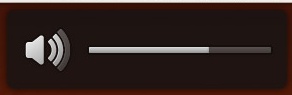
volumectl displays a nice notification bubble when notify-osd is installed.
Usage Examples
Increase volume (by default the increment is 2%):
$ volumectl up
Increase volume with 7%:
$ volumectl set 7%+
Decrease volume (by default the decrement is 2%):
$ volumectl down
Toggle mute:
$ volumectl toggle
Set volume to 50%:
$ volumectl set 50%
Installation
The easiest way to install volumectl is to download the latest binary from Releases and add it to your PATH.
Arch Linux
volumectl is also available from the AUR
Building from source
If you're a developer or you want to build it from source you should: go get github.com/vially/volumectl
Runtime Requirements
- PulseAudio
- notify-osd (required for displaying the notifications)
Available Commands
USAGE:
   volumectl command [arguments]

COMMANDS:
   up          increase volume (with 2%)
   down        decrease volume (with 2%)
   mute        mute volume
   unmute      unmute volume
   toggle      toggle mute
   set         set volume to a specific value
   help, h     Shows a list of commands or help for one command

GLOBAL OPTIONS:
   --version, -v    print the version
   --help, -h       show help
 Documentation

Documentation


There is no documentation for this package.
 Source Files
 Directories
Click to show internal directories.
Click to hide internal directories.